
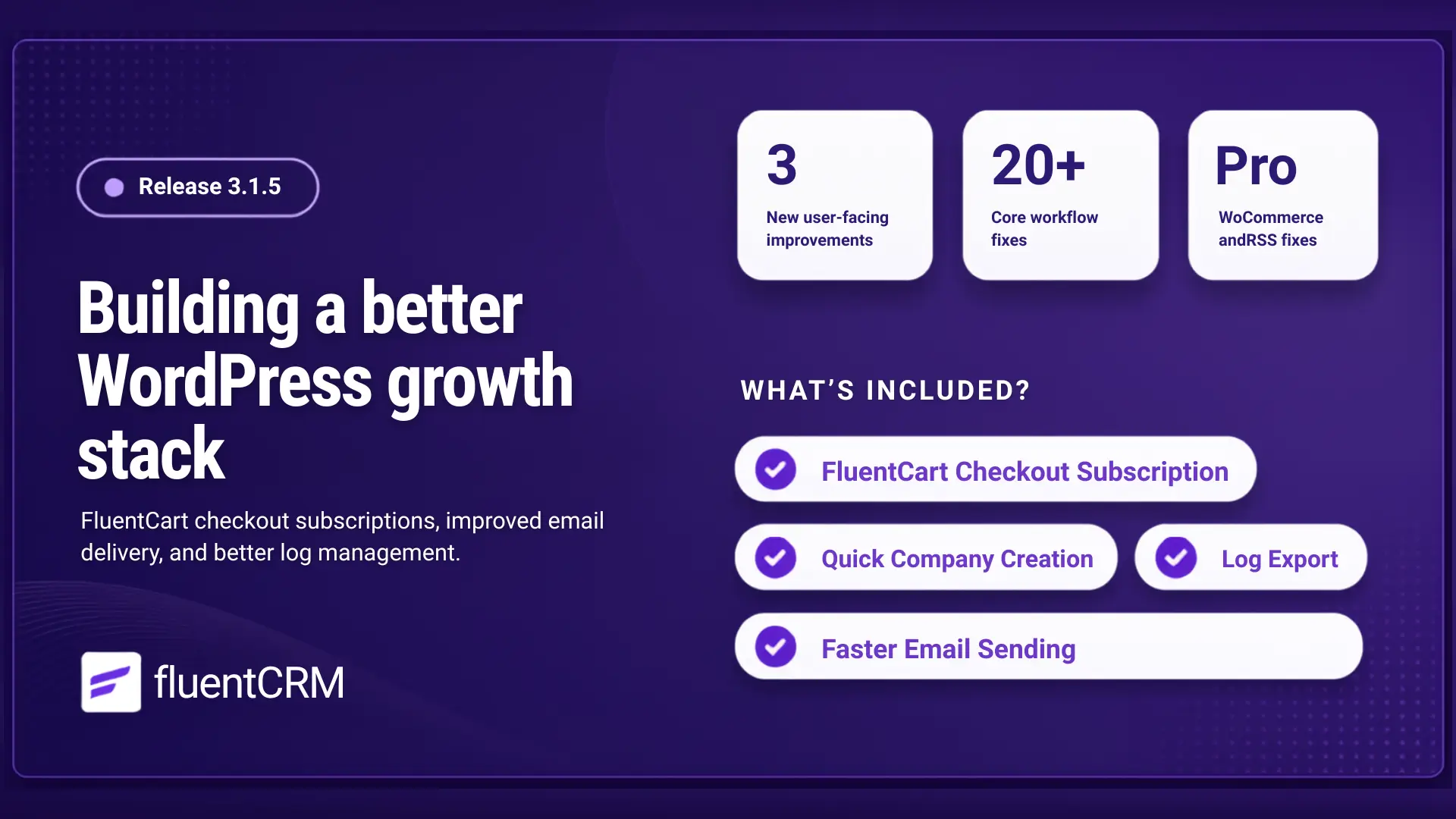
FluentCRM 3.1.5: FluentCart Checkout Opt-In, System Log Exports, and More

Summarize with


Last Updated:
Over the last few weeks, we’ve been moving quickly.
First came FluentCRM 3.0, one of the biggest updates in the product’s history. It wasn’t just a feature release. It was a major infrastructure upgrade designed to make FluentCRM faster, more scalable, and better prepared for the future.
Shortly after that, FluentCRM 3.1.0 focused on improving the experience for WordPress 7.0 users, bringing better compatibility with the latest WordPress ecosystem while continuing to refine the new Gutenberg-powered email experience. FluentCRM 3.1.5 continues that work.
This release isn’t about introducing another major headline feature. Instead, it’s about refining the foundation we’ve been building. It introduces a tighter connection between FluentCRM and FluentCart, making it easier to turn customers into subscribers directly from checkout. Alongside that, we’ve improved campaign delivery reliability, added CSV exports for system logs, and included a long list of fixes and wo
Let’s take a look at what’s new in FluentCRM 3.1.5.
Turn FluentCart Customers Into Subscribers at Checkout
If you run an online store, checkout is one of the most important moments in the customer journey.
A visitor has already decided to trust your business. They’ve completed their purchase. They’re engaged and paying attention.
Until now, turning that customer into an email subscriber often meant adding a separate workflow behind the scenes. We wanted a simpler approach.
FluentCRM 3.1.5 introduces a built-in checkout subscription option for FluentCart stores, allowing customers to join your email list directly during checkout.
Under Settings → General Settings, you’ll now find a new FluentCart Checkout Subscription section.
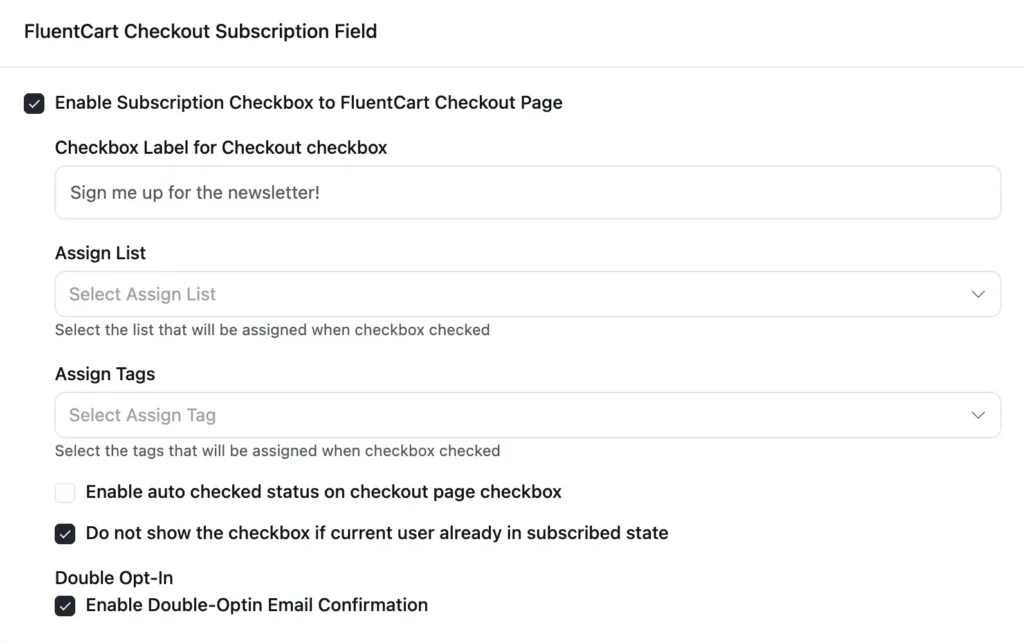
Once enabled, FluentCRM automatically displays a subscription checkbox on the checkout page, right above the payment methods section.
You can customize:
- The checkbox label text
- The target list
- Tags applied after subscription
- Whether the checkbox is checked by default
- Whether double opt-in is required
When an order is completed, FluentCRM creates or updates the contact using the customer’s billing information and applies the selected lists and tags automatically. If double opt-in is enabled, the contact is added as pending and receives the confirmation email immediately.
More Reliable Email Campaign Sending
Sending a campaign seems straightforward on the surface: A contact enters the queue, receives the email, and the system moves on to the next recipient.
But once you’re sending to larger audiences or running a busy WordPress site, there are a lot of moving parts involved behind the scenes.
In certain situations, queue runners could compete for the same email, stalled emails could take longer to recover, and large recipient lists could occasionally experience processing inconsistencies during chunking.
Most users never notice these edge cases, but reliability improvements are always worth making before they become bigger problems.
In FluentCRM 3.1.5, we’ve improved the way campaign queues are processed. The updated system now:
- Handles email processing more safely when multiple queue runners are active
- Recovers stalled emails more reliably
- Uses additional fallback mechanisms to keep campaigns moving
- Fixes a chunking issue that could skip recipients during large sends
The result is a more dependable sending experience, especially for larger campaigns and busier sites. You shouldn’t have to think about queue processing at all, and that’s exactly the point!
Community-Requested Improvements
Not every improvement needs to be a major feature. Some simply remove friction from workflows you use every day. A couple of smaller but highly requested workflow improvements also made their way into this release.
Global Link Colors for Emails
Email templates now include a dedicated Links color option inside the Gutenberg email editor’s Global Colors panel.
Instead of styling links individually or relying on defaults, you can define a single link color and have it applied consistently throughout the email.
It’s a small addition, but one that makes email design faster and more predictable.
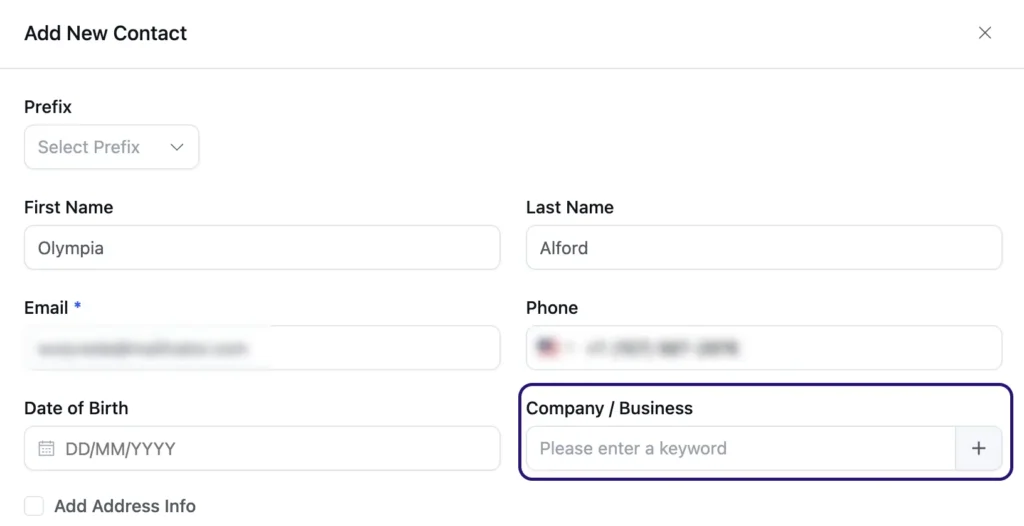
Quick Company Creation
Creating a contact and realizing their company doesn’t exist yet used to interrupt your workflow. You’d leave the contact screen, create the company, and then return to finish what you were doing.
Managing company records should be as convenient as managing tags and lists. The company selector now includes a quick-create option, allowing you to create a new company directly from the selection field without leaving the screen you’re working on. It’s a small workflow improvement that removes unnecessary clicks and keeps you moving.
Better Campaign Progress Visibility
When sending campaigns to larger audiences, it wasn’t always obvious how much of the recipient list had already been processed. We’ve improved the campaign recipient progress interface to provide a clearer view of what’s happening during larger sends.
CRM System Logs
When troubleshooting an issue, reviewing automation behavior, or helping our support team investigate a problem, system logs often contain the answers. FluentCRM 3.1.5 introduces CSV exports for CRM system logs.
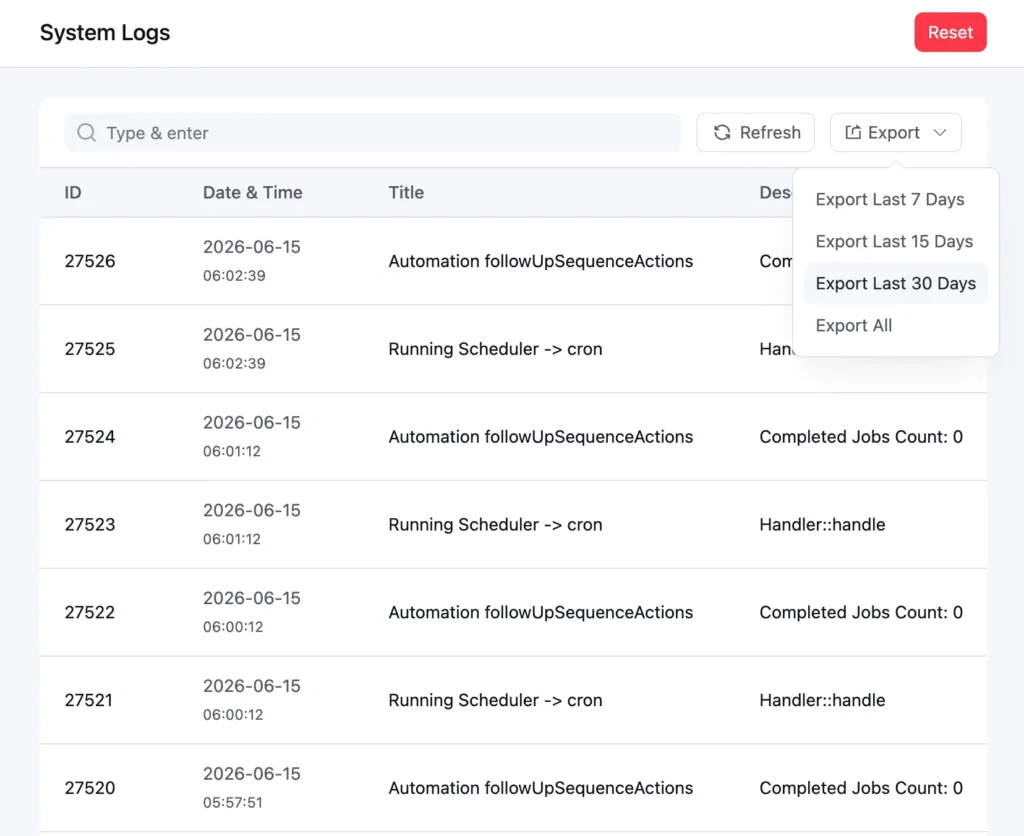
You can now:
- Export logs to CSV
- Filter exports by date range
- Review log data in spreadsheets
- Share log files with support more easily
Instead of scrolling through log entries inside WordPress, you can now work with the data however you prefer.
Better Compatibility With Content Security Policy (CSP)
Some websites operate with stricter Content Security Policy (CSP) settings to improve security. These policies can occasionally affect how public-facing FluentCRM pages and browser-based email previews render on the frontend.
This release improves compatibility for:
- Public forms
- Preference center pages
- View-in-browser email pages
If your site uses stricter security rules, these pages should now behave more consistently.
Better Campaign Progress Visibility
When sending campaigns to larger audiences, it wasn’t always obvious how much of the recipient list had already been processed.
We’ve improved the campaign recipient progress interface to provide a clearer view of what’s happening during larger sends.
SmartCode Links Work Properly Again
Dynamic links are a fundamental part of email marketing.
Whether you’re adding a view-in-browser link, an unsubscribe URL, or a custom SmartCode-powered destination, FluentCRM relies on SmartCodes to generate the right URL for each recipient automatically.
A recent change in WordPress’s block editor validation introduced an unexpected problem. SmartCode placeholders inside links were being treated as invalid URLs, causing the Gutenberg email editor to reject them during saving.
The issue wasn’t with the links or the plugin, they worked correctly once rendered. The problem was simply that the editor no longer recognized SmartCode placeholders as valid link values. With FluentCRM 3.1.5, the editor now properly recognizes SmartCode-based URLs and allows them to be saved normally.
If you’re using dynamic links in your campaigns, everything should simply work again.
Additional Fixes and Improvements
Alongside the larger additions, this release includes a substantial collection of fixes across the email editor, reporting, automations, and campaign workflows.
Email Editor & Campaign Improvements
- Fixed email template footer settings not saving correctly
- Restored missing footer settings in the classic email editor
- Fixed duplicate footer output in email web previews
- Fixed RSS block rendering issues
- Fixed SmartCode URL rendering issues including
##web_preview_url## - Fixed recurring campaign settings visibility in the Gutenberg editor
Reporting & Revenue Tracking
- Fixed campaign revenue re-sync issues
- Improved WooCommerce revenue reporting compatibility
- Added support for modern WooCommerce order tables and HPOS environments
Workflow & User Experience Improvements
- Fixed automation label contrast in dark mode
- Fixed automation label synchronization issues
- Fixed company note attachment uploads
- Fixed conditional block selection behavior
- Fixed interruptions in the data cleanup workflow
Stability & Compatibility Fixes
- Fixed recipient skipping during large campaign processing
- Fixed pagination issues for recipient chunks
- Improved URL validation for RSS Aggregator feeds
- Fixed FluentCart and FluentCRM autoloader compatibility issues
Thank You for Helping Shape FluentCRM
FluentCRM 3.1.5 may not be the biggest release we’ve shipped, but it’s the kind of update that improves the everyday experience of using the plugin.
The SmartCode compatibility fix removes a frustrating editor issue. The campaign queue improvements make large sends more reliable. And several workflow enhancements came directly from conversations with users in our community.
That’s how we prefer to build FluentCRM. Not by guessing what people need, but by listening, testing, improving, and continuously refining the workflows that matter most.
Thank you for your feedback, bug reports, feature requests, and patience. Update when you’re ready, and if you run into anything unexpected, our support team will be happy to help.
We’ll see you in the next release!
Full Changelog
FluentCRM 3.1.5 — June 11, 2026
New
- Added FluentCart checkout subscription opt-in for assigning lists, tags, and optional double opt-in directly from checkout
- Added global link color picker to the Gutenberg email editor
- Added CSV export for FluentCRM system logs with date range filtering
- Added company quick-create functionality when creating or editing contacts
Improvements
- Improved campaign email queue reliability with safer queue processing and recovery handling
- Improved campaign recipient progress tracking UI for large sends
- Improved CSP compatibility for public forms, preference pages, and browser-based email views
- Added fallback handling for campaign sender loopback requests
Fixes
Campaigns & Email Sending
- Fixed recipient skipping during large campaign processing
- Fixed recipient chunk pagination issues
- Fixed recurring campaign editor missing subject and settings step
Email Editor
- Fixed RSS block rendering issues
- Fixed Latest Posts block feed item URL handling for WP RSS Aggregator feeds
- Fixed validation of filtered feed URLs before rendering
- Fixed
##web_preview_url##and related URL SmartCode rendering issues - Fixed duplicate footer output in email web previews
- Fixed email template footer disable setting persistence
- Restored missing footer settings in the classic email editor
Reporting & Revenue Tracking
- Fixed campaign revenue re-sync issues
- Improved WooCommerce revenue reporting compatibility with HPOS and modern order tables
Companies & Contact Management
- Fixed contact submission issues when company validation failed
- Fixed Add Media button in Company Notes & Activities
Automations & Workflow Builder
- Fixed automation label contrast issues in Dark Mode
- Fixed automation label synchronization from the label dialog
- Fixed conditional blocks being selectable from within child branches
Stability & Compatibility
- Fixed data cleanup deletion flow interruptions and duplicate execution issues
- Fixed Emogrifier autoloader conflict with FluentCart
In Case You Missed
The last few FluentCRM releases have been closely connected.
FluentCRM 3.1.0
After the infrastructure work introduced in 3.0, FluentCRM 3.1.0 focused on improving compatibility with the latest WordPress ecosystem and refining the email editing experience. Highlights included:
- WordPress 7.0 AI support
- SmartCode insert menu in the email editor
- Visual/Text mode switch for custom email footers
- Font family selector in the footer editor
- Searchable filter dropdowns for custom fields, tags, and lists
FluentCRM 3.0.7
A refinement release focused on stability and workflow improvements. Highlights included:
- WP Media Library support in the email editor footer
- Visual Builder template import improvements
- Sequence duplication fixes
- RTL rendering improvements
FluentCRM 3.0.6
A maintenance release addressing several issues reported after the 3.0 launch. Highlights included:
- Template import fixes
- Email footer improvements
- Recurring campaign fixes
- General stability improvements
Shahjahan Jewel
Hello, this is Jewel, CEO & Head of Ideas at WPManageNinja. I am obsessed with WordPress since 2009. My aim is to be a user-centric developer first, and a serial entrepreneur second. You will find me discussing various tech issues and trying to come up with scalable solutions on different forums when I am not busy coding.
Table of Content
Related Articles and Topics
-
FluentCRM 3.2.0: WhatsApp Messaging, Faster Campaigns, and Better Email Workflows
When we added SMS marketing to FluentCRM, one question kept coming back: “Can we do…
-
Signed releases and public checksums for FluentCRM Pro
FluentCRM Pro 3.1.13 shipped on 24 August 2026. It is the first FluentCRM release your…