
SPF vs DKIM vs DMARC: Differences & Why They Are Important?


If your emails matter, authentication matters too. You can write a great campaign, set up a sharp automation, and still land in spam if inbox providers don’t trust your domain.
That’s where SPF, DKIM, and DMARC come in. They don’t make your emails more exciting. They make emails more trustworthy. For WordPress users, this is the part you can’t skip.
Good content gets attention, but authenticated sending gets delivered. Let’s break it down without the jargon soup.
SPF vs DKIM vs DMARC: Core Differences
| Feature | SPF (Sender Policy Framework) | DKIM (DomainKeys Identified Mail) | DMARC (Domain-based Message Authentication, Reporting & Conformance) |
|---|---|---|---|
| Core Purpose | Verifies who is allowed to send emails on behalf of your domain | Verifies message integrity (that the content wasn’t altered) | Email may still be delivered, but flagged as suspicious |
| What It Checks | The sending server’s IP address against your domain’s authorized list | A cryptographic signature attached to the email | Whether SPF and/or DKIM passed, and if alignment is correct |
| Focus Area | Sender identity (infrastructure level) | Message authenticity (content level) | Policy + domain reputation (strategic level) |
| How It Works | Domain publishes a DNS record listing approved sending servers | Email is signed with a private key; receiving server verifies using public key in DNS | Domain publishes a policy telling inbox providers how to handle failures |
| Pass Condition | Email comes from an authorized server | Email may still be delivered, but flagged or altered | SPF/DKIM pass and align with the domain |
| Fail Outcome | Email may still be delivered, but flagged as suspicious | Email may still be delivered, but flagged as suspicious | Inbox provider follows your rule: none, quarantine, or reject |
| Control Level | Low (just verification) | Medium (ensures trust in content) | High (you define enforcement rules) |
| Protection Against | Spoofed sending servers | Message tampering, phishing modifications | Full domain spoofing + phishing enforcement |
| Dependency | Works independently but is limited alone | Works independently but is limited alone | Relies on SPF and/or DKIM to function properly |
In simple words, SPF checks the sender, DKIM checks the message, and DMARC sets the rules. You need all three working together. One alone is not enough.
SPF: Who Is Allowed to Send?
SPF, or Sender Policy Framework, is the permission list for your domain. It tells inbox providers which mail servers are allowed to send emails using your domain name.
If a server is not on that list, it looks suspicious. That matters because spoofed emails usually fail this check. It is one of the simplest ways to stop fake senders from pretending to be your brand.
Pro-Tip: Sometimes, WordPress users face more issues with email, more severe than authentication. In that case. Check out this blog to find out why WordPress is not sending emails, and what might be the fixes for you.
How Does SPF Work?
SPF works by adding a rule in your domain’s DNS that lists which mail servers are allowed to send emails on your behalf. When an email is received, the recipient’s server checks this list. If the sending server is included, the email is trusted. If not, it may be flagged or rejected.
The setup is simple: You publish an SPF record in your DNS settings as a single line of text defining authorized sources.
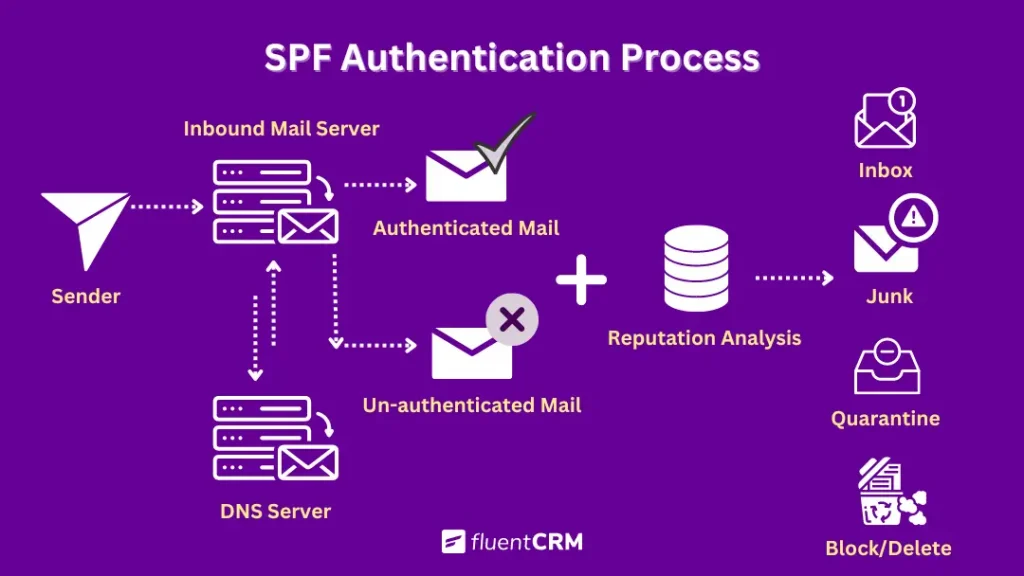
For example, if you use Google to send emails:
v=spf1 include:_spf.google.com ~allHere’s what it means:
- v=spf1 → identifies the record as SPF
- include:_spf.google.com → allows Google’s servers to send emails
- ~all → marks everything else as a soft fail (often treated as suspicious)
Once published, every outgoing email is checked against this rule. If you use multiple sending tools (WordPress plugins, CRMs, or email services), all of them must be included in the same SPF record. Missing even one can cause some emails to fail authentication.
DKIM: is the Message Still Intact?
DKIM, or DomainKeys Identified Mail, is the signature on your email. It adds a digital signature to each outgoing message so inbox providers can confirm the email was really sent by your domain and was not changed along the way.
If SPF is the guest list, DKIM is the wax seal on the envelope. That matters because email can pass through different servers before it reaches the inbox. DKIM gives providers another reason to trust that the message is authentic.
How Does DKIM Work?
DKIM adds a cryptographic signature to every outgoing email using a private key from your sending server. This signature is tied to your domain and proves the message was authorized by it.
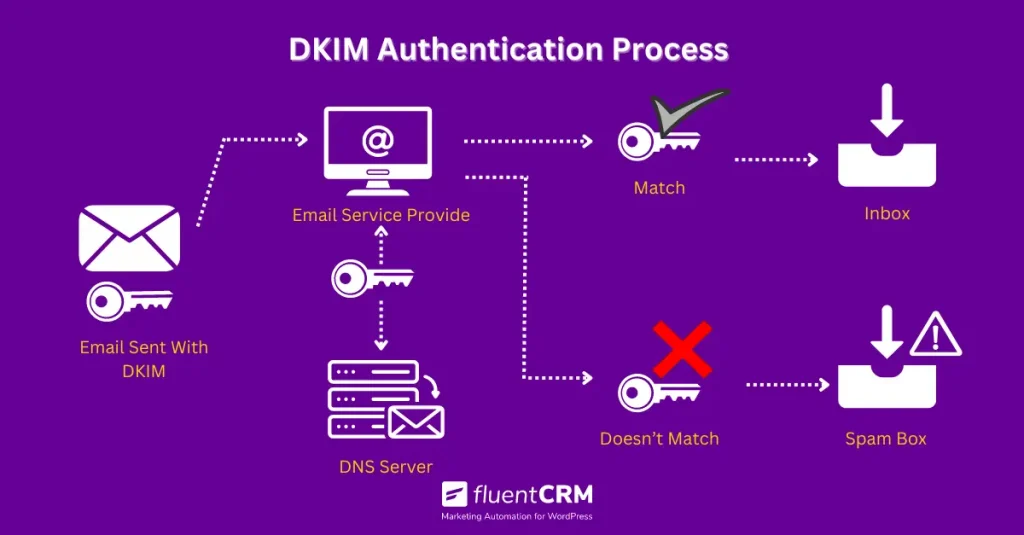
When the email arrives, the recipient’s server fetches the public key from your domain’s DNS records and uses it to verify the signature. If the values match, the email is accepted as authentic and unaltered. If not, it fails the check.
In simple flow:
You send an email → DKIM signs it with a private key
Recipient server receives it → checks signature using public DNS key
Match = pass, mismatch = fail
Even when emails are forwarded, DKIM can still validate integrity in many cases, since it verifies whether the content was changed after signing rather than relying only on the sending path.
DMARC: What Happens If Something Fails?
DMARC, or Domain-based Message Authentication, Reporting & Conformance, is the rulebook.
It tells inbox providers what to do if SPF or DKIM fails. Should they deliver the email? Quarantine it? Reject it?
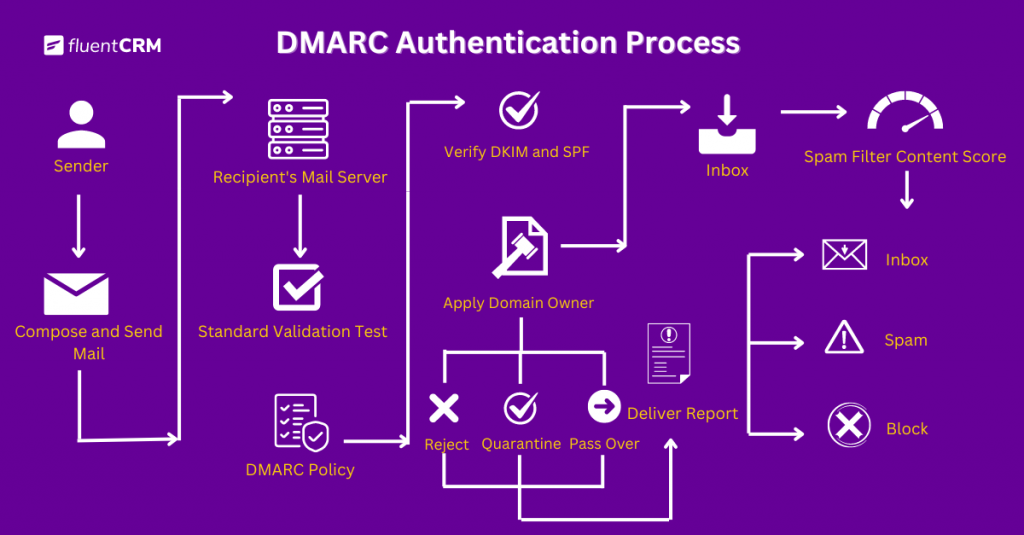
It also gives you reports, which is where the real value starts to show up. Those reports tell you if someone is trying to spoof your domain or if one of your sending sources is not authenticated properly. In short:
- SPF checks who can send
- DKIM checks the message
- DMARC decides what happens if the checks fail
That is why DMARC is the layer that ties everything together. It gives you control, not just verification.
Pro-Tip: If you want to go deeper, the Email Compliance Guide and One-click Unsubscribe fit nicely with this topic.
How Does DMARC Work?
DMARC sits on top of SPF and DKIM and acts as the decision layer. It checks whether an email passes SPF and/or DKIM and whether those results align with the domain shown in the “From” address.
When an email is received, DMARC performs two core checks:
First, it confirms SPF and DKIM results. Then, it checks alignment, meaning the authenticated domains must match the visible sending domain. In simple flow:
- Email arrives → SPF and DKIM are evaluated
- DMARC checks alignment with the “From” domain
- If aligned + passed → email is accepted
- If not → DMARC applies the domain’s policy
That policy is defined by the domain owner and can be:
- p=none → monitor only, no action taken
- p=quarantine → send to spam/junk
- p=reject → block the email completely
DMARC also generates reports showing authentication results across all sending sources, helping to identify unauthorized or misconfigured email streams.
Why You Need All Three
Inbox providers are not looking for one magic signal. They want consistency both in email frequency and email sender reputation.
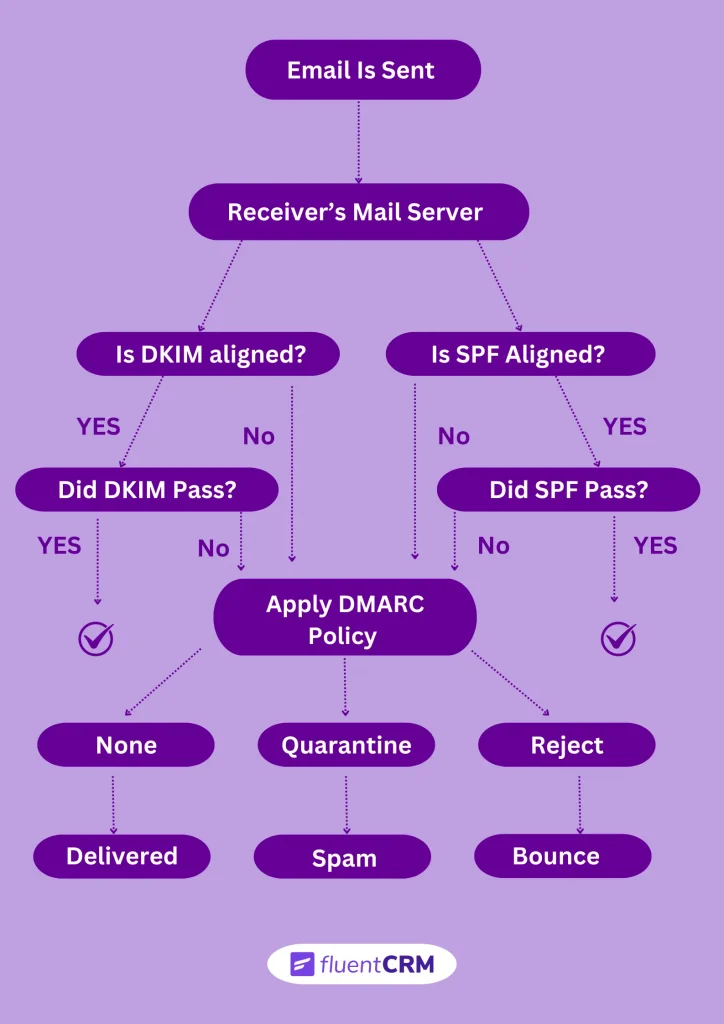
If SPF passes but DKIM fails, that is a problem. If DKIM passes but DMARC is missing, you are leaving control on the table. If DMARC exists but your underlying records are wrong, the whole setup is shaky.
The point is simple: authentication is a system, not a checkbox. And for anyone sending from WordPress, this matters even more.
Great campaigns, automations, and abandoned cart emails only work if the sending side is trusted.
That is why this topic matters to FluentCRM users, even though FluentCRM itself is not the DNS setup tool. It is the layer that sends the campaigns. The trust layer has to be right underneath it. For testing and diagnosis, email testing tools are worth a look.
Where Your Email Tools Fit in This Process
While making sure of your email authentication, it helps to understand which part of your setup controls what.
If you’re using a tool like FluentCRM, that’s typically where your campaigns, automations, and audience segmentation are managed. It handles the logic behind what gets sent and when.
But the authentication results you’re checking here are SPF, DKIM, and DMARC. And these don’t come from your campaign setup. They come from your sending configuration and domain-level settings.
This is where a sending layer (for example, something like FluentSMTP) plays a role. It connects your site to your email service provider and ensures emails are routed through properly configured channels, where authentication records can actually be validated.
In other words:
- Your marketing tool controls the email experience
- Your sending setup determines whether that email is trusted and delivered
How to Check Your Email Authentication Status
One of the simplest ways to verify whether your emails are properly authenticated is to send a test email from your domain and review its message header. This header contains the SPF, DKIM, and DMARC results, giving you a quick snapshot of whether your setup is working as expected.
Before running these checks, it’s also a good idea to clean your recipient list using an email verification tool. This helps reduce noise from invalid or risky addresses that could affect your results.
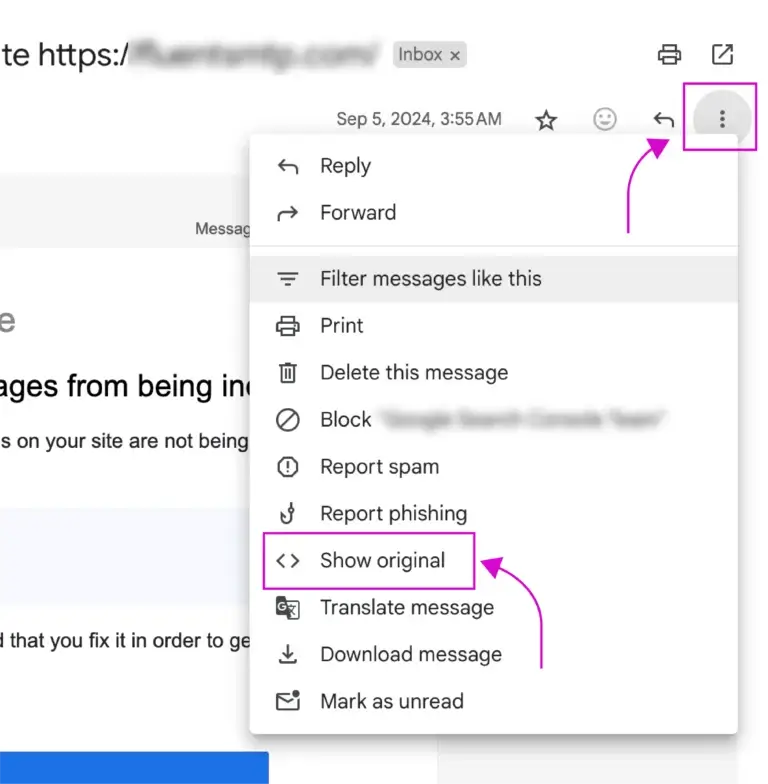
Start by sending a test email to yourself using a common provider like Gmail or Outlook. Once it arrives, don’t focus on the content; open the message header instead, where the technical details live.
- In Gmail, click the three dots in the top-right corner and select “Show Original.”
- In Outlook, open the email, go to “File,” then “Properties” to access the header.
Inside the header, look for entries related to SPF, DKIM, and DMARC. These will typically show a “pass” or “fail” status next to each protocol.
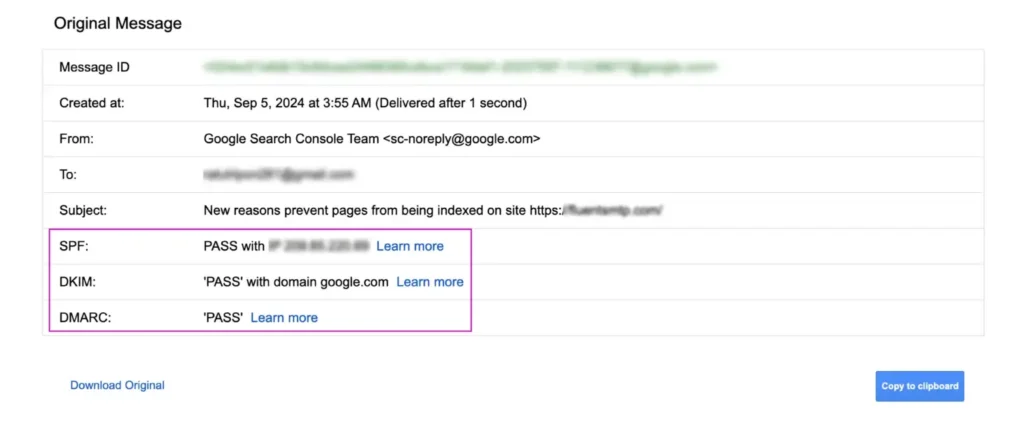
If all three pass, your authentication is set up correctly. If any fail, the issue usually lies in your domain’s DNS or sending configuration, not in the email content itself.
Common Mistakes Email Marketers Need to Avoid
A lot of email problems come from one of these:
- Relying on SPF alone, while messages still get flagged or questioned
- Setting up DKIM, but sending from a different domain than the one being signed
- Adding a DMARC policy, but keeping it at “none” indefinitely
- Updating sending tools without reflecting those changes in DNS records
- Using multiple tools to send emails, but only authenticating one of them
- Hitting SPF limits because of too many includes, even though the record “looks fine.”
- Rotating DKIM keys or switching providers, but old records are staying in DNS
- Sending from a “From” address that doesn’t match SPF or DKIM domains
- Using the root domain for everything instead of separating marketing and transactional email
- Testing once, seeing a “pass,” and assuming the setup will hold forever
- Switching email providers without rechecking authentication results
- Ignoring the new Gmail and Yahoo deliverability rules while sending brand emails
- Focusing on subject lines and copy, while delivery issues remain unresolved
If your emails are landing in spam, it is not always the subject line. Sometimes the problem is much lower down in the stack. That is why the authentication basics matter before you start optimizing campaigns.
If Your Emails Aren’t Landing, Start Here
At its core, email authentication is straightforward:
- SPF defines who is allowed to send
- DKIM confirms the message hasn’t been altered
- DMARC decides how strictly failures are handled
Together, they form the trust layer behind every email you send.
If you’re working with WordPress, the practical next step is making sure your domain is properly authenticated, and your sending setup is reliable. Without that, even well-crafted campaigns can struggle to reach the inbox.
Once that foundation is in place, everything else starts to work the way it should. Your emails are trusted, delivery becomes more consistent, and your marketing efforts can actually do their job, whether that’s automation, segmentation, or long-term lifecycle engagement through tools like FluentCRM.
Because in the end, email performance isn’t just about what you send; it depends on whether your emails are trusted enough to be seen in the first place.
Samira Farzana
Once set out on literary voyages, I now explore the complexities of content creation. What remains constant? A fascination with unraveling the “why” and “how,” and a knack for finding joy in quiet exploration, with a book as my guide- But when it’s not a book, it’s films and anime.
Table of Content
Related Articles and Topics
-

Email Compliance Guide: Must Know Rules, AI Risks, and Top Brand’s Email Compliance Examples
Email is one of the most direct ways for brands to connect with their customers.…
-
WordPress Not Sending Emails? Try These 5 Easy Fixes!
Didn’t it feel like a nightmare when your WordPress site failed to send emails? You’re…


