The WordPress Agency’s Guide to Client Communication and Reporting

Summarize with


Last Updated:
Many WordPress agencies excel at the technical work, but often struggle with client communication. But even with best-in-class technical delivery, a lack of a clear communication strategy can limit their business growth and revenue.
Just like in any other business, managing multiple clients and continuously onboarding new ones requires a stable communication system that doesn’t reinvent the wheel every time a message needs to be sent to a client.
Instead, the communication system should provide one clear workflow covering every touchpoint – from initial outreach to ongoing reporting.
In this guide, we’ll break down the client communication lifecycle, highlight where automations can help, and point to practical tools like FluentCRM and WP Umbrella to help agencies communicate effectively with clarity and consistency.
The Client Communication Lifecycle
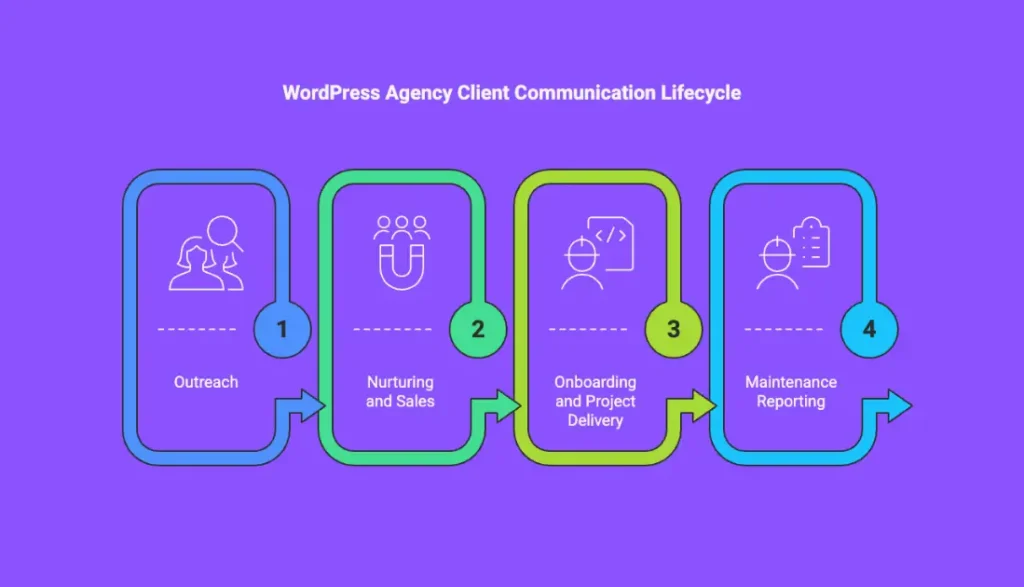
When analyzing how WordPress agencies interact with clients, we can identify four main stages:
- Outreach: Finding and connecting with potential clients.
- Nurturing and sales: Keeping leads warm with personalized follow-ups and relevant messaging as they move through the different sales funnels.
- Onboarding and project delivery: Starting a project, bringing clients on board, defining scope, going through important documentation, and setting expectations for the final delivery.
- Maintenance reporting: Keeping clients informed about the work you’re doing after the project is delivered and the results it produces.
Every WordPress agency manager should understand these stages if they want to create repeatable, scalable communication processes.
Each stage has unique requirements, but one principle remains constant: clients should never feel like they’re interacting with a robot.
Let’s explore what’s important for each stage.
Stage 1: Cold Outreach
Build a High-quality Contact List
Outreach begins once you’ve clearly defined who you want to work with. This means creating a detailed Ideal Client Profile (ICP) and gathering contact information based on the criteria you’ve set.
Your contact data should include publicly available business details, such as company name, employee names and job titles, business emails, LinkedIn profiles, phone numbers, HQ addresses, and any other relevant data points.
Make Your Message Stand out
After you have a tight list of people you’d like to reach out to, you need to make sure your message stands out in their inbox.
Sending generic emails or copy-paste LinkedIn messages won’t get you anywhere. Due to the high volume of communications decision makers receive, most cold outreach messages end up ignored, filtered, or deleted.
To avoid that, make sure your message addresses a real pain point and offers real value upfront.
Lead with something that matters to your targeted audience: a quick insight, a genuine observation, a short site audit, or a tip tailored to their online presence, their social media content, or their niche.
Personalize Your Approach
At this stage, personalization is also key. Sometimes it’s the difference between “mark as spam” and “reply.”
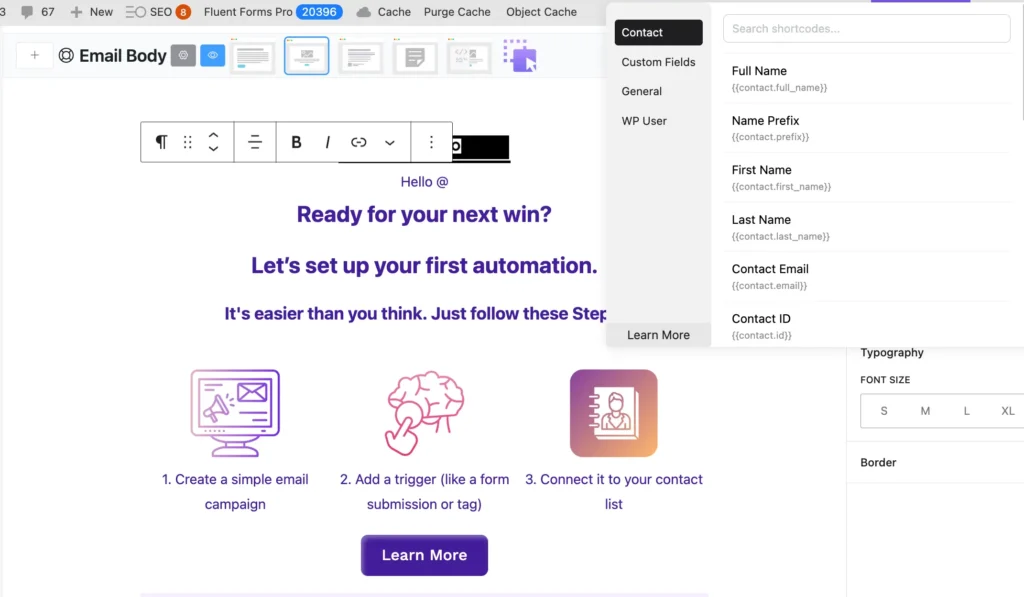
The goal of a personalized message is to make the reader know your message is meant specifically for them. Consider using a tool that supports merge tags/smartcodes to ensure every messege is personalized.
Back Your Message with Real Outcomes
Keep in mind that, in a short cold message, numbers and results speak louder than adjectives.
Instead of saying “We’re a great WordPress agency,” say “We helped X sites reduce load time by 35% in less than two weeks.” The aim is to show proof that you’re an expert in what you do, and they can trust you.
Be Clear About the Next Step
Finally, be clear on what you want the prospect to do as a next step. Whether it’s a short call, a demo, a free evaluation, or a face-to-face meeting, make it easy for your prospects to say yes.
Cold Outreach Best Practices
A couple of best practices you can lean on are:
- Short and clear messages win over long and complex ones. Every word in your message should earn its place. If it’s not adding value – delete it.
- Tracking your results helps you optimize your outreach efforts. Once you see what works, double down on it. Don’t keep sending messages that continuously show low open, reply, or positive response rates.
- Multi-channel outreach works best. Combining email, LinkedIn, short voice messages, and other touch points is likely to improve your chances of success, compared to relying solely on one channel.
Cold outreach is often associated with spamming inboxes. But when done right, cold outreach is about getting the right people to notice you and open doors to business collaborations valuable to both sides.
Turn Outreach into a Structured Pipeline
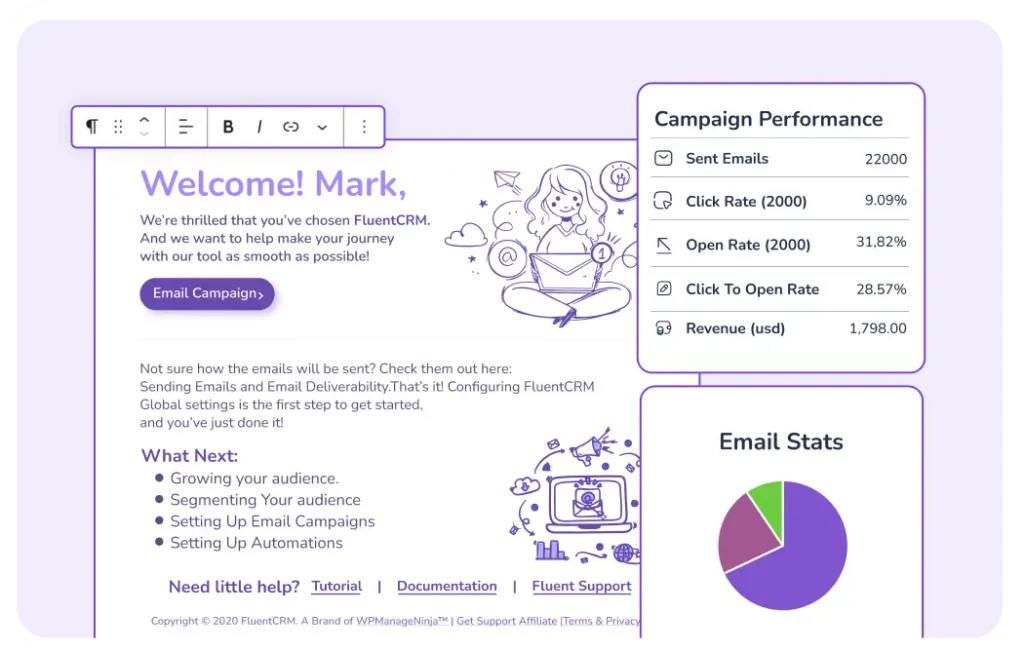
FluentCRM helps agencies turn outreach into a structured pipeline instead of a scattered list of contacts. You can capture leads directly from WordPress forms, automatically tag them based on service interest or industry, and track every interaction in one place. Agencies can segment prospects, run personalized outreach sequences, and monitor open or reply behavior to understand what resonates.
Stage 2: Nurturing
Stay Relevant and Helpful
Once a prospect shows interest, replies with a question, downloads a resource, or agrees to a short call, they become a lead and enter the nurturing stage. During this stage, it’s important to stay relevant and helpful while your lead evaluates options, priorities, and timing.
Even in small and micro businesses, most buying decisions don’t happen overnight. Decision-makers need reassurance, market context, and repeated proof before they’re ready to commit. This is where many agencies quietly lose deals. Often it’s not because their offer isn’t good, but because they disappear for too long or follow up with generic messages such as “just checking in”.
Aim for consistent intentional follow-ups that keep you top of mind without becoming intrusive. This can include case studies related to their niche, insights from similar projects you’ve worked on, or educational content that helps them better understand the problem they’re trying to solve.
Keep in mind that you probably know much more about your ecosystem and the market than your lead. Aim to patiently educate them and help them answer the main question they’re likely asking themselves: “Is this agency right for us?”
Organize and Automate with the Right Tools
One of the most common mistakes agencies make here is relying on memory or manual reminders. Without a proper CRM tool, leads slip through the cracks and conversations lose context. A CRM gives you visibility into where each lead is in the process, what resources they’ve interacted with, and when it’s time to reach out again.
If you are on WordPress, FluentCRM and FluentBoards are a match made in heaven for this. From centralizing data to scaling personalized communications, this combination can match all your agency management needs. Together, they help agencies centralize client data, automate nurturing, and manage delivery without juggling disconnected tools.
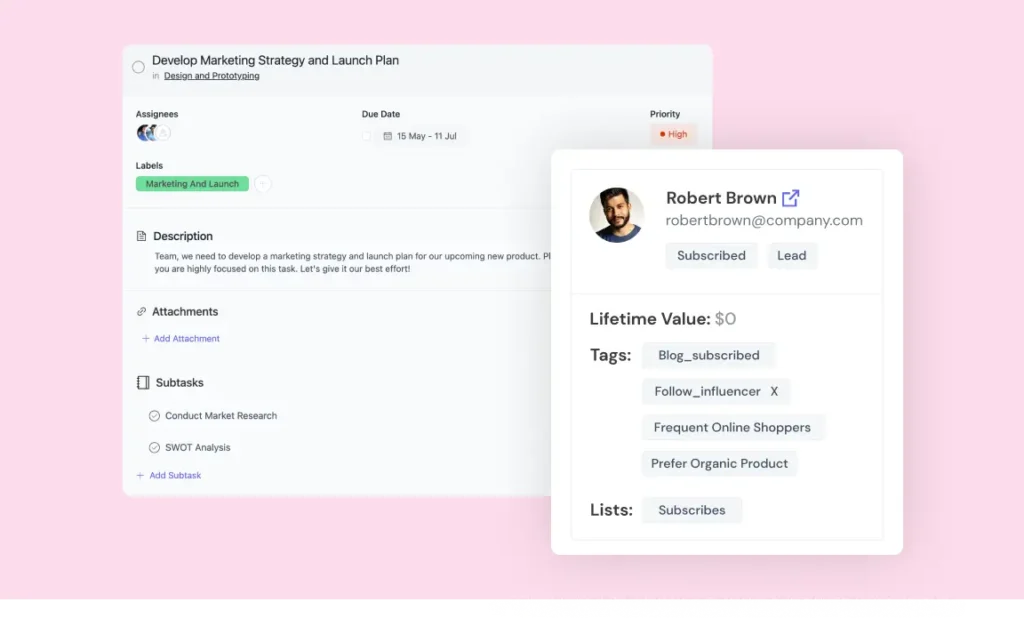
- Centralize client data (FluentCRM): Keep leads, contacts, deals, activity history, and communication in one unified client record.
- Automate onboarding journeys: Send welcome emails, kickoff steps, questionnaires, and expectations immediately after signup.
- Segment clients intelligently: Organize prospects, active clients, upsell opportunities, and past clients for targeted nurturing.
- Schedule value-driven follow-ups: Automate check-ins, reports, renewal reminders, and educational touchpoints.
- Trigger behavior-based nurturing: Launch sequences when contracts are signed, forms submitted, or milestones reached.
- Manage work with FluentBoards: Track projects, deliverables, and deadlines using dedicated boards for each client.
- Align marketing and delivery: Sync CRM insights (status, notes, priority) with board tasks to keep communication consistent.
- Track lifecycle progression: Move clients through stages like Onboarding → Active → Expansion → Renewal using tags and workflows.
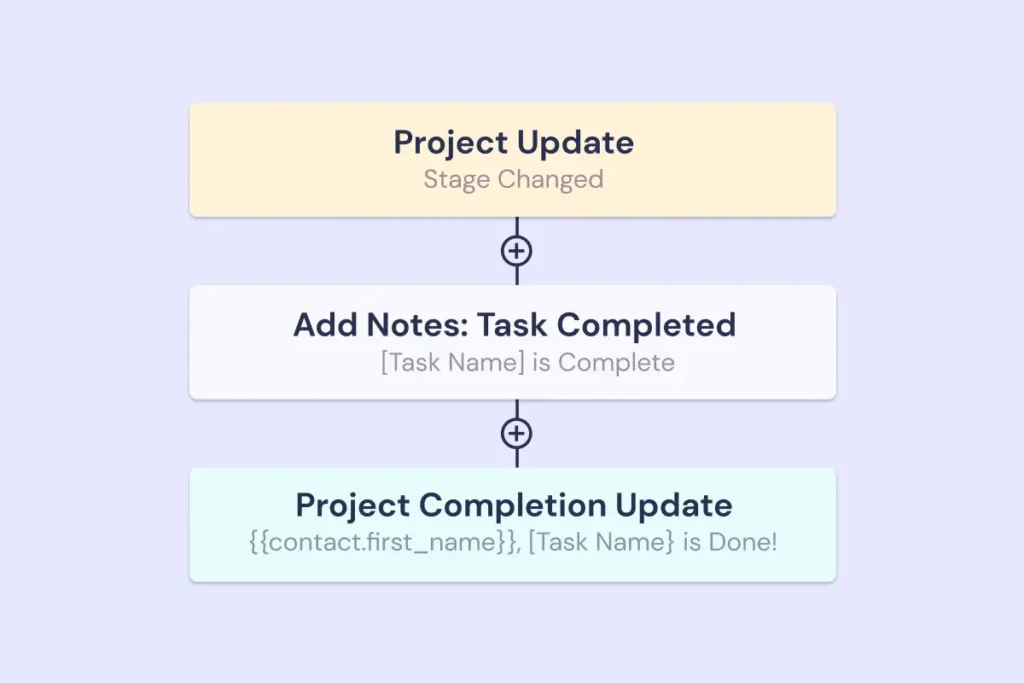
- Improve retention proactively: Auto-create follow-up tasks in FluentBoards when inactivity or risk signals appear in FluentCRM.
- Scale personalization without chaos: Combine automated CRM communication with structured task management so every client feels intentionally handled.
Stage 3: Onboarding
The onboarding stage starts once your lead says “yes” to the official proposal. This is the stage where expectations are set and the initial trust is reinforced.
Align on What Matters
A well-structured onboarding process creates confidence on both sides while aligning on project scope, responsibilities, timelines, and success criteria. When these things are vague, misunderstandings can happen and slowly become the root cause of churn and ruined relationships.
Make the Process Repeatable
From an operational perspective, a strong onboarding process is well-structured and therefore repeatable. Every client should go through the same core steps, even if the project itself is custom. This usually includes a kickoff call, technical access setup, documentation review, and an overview of how ongoing communication and reporting will work.
Set up the Required Automations
Manually repeating the same emails, checklists, and setup steps is time-consuming and prone to mistakes. The more predictable this process is internally, the calmer and more professional it feels externally.
Setting up the right automations can ensure nothing is missed, while still leaving room for personal interaction where it matters most. They can cover forms, welcome emails, access instructions, invoicing, and more.
Automations also help with speed. Long gaps between contract signing and first action can create doubt and impatience. Clients want to feel momentum.
Provide On-Demand Information and Education
Finally, you might value full transparency and want to educate your clients during the onboarding. But even though your intentions are good, try to resist the urge to overload clients with information.
Instead, aim to share only what’s necessary at each step of the process. Clear instructions, short explanations, and simple next actions reduce confusion and keep projects moving forward.
When onboarding is done right, clients feel taken care of, projects start faster, and future communication becomes easier.
Tip: FluentCRM and FluentBoards Can Help!
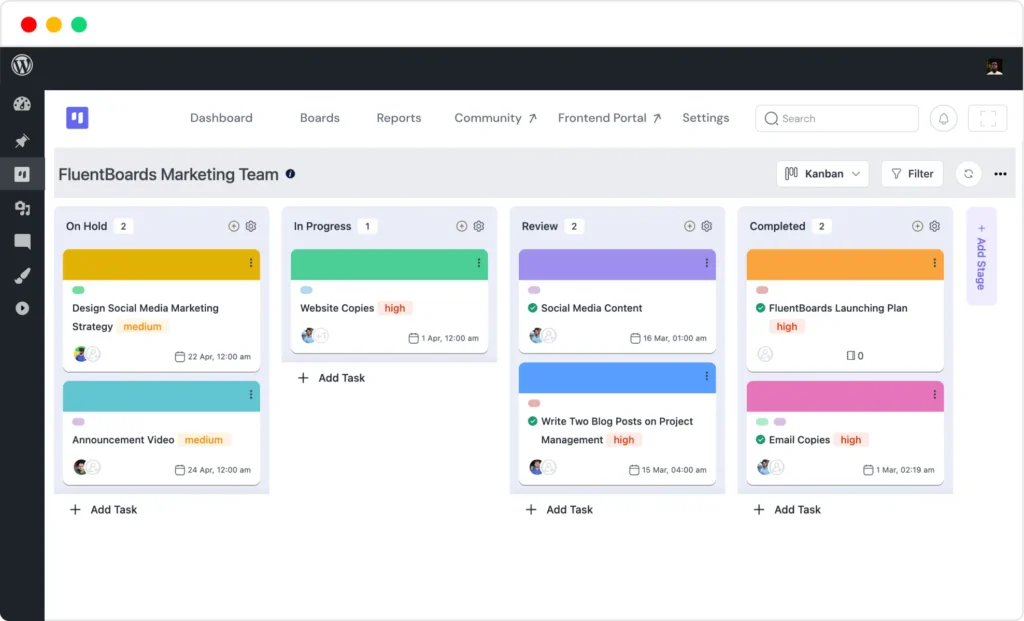
During onboarding, FluentCRM can automatically trigger welcome emails, access instructions, questionnaires, and internal notifications the moment a deal is marked as won. On the other hand, a tool like FluentBoards gives agencies a clear onboarding workflow with predefined task lists, checklists, and responsibilities, ensuring every client goes through the same structured setup process. Together, these tools reduce delays, prevent missed steps, and create a smoother, more professional first experience for new clients.
Stage 4: Maintenance Reporting
Once the initial project is delivered, WordPress agencies often keep clients on a website maintenance subscription, packaged as WordPress care plans. As part of a care plan, agencies perform a dozen recurring tasks that need to be performed consistently in order to keep a site safe and well-performing.
Keep the Communication Going
During this stage, many WordPress agencies discontinue client communication, thinking that there’s nothing new or exciting to report on. But regular reporting is exactly how agencies prove the value of their work, build trust, and create opportunities for upsells or renewals. Without it, clients quickly forget the effort it takes to keep their sites fast, secure, and live.
Focus on Insights without the Jargon
To keep an effective reporting process, focus on actionable insights: uptime stats, performance metrics, completed updates, security checks, backups done, and any custom improvements you’ve worked on during the month. But don’t overwhelm your clients with WordPress jargon or information they don’t fully understand if they’re not as tech savvy.
Save Time with Automation
If you’re managing multiple sites for different clients, automation is your ally. Manual reporting on scale can be slow, prone to errors, and (as a result) inconsistent. That’s why combining automations with human touches is the best way to keep your reports personalized, informative, and always on time.
WP Umbrella: A Management Platform that Does it All
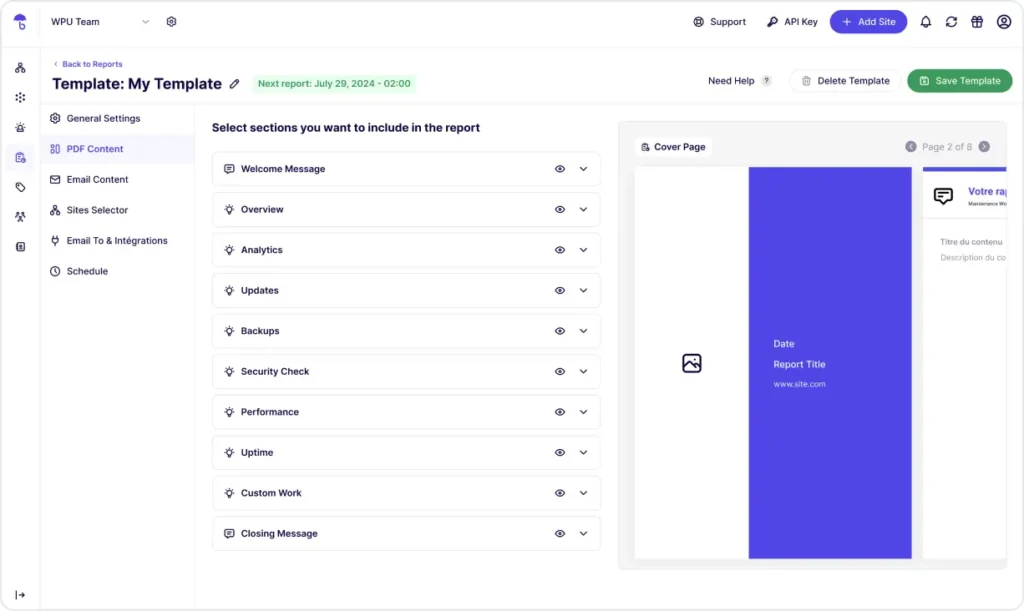
WP Umbrella is a WordPress management platform that consolidates updates, uptime, and performance monitoring, backups, and security checks into one clean dashboard. Apart from making the WordPress maintenance work almost effortless, it also helps agencies automatically generate client reports that are:
- Fully white-labeled,
- Personalized for each client and each site,
- Sent automatically on a schedule you choose,
- Formatted as a clean email and/or a professional PDF,
- Automatically covering everything from completed updates, all the way to Google Analytics stats. They can also include personalized messages, and an optional section on custom work you did for your client’s site and want to report on.
Benefits and Trade-offs of Automating Client Communication
| Benefits | Tradeoffs |
| 1. When scaling, automation is a reliable help agencies can get, without burning out their team. | 1. When overused or poorly designed, it can feel cold and generic. |
| 2. It saves time, reduces human error, and creates consistency across all client touchpoints. | 2. Clients can tell when they’re stuck in a rigid workflow that doesn’t take their specific situation in mind. |
| 3. Emails go out on schedule, reports are generated without human input, reminders don’t get forgotten, and no client slips through the cracks because someone was “too busy.” | 3. Automated messages sent at the wrong moment, or with the wrong context, can sometimes do more harm than good. |
| 4. For agencies managing dozens or hundreds of clients, automation becomes a must. Without it, communication becomes reactive, messy, and dependent on individual team members. |
When to Avoid Automations?
When built right, communication systems automate what’s repetitive and predictable, and keep the high-impact moments fully human. Some examples of high-impact moments of communication that should always stay human are:
- Responding to complex client questions;
- Clarifying changes in project scope or pricing;
- Presenting strategic recommendations or long-term plans;
- Handling sensitive situations like prolonged downtime, security incidents, or billing issues.
These moments require judgment, empathy, and accountability – things that no workflow or trigger can replace yet. The main goal of having communication automations is to free your team from busywork so they can focus on conversations that actually move relationships forward.
Conclusion
Your technical expertise is the backbone of your WordPress agency, but your communication is what keeps clients coming – and staying.
Strong client communication is about building a reliable system that supports every stage of the client journey – from first outreach to ongoing reporting.
When communication is intentional and well-structured, it stops being a bottleneck. Outreach becomes more focused, leads stay warm and nurtured, onboarding feels calm and professional, and reporting turns into a client-retention strategy instead of a formality. Over time, this leads to better client relationships, lower churn, higher lifetime value, and more predictable revenue.
The agencies that scale sustainably are not the ones doing the most work, but the ones doing the right work consistently. They automate what’s repetitive, document what’s essential, and keep human attention where it matters most.
Helpful tools like FluentCRM and WP Umbrella reinforce good communication and give agencies the structure and visibility needed to stay organized, proactive, and trustworthy as they grow.
Editorial Panel
Content Writer
FluentCRM Editorial Panel is a group of content writers experienced with digital tools, marketing, and business trends.
Table of Content
Related Articles and Topics
-
5 Best Design Tools in 2026 for Designers, Marketers, and Creative Teams
Every design tool wants to be the one app you never leave, and none of…
-
How to Drive More Engagement with WhatsApp Marketing Inside WordPress
You might be sending emails to your contacts regularly. It might be: All of them…