FluentCRM MCP: Operating FluentCRM with AI-Assistants and What it Means for You

Summarize with


Last Updated:
Marketing automation has always been about two things: creating better user journeys and implementing meaningful workflows.
The strategy behind those journeys still depends on your business, your audience, and how you want to grow. But operating those workflows has mostly meant navigating interfaces.
Whether you were writing emails, creating segments, or building automation funnels, marketing automation still relied heavily on dashboards, filters, menus, and workflow builders. That’s the part that started feeling different once we connected FluentCRM with MCP.
Instead of manually navigating through workflows, you can now simply ask:
“Show contacts who never opened our last campaign.”
Or:
“Estimate how large this segment is.”
Today, I want to talk a little about that shift. I will explain what MCP actually means for FluentCRM users, why this matters for WordPress-native marketing automation, and where this shift could lead next.
What MCP Actually Means (Without the Technical Jargon)
If you’ve heard the term MCP for the first time and thought it sounds “technical”, you’re not alone.
AI tools like Claude and ChatGPT have become surprisingly good at understanding requests and working through tasks. However, they have no idea what’s happening inside your business. They can’t see or create contacts, campaigns, or email sequences for you.
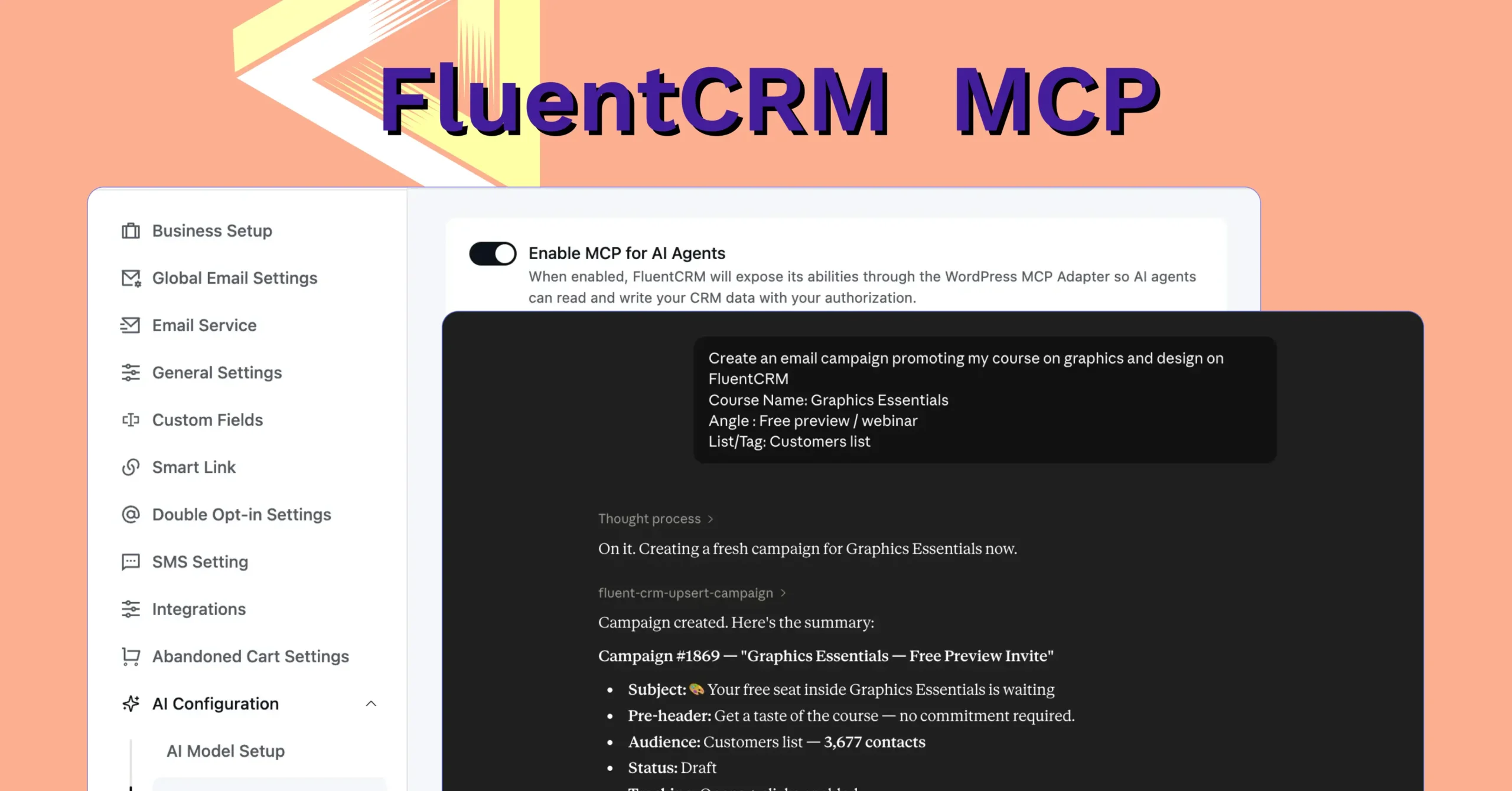
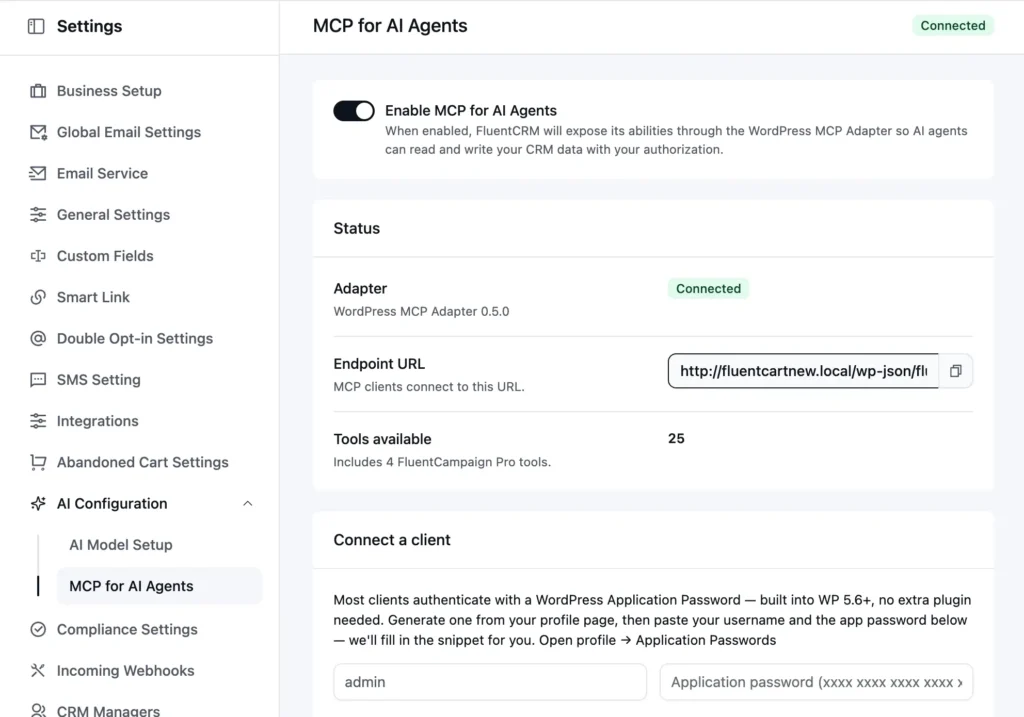
MCP (Model Context Protocol) is a way for AI tools to securely interact with other systems. In practical terms, that means AI assistants can understand parts of FluentCRM and perform actions conversationally.
For example, instead of manually opening multiple filters and screens, you can ask AI assistants to:
- “Find contacts tagged as webinar leads.”
- “Show inactive subscribers from the last 90 days.”
- “Estimate how large this audience segment is.”
- “Add these contacts to a sequence.”
The important distinction here: this isn’t just AI generating content, this is AI helping operate marketing workflows. And honestly, that changes the experience more than we initially expected.
What AI Assistants Can Do with FluentCRM MCP?
Let’s get concrete here. Because the most useful thing we can do here is show you what’s actually possible, not what might be possible.
Right now, FluentCRM MCP already allows AI models to interact with several important parts of FluentCRM.
Contact Management
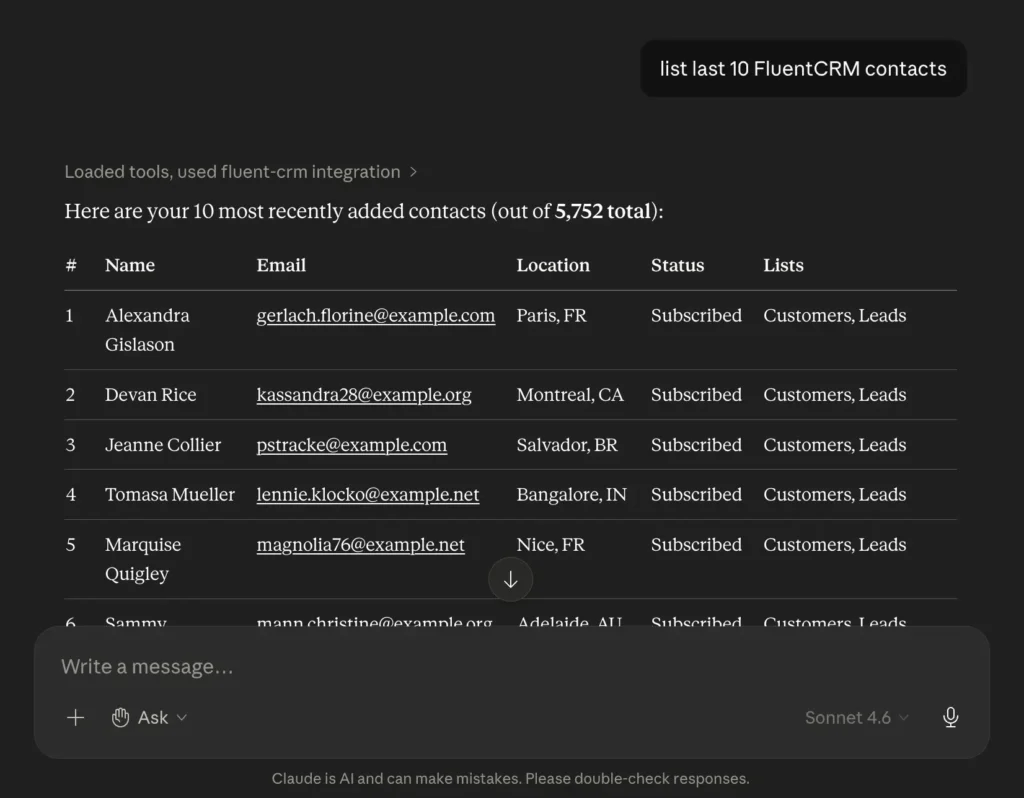
Managing contacts is one of the clearest examples of where conversational workflows immediately feel useful. With the MCP, now you can ask an AI model to search your contact database, filter by tags, lists, or subscription status, and pull up the audience you’re looking for.
Once you’ve found the right audience, you can update contact details, add notes, apply tags or lists in bulk, or create and update contacts, including bulk imports of up to 500 at a time!
In practice, that might look like:
“List the last 10 FluentCRM contacts.”
“Add these contacts to the Re-engagement tag.”
“Create 20 test contacts with US-based data.”
Instead of manually building conditions across multiple filters, you can simply ask AI models what you’re looking for, and they will get back to you with the right answers.
Campaign Management
The integration can also work with campaigns. You can:
- Create campaigns
- Retrieve campaign details
- Update campaigns
- Send test emails
- Change campaign status
Again, the interesting part isn’t necessarily the action itself. It’s the interaction model.
Most of these things were already possible inside FluentCRM. What changes is how you operate the workflow around those actions.
Instead of navigating multiple campaign screens, you can simply describe what you want to do conversationally.
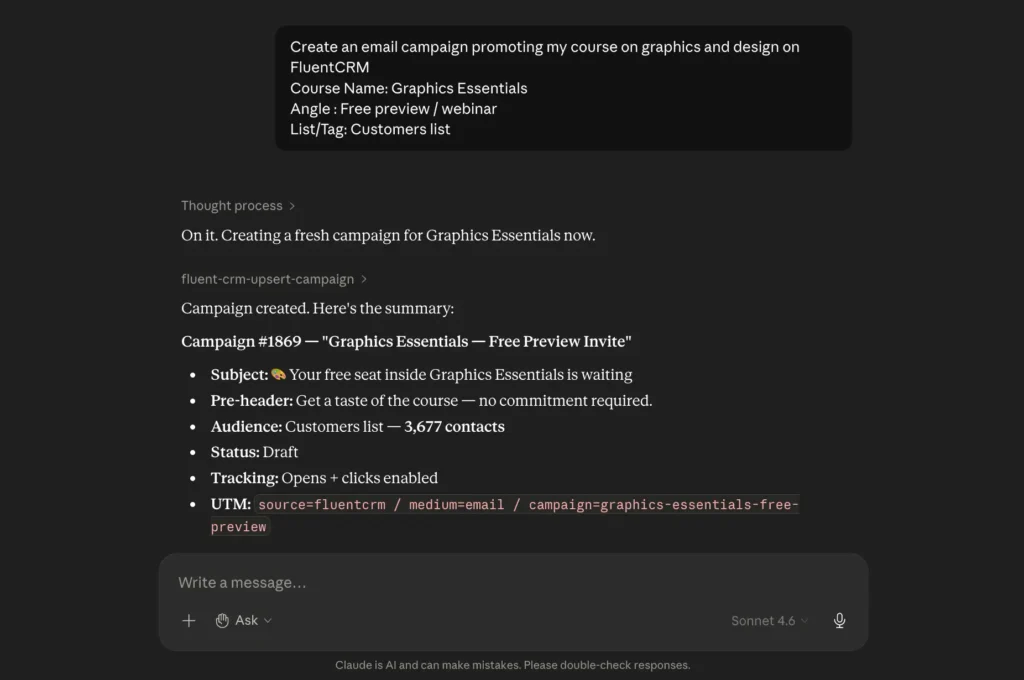
If you also want to review which campaigns are currently active or check the setup on a specific campaign before it goes out, you can ask instead of navigating through campaign dashboards.
Automations & Sequences
If you’ve spent years building automation systems, you probably know how operationally heavy they can become over time. Even small tasks often require several clicks and multiple screens. With FluentCRM MCP, many of those operational steps become conversational.
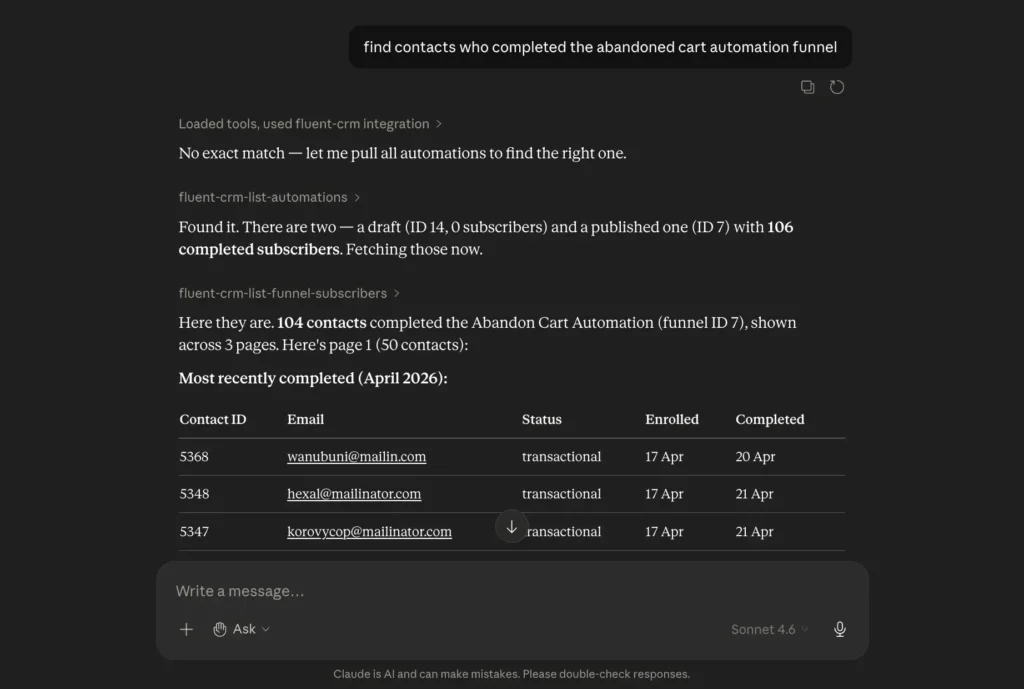
You can view active automations, check what state they’re in, and see which contacts are enrolled in a funnel and where they are in it. You can update a contact’s automation status, add contacts to email sequences, or remove them.
Let’s say you want to identify contacts currently stuck inside a workflow or update tags for a specific automation group. You can do that through simple prompts instead of manually navigating the funnel structure.
For anyone managing multiple automations across a large contact list, this kind of operational shortcut makes a real difference.
Important Note About Privacy, AI Access, and Customer Data
Before going further, I want to address something important directly. We want to be straightforward about this.
The moment AI tools interact with CRM data, questions around privacy and data protection naturally come up. And honestly, they should.
Some of you have raised it directly in comments and messages, and it matters to us. So it’s important to clarify what’s actually happening.
MCP is Optional
First, MCP integration is entirely optional. Nothing is enabled automatically inside FluentCRM, and AI tools do not magically gain access to your CRM data on their own.
Users explicitly choose:
- Whether to connect an AI tool
- Which provider they want to use
- How they interact with it
FluentCRM doesn’t connect to any AI tool on its own. You have to intentionally set it up by generating credentials, configuring your AI tool, and deliberately enabling the connection.
A password manager can help administrators store these credentials securely without reusing them across integrations.
AI Access Requires Your Explicit Action
An AI model doesn’t passively sit in your CRM reading data. It only accesses FluentCRM when you send it a prompt that requires it, and only through the connection you’ve configured. You control when the interaction happens, what data is involved, and what actions are being requested.
Customer Data May be Processed by External AI Providers
This is the part that requires the most careful thought. And we’re not going to soften it. Transparency around these matters, rather than pretending these concerns don’t exist.
When using external AI providers through MCP, customer data may be processed by those providers depending on the workflow and provider policies. And because of that, compliance considerations still apply.
Whether a specific workflow aligns with GDPR or local privacy requirements depends on:
- The AI provider being used
- What customer data is shared
- How that provider handles data processing
- Your own consent and compliance practices
FluentCRM itself remains self-hosted and WordPress-native. But every major AI provider has data-handling policies, and many have enterprise or privacy-focused options.
At the end of the day:
- You need to read those policies
- Understand what your chosen provider does with the data it processes
- Make an informed decision based on your own situation, customers, and the regulations that apply to your business.
Honestly, we understand why some businesses may choose not to connect AI tools to their CRM data at all. That’s completely okay, too!
The MCP connection is an additional layer you choose to enable. If you’re not comfortable with what that involves, you don’t have to use it. The rest of FluentCRM works exactly as it always has.
Why This Feels Different for WordPress Users
Even with valid privacy considerations, the underlying infrastructure shift here is still important to understand.
Most AI-powered marketing tools today operate inside their own ecosystems. You connect to a SaaS platform, sync data to their servers, and run automations on their cloud hosting infrastructure.
As you add more tools: an email platform here, a CRM there, an analytics dashboard somewhere else, you end up with customer data scattered across multiple systems.
That’s not how we built FluentCRM to work.
Your customer data, automations, and workflows live inside WordPress and stay under your control. That WordPress-native structure creates a very different foundation for AI-assisted workflows.
What MCP does, in this context, is extend that infrastructure to work conversationally with AI tools without moving your data to a new platform. You’re not syncing your CRM to an external AI system; you’re connecting an AI tool to your existing WordPress-native setup.
That doesn’t automatically solve every privacy concern. But it does preserve your ownership and control over the marketing system itself.
The Most Interesting Part: Conversational Workflows
The biggest shift here may not actually be the features themselves. It’s how marketing automation starts feeling.
For years, operating a CRM meant learning interfaces and carefully navigating each to create the workflows you wanted to build. You needed to know:
- Where filters lived
- How segments were structured
- Where automations were managed
- How workflows were organized
Now imagine simply saying: “Find contacts inactive for 90 days.”
Then: “Estimate how large this segment is.”
Then: “Add them to a re-engagement sequence.”
It’s not that any single task became dramatically faster. Most things you can do through MCP, you could already do through the FluentCRM interface. What changes is the cognitive load of operating the system.
Instead of constantly translating intentions into interface navigation, the interaction itself becomes conversational. And honestly, after using it for a while, going back to purely menu-driven workflows will feel surprisingly old-fashioned.
Where This Could Lead Next
We’re still very early in this. And honestly, we want to be careful not to drift into AI hype or unrealistic expectations.
Right now, FluentCRM MCP mainly opens the door to conversational CRM operations and workflow management. But even at this stage, it already hints at where things may evolve next. Things like:
- Smarter segmentation assistance: Where an AI model helps you identify audience patterns you might not have thought to look for
- Automation recommendations: Where you can ask why a particular automation isn’t performing and get a contextual explanation.
- Campaign review: Where you describe your goal, and the model checks whether your setup actually supports it.
- Next action suggestion: Where AI could suggest the next logical step based on campaign activity and automation behavior.
Some of these things are already partially possible today in limited ways. The bigger question is how useful they become in real-world marketing operations over time. We don’t know the full answer yet. But we believe it’s worth exploring.
No, Marketing Automation isn’t Going Away
At the end of the day, this isn’t really about AI replacing marketing automation. Marketing systems still matter. Strategy, segmentation, and automation logic still control what you can do with marketing automation.
What’s changing is how you operate the workflow.
For the first time, marketing workflows inside WordPress can start becoming conversational instead of purely interface-driven. And honestly, that shift feels much bigger than simply adding “AI features” to a plugin.
We’re still exploring this space ourselves, and there’s a lot to learn moving forward. But even now, it already feels like a meaningful shift in how marketing systems are operated.
Editorial Panel
Content Writer
FluentCRM Editorial Panel is a group of content writers experienced with digital tools, marketing, and business trends.
Table of Content
Related Articles and Topics
-

6 Years, 80K+ Businesses: A Story of Rapid Rebuild, Revamp, and Transformation
Six years! Isn’t this incredible? Back in 2020, we had one big dream: to build…
-
Meet FluentPlayer: The Interactive Video Plugin Built for WordPress
Most marketing automation funnels start with a signal. Someone submits a form, makes a purchase,…