How to Segment Email List Based on Email Activity

Summarize with


Last Updated:
If you sent a newsletter campaign last month, could you name the group of people who never opened that email? Or the group that clicks nearly every link?
If you can’t, then you are just blasting emails to the same people without even knowing how they interacted with your brand. It’s like sending emails to a list, not to an audience.
This is why your email marketing metrics show a gradual decline!
To improve it, you need to segment emails based on their email activity.
Instead of guessing who is interested, you let subscriber behavior tell you. Opens, clicks, and campaign responses become the criteria that decide who gets which email, and when. And this guide walks through the full process.
TL;DR
- Email activity segmentation groups subscribers by what they actually do with your emails: opens, clicks, and campaign responses, not just who they are.
- FluentCRM tracks this activity automatically the moment you start sending campaigns.
- You can filter by activity instantly using Advanced Filter, or save the filter as a Dynamic Segment that updates itself.
- Campaign Reports let you turn a one-time activity snapshot into a tag, which can then trigger automations.
- Combine activity data with lists, tags, and purchase history for sharper, more useful segments.
What is Email Activity-based Segmentation?
Email activity-based segmentation is a type of behavioral segmentation.
Instead of grouping subscribers by who they are (location, job title, age), you group them by what they do with your emails.
It’s one of the most reliable email segmentation strategies because it relies on observed subscriber behavior rather than assumptions.
The core activity signals most email marketing tools track are:
- Open Rate: Whether and when a subscriber opened a specific email
- Click Rate: Whether and when a subscriber clicked a link inside an email
- Click-to-open Rate: How many went on to click a link from the people who opened
- Unsubscribes: Subscribers who opted out after a specific send
- Bounces: Emails that failed to deliver to recipients’ inboxes
- Campaign Response: Whether a subscriber was sent an email at all, and how they reacted
Put together, these signals tell you who is paying attention, who has gone quiet, and who is ready for a more direct offer or promotions.
It’s a much smarter way to segment a list rather than relying on static details alone.
Moreover, it naturally complements other types of segmentation in marketing like geographic or demographic grouping.
Why Segment by Email Activity in the First Place?
Assuming you have a subscriber list of 100K contacts. So, sending the same campaign to your entire list treats a brand-new subscriber the same as someone who has not opened an email for months.
This approach quietly damages three things at once:
Engagement Rates
Subscribers who never open your emails will not suddenly start opening your emails because you sent one more. Sending multiple campaigns even after they did not engage will eventually harm your email engagement metrics instead of benefiting.
Rather, your focus should be on subscribers who open consistently. They deserve more frequent, more direct offers.
Sender Reputation
Mailbox providers watch how recipients treat your emails. Repeated sends to inactive addresses lower your open rates, and low open rates signal to inbox providers that your mail might not be wanted.
And that eventually hampers the overall sender reputation of your domain.
List Health
Without email activity data, you cannot tell the difference between someone who is quietly interested and someone who has mentally unsubscribed.
This is the reason you should know why segmenting contacts is necessary, because unsegmented lists make every campaign a guesswork.
So, an effective email segmentation strategy treats email activity metrics as an ongoing signal, not a one-time snapshot.
It gives you an ideal pattern to differentiate the subscriber who opened every email for a year and suddenly stopped from the one who has clicked three links this week.
What FluentCRM Gives You to Build Activity-Based Segments
FluentCRM records activity data automatically for every contact the moment you send campaigns. You do not need to configure anything extra to start collecting this data.
What you do need to understand is the four key features FluentCRM gives you to act on it to manage your contacts.
Contact Activity Fields
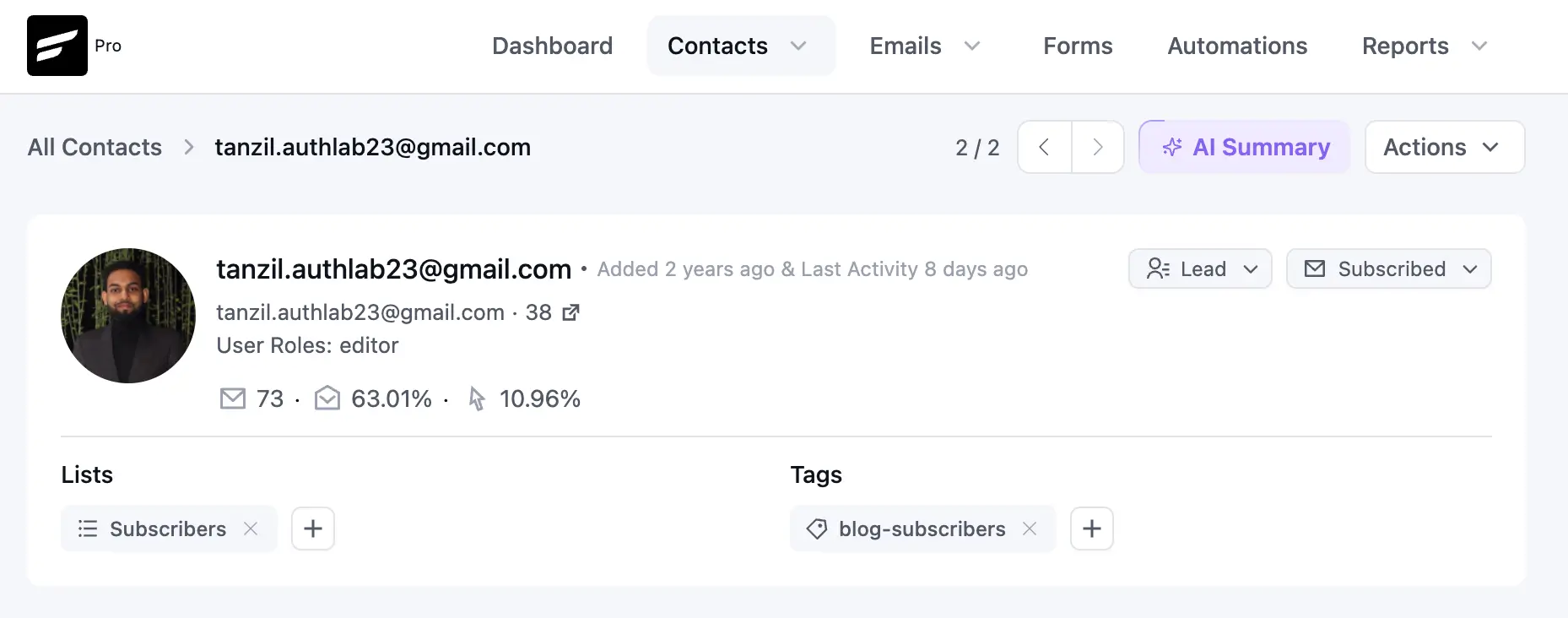
Every contact profile quietly accumulates information like:
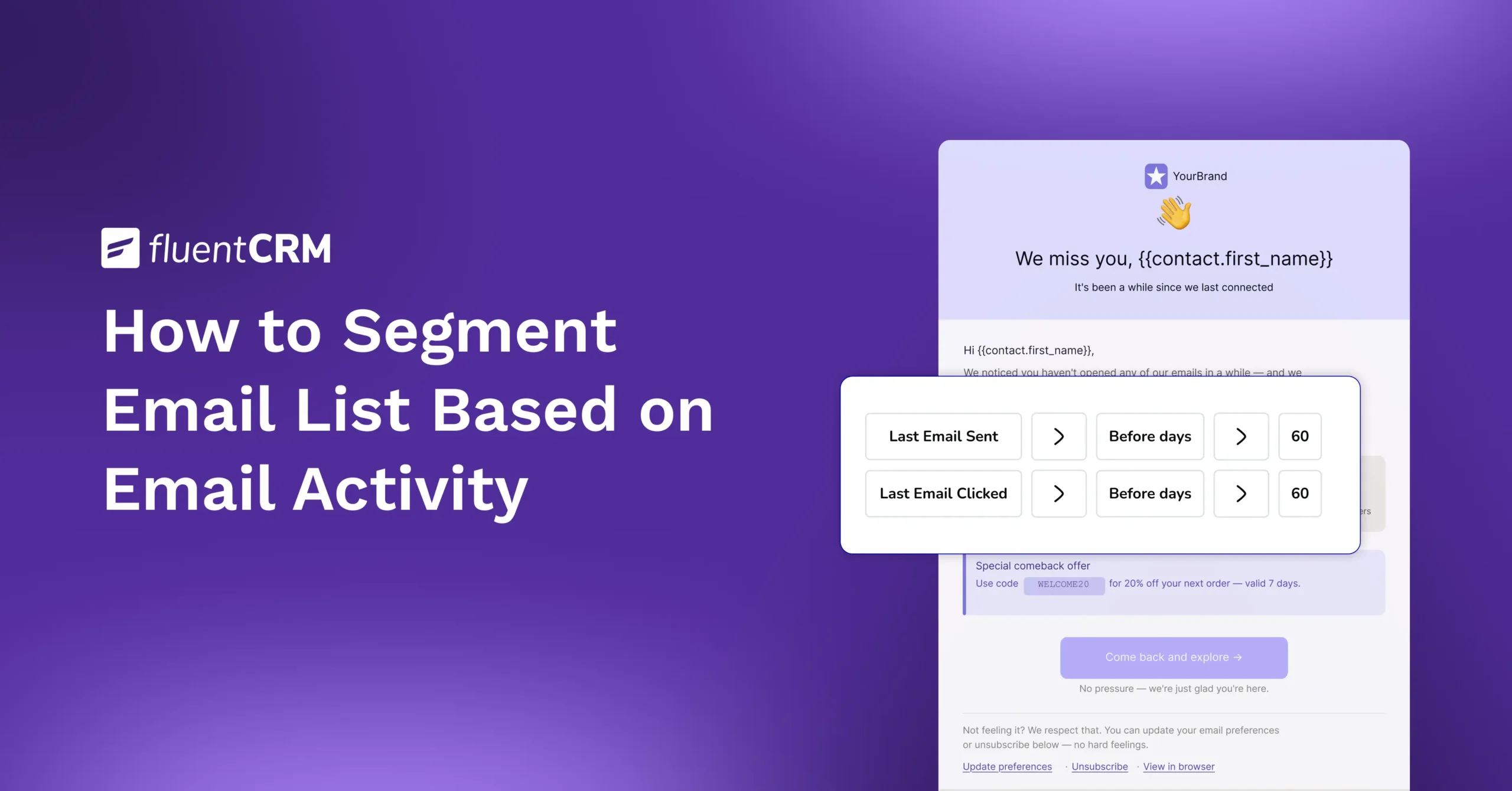
- Last Email Open: The most recent date a subscriber opened any email from you
- Last Email Clicked: The most recent date a subscriber clicked any link
- Last Email Sent: When they last received a campaign
These fields update on their own and form the backbone of every activity-based segment you build.
Advanced Filter
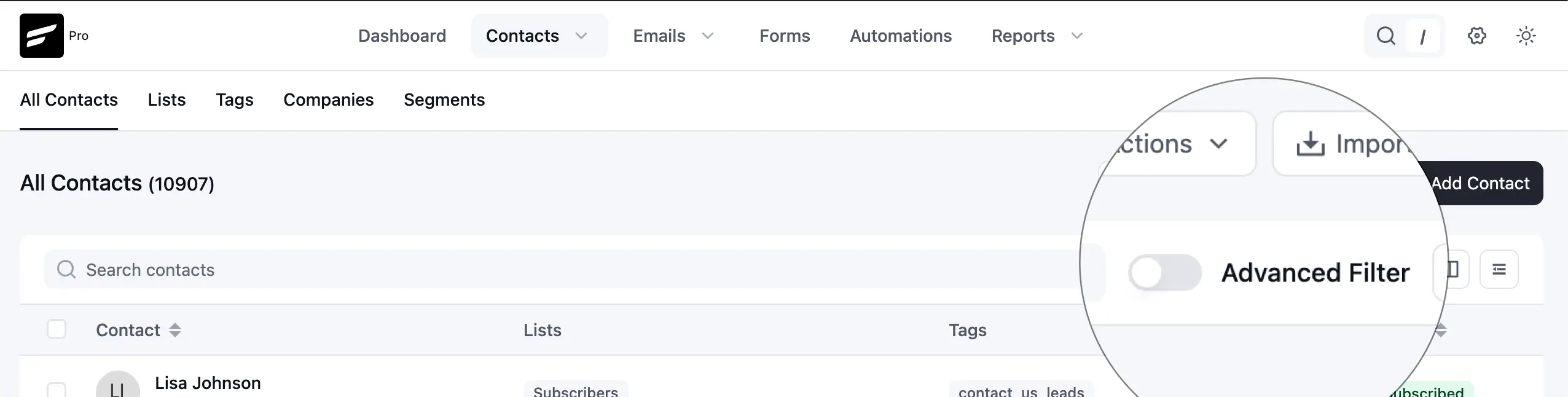
Advanced Filter is the condition builder available right on the Contacts dashboard.
Toggle it on, and you can filter contacts using both static data (lists, tags, custom fields) and activity data (opens, clicks, campaign responses), combined with AND/OR logic.
This is the fastest way to answer a specific question, like “who opened this week.”
Dynamic Segments
A filter built with Advanced Filter is temporary. Dynamic Segments make it permanent.
You set your activity conditions once, save them under a name, and FluentCRM keeps that group updated automatically on its own.
No manual refreshing, no re-running the filter every time you plan a campaign.

Campaign Summary and Tags
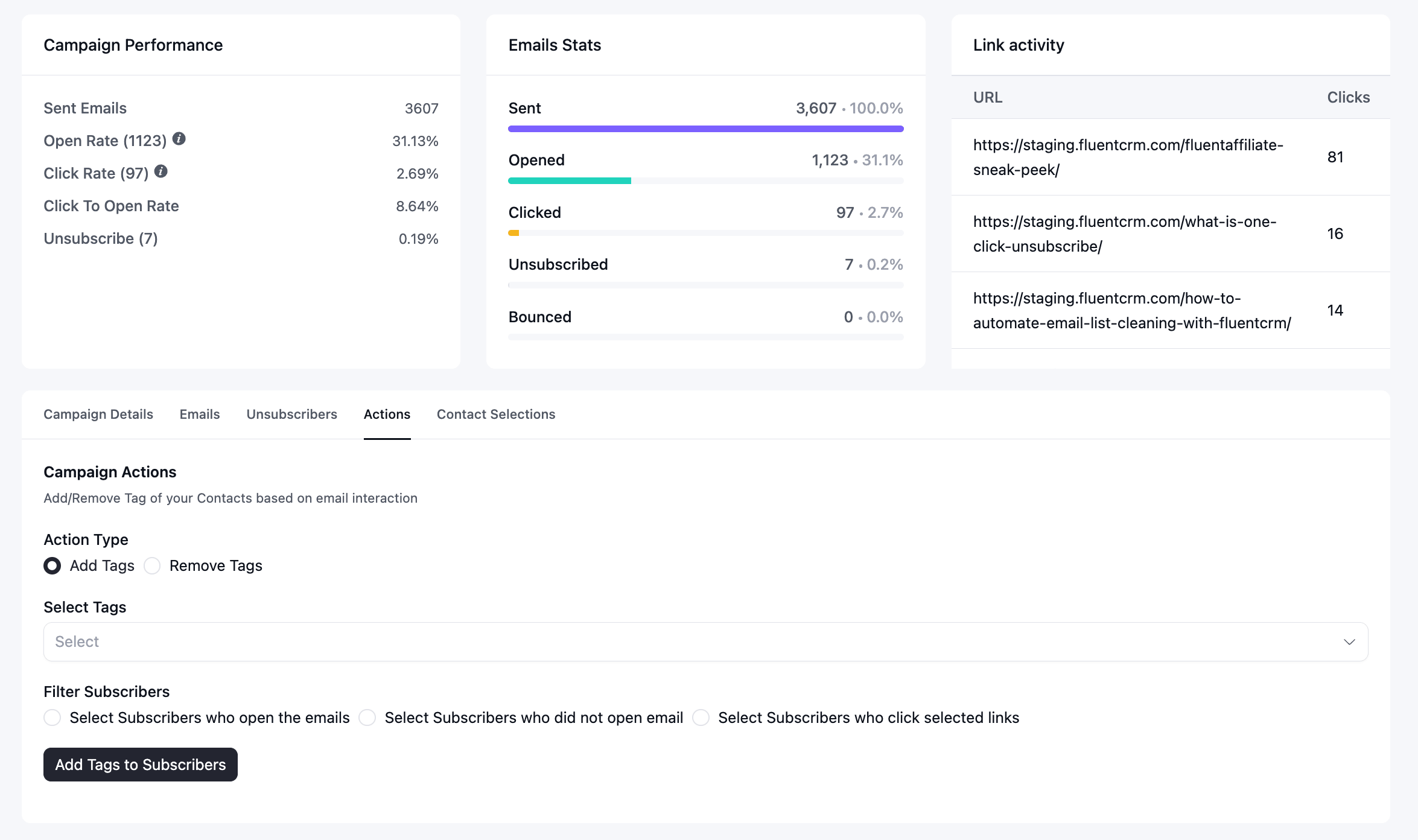
Sometimes you want to act on activity from one specific campaign, not on one predefined rule. In FluentCRM, every campaign has its own report section.
This Campaign Summary page lets you filter recipients using options like:
- Select subscribers who opened
- Select subscribers who did not open
- Select subscribers who clicked selected links
You can choose any option and then apply a new or existing tag to that group directly.
Later on, automation can turn this one-time activity tag into something that can start a workflow.
How to Segment Subscribers Based on Email Activity: Step by Step
So far we have discussed the ways you can segment contacts based on their email activity. Now, let’s put everything into action to show you the complete process of how you can turn raw activity data into a working automated workflow.
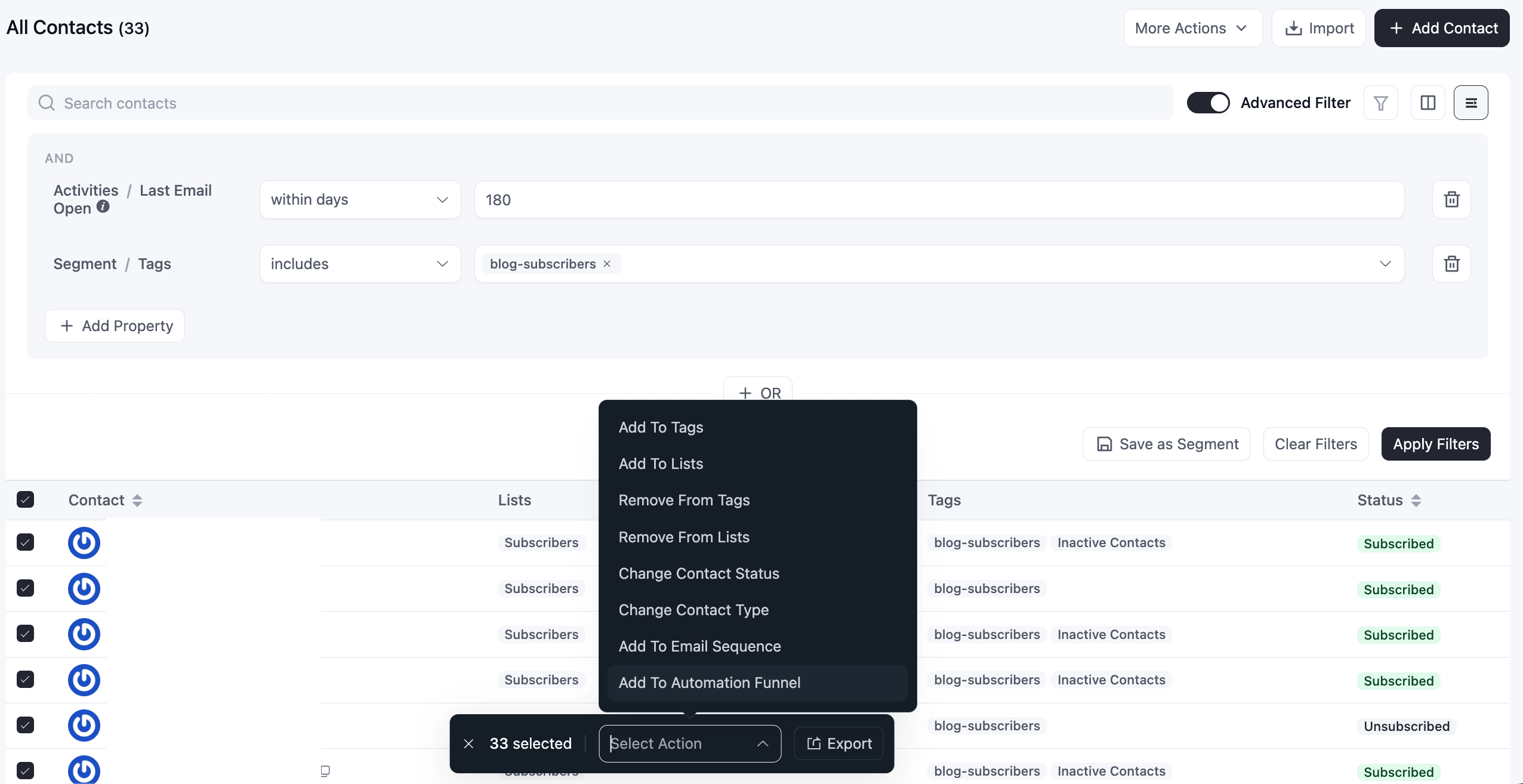
Step 1: Build a Quick Filter With Advanced Filter
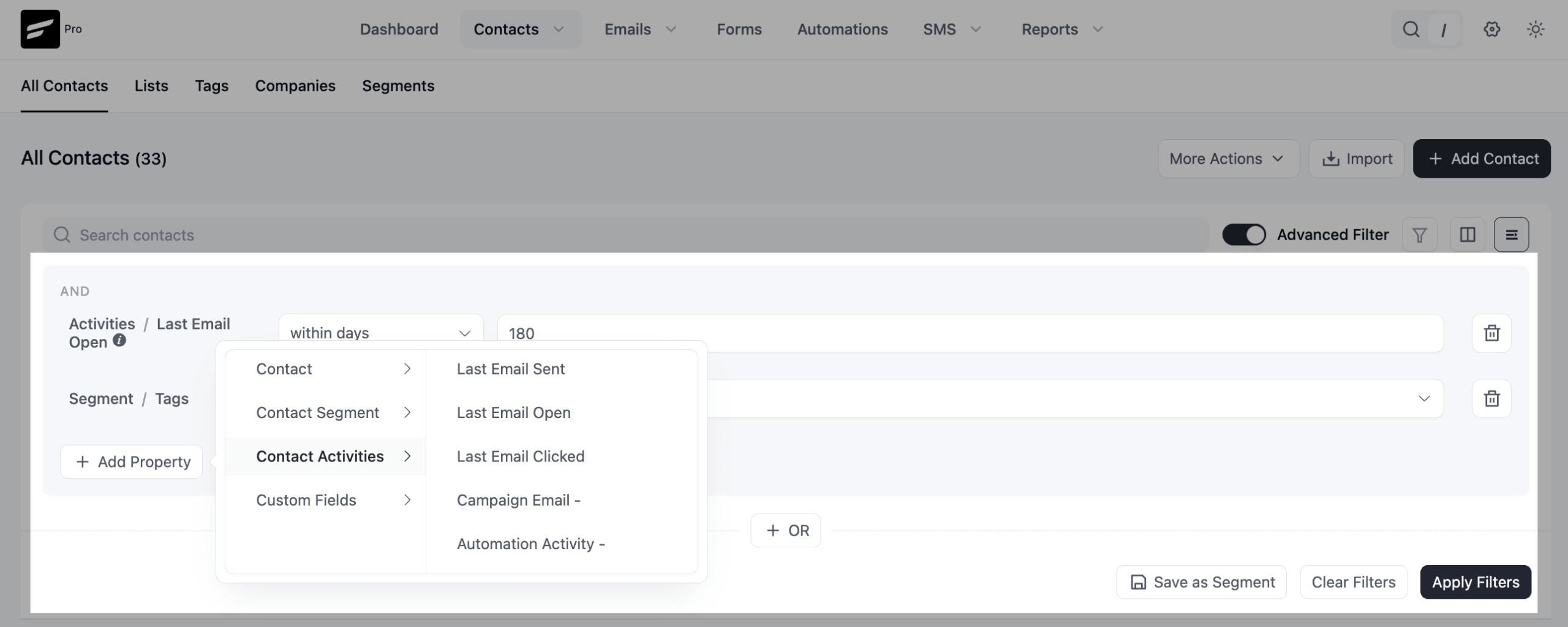
Go to “Contacts” and toggle on “Advanced Filter”.
Click “Add Property” and look for activity-based options such as:
- Last Email Open, with a time window like “within 7 days” or “before 30 days ago”
- Last Email Clicked, using the same time-based logic
- Opened or did not open a specific campaign
- Clicked or did not click a specific link
Stack conditions with AND/OR to get specific.
For example, “Last Email Open before 30 days ago” AND “Status is Subscribed” surfaces subscribed contacts who have gone cold, a classic starting point for a win-back campaign.
Step 2: Save it as a Dynamic Segment
A filter you build this way disappears once you navigate away.
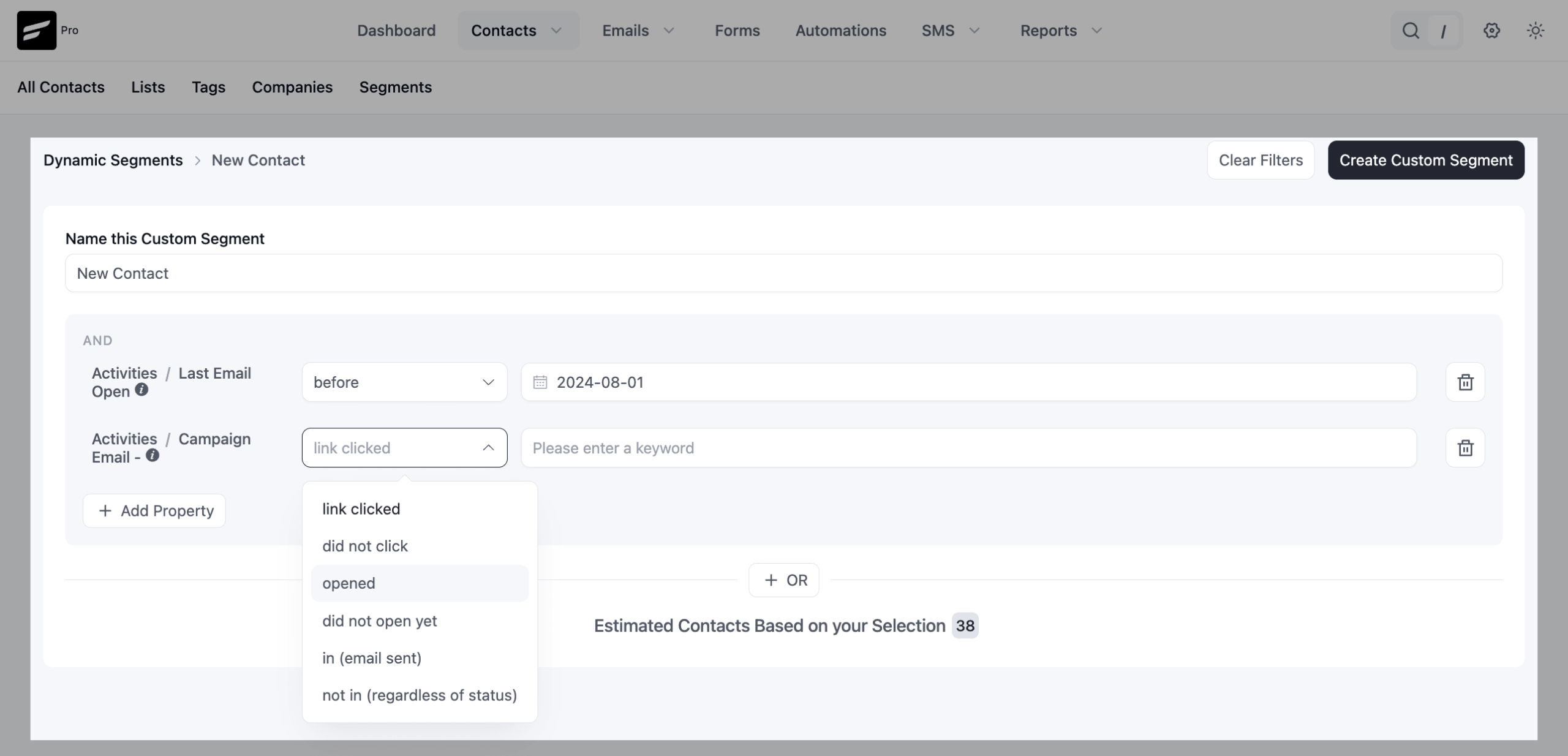
To reuse it, go to Contacts > Segments > Create Custom Segment.
Give it a name and set properties the same way you did in the contact panel. Once saved, this segment stays live.
Every time you select it for a campaign, it reflects current activity, not the activity from the day you created it.
You can also create and save a segment from the contacts advanced filter options using lists and tags.
This way you can organize contacts in FluentCRM overall. The key difference among lists, tags, and dynamic segments is: lists and tags are for stable groups that don’t change much, like where someone signed up. Dynamic Segments are for the groups that shift on their own as behavior changes.
Step 3: Turn Contacts Into a Tag
Dynamic Segments are great for viewing and selecting contacts, but they are not built to trigger automations directly.
To do that, you need to assemble contacts under tags or a list.
To do that, go to Contacts > Advanced Filter > Select Property > Select All Contacts > Select Action > Add to tags/ list.
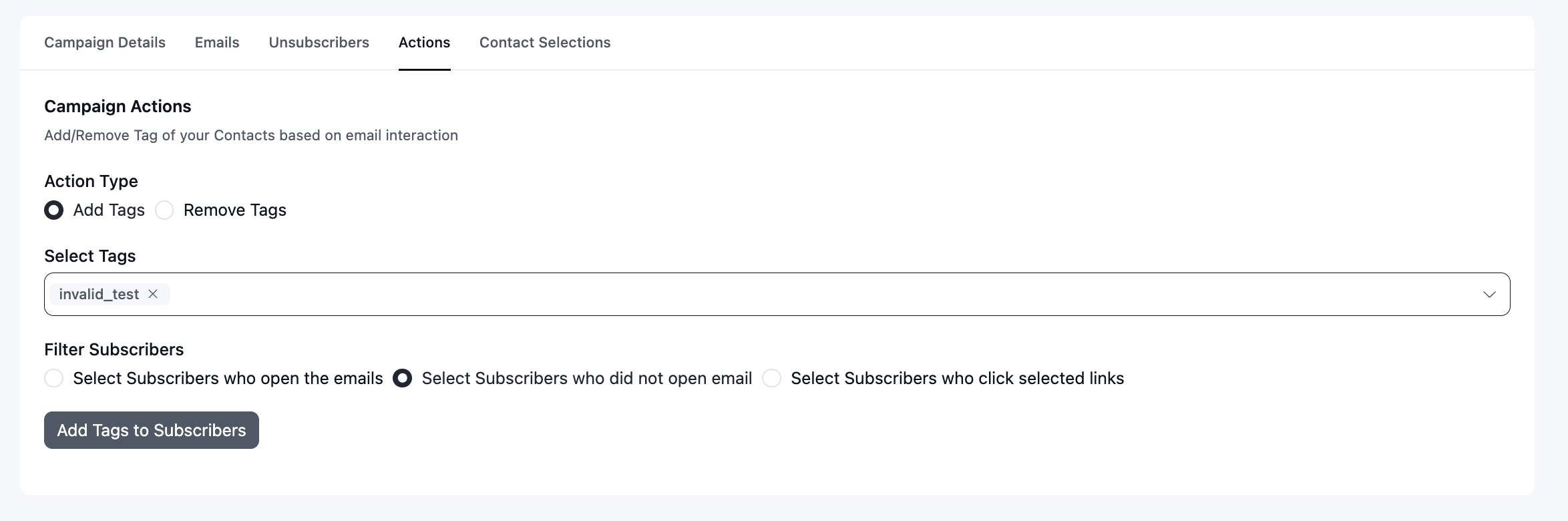
Alternatively, if you wish to add tags based on a single campaign, then go to the campaign’s Reports tab instead:
- Open the campaign and go to Reports
- Under Actions, choose any of the 3 options
- Then select and apply a tag
That tag is now a permanent marker you can build on.
Step 4: Select Tag and Build Automation Workflow
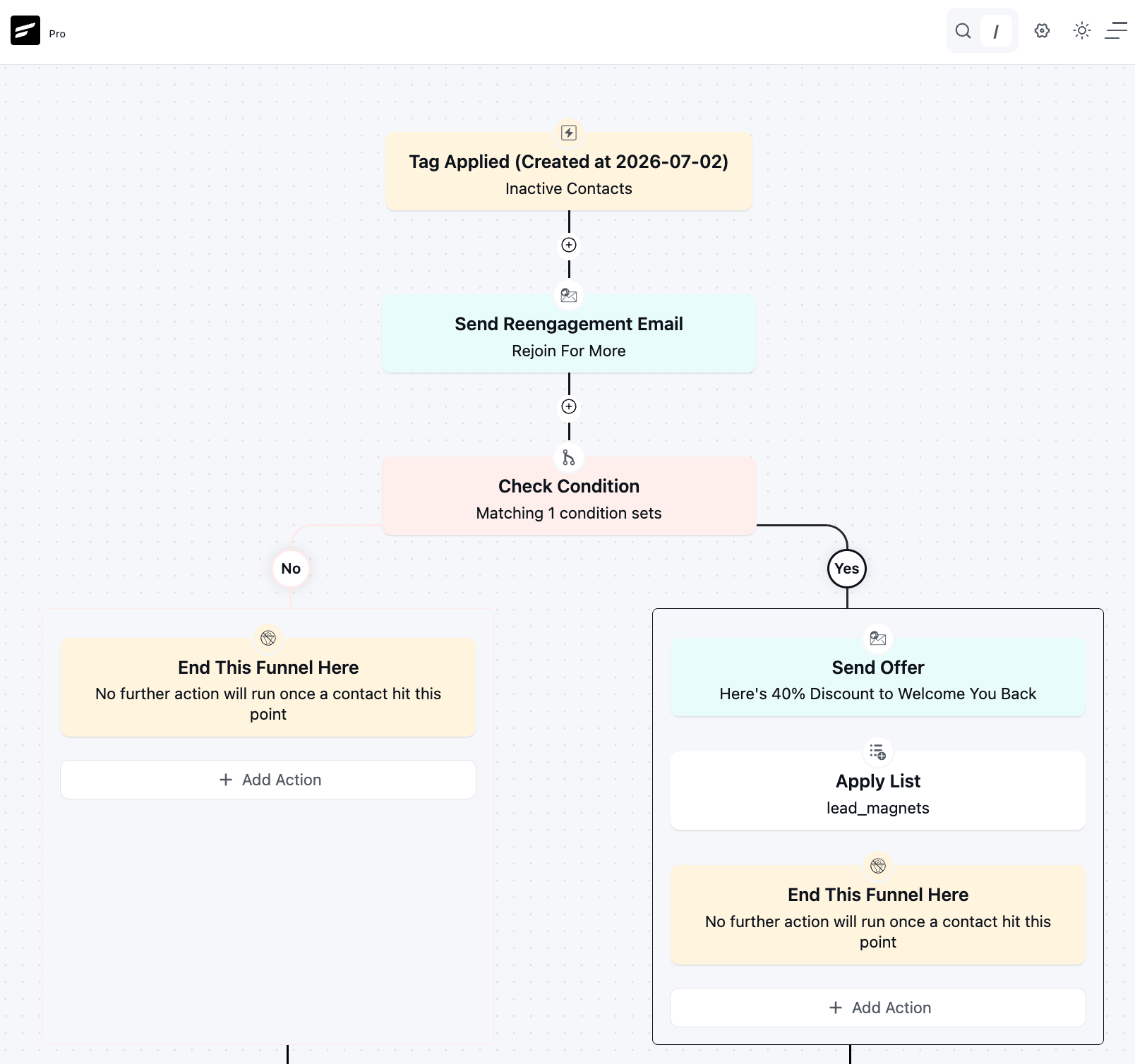
With the tag in place, go to “Automations”, create a new workflow, and set the trigger to “Tag Applied”, using the tag that was selected before.
From here, you can build a re-engagement sequence, adjust send frequency, or move the contact into a different nurture path entirely.
Practical Contact Segments Worth Building
To get the highest outcome for your business, you need to set up workflows that can bring in real value.
A few workflows you can build around specific segments that can consistently pay off for any business:
- Highly Engaged Subscribers: Contacts who opened or clicked within the last 7 to 14 days. Give them your earliest access, your most direct offers, and consider surveying them since they are the most likely to respond.
- Cold Subscribers: No opens or clicks in 60 to 90 days. Route them into a re-engagement sequence before you consider removing them from active sends.
- Layered Segments. Combine activity with other data for precision. “Opened in the last 7 days” AND “on the Lead Magnet list” AND “no purchase yet” narrows a broad list down to exactly the people ready for a next-step offer.
Read More: The Benefits of Contact Segmentation for Your Business
Email Activity-based Segmentation: Mistakes to Avoid
A good segment can still fall flat if the basics get overlooked. Keep these in mind as you build out your email segmentation strategy.
- Send a few campaigns first. A brand-new list won’t have enough open or click history to segment on yet.
- Keep segments large enough to act on. A dozen-person segment is rarely worth a dedicated campaign.
- Pair activity data with lists and tags instead of relying on it alone. Activity shows engagement; lists and tags show why someone’s on your list.
- Revisit cold segments every few months. A well-timed re-engagement email often wins back more subscribers than expected.
Start Segmenting Subscribers by Email Activity Today
Email activity-based segmentation is not a one-time project. It is an ongoing feedback loop:
- You send campaigns
- Subscribers respond according to their preferences
- Their responses shape who gets what next
FluentCRM gives you complete freedom to apply tags, lists, and dynamic segments based on the various actions subscribers take against your sent campaigns, so that feedback loop keeps working for you with very little manual intervention.
Put that loop to work with one segment first. Cold subscribers who haven’t opened in 60 days are usually the easiest to build and the most immediately useful. Once that segment is live and feeding your automations, the rest of the loop tends to fall into place on its own.
Tanzil Ebad Efti
Content Writer & Strategist
Words are my favorite playground. As a Creative Writer at WPManageNinja, I don’t just produce content; I tell stories. By mixing fiction and metaphors with real-life examples, I turn my writing into a creative journey that’s easy for readers to digest and relate to.
Table of Content
Related Articles and Topics
-
How to Organize Contacts Using Lists, Tags & Custom Fields in FluentCRM
If you had to send an email right now to every contact who has shown…
-
eCommerce Customer Segmentation: Everything You Need to Know for Your Business
Two customers visit your store today. One finds exactly what they need and checks out…