Why FluentCRM 3.0 Feels So Fresh & What It Means for You?

Summarize with


Last Updated:
So, FluentCRM 3.0 is out. You’ve had a couple of days with it. Are you liking what you’re seeing? We hope so.
It feels a bit different after 3.0, right?
Updates like this bring questions, some of which the release note didn’t fully answer. So, this post is all about answering all of that.
It’s not another feature breakdown. Not a repeat of the release note. It’s the actual behind-the-scenes.
We’ll be honest: we’re also a little obsessed with telling our story. FluentCRM is a milestone product for us. It’s something we’ve genuinely poured ourselves into since the day we started building it.
We know, FluentCRM sits at the heart of countless businesses, including ours. So, when a version this big comes out, we can’t just let the changelog speak for itself.
So this is us, speaking for ourselves. Hope you’ll stick around for it.
Before 3.0 vs. After 3.0: Good Wasn’t Good Enough Anymore
That’s not a criticism of our earlier versions. It’s just what happens when a product outgrows its own foundation.
For quite some time, one question kept coming back to us:
What’s the difference between a product that works and a product that’s genuinely ready for the next five years?
That question stayed with us throughout the entire journey of building 3.0. And honestly, it ended up influencing almost every major decision we made along the way.
The Reality: Things Needed An Upgrade
Let’s be clear about that. FluentCRM’s earlier version worked well.
Thousands of businesses ran their entire email marketing operation on it. Automations were firing. Campaigns were going out. Revenue was being generated. In simple words, everything worked effortlessly.
Honestly, we could add features without much complexity.
But the world is moving towards a fast, scalable solution, and we had to make the right decision to make FluentCRM scalable enough so it can grow fast.
Aging UI Architecture
FluentCRM’s frontend was built on Vue 2, a framework that served us well but is now outdated.
Due to the outdated framework, every new feature we wanted to build required working around its limitations. Lately, workarounds have become the norm. Technical debt accumulated quietly, invisibly. And, it was costing us time and productivity.
Lack of Scalability
With over 80,000+ users running increasingly complex workflows, the gap between what FluentCRM could do and what users needed it to do kept widening.
Contact lists were growing. Automation funnels were getting longer. However, the system was handling it, but not handling it gracefully.
Fragmented Workflows
If you wanted to reach a contact via SMS, you left FluentCRM, opened a separate tool, managed a separate contact list, and hoped everything stayed synchronized.
While other email marketing platforms integrated SMS, FluentCRM used email as the only communication channel. That was one of the biggest drawbacks until 3.0!
Shaky Email Editor
It looked Gutenberg-native on the surface. But we got queries, things would break. Layouts would render inconsistently. The editing experience was just slightly off.
So, we decided to address these and give users a complete WordPress-native solution.
The Harder Call: We Chose to Rebuild Instead of Patching
The easier choice would have been a few more releases. Add a few headline features, ship a blog post, and generate some excitement.
It could’ve worked for now.
But we made a harder call. We sat for a meeting and decided:
“We won’t stretch the older version by patching the old foundation; instead, we will rebuild it completely.”
The centerpiece of that rebuild was the migration to Vue 3 and Element Plus. This is the kind of work that’s completely invisible. You won’t see any visual difference from the outside until you upgrade and use it to feel the difference.
- The dashboard loads faster.
- Interactions feel snappier.
- Large contact lists management feels effortless.
- The UI finally feels like software built in 2025, not 2020.
The real reason we made this move was developer velocity and product scalability.
With Vue 3, our team can build new modules faster, improve existing features more cleanly, and respond to community feedback without fighting the framework at every turn, and above all, ship updates faster.
The New Possibilities: What 3.0 Made Possible?
The Vue 3 migration didn’t just fix what was slowing us down; it made what was complex before possible.
- Faster feature releases
- More complex automation workflows
- True multi-channel communication (Email & SMS)
- Deeper integration with the Fluent ecosystem
- Better WordPress-native experience across the product
And most importantly: a future-proof foundation that can scale with your business.
The Capability Shift: It’s No Longer Just an Email Marketing Plugin
This is the honest positioning shift that 3.0 represents.
FluentCRM was and is still an email marketing plugin, but with more capabilities.
With SMS, AI, automations, ecommerce recovery, contact intelligence, reporting, and many more important introductions, FluentCRM is turning into a WordPress-native growth platform that is capable of running your entire business from one dashboard.
The Thinking Behind FluentCRM 3.0
Every major release has a public story and a private one.
The public story is the release note. You’ve read that.
This is the private one; the questions we knew you’d have, the decisions we knew would need explaining, and the honest answers we’d rather give you directly than let rumors fill the gap.
Why Did V3 Take So Long?
We won’t pretend 3.0 arrived on schedule. It didn’t.
Almost half a year ago, we shared the first glimpse of what was coming. The response was exciting.
Behind the teaser, we were still building, and over time, the scope kept expanding, not because we lost control of the project, but because we found a lot of things that needed rebuilding.
A few months in, we launched our first private beta. Not to create buzz, but because we’ve always believed the best products are built with users, not just for them.
We kept the beta launches intentionally quiet, watched how people used it, collected their feedback, and kept developing around what we were hearing. That process added time.
So, all of that took a while, but it also made the product significantly better.
Why Did Vue 3 Matter So Much?
Vue 2 wasn’t broken. But Vue 3 is faster, more memory-efficient, and gives developers significantly better tools for building complex interfaces.
There’s also a maintenance reality. Vue 2 will eventually stop receiving security updates. Staying on an unsupported framework with 80,000+ active users is a risk we weren’t willing to carry indefinitely.
The migration was painful. It took longer than we wanted. But it was the right call, and the speed improvement you feel when you open the dashboard today is the most immediate proof.
Why SMS Over Sales Pipelines?
This is probably the question we’ve been asked most.
We know pipelines have been on the wishlist for a long time. When we were scoping 3.0, pipelines were genuinely in the conversation.
Here’s why SMS is coming ahead of the Sales Pipelines.
Honestly, SMS fits naturally into how FluentCRM already works. You have all the relevant resources: contacts, segments, sequences, and automations. So, adding SMS meant giving you a faster communication channel inside the same system you already know.
In short, SMS in 3.0 felt the right feature at the right time.
Will Sales Pipelines Ever Be Introduced?
Yes.
We want to be clear about this because we know it’s something a meaningful part of our community has been waiting for. Sales Pipeline is on the roadmap, and it’ll arrive “when we can do it with proper care.”
And, migration to Vue 3 actually makes this more realistic. The new architecture gives us the foundation to build a pipeline system that integrates cleanly with everything else in FluentCRM.
The Sales Pipelines story is different. We don’t want to rush it. We’ll share more when there’s something concrete to share.
How Did We Approach Backward Compatibility?
FluentCRM is powering thousands of businesses, and it runs quietly in the background. The last thing any of those businesses needs is an update that breaks something that was working.
So every decision in the rebuild was made with the constraint that “your existing setups must keep working.”
We did the testing. The multiple beta period existed specifically to find the edge cases that internal testing couldn’t fully eliminate. We took every piece of feedback seriously before we shipped.
Backward compatibility isn’t exciting to talk about. But for a product people trust with their marketing infrastructure, it’s one of the most important things we can get right.
What Scared the Team?
There were phases of this project where it felt like building a new plane while the old one was still flying!
The thing that concerned us most was the risk of the big-bang release. Rebuilding so many things at once means more surface area for things to go wrong. The beta period helped enormously. The RC cycles helped. But the truth is that version 3 carries a weight that the team felt throughout the entire process.
What kept us steady was remembering we owed it to our users to build something that could carry them for the next five years, not just the next five months.
The Biggest Additions in 3.0 (And Why Each One Matters?)
As you already know, Version 3.0 brings some major advancements within FluentCRM.
So, instead of walking you through a list of what’s new, which you’ve already seen in the release notes and the beta post. We’ll share the whys behind the biggest shifts in this version.
MCP-Powered Workflows
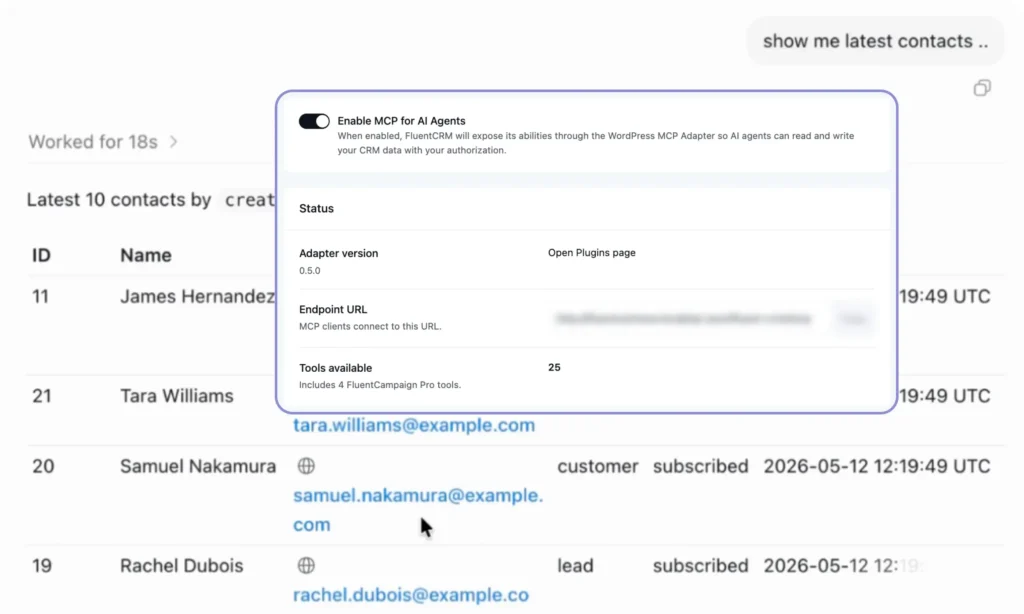
FluentCRM 3.0 introduces 25 MCP tools built to help AI interact more intelligently with your CRM workflows.
Why: AI tools are powerful, but without access to the right context, they often operate in isolation. Manually switching between CRM data, activity logs, and AI tools slows down workflows and limits how useful AI can actually be inside a real business environment.
So, FluentCRM 3.0 was designed to bridge that gap. By connecting FluentCRM with leading LLMs and AI providers, users can generate instant summaries, uncover contact insights, and create AI-powered responses without manually digging through CRM data. More importantly, it creates a flexible foundation for smarter, faster, and deeply connected AI workflows moving forward.
Vue 3 Migration (Full Rebuild)
The entire FluentCRM frontend was rebuilt on Vue 3 and Element Plus.
Why: Vue 2 was the older version. Simply adding more features on top of the old system would have eventually slowed down the experience. So, the team rebuilt the architecture to allow a faster, smoother experience and, more importantly, gave developers the ability to evolve the product rapidly.
SMS Marketing (Full Module)
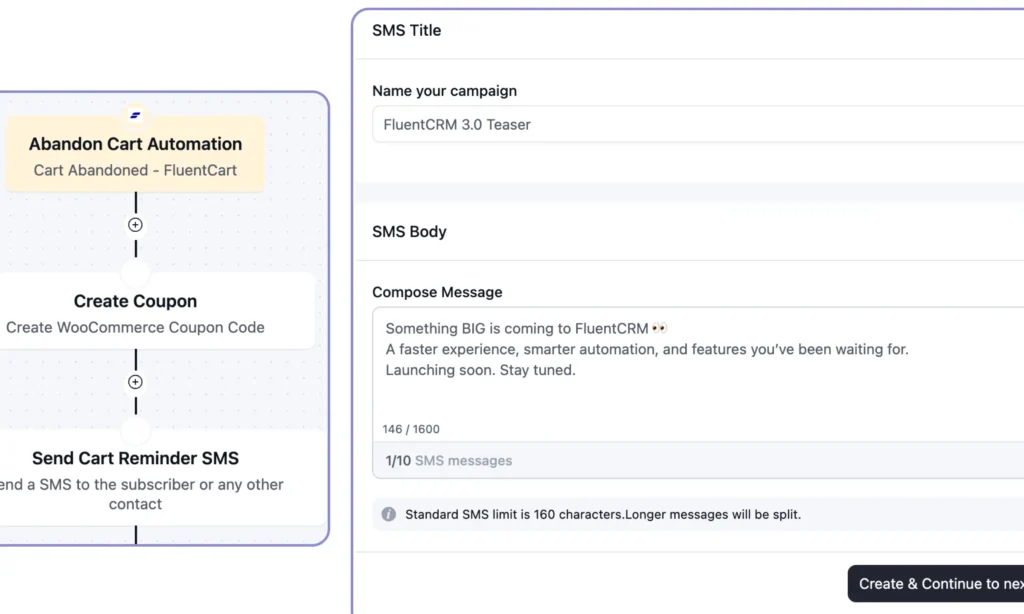
A complete SMS Automation System: bulk campaigns, automation, two-way conversations, WhatsApp integration (upcoming), and more.
Why: Modern communication doesn’t happen through email alone anymore. Users were switching to separate SMS tools, managing contacts in two places. So, the need for an SMS module inside FluentCRM was paramount. It gives businesses flexibility around cost and regional reach.
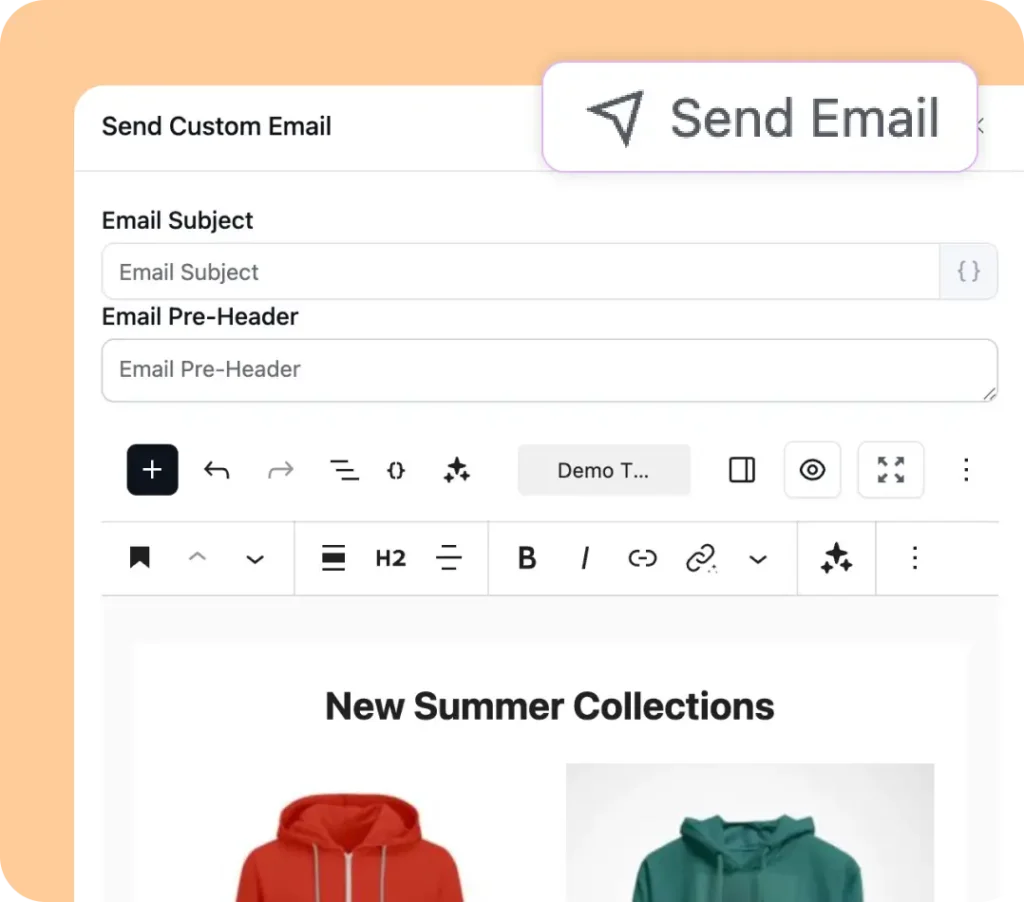
Gutenberg-Native Email Editor
The email editor was rebuilt to be genuinely Gutenberg-compatible and WordPress-native.
Why: The previous block-based editor wasn’t fully compatible with WordPress. The rebuild makes the editing experience consistent with what users already know from the rest of WordPress, removing the gap between “how I build pages” and “how I build emails.”
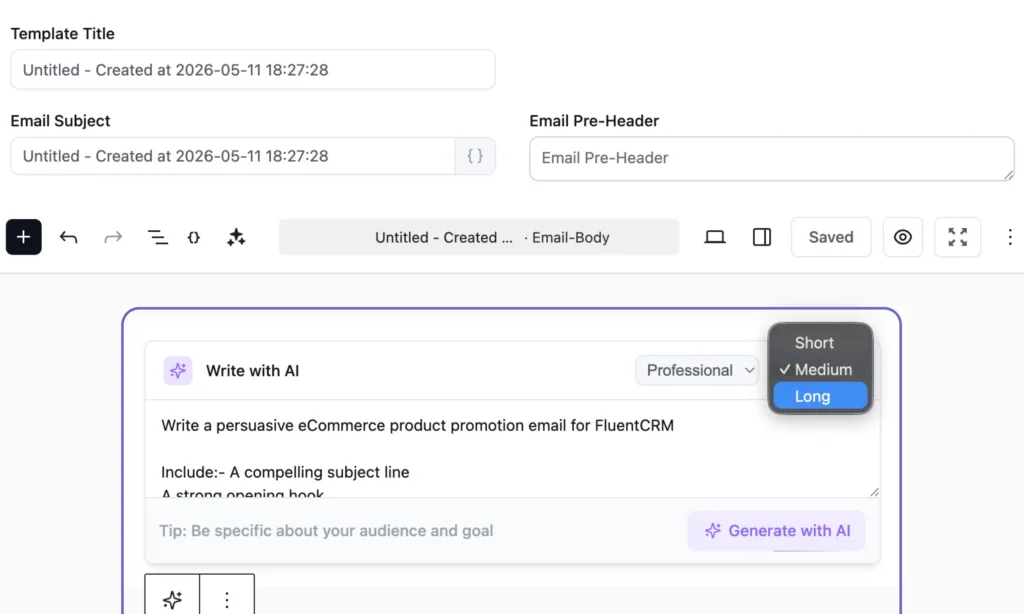
AI-Native Email & Contacts
AI email writing inside the editor with six tone options. And a one-click AI contact summary that pulls together a contact’s full history into a single readable snapshot.
Why: The blank page is where time goes when you’re writing emails at scale. AI writing solves that specifically. It gets you a usable draft fast so you can focus on refining. The AI contact summary solves the other side of the same problem. FluentCRM already collects more than enough per contact. The AI summary summarizes contact data in just one click.
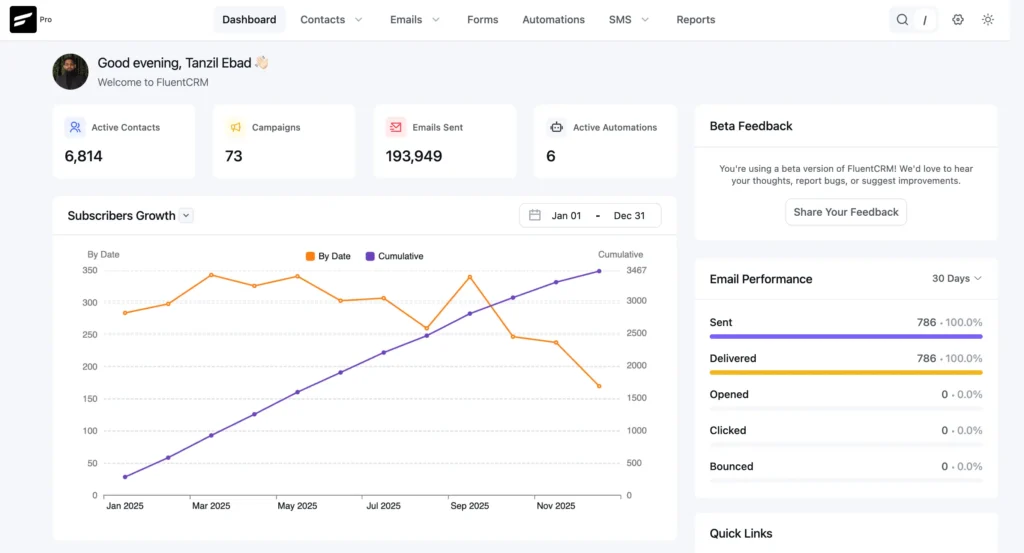
Brand New Product UI
A completely new central and feature dashboard with modern charts, graphs, widgets, and data cards.
Why: The old dashboard was okay, but it needed some modernization. The goal with the dashboard redesign was not to show more numbers, but to see those numbers vibrantly so you can make quick business decisions.
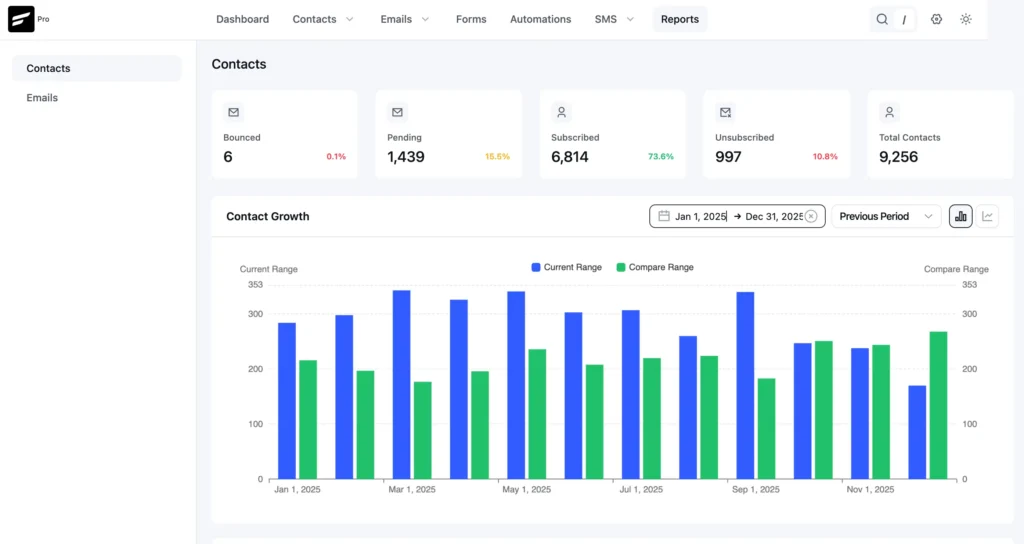
Rewritten Reports Module
Reports were rewritten, and the dashboard was redesigned from the ground up.
Why: The old reports module was functional, but old-fashioned and created friction. Data was also technically present, so we rewrote and redesigned it. The goal is to help users make better decisions faster, not just show them more data.
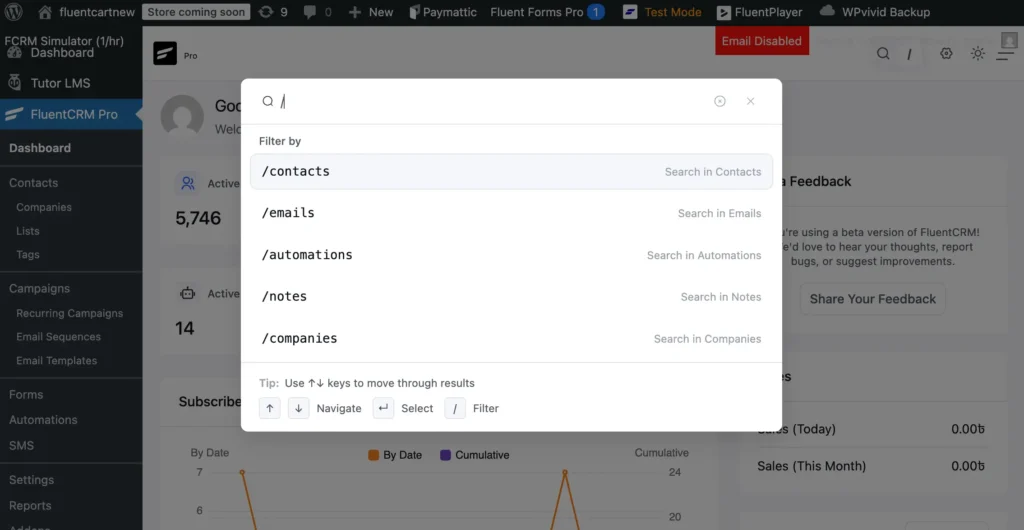
Global Search
Instant search across contacts, campaigns, companies, automations, and notes from a single place.
Why: As our functionalities grow, navigation becomes a real bottleneck. From now on, global search will directly address daily navigation friction for power users and larger teams.
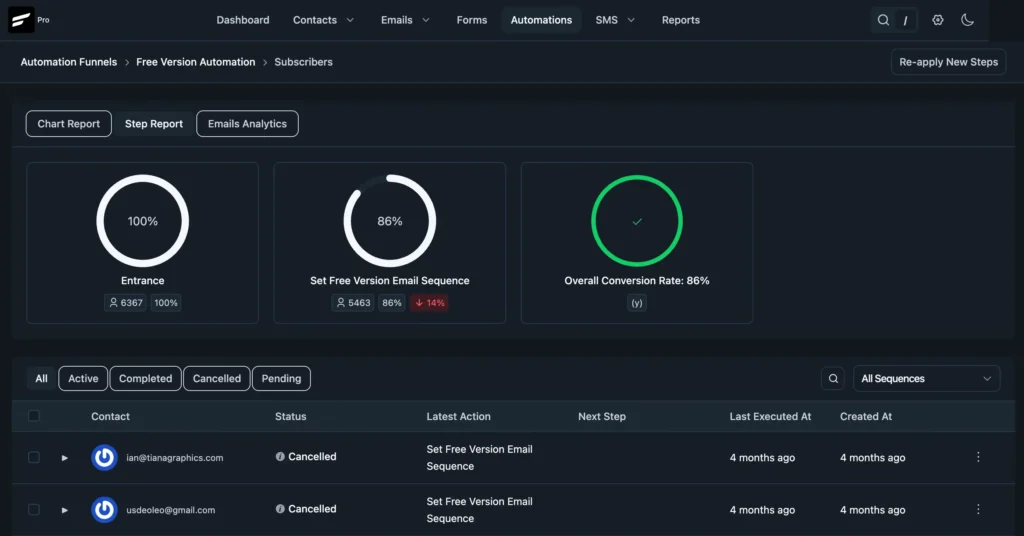
Dark Mode
A full dark mode with persistent theme preferences.
Why: This had been a longstanding community request. FluentCRM needed to be consistently compatible with the dark mode. In Version 3.0, this request has been shipped.
FluentCRM 3.0 Is Bigger Than New Features
Most software adds features. FluentCRM 3.0 changed the foundation.
Features are what you use today. Foundation is what determines whether the features you use three years from now are genuinely better than the ones you use today.
- Brand New Architecture: The new foundation gives FluentCRM a modern, maintainable frontend and performance upgrade. These aren’t incremental improvements; they’re the result of rebuilding key systems with current best practices instead of patching 2020 code in 2026.
- Measurable Performance: The dashboard is faster and more responsive. The overall navigation feels easier. Tracking business growth now feels effortless. These aren’t incremental improvements; they’re the result of rebuilding key systems with current best practices.
- UI Consistency: If you use any other Fluent Ecosystem products, Fluent Forms, FluentCart, or FluentBoards alongside FluentCRM, the 3.0 interface will feel familiar in a way it never quite did before. The visual language across the Fluent ecosystem is now coherent.
- Accelerated Roadmap: The hard infrastructure work is done. Now, developing new modules, smarter automation, more communication channels, and deeper integrations can be faster and better because of the foundation 3.0 establishes.
What Building FluentCRM 3.0 Taught Us?
Building a major version while keeping a live product running for 80,000+ businesses teaches you things you can’t learn any other way.
- Rebuilding is harder than starting fresh. Every change has to guarantee that the automation someone built in 2021 still works correctly after the migration.
- Backward compatibility doesn’t get enough credit. When it works, nobody notices. We learned to treat that silence as the goal.
- Scope always expands. The Vue 3 migration revealed more interconnected dependencies. For example, the editor rebuild found edge cases buried in years of templates. Each one added time, and made the final version better.
- WordPress has its own rules. Email HTML rendering constraints differ from web rendering. Our beta community helped us in many ways in this case.
- Rapid performance improvement. When the foundation gets faster, everything on top of it does too. That was one of the most satisfying outcomes of the whole rebuild.
- The hardest decisions are the ones you make publicly. SMS over pipelines. The extended timeline. The version number. You make the right call, you explain it honestly, and you move forward.
How FluentCRM 3.0 Sets Up the Next 5 Years
The groundwork is done. The foundation is laid. Now it’s about building and building fast.
This is the part we’re most excited about, because 3.0 isn’t the peak. It’s the base camp.
FluentCRM’s first five years were about proving that a self-hosted, WordPress-native marketing automation platform was viable, and that you didn’t have to sacrifice power to keep your data on your own infrastructure.
The next five years, it’s about proving FluentCRM is the best option, period.
And, we believe it’s possible, because in the coming days:
- The automation system will get smarter
- The Sales pipeline is coming, and the update is also on its way
- AI will go further because the infrastructure is now in place to extend AI
- We plan to bring more communication channels beyond Email and Sms
- Reporting will become a genuine intelligence layer for making business decisions
- The Fluent ecosystem will function more tightly with existing and upcoming tools
Above all, Version 3.0 is where the new chapter of FluentCRM starts.
P.S. — 3.0 is the biggest thing we’ve ever shipped. Months of testing, a private beta, and real user feedback built into every decision. We’re confident in it, but if you run into something after you update, tell us immediately. And if you love what you’re seeing, come say so in the community. We genuinely want to hear from you either way.
Tanzil Ebad Efti
Content Writer & Strategist
Words are my favorite playground. As a Creative Writer at WPManageNinja, I don’t just produce content; I tell stories. By mixing fiction and metaphors with real-life examples, I turn my writing into a creative journey that’s easy for readers to digest and relate to.
Table of Content
Related Articles and Topics
-

6 Years, 80K+ Businesses: A Story of Rapid Rebuild, Revamp, and Transformation
Six years! Isn’t this incredible? Back in 2020, we had one big dream: to build…
-
Meet FluentPlayer: The Interactive Video Plugin Built for WordPress
Most marketing automation funnels start with a signal. Someone submits a form, makes a purchase,…