

3X Your WordPress Plugin Business with Email Automation


A WordPress plugin business works because it offers a solution. You spot a real problem, build a solution, and people trust it enough to install it. Over time, that trust becomes revenue.
Then sales start coming in, and the chokehold begins. You’re no longer just building features. You’re buried in support tickets, juggling licenses, chasing renewals, and slowly losing touch with users after the first install.
This friction quietly leaks revenue: missed renewals, disengaged users, and one-time buyers who never return.
But this is where you can turn the tables. With the right strategies in place, those same choke points become growth levers. Let’s find out more about those strategies!
What Are the Common Chokeholds in the Plugin Business?
Even the best plugins can hit roadblocks. From managing licenses to keeping users engaged, many plugin businesses struggle with recurring challenges that quietly limit growth and revenue.
Here are the common chokeholds any WordPress plugin business can face:
- License Management Overload: Keeping track of who has which license, handling renewals, and preventing misuse can be a chaotic process.
- Fragmented Workflows: Using multiple plugins or external tools can lead to disjointed sales, communication, and management.
- Manual Follow-Ups: Sending renewal reminders, onboarding emails, or upsells manually is time-consuming and prone to errors.
- Limited Insights: Lack of data on sales, engagement, and user behavior makes growth decisions harder.
- Revenue Leakage: Missed renewals, abandoned carts, and ineffective campaigns reduce potential earnings.
- Scaling Difficulties: Systems that worked at launch may break under increasing users and revenue.
These are the common challenges any plugin business will definitely face. But these are also the opportunities to multiply your revenue.
How to Increase Your WordPress Plugin Business
Many plugin businesses start with WooCommerce, Easy Digital Downloads, or external platforms. They work, but often add extra plugins, scattered workflows, and distance from your users.
If you’re just starting, we recommend FluentCart, as it offers:
- a simple, WordPress-native way to sell digital products
- manage orders
- and connect sales with email automation
without overcomplicating your setup.


Smarter sales, stronger relationships, and sustainable growth — all from one platform.
Here’s how you can increase your WordPress Plugin business:
Create Licensing That Scales Automatically
One of the biggest hidden growth barriers for plugin businesses is manual or fragmented licensing systems. So, naturally, there are a few problems they face regularly:
- Many store owners struggle to generate license keys on time
- Tracking activations becomes difficult as users grow
- Handling renewals often requires extra effort
- Revoking access when a license expires is manual in many setups
To manage all this, businesses rely on separate extensions or third-party tools. These tools do not always sync properly with the store or billing system. Over time, this creates missed renewals, extra manual work, and steady revenue leakage.
To solve this issue, FluentCart approaches licensing differently. It automatically generates and delivers license keys immediately after purchase and tracks license activity right in your dashboard.
It also manages renewals and revokes access when a subscription lapses, all without manual intervention or stitching together multiple plugins.
Here’s how you can set up your license with FluentCart:
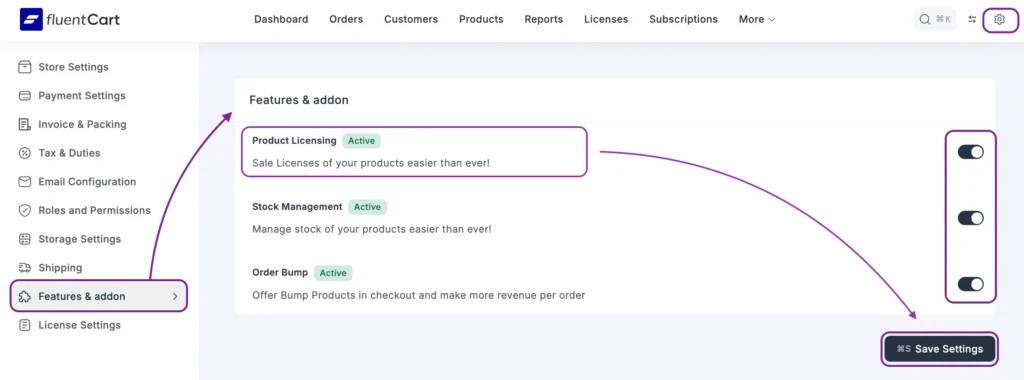
Step 1: Enable Licensing
Go to your dashboard > select ‘Features and Addon’ > enable ‘Product Licensing.’
Other options like ‘Stock Management’ and ‘Order Bump’ are also available, enable if you need it.
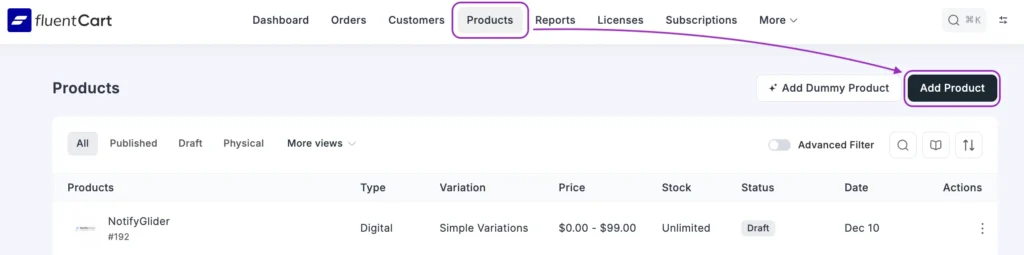
Step 2. Add Your Digital Product
For the plugin business, you need to add your digital products. For this, go to ‘Product’, click ‘Add Product’.
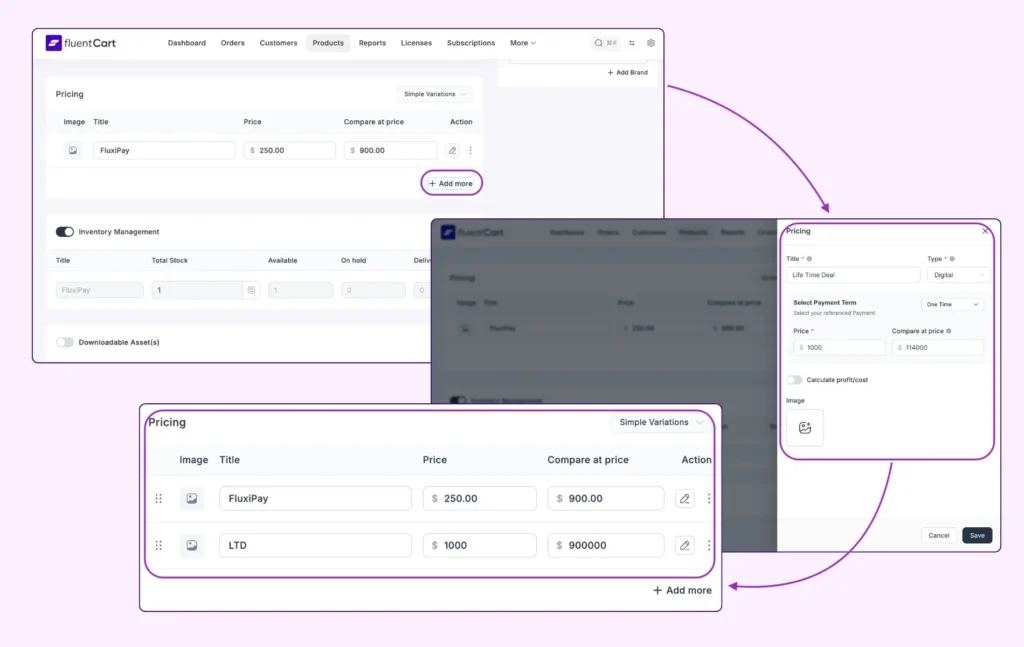
Step 3: Update Product Pricing
In your product segment, you will see options to add pricing, type of pricing, inventory management, and base price to compare your product’s pricing. Set your pricing after researching the market well to ensure a steady revenue.
Step 4: Update Product License
This is your final licensing setup. To proceed, follow these steps: Go to ‘Product’ > select ‘License Settings’ > enable ‘Licensing’ for the product > Set ‘Version Number’ > and enter the ‘License Key.’
Make sure to enable it if your plugin is a WordPress Plugin or not.
And you are good to go! Definitely don’t forget to update your changes.
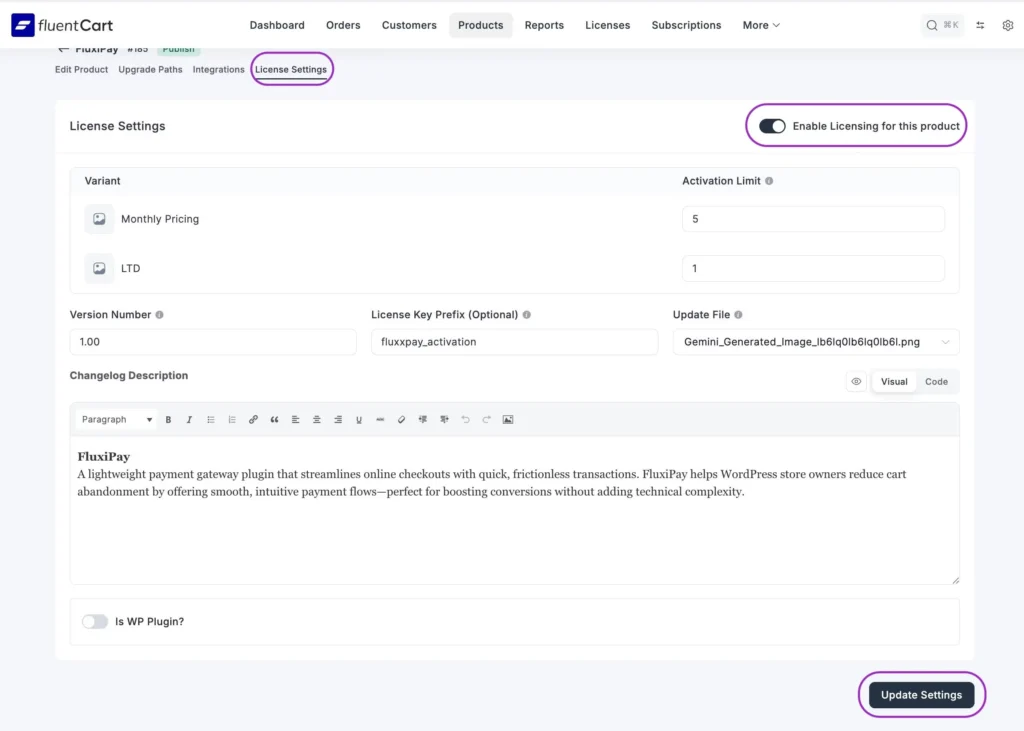
FluentCart handles licensing as a built-in part of the commerce system. This keeps the entire sales process in one place. Purchases, activations, and renewals stay connected and reliable.
As a result, revenue loss is reduced, and support workload stays lower compared to setups that rely on separate licensing tools.
Quick Tip: To drive revenue, you need to make sure your emails are well-timed and well-written. You can check out these bad email examples to know what not to do.
Build an Email Funnel that Adapts to User Behavior
Another major chokehold for plugin businesses appears after the first sale. Email communication becomes inconsistent, generic, and hard to manage. As a result, many businesses struggle with the following issues on a regular basis:
- The same emails are sent to all users, regardless of what they purchased
- Manual tagging and segmentation become time-consuming and error-prone
- Post-purchase follow-ups are inconsistent, leading to low engagement
- Upsell and renewal opportunities are missed due to disconnected tools
- Funnels are built on assumptions instead of real user behavior
- Email campaigns fail to scale as the user base grows
Over time, this leads to low conversions, higher churn, and email fatigue among users.
To solve this, FluentCart and FluentCRM work together as a connected system. Purchase data is recorded directly into the CRM. This allows email funnels to react to cart abandoner instead of static lists.
Step 1: Add Product Integration Trigger
First, you need to go to the product section and select ‘Integrations’. Select FluentCRM from there. You can choose another CRM tool, but we recommend that you use FluentCRM as it has tight integration with FluentCart.
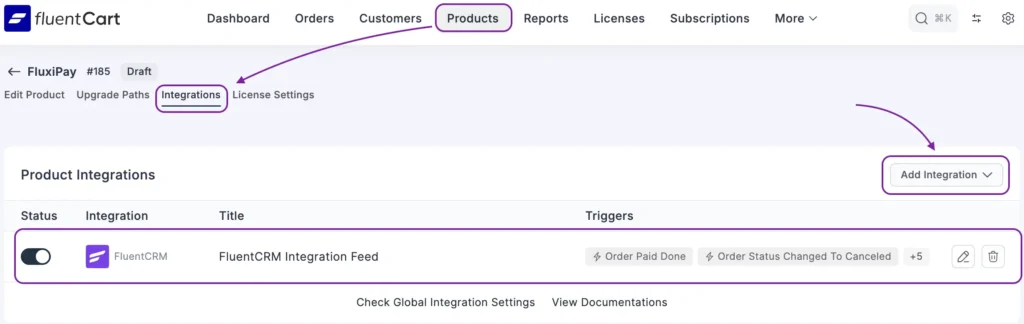
Step 2: Enable Integration and Set Up Triggers
Create a new FluentCRM Integration Feed, name it, and choose which lists and tags, contacts should be added to or removed from. Select the event trigger, such as purchase or subscription expiry. This ensures your email funnel reacts instantly to real user actions.
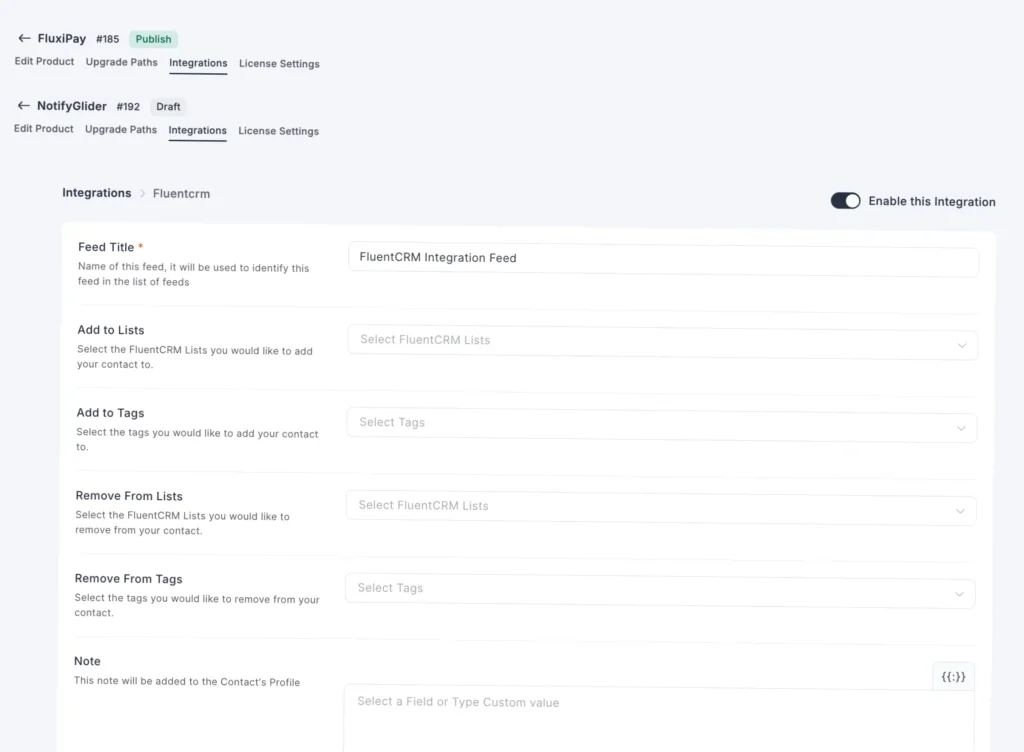
Now that your integration and email trigger are set, any time any of these noted events take place, you can take action as necessary, without any manual hassle.
Quick Tip: To successfully execute this, you need to segment your audience according to their behaviour. To master behavioral segmentation, check out this blog!
Let Customer Action Drive Your Revenue Automatically
For subscription-based plugin businesses, email communication quickly becomes overwhelming. Order confirmations, onboarding emails, renewal reminders, payment failure notices, cancellation follow-ups, and win-back messages all demand attention. When these emails are handled manually, delays happen, important messages get missed, and users lose trust.
This is where email automation becomes a must. With the right triggers in place, every key customer action can automatically start the right email sequence. Customers receive timely and relevant messages without anyone having to monitor the system constantly.
Here’s how you can set up the automation with FluentCRM for your plugin business:
1. Click on ‘New Automation’ to create automation

2. Select the trigger to start your automation. You can either select from pre-built triggers. You can choose your trigger categorized for CRM, Community, Fluent Forms, FluentCart, WooCommerce, etc, as necessary.
For your business, you will need to choose your trigger from the FluentCart category.
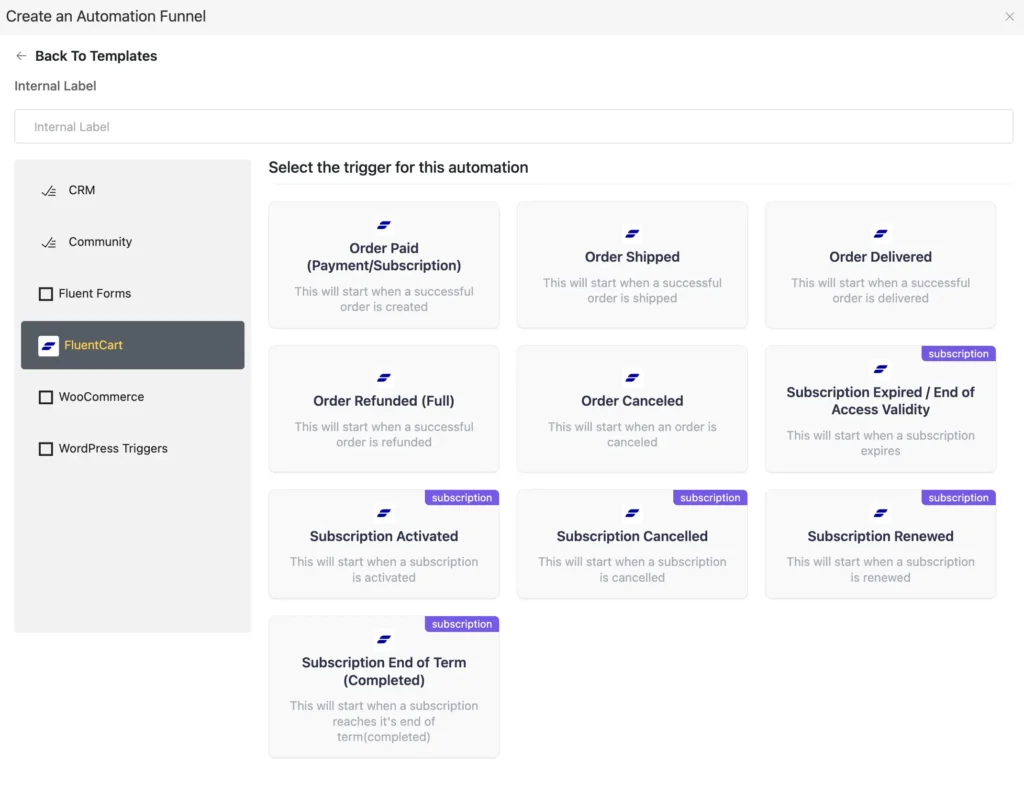
3. After choosing the trigger, you can create the automation. Here is an example for ‘Order Paid’ automation. As soon as someone completes the payment, this automation will start.
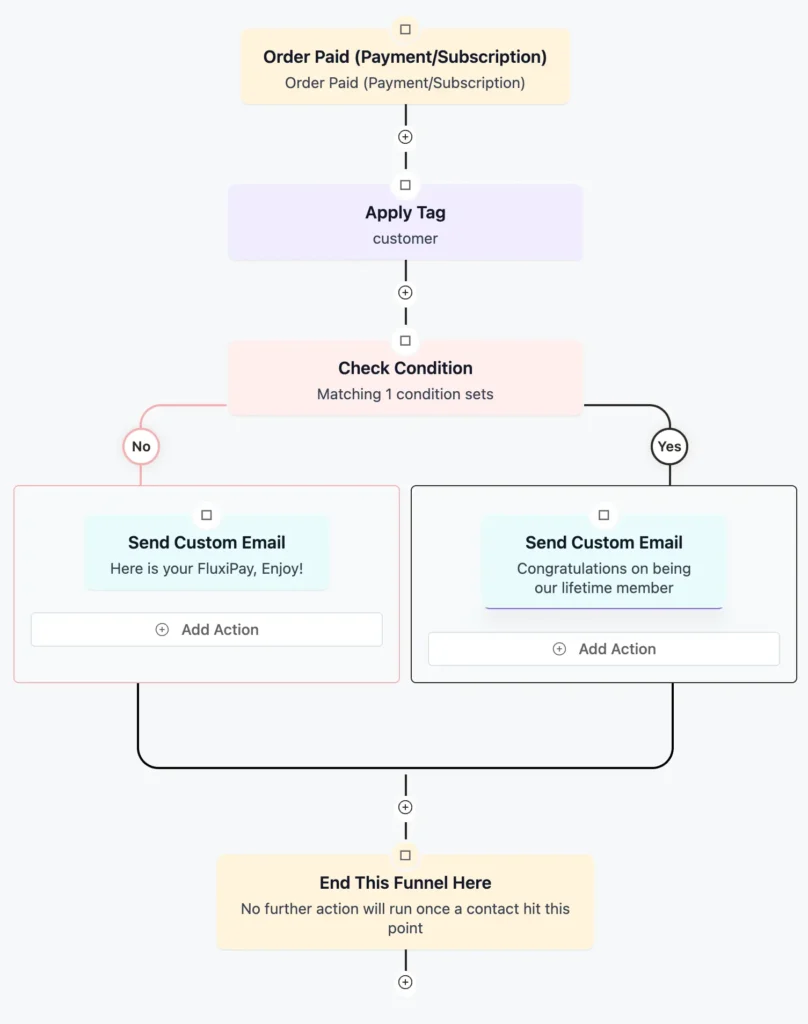
You can create as many automations as you need. You can choose any automation template from the library and customize, as you need.
Once these automations are set, communication runs quietly in the background, keeping users informed, engaged, and far more likely to stay subscribed.
Quick Tip: Your target is to keep the audience engaged. Continuously sending emails, only promoting deals, can backfire. So, include gated content to offer value for your audience.
Recover Revenue You’re Already Losing
One of the most painful realities of running a plugin business is ‘Abandoned Cart.’ And because they happen quietly, most plugin businesses underestimate how much revenue slips away every day.
But this can be solved with FluentCRM. For that:
- First, you have to enable ‘Abandoned Cart Settings.’
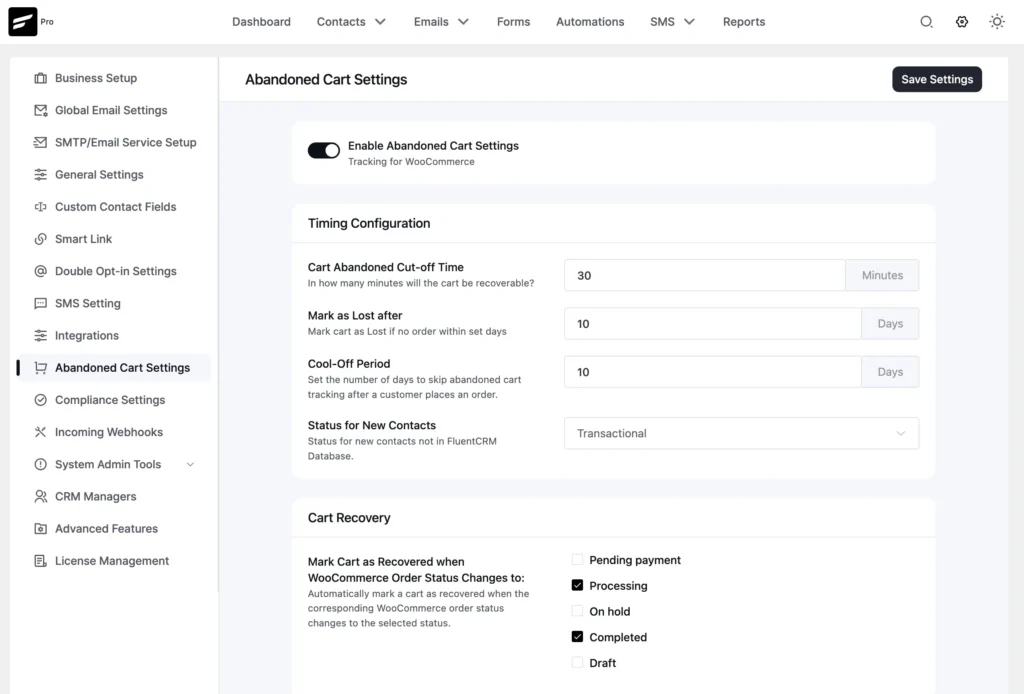
2. Set up all the necessary variables for abandoned cart, such as cut-off time, lost cart period, cool-off days, and assign lists/tags for abandoned or lost carts.
3. Enable GDPR consent and exclude roles if needed, and save to enable abandoned cart tracking.
When FluentCRM is connected to your store and the abandoned cart feature is enabled, checkout activity is captured automatically. If a user starts checkout but does not complete the purchase, the system marks it as an abandoned cart. This behavior data then becomes available for follow-up communication.
Instead of guessing, you now respond to real user actions. A timely reminder, a helpful clarification, or a gentle incentive sent through your email funnel can bring users back to complete their purchase.
Quick Tip: Some emails are more important than others, for example, abandoned cart emails. Check out these abandoned cart email examples to increase revenue from abandoned carts.
Use Feedback to Improve Product and Marketing
Many plugin businesses make decisions based on assumptions rather than real user experience. This often leads to misaligned updates, poor onboarding, and missed opportunities to improve retention.
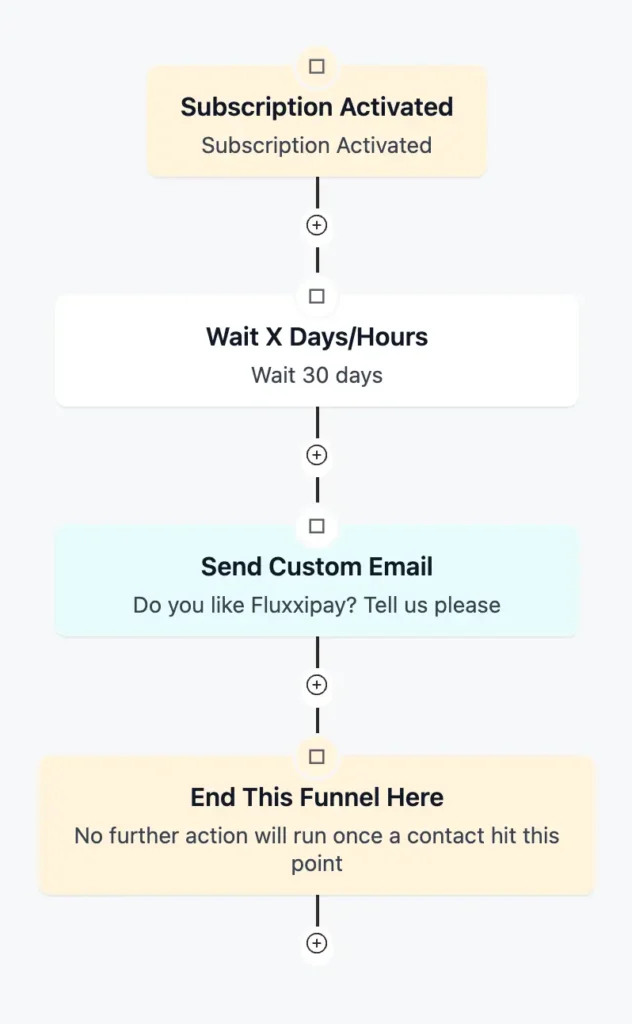
By collecting feedback automatically after key events such as first login, purchase, or subscription renewal, you gain direct insight into how users experience your product. With FluentCRM, responses can be tagged and organized, making it easy to see patterns and prioritize improvements.
When feedback flows into your CRM, you can adjust onboarding sequences, refine messaging, and fine-tune product updates. Decisions become data-driven, engagement increases, and your product grows in a way that truly meets customer needs.
Quick Tip: The more you automate, the better. Check out these email automation examples to boost email marketing KPIs.
Increase Average Order Value Without More Traffic
Many plugin businesses focus on acquiring new users, but growth doesn’t always come from traffic. Often, the easiest way to boost revenue is to earn more from each customer.
With FluentCart and FluentCRM, you can set up automated upsells and order bumps based on real purchases. For example, if a user buys an SEO plugin, you can offer a premium keyword research add-on immediately after checkout or via a follow-up email.
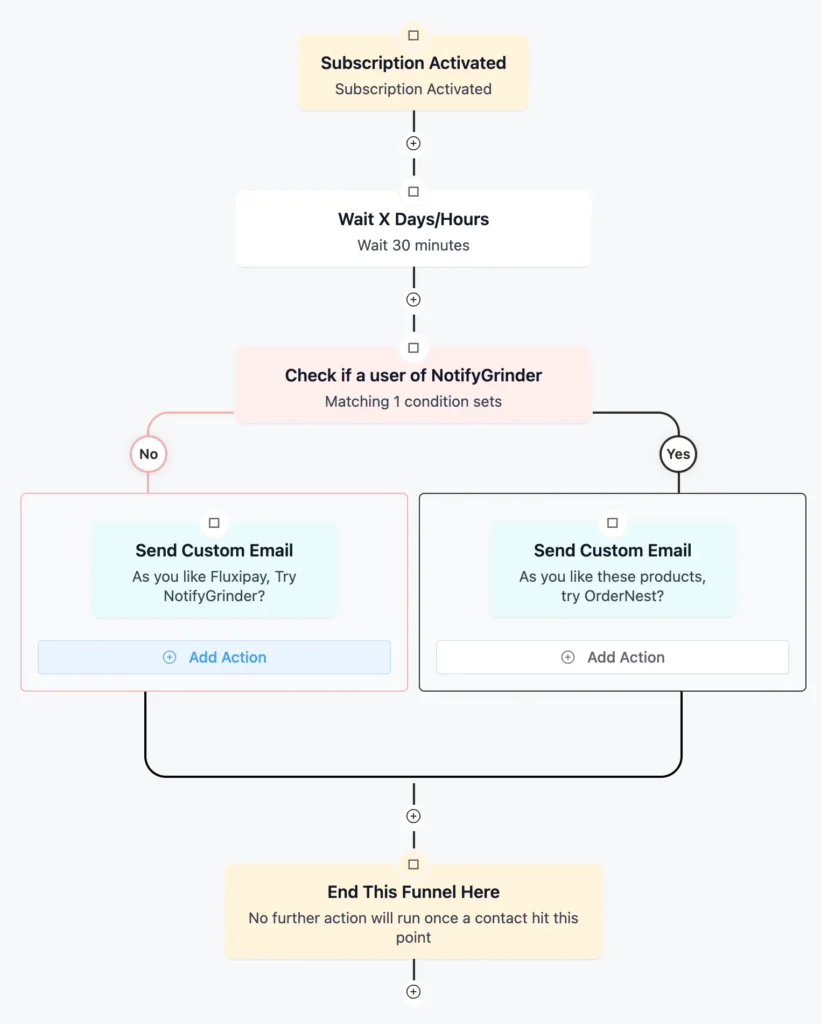
These targeted, behavior-driven offers increase the value of each sale without extra traffic, turning single purchases into higher-value transactions automatically.
Quick Tip: To increase your order value, cross-selling is one of the most effective techniques. Read this blog to cross-sell effectively.
Track Reports to Shape Your Strategy
As your plugin business grows, intuition alone is no longer enough. Without clear reporting, it becomes difficult to understand what is actually driving revenue, where users drop off, and which decisions are helping or hurting your growth.
This is where built-in reporting becomes essential. FluentCart provides a clean revenue overview that shows your business performance at a glance. You can monitor your gross revenue, compare results over time, and instantly see trends such as year over year growth or decline. Quarterly performance snapshots help you understand seasonal shifts and sales momentum.
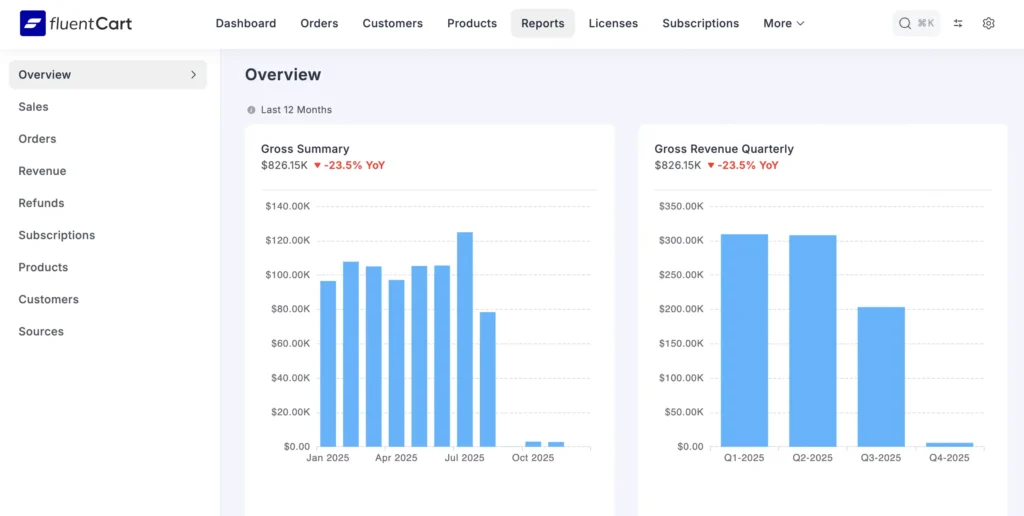
When you can clearly see how your business is performing over the years and how revenue is changing quarter by quarter, your decision-making process becomes more rational. You stop guessing and start adjusting pricing, campaigns, and offers based on real numbers.
And this turns reporting into a practical growth tool, not just a dashboard tool for decoration.
Quick Tip: Each community member of your product is a loyal advocate. So, you need to have and use your community well. You can use email automation to keep community engaged.
Turn Your Plugin Business Into a Self-Growing Sustainable System
With recent technological advancements, working hard is not the only deciding factor anymore. Which has a huge impact, is to build systems that work even when you step away.
When licensing, sales, communication, recovery, feedback, and reporting sync in one connected flow, your plugin business stops leaking revenue and starts compounding it. The most successful products are not just well-built. They are well-orchestrated.
So, build once, automate wisely, and let your business scale with clarity and control.
Samira Farzana
Once set out on literary voyages, I now explore the complexities of content creation. What remains constant? A fascination with unraveling the “why” and “how,” and a knack for finding joy in quiet exploration, with a book as my guide- But when it’s not a book, it’s films and anime.
Table of Content
Related Articles and Topics
-
FluentPlayer Sneak Peek: The Media Player to Bring Video Into Your Automation Stack
Videos hold attention longer than text, build trust faster than static pages, and explain complex…
-
Built for WordPress eCommerce Stores: Discover What’s Coming in FluentCart!
You built an online store to sell products; it’s your money-making machine. But somehow, your…



Leave a Reply