How to Send Automated Payment Reminder Using FluentCRM

Summarize with


Last Updated:
Late payments are rarely dramatic. People forget, get busy, miss a date, or mean to pay “later” and never circle back. That is exactly why payment reminders work.
With FluentCRM, you can turn that follow-up into a system. Instead of manually chasing every overdue invoice or pending payment, you set the trigger once and let the sequence do the work.
That keeps cash flow moving and keeps your team out of the awkward reminder game. If you already use FluentCRM for follow-ups, segmentation, or lifecycle email, this is one of the cleanest automations you can add. It is simple, useful, and very hard to argue with.
What is an Automated Payment Reminder?
An automated payment reminder is an email sent when a payment is due, overdue, or still pending. It does the same job a manual follow-up would do, only without the copy-paste headache. You can use it for:
- overdue invoices
- subscription renewals
- installment plans
- pending orders
- incomplete payments
The point is not to pressure people. The point is to make sure the payment does not get buried under everything else in their inbox.
What You Need Before You Set Up Payment Reminders
Before you build the sequence, you need three things in place:
- a contact record
- a payment source or trigger
- a clear reminder schedule
These are the building blocks of an effective reminder system. Without them, even the best automation can feel disconnected, mistimed, or irrelevant.
The first step is to track customers. Your contacts, tags, and activity history give you the foundation to send reminders that feel timely and personalized instead of generic.
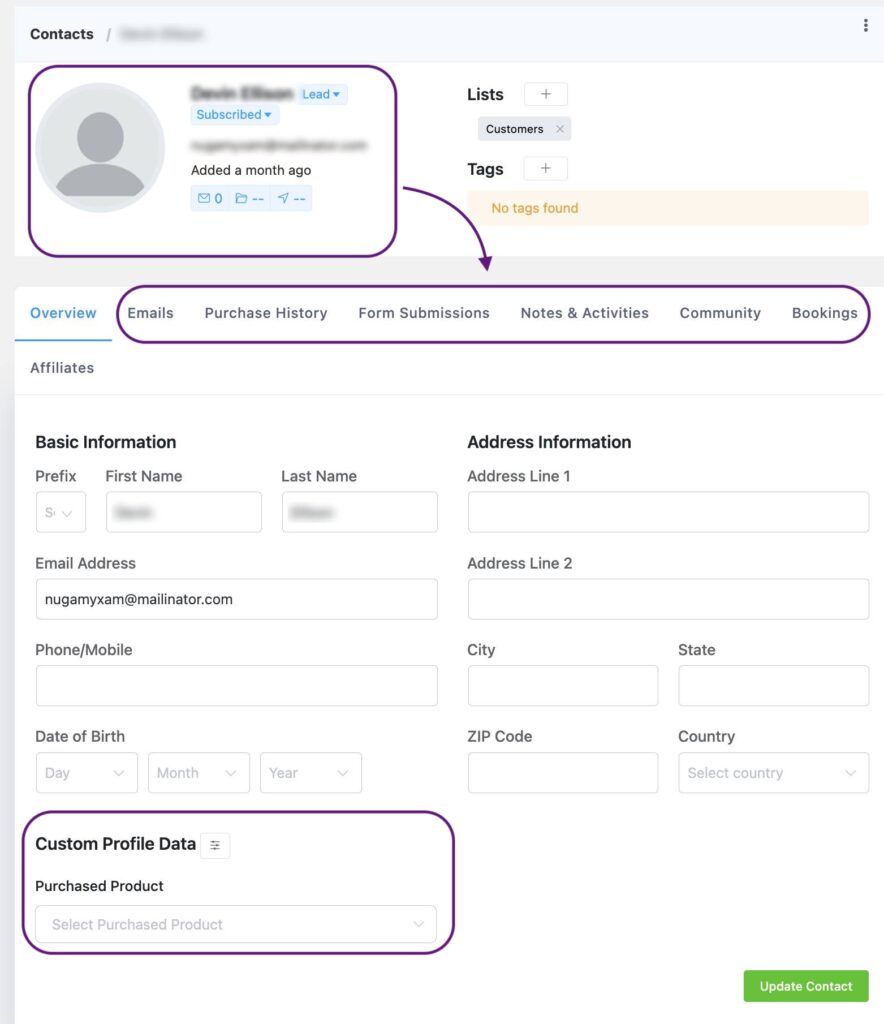
The next step is identifying where the payment data comes from. That could be WooCommerce, FluentCart, a recurring subscription workflow, or a payment form connected to your CRM. Once FluentCRM detects an order, renewal date, failed payment, or pending invoice, reminders become easy to automate.
Then comes timing, which is where many businesses lose revenue. Too many reminders sent too close together can feel pushy. A smarter schedule creates momentum and gives customers enough notice to act.
For example, a strong reminder flow might include:
- an early heads-up before the due date
- a reminder on the payment day
- a follow-up if payment is still pending
- a final notice before access expires or service pauses
This creates a smooth customer experience while reducing manual follow-ups for your team.
If your business already uses email authentication and proper deliverability setup, that also helps. A reminder is only useful if it lands in the inbox. Good timing matters, but deliverability determines whether the message gets seen at all.
Best Use Cases for Payment Reminder Automation
Not every payment reminder is the same. A freelancer chasing a late invoice does not need the same sequence as a SaaS company reminding users about a renewal.
- Not every payment reminder should follow the same sequence. A freelancer chasing an invoice needs a different flow than a SaaS business managing renewals.
- Overdue Invoice Reminders: For freelancers, agencies, and service businesses collecting late payments.
- Subscription Payment Reminders: For SaaS, memberships, and recurring billing before failed charges.
- Pending Payment Reminders: For bank transfers, manual approvals, or incomplete checkouts.
- Installment Reminders: For courses, coaching, and payment plans.
- Renewal Reminders: For annual plans, retainers, and contracts nearing expiry.
- Failed Payment Alerts: For declined cards or expired payment methods.
- Trial Ending Reminders: For free trials that need conversion into paid plans.
- Deposit Payment Reminders: For bookings, custom work, and event confirmations.
When to Send Each Reminder
Timing matters as much as the message. A reminder sent too early feels pointless. One sent too late feels lazy. The right timing depends on the payment type:
- B2B invoices usually need a slower rhythm
- Subscription reminders should move faster
- Installment plans need clear, predictable intervals
Your payment reminder email should follow your brand’s email frequency. So, align timing well with it.
How to Send Automated Payment Reminders Using FluentCRM
FluentCRM makes payment reminders easier once the trigger is connected correctly. The process is simple in theory: pick the payment event, build the automation, write the email, and make sure the sequence stops when the payment comes in.
FluentCRM makes payment reminders much easier once your payment source is connected properly. Instead of manually chasing unpaid invoices or checking overdue renewals, you can build an automated workflow that handles reminders in the background.
The process is simple: choose the right trigger, build the automation, write helpful emails, and make sure the sequence stops as soon as payment is completed.
Once set up, it saves time, protects customer relationships, and helps recover revenue consistently.
Here is how to build the full system step by step.
1. Choose the Right Trigger
Every automation starts with a trigger. This is the action that tells FluentCRM when to begin the reminder sequence.

Your trigger should match the real payment event happening in your business.
Common examples include:
- WooCommerce Order Status: Start when an order becomes Pending Payment or Failed
- Fluent Forms Submission: Useful if you send quotes, invoices, or payment requests through forms
- Tag Applied: Start when a contact receives a tag like Payment Pending or Invoice Unpaid
- List Joined: Useful for subscriptions, memberships, or payment-plan customers
- Custom Integration Trigger: If another tool sends payment updates into FluentCRM
The better your trigger matches reality, the smoother the reminder flow becomes. For example:
- An online store may use Pending Payment
- A freelancer may use Invoice Sent
- A membership site may use Renewal Due Soon
Choose the event that naturally signals, “It is time to remind this customer.”
2. Create the Automation Funnel
Go to Automations inside FluentCRM and click Create New Automation.
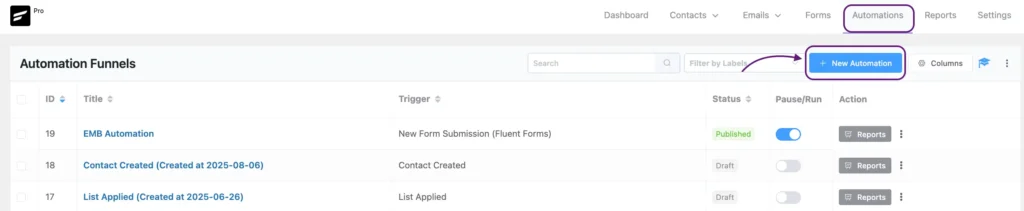
Think of this funnel as your payment follow-up assistant. It watches for triggers, waits the right amount of time, sends reminders, and exits when payment is completed.
Start with a clear name such as:
- Overdue Invoice Follow-Up
- Subscription Renewal Reminder
- Failed Payment Recovery
- Installment Due Sequence
Naming matters more than most people realize. As your automations grow, clear names make management easier.
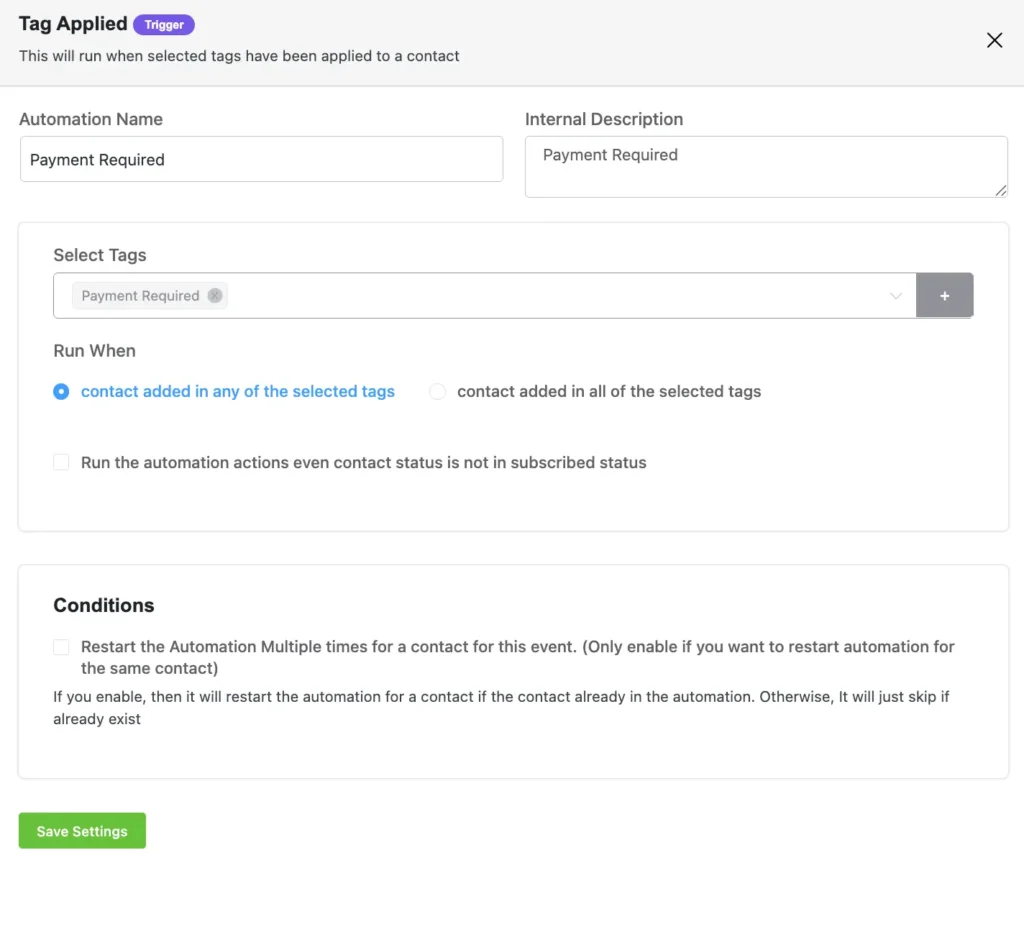
Before moving on, confirm your payment system is properly connected. If FluentCRM cannot receive order or payment updates, the reminders may continue after payment is made.
That is why integrations matter. Clean data creates smart automation.
3. Build the Reminder Flow with Wait Steps
One reminder is often not enough. Five reminders in two days is too much. The goal is a steady, respectful follow-up. Use Wait steps to space emails naturally. A common overdue payment sequence might look like this:
- Day 0: Payment due date passes → first reminder
- Wait 3 days → second reminder
- Wait 7 days → final reminder
- Wait 14 days → optional internal alert or escalation
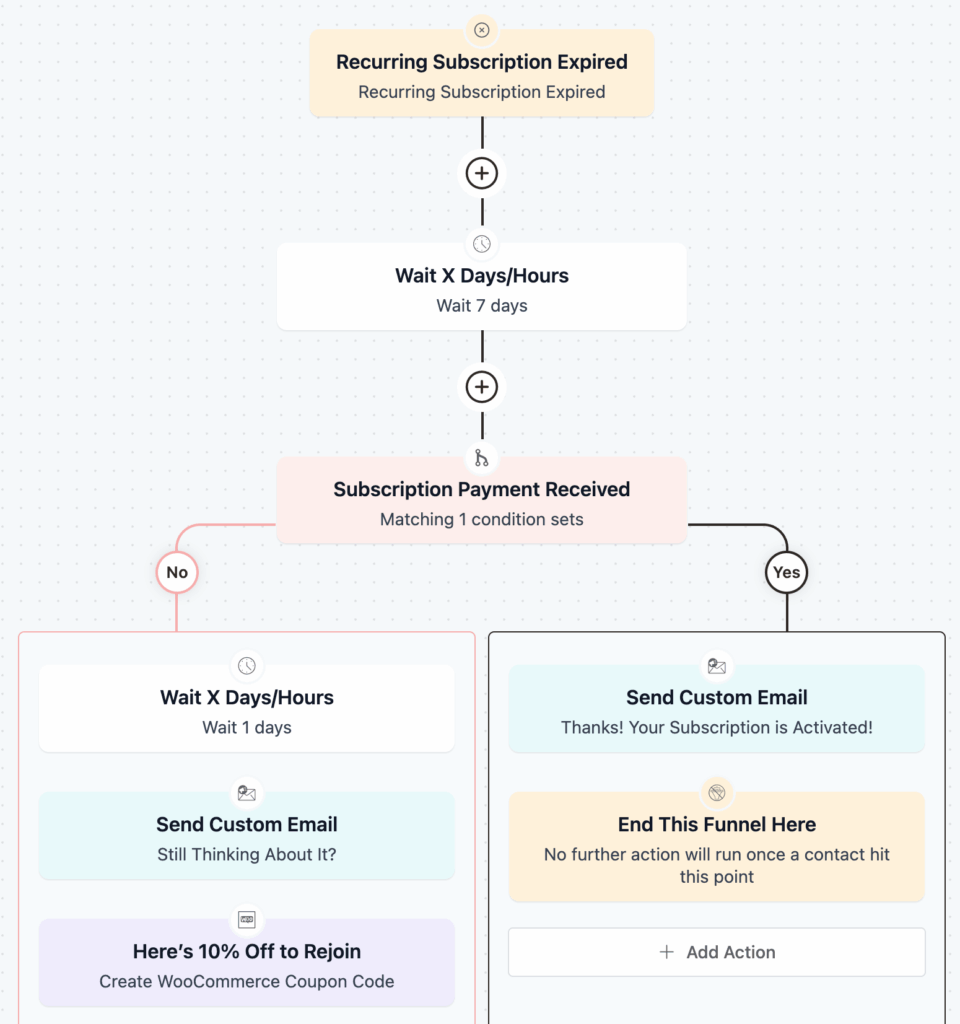
For subscriptions, you may remind people before payment fails:
- 7 days before renewal
- 1 day before renewal
- After a failed charge
- 3 days later, follow-up
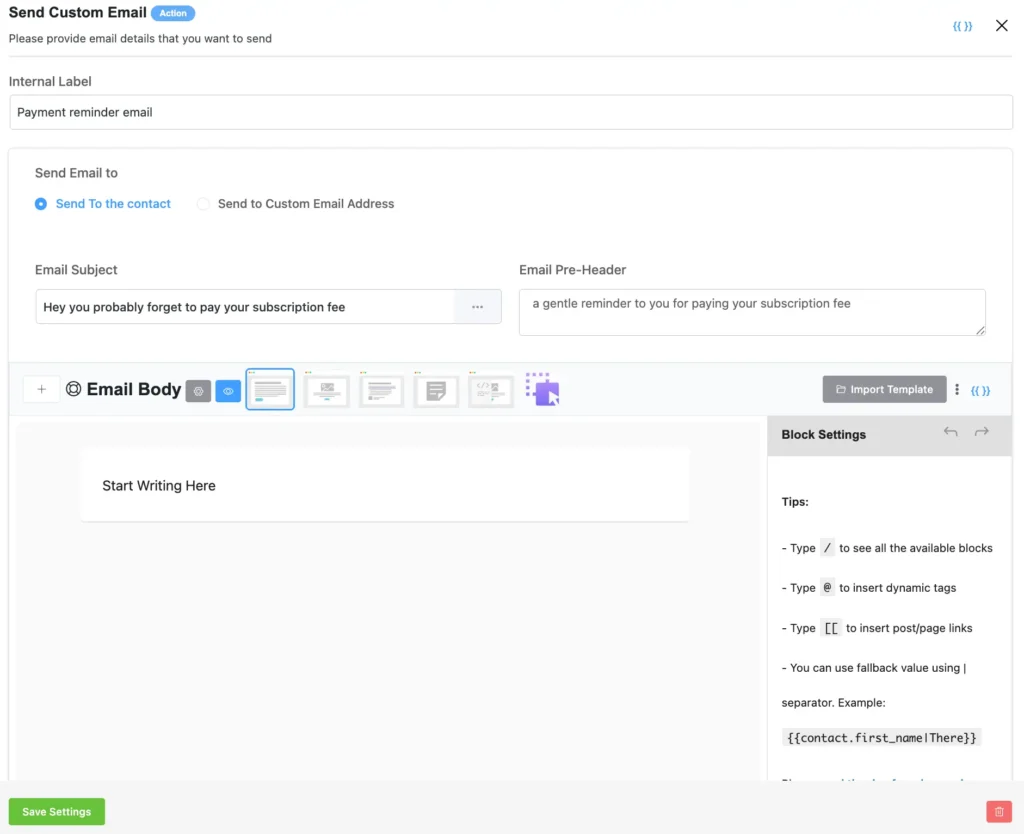
4. Write Reminder Emails People Actually Respond To
Most payment reminders fail because they are vague, robotic, or aggressive. Your emails should feel clear, calm, and easy to act on.
Include these essentials:
- Customer name
- Amount due
- Due date
- Invoice or order number
- Payment method or link
- Support contact if they need help
Use FluentCRM Smart Tags like:
{{contact.first_name}}{{contact.email}}
This makes the message feel personal instead of automated.
Keep the tone helpful:
Just a quick reminder that your invoice is due today. You can complete payment using the link below.
That usually works better than sounding demanding.
5. Add Smart Conditions for Better Targeting
Not every customer should receive the same message. FluentCRM lets you create smarter paths using conditions.
Examples:
- Send VIP clients a softer reminder tone
- Send overdue customers a stronger follow-up after 14 days
- Skip customers who have already contacted support
- Use different reminders for local vs international payment methods
This keeps your automation more human and relevant. The more relevant the message, the better the response rate.
6. Most Important Step: Add Stop Logic
This is where many businesses make mistakes. If someone pays, they should instantly stop receiving reminders. Use Goals or Exit Conditions such as:
- Order Completed
- Payment Received
- Pending tag removed
- Renewal successful
- Invoice marked paid
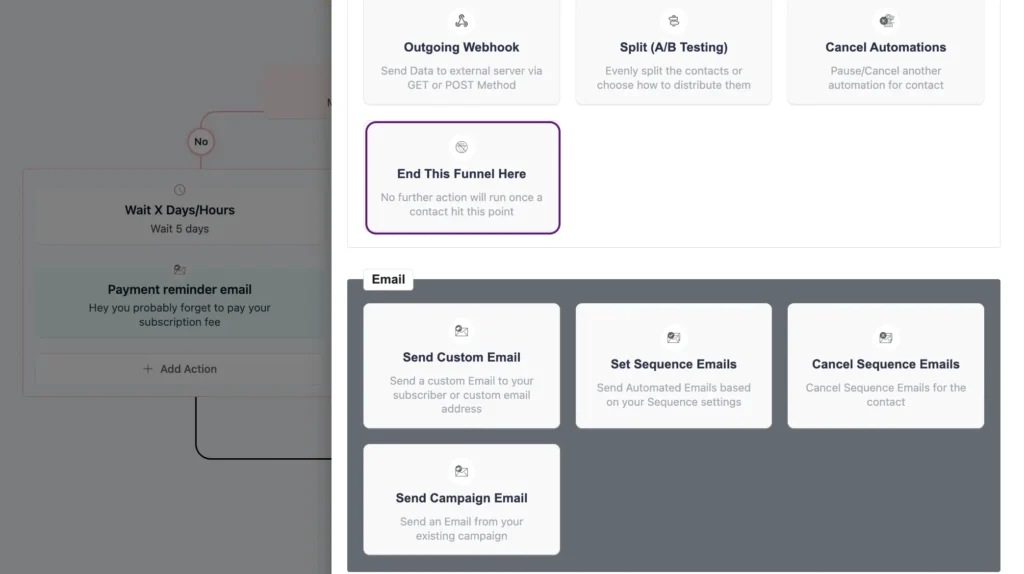
Once the condition is met, FluentCRM automatically removes the contact from the sequence. This keeps communication clean and protects trust.
7. Test the Full Journey Before Going Live
Before activating the automation, test everything once. You need to check:
- Does the trigger fire correctly?
- Does the wait timing make sense?
- Does the payment link work?
- Does the email look good on mobile?
- Does the sequence stop after payment?
- Is the sender’s name trustworthy?
Even one broken link can cost real revenue. Testing now saves embarrassment later.
8. Monitor Results and Improve Over Time
Once live, use FluentCRM reports to track performance. You can monitor your result by observing metrics like:
- Open rates
- Click rates
- Completed payments
- Recovery revenue
- Unsubscribes
- Time-to-payment after reminder
These numbers tell you what to improve. For example:
- Low opens → improve subject lines
- High opens, low clicks → improve CTA button
- Many clicks, low payments → fix checkout friction
When built properly, payment reminders stop being awkward admin work and become a reliable revenue system..
How This Fits Into a Bigger Revenue Recovery System
Payment reminders work best when they are part of a larger follow-up strategy, not a standalone tactic.
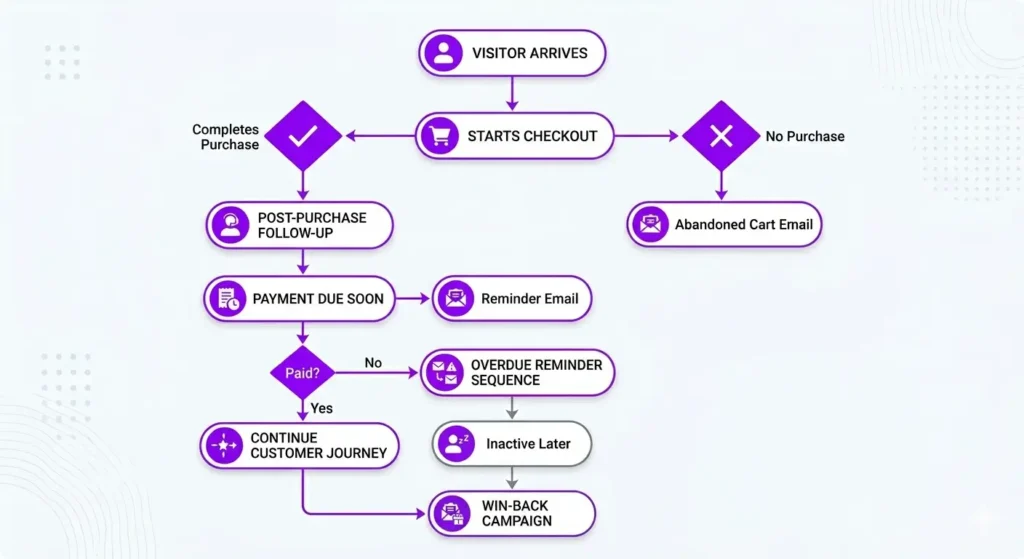
Most businesses lose revenue in small moments: a customer abandons checkout, forgets to renew, delays an invoice, or stops buying altogether. Individually, these issues seem minor. Together, they create steady revenue leakage over time.
A complete recovery system often includes:
- abandoned cart emails
- post-purchase follow-ups
- renewal reminders
- win-back campaigns
- payment reminders
Pro-Tip: Any email is a direct way to communicate with your clients, and the better you can communicate, the better you can sell. If you need inspiration to increase your revenue with automations, you can check out this blog.
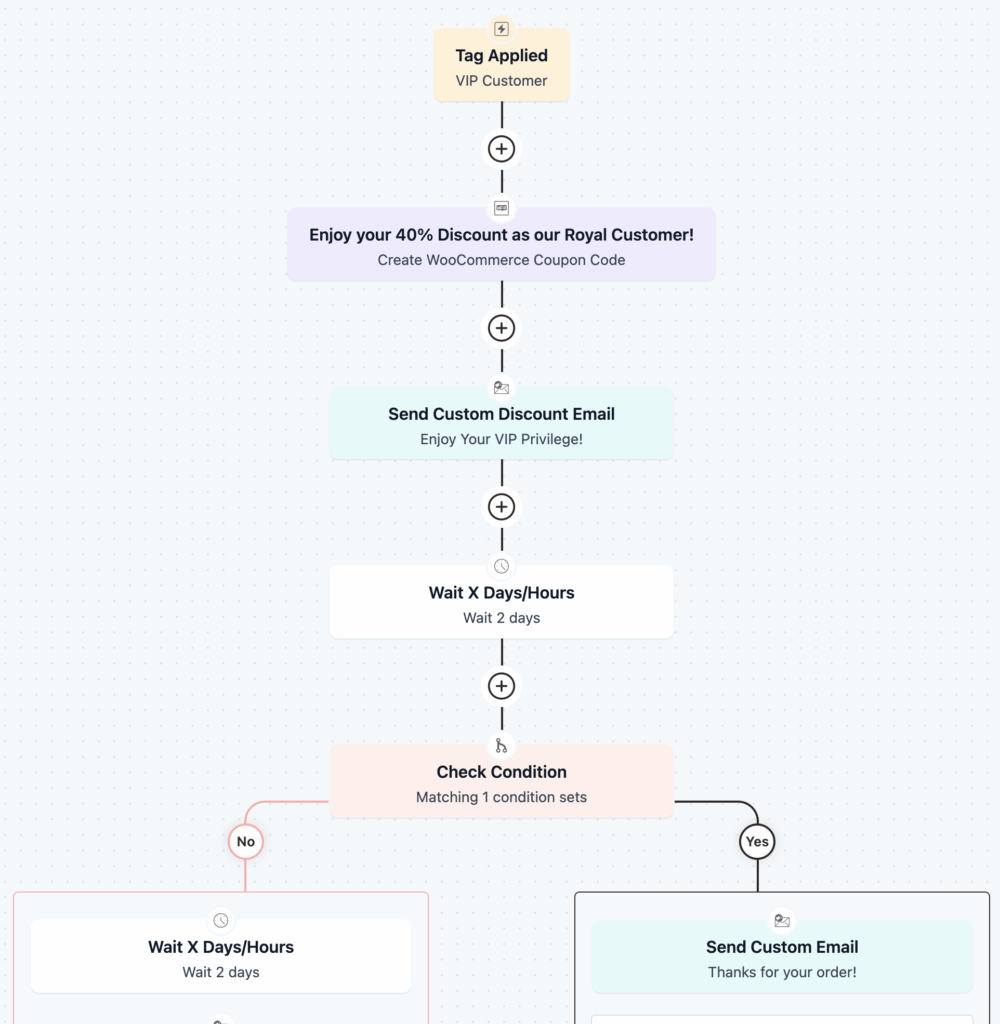
Instead of manually chasing payments or relying only on new traffic, you build systems that recover missed opportunities automatically.
Pro-Tip: Take inspiration from automation examples to find out how you can properly integrate your payment email notification into an automation flow to get more revenue.
Automate the Reminder, Keep the Relationship
Late payments often happen because people forget, get distracted, or intend to pay later—not because they want to avoid paying. A well-timed reminder solves that quietly and professionally.
That is where automated payment reminders make the difference. They help you stay consistent, collect on time, and reduce awkward manual follow-ups without sounding pushy or disorganized.
FluentCRM gives you the structure to make that process simple. Set the right trigger, build a thoughtful sequence, and let automation handle the repetitive part.
Because in many businesses, revenue is not always lost at the sale, it is lost in the silence after it. Smart follow-up is often where the money gets recovered.
Samira Farzana
Once set out on literary voyages, I now explore the complexities of content creation. What remains constant? A fascination with unraveling the “why” and “how,” and a knack for finding joy in quiet exploration, with a book as my guide- But when it’s not a book, it’s films and anime.
Table of Content
Related Articles and Topics
-
How to Change the Gmail Profile Picture of Your Custom Email (2026)
Email communication is a vital tool for any business since it’s an opportunity to connect…
-
FluentCRM Email Signature Generator: Create Professional Signatures for Every Email
FluentCRM’s Email Signature Generator is a browser-based email signature builder that creates professional, HTML-formatted signatures…