
eCommerce Email Marketing: The Complete Guide to Driving Revenue in 2026


Email marketing for ecommerce is about responding to what shoppers actually do. Let it be browsing products at midnight, adding items to cart during lunch, making purchases on Sunday morning, or going silent for three months.
The difference between stores that grow and stores that struggle often comes down to what happens after the first visit. Most shoppers leave. The question is: do they come back?
Well, they do, only when the eCommerce email marketing is done correctly. How and why? That we will explore this in this blog.
What is Email Marketing for eCommerce?
Email marketing for eCommerce is a strategy that uses customer data and shopping behavior to send targeted, timely emails that drive revenue across the customer lifecycle.
Rather than relying on generic newsletters, it responds to real actions, such as product views, abandoned carts, completed purchases, and repeat visits, to move shoppers toward buying and buying again.
The goal is simple: send the right message at the right time, based on what the customer actually does.
Key Characteristics of eCommerce Email Marketing
eCommerce email marketing works because it is built around intent and automation. Its core characteristics include:
- Behavior-based: Emails are triggered by real actions like product views, cart abandonment, purchases, and inactivity.
- Data-driven: It uses live store data of products, orders, and customer history to personalize messages at scale.
- Automated by design: Once set up, emails run continuously without manual sending.
- Revenue-focused: Every email supports a clear business goal: conversion, retention, or repeat purchase.
These traits make eCommerce email marketing predictable and scalable, not dependent on constant effort.
Traditional Email Marketing vs. eCommerce Email Marketing
eCommerce email marketing is slightly different from traditional email marketing, based on the intent and need. Here’s a precise difference between these two types of email marketing:
| Traditional Email | eCommerce Email |
|---|---|
| Newsletters and announcements | Customer actions and intent |
| Fixed schedules (Tuesday at 10 AM) | Real-time triggers (1 hour after cart abandonment) |
| Same message for everyone | Personalized by behavior and purchase history |
| Limited sales connection | Direct store integration with revenue tracking |
| Engagement-focused (opens, clicks) | Revenue-focused (sales, repeat purchases) |
Today, this distinction matters more than ever. With inbox providers using AI to filter promotional content and bot clicks inflating engagement metrics by 20-60%, behavioral relevance is what gets your emails seen and acted upon.
Why eCommerce Email Marketing Is Critical for eCommerce Growth
The biggest pain point for ecommerce brands? Lost potential.
Unlike rented platforms, where you’re one algorithm change away from losing reach, your email list is an asset you own. Here’s how ecommerce email marketing helps you bring that lost potential:
- Recovers lost revenue: Cart recovery emails convert at 10.7%, with top performers hitting 20%+.
- Builds long-term value: Automated emails drive 37% of total email revenue from just 2% of sends.
- Increases repeat purchases: Post-purchase sequences boost customer lifetime value by 25%.
- Outperforms paid channels: Email converts at 2.8-3% vs. 1-2% for paid ads, with ROI up to $68 per $1 spent.
- Maintains consistency: While social reach dropped below 10% for organic posts and ad costs continue climbing, email deliverability stays at 95-99% for authenticated senders.
How eCommerce Email Marketing Works
Think of it as a cause-and-effect system. Every email exists because a customer did something.
The flow is simple: Customer Data → Trigger → Email → Result
- Customer data: Every action creates data. Views, adds to cart, buys, or leaves. These actions show intent.
- Trigger: When something happens or doesn’t, the system reacts. For example: cart abandoned, product viewed, order completed.
- Email: An email is sent automatically to match that moment. A reminder. A confirmation. A follow-up. Nothing generic.
- Result: The goal of eCommerce email marketing is to complete a purchase, encourage a repeat order, and bring them back.
Types of eCommerce Emails You Need to Know
There are different types of ecommerce email based on their goal and need. Here is the list you should check out:
| Email Type | What It Does | When to Send |
|---|---|---|
| Order Confirmation | Confirms purchase, sets expectations | Immediately after checkout |
| Shipping Updates | Tracks delivery status | When the order ships/delivers |
| Abandoned Cart | Recovers incomplete purchases | 1-24 hours after abandonment |
| Browse Abandonment | Follows up on viewed products | 5-24 hours after browsing |
| Promotional | Announces sales and offers | During campaigns/events |
| Post-Purchase | Requests reviews, suggests next purchase | After delivery |
| Re-engagement | Brings back inactive customers | After 60-90+ days inactive |
| Welcome/ Onboarding | Introduces brand, sets tone | Immediately after signing up |
An email sent at the right time replaces five sent at the wrong time. When emails are triggered by behavior, customers expect them. They make sense.
What to Consider Before Starting eCommerce Email Marketing
Once the strategy is clear, the practical question becomes: what does your store actually need to make email marketing work?
Here’s what to look for:
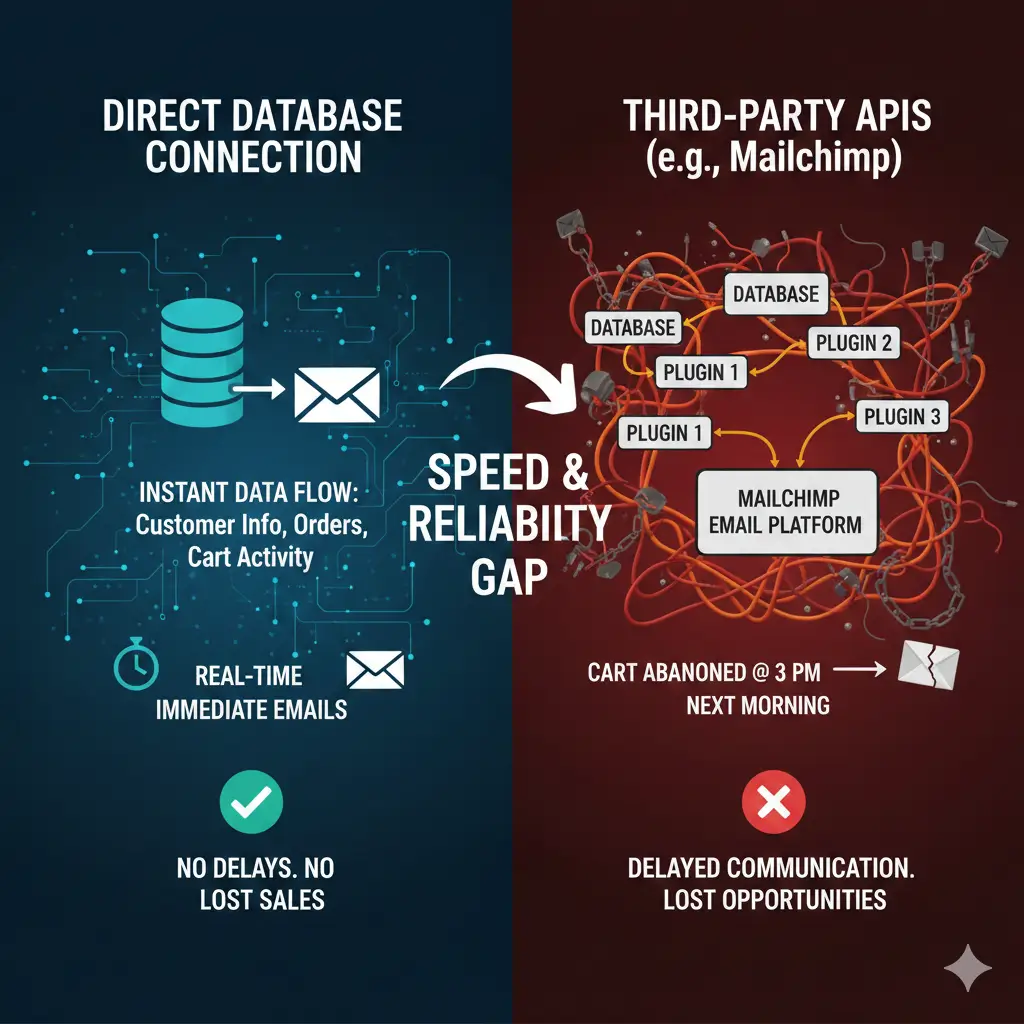
- Direct database connection: Your email platform should pull customer information, orders, and cart activity directly from your database. Platforms that rely on third-party APIs create delays. Take Mailchimp for example, it takes several plugins to tie everything togather and if anything goes wrong, a cart abandoned at 3 PM might not trigger an email until the next morning!
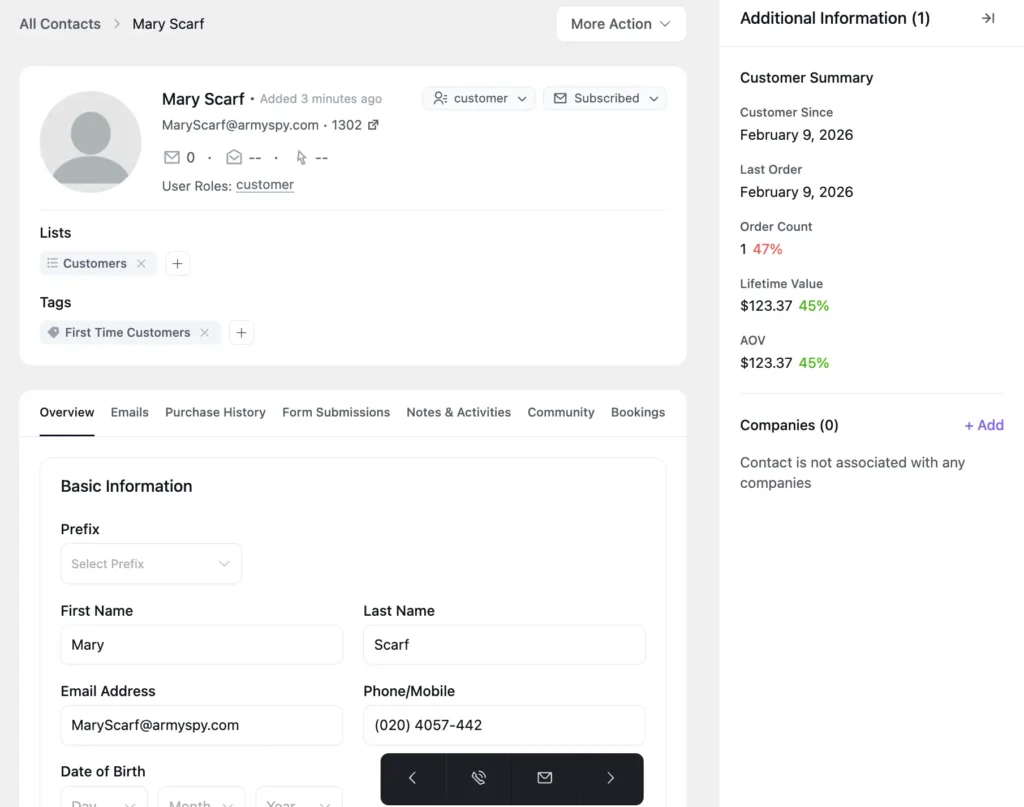
- Complete customer view: It’s crucial to be able to see everything about a customer in one place, including purchase history, browsing behavior, email engagement, and lifecycle stage. When this information lives across separate tools, you’re constantly switching dashboards.
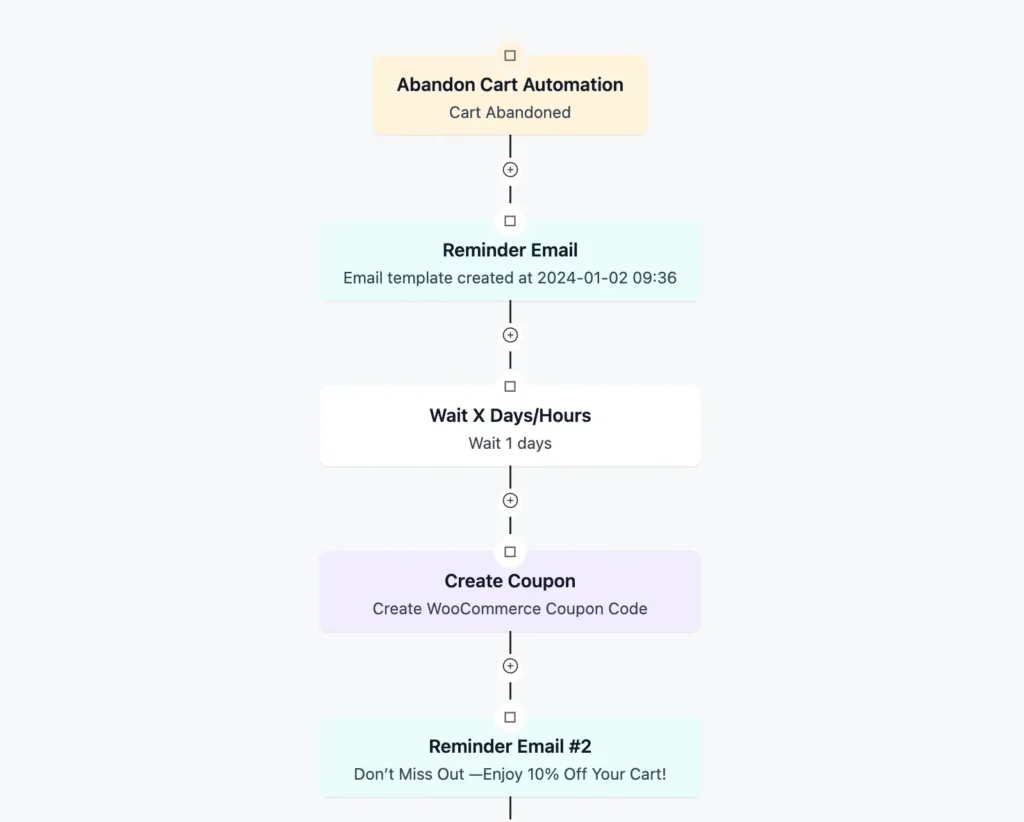
- Automated lifecycle workflows: Cart recovery, welcome series, and win-backs should work continuously based on customer behavior. You build them once. They run without manual intervention.
- Data ownership: Customer information and engagement history should live somewhere you control. When data is locked inside an external platform, switching tools later means rebuilding everything from scratch.
For WordPress stores, you’re choosing between two approaches:
- WordPress-native platforms, where everything lives in your database
- External SaaS tools that sync through plugins and APIs
The first keeps your data local and under your control. The second handles infrastructure and updates for you. Most growing stores eventually prioritize ownership because data portability and speed matter more as your list grows.
This is why FluentCRM is empowering over 70,000+ businesses. With direct WordPress database connection, WooCommerce integration, and tons of email automation features, FluentCRM is helping many WooCommerce businesses grow without cost complexities.
“FluentCRM Saves Me $3K a Year”
I switched from ActiveCampaign to FluentCRM about two years ago, and it remains one of the best business decisions I’ve made. Not only has it saved me approximately $3,000 per year, but it also provides a much tighter and more seamless integration with all my other WordPress plugins.

The 7 Essential eCommerce Email Automation Flows
Now that the prerequisite checklist is checked, let’s check out these automations to make your taskload easier. Here are the essential ecommerce email automation flows you will need:
1. Welcome Automation
First impressions matter. Welcome emails see the highest open rate of any automation type- around 50%. The purpose of this automation is to convert new subscribers into first-time buyers while they’re most engaged.
2. Cart Recovery Automation
Cart abandonment represents your single biggest revenue leak. With cart recovery automation, you can convert around 10.7% of abandoned carts. Take inspiration from the abandoned cart recovery email example for making the best use of your automation.
Pro-Tip: Know proven strategies to recover abandoned carts before implementing cart recovery automation.
3. Post-Purchase Automation
The sale isn’t the end, it’s the beginning. And, post-purchase emails reduce uncertainty and set the foundation for repeat business.
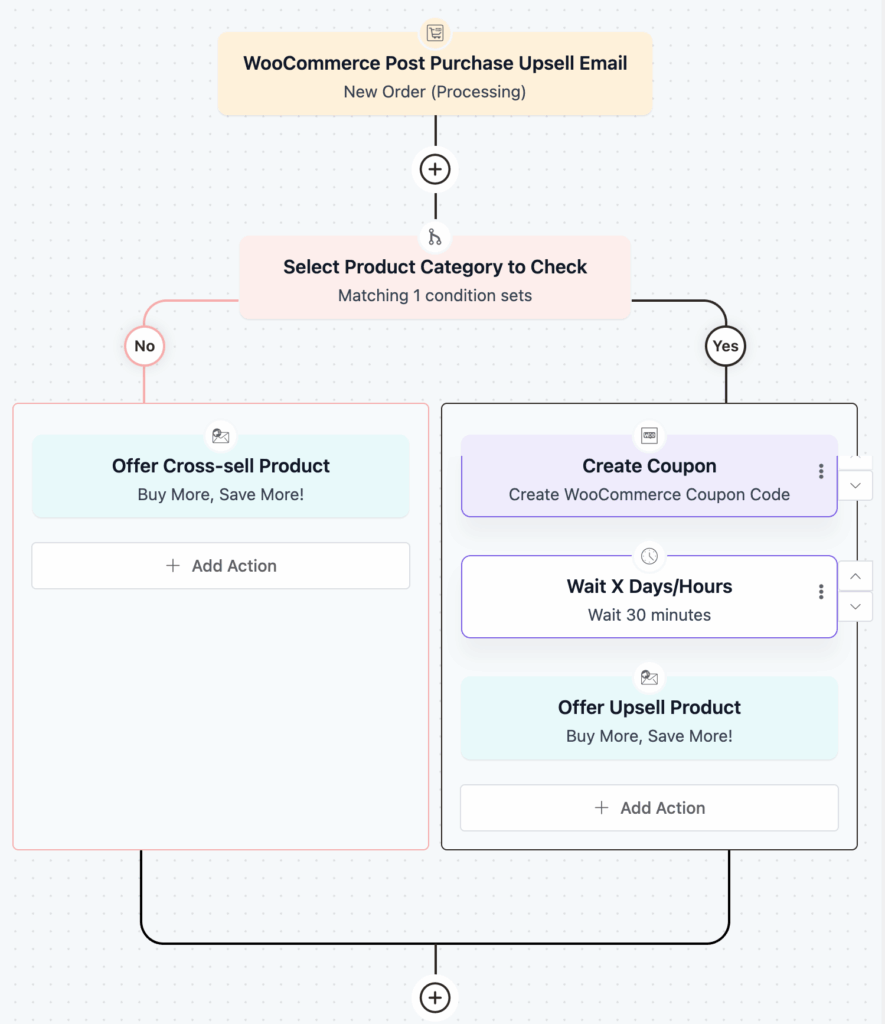
The purpose of this automation is to confirm orders, provide tracking, reduce buyer’s remorse, and encourage reviews.
Pro-Tip: In ecommerce business, you definitely need to know about cross-selling, all the perks and details about it, to implement post-purchase automation successfully.
4. Win-Back Automation
Past customers are easier to convert than new prospects. They’ve already overcome trust barriers. The purpose of this automation is to re-engage inactive customers before they’re permanently lost. Start without discounts. Many customers return just from the reminder.
5. Back-in-Stock Automation
These emails see 59% open rates because recipients explicitly requested notification. The purpose of this automation is to capture sales from customers who expressed interest in unavailable products.
6. List Cleaning Automation
List quality beats list size. Inactive subscribers hurt deliverability and inflate costs.
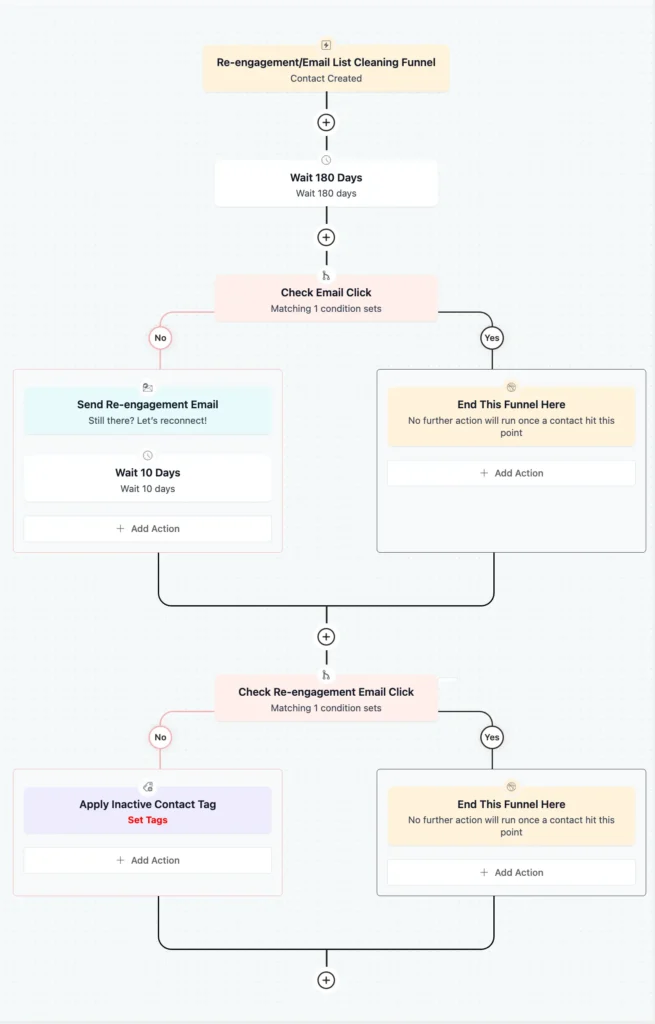
The purpose of this automation is to improve deliverability by removing permanently disengaged subscribers
7. Loyalty & VIP Automation
Your best customers deserve recognition. Loyalty automation strengthens relationships and creates advocates. The purpose of this automation is to recognize and reward the best customers to increase lifetime value. VIP status recognition, exclusive perks, personalized thanks, and tier progress work in this type of automation.
Pro-Tip: For creative loyalty campaigns, explore our discount coupon strategies guide that works.
eCommerce Email Segmentation That Drives Revenue
Once your automations are running, the next question is obvious: should everyone get the same email?
No, if you want to protect margins and maximize conversions.
Segmentation helps you to decide who sees what and when. Done right, it stops unnecessary discounting and delivers offers that actually match customer intent.
Here is how you can segment specifically for ecommerce:
- Purchase frequency: Monthly buyers need different messaging than someone who bought once six months ago.
- Cart value: High-value carts deserve personal attention or stronger incentives; low-value carts often convert with a simple reminder.
- Purchase recency: Bought recently? They’re active. Silent for 90 days? They’re slipping away.
- Engagement level: Active clickers vs. non-openers need different strategies.
- Discount sensitivity: Know who only buys on sale vs. full price to protect margins.
A basic RFM lens is enough to segment your contact list easily:
- Recency: When they last engaged or purchased
- Frequency: How often they buy
- Monetary value: How much they typically spend
These three signals give you clarity without overengineering.
eCommerce Email Metrics You Should Track
Most traditional email metrics don’t tell the full story anymore. Opens and clicks look impressive, but they often hide what’s really happening.
The problem is automation and privacy. Security filters now pre-scan emails to check for malicious links, automatically clicking them before a human ever sees the message. This creates artificial engagement spikes. Industry estimates suggest that 20–60% of recorded clicks can come from bots, not real people.
Because of this, engagement numbers that look healthy but don’t reflect real customer intent.
That’s why modern eCommerce teams focus on email marketing KPIs that connect directly to business outcomes:
- Revenue per email shows whether your emails are actually contributing to growth or just creating activity. It helps you understand which messages deserve to be sent more widely and which aren’t pulling their weight.
- Conversion rate cuts through vanity metrics. Instead of measuring interest, it shows real action, like: did the email lead to a purchase? This is where timing and relevance reveal their true impact.
- Click-through rate still matters, but only in context. Clicks alone can be misleading. When paired with conversions, click-through rate shows whether curiosity turns into intent or just noise.
- List growth rate reflects the health of your future revenue. Email lists naturally shrink as people disengage. If you’re not replacing and growing your audience, even great campaigns eventually stall.
In short, track metrics that reflect human behavior and revenue, not just inbox activity. Those are the numbers that keep your email strategy honest and profitable.
Best Practices You Need to Maintain for eCommerce Email Marketing
Email marketing has matured. What worked a few years ago isn’t enough in 2026. Performance now depends on execution and specific strategies according to the upcoming shift:
Deliverability: Make Sure Emails Reach the Inbox
Email providers now strictly enforce email authentication. SPF, DKIM, and DMARC are no longer optional.
Monitor bounce rates and spam complaints closely. A sudden spike can damage your sender reputation for months and quietly reduce reach across all campaigns.
Using a reliable sending setup matters. Tools like FluentSMTP handle authentication and delivery infrastructure, so strategy, not technical issues, gets your attention.
List Hygiene: Protect Long-Term Performance
Email lists naturally decay as people disengage or change addresses. Cleaning your list quarterly removes inactive contacts before they drag down performance and protect your sender reputation.
Run a simple re-engagement attempt first. If there’s no response, remove them. A smaller engaged list consistently outperforms a larger silent one.
Pro-Tip: You can automate cleaning your contact list. That eases the workload and increases efficiency at the same time.
Zero-Party Data Collection
As privacy limits tracking and third-party data disappear, the information customers choose to share becomes a competitive advantage.
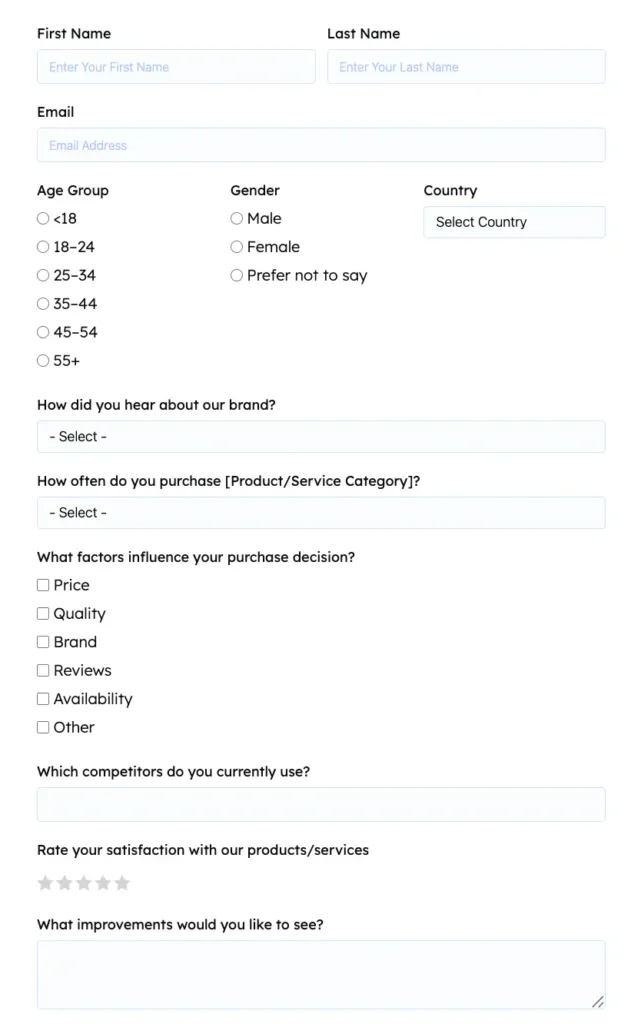
Collect preferences at signup, ask simple post-purchase questions, and use surveys to understand motivations. This data improves segmentation and relevance without relying on invasive tracking.
Mobile-First and Accessible Design
Most emails are opened on mobile. If it doesn’t work on a phone, it doesn’t work.
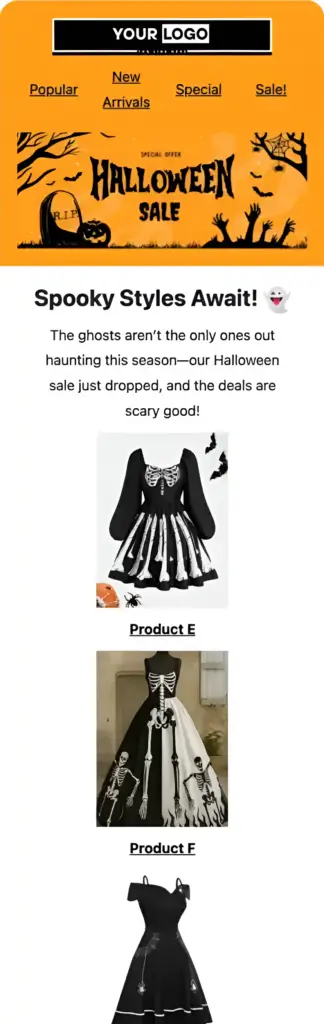
Use single-column layouts, readable font sizes, tappable buttons, and compressed images. Test on real devices. Design for dark mode, add alt text, maintain color contrast, and use proper HTML structure. Accessibility improves usability for everyone.
Pro-Tip: Check out this do’s and don’ts of mobile optimization to optimize your email better for smartphones.
Use AI Wisely
AI is powerful when used correctly. Use it to generate variations, analyze behavior, optimize timing, and support personalization at scale.
Don’t let it replace strategy, brand voice, or human judgment. Winning brands use AI for speed and efficiency, and humans stay in charge of meaning and direction.
And of course, know the latest AI trends of email marketing before building your strategy.
How to Build A Successful eCommerce Email Marketing Strategy
Now that you know about the types of ecommerce email, automation you can use, and best practises you can follow, it’s your time to build your ecommerce email strategy.
Here’s how you can build your eCommerce email strategy following these steps:
Step 1: Set Revenue-Based Goals
Good goals connect to outcomes: Increase email revenue 25%, recover 15% of abandoned carts, and increase repeat purchase rate from 20% to 30%.
Avoid vague goals like “get more subscribers” without tying them to business impact.
Step 2: Understand Your Customers
Understand your target audience. For that, analyze the data you have of your audience. Primarily, two types of data help:
- Zero-party data (what they tell you): Survey responses, quiz answers, explicit preferences
- First-party data (what behavior reveals): Products viewed/purchased, cart abandonment, email engagement
Collect both through post-purchase surveys, quizzes, preference centers, and behavioral tracking.
Step 3: Choose the Right Platform
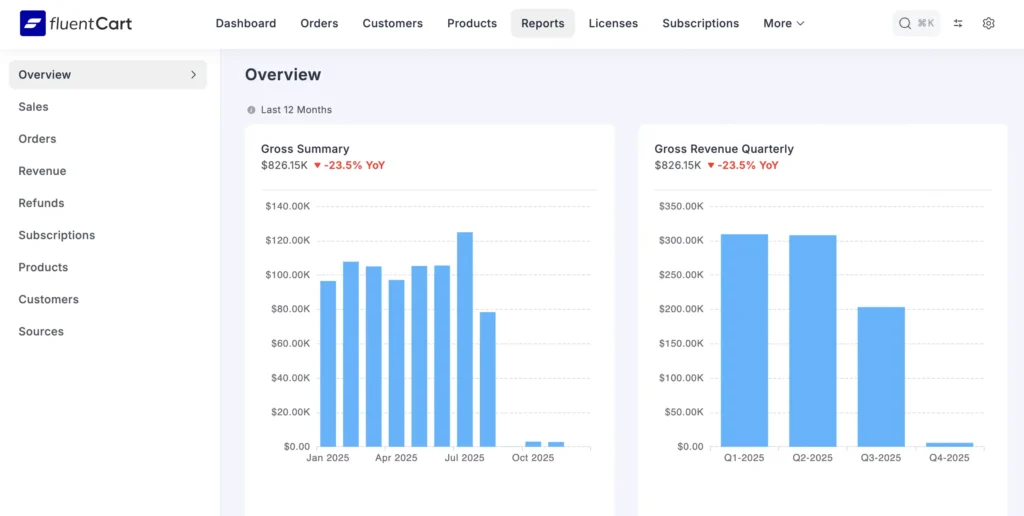
Look for real-time store sync, behavioral automation, deep segmentation, visual workflow builders, native ecommerce integrations, revenue tracking, and CRM capabilities. For WordPress and ecommerce stores, consider platforms like FluentCart that are built specifically for this ecosystem with native CRM and full data ownership.
Step 4: Build Your List Ethically
Use exit-intent popups, time-delayed forms, and scroll-triggered forms. Offer first-order discounts, free shipping, size guides, and exclusive access. Never buy lists or use aggressive instant popups. For form creation, tools like Fluent Forms integrate seamlessly to capture leads effectively.
Step 5: Segment for Personalization
Create segments for VIP customers, new customers, lapsed buyers, high-intent browsers, and never-purchased subscribers to ensure email personalization. Layer segments by combining attributes.
Step 6: Map Customer Journey Emails
Map the complete customer journey to design your strategy.
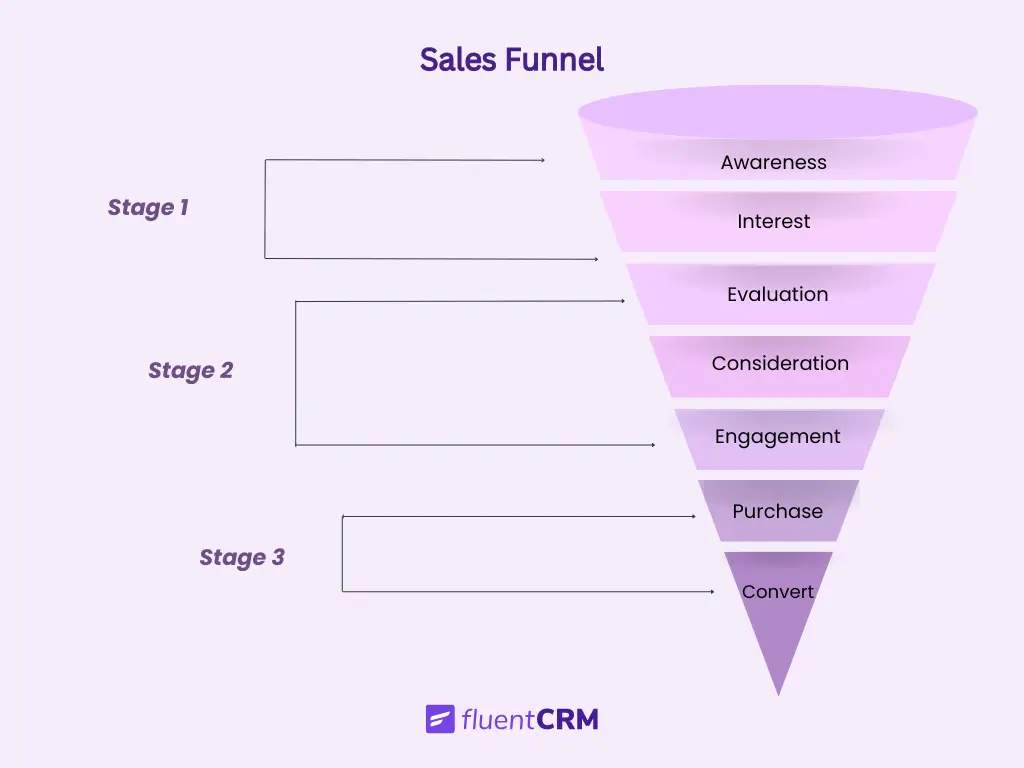
Plan essential automations: Welcome (3-5 emails over 7 days), cart recovery (3 emails over 3 days), post-purchase (4-5 emails), browse abandonment (2-3 emails), win-back (3 emails over 30 days) that fit properly with the customer journey.
Pro-Tip: You can map and design your audience’s customer journey, and you need to send a lead nurturing email sequence. Remember that your audience will never be ready for conversion unless you make them.
Step 7: Plan Design and Calendar
Maintain visual consistency by sticking to your brand colors, fonts, and style, so every message feels familiar and professional. Test and optimize sending frequency to find the right balance.
Finally, plan campaigns months ahead to stay organized, but keep flexibility to adjust for trends, product launches, or unexpected opportunities.
Pro-Tip: Use a project management tool like FluentBoards to keep track of all projects and tasks, to automate project progress with the clients.
Step 8: A/B Test for eCommerce Emails
Once you have a plan ready, A/B test to recheck your assumptions. Focus on key elements like: subject lines, send times, CTAs, and incentives.
Make sure to test one variable at a time with a proper sample. Use hypothesis-driven tests, track results, and document learnings.
Small improvements compound; even a 5–10% lift across campaigns can drive significant revenue.
Common eCommerce Email Marketing Mistakes You Must Avoid
Even experienced teams fall into predictable traps that hurt revenue, reputation, and engagement. Avoiding these common errors can save thousands in lost sales and wasted effort:
- Sending the same message to everyone
- Emailing too frequently with or without behavioral triggers
- Ignoring mobile-friendly design
- Leading every email with discounts
- Failing to increase customer engagement
- Skipping compliance requirements
Recognizing these pitfalls helps you course-correct before they damage your list, reputation, or ROI.
eCommerce Tools You Need for Successful eCommerce Email Marketing
eCommerce email marketing only works when the right tools are connected. For any ecommerce business, this often means choosing between a native ecosystem or a stack of disconnected SaaS tools glued together with plugins and APIs.
The difference shows up later, in speed, reliability, data ownership, and scalability.
Below is a list of the essential tools you need:
| Why You Need This Tool | Tool Name | Why It’s Better Than Alternatives |
|---|---|---|
| Manage contacts, segments, and automations based on customer behavior data | FluentCRM | Runs inside WordPress with real-time WooCommerce data and full data ownership. SaaS CRMs rely on API syncs, add delays, and lock data externally. |
| Capture leads, preferences, and zero-party data | Fluent Forms | Native CRM and eCommerce plugin integration with instant tagging and segmentation. Other form tools require Zapier or webhooks, increasing lag and failure points. |
| Handle cart, checkout, and order flows natively | FluentCart | Order and customer data stay unified with CRM. External cart/funnel tools fragment data and weaken behavioral automation. |
| Support customers post-purchase without breaking context | Fluent Support | Support tickets connect to orders and customer profiles. External help desks operate in isolation from store and CRM data. |
The advantage of choosing the right tools doesn’t depend on individual tools, but rather on how they work as one system.
You may choose SaaS or plugins of a eco system. Which one works the best for you? You can decide after knowing the pros and cons of both, listed here:
- Automatic Data Flow: When CRM, forms, email delivery, cart, and support live inside one WordPress ecosystem, customer data updates directly without manual efforts. Triggers fire immediately, not hours later due to API delays.
- True Data Ownership: Your customer data stays in your database, not locked inside third-party SaaS platforms. That means easier migrations, better compliance control, and long-term flexibility in a plugin ecosystem.
- Lower Operational Friction: Fewer integrations mean fewer breaking points. Updates don’t silently disrupt automations. Maintenance stays predictable as your list grows.
- Scales Without Penalties: SaaS stacks charge more as you grow and often slow down with volume. A native ecosystem scales with your store, not against it.
External tools synced via APIs introduce lag, fragment customer history, increase costs, and make switching platforms painful later. Growth becomes harder not because of strategy, but because of infrastructure.
Your Next Steps to Succeed in eCommerce Email Marketing
Now that you know all about eCommerce email marketing, these are the steps you need to proceed.
- If you’re starting, set up abandoned cart recovery first; it generates immediate ROI. Build your welcome series to convert new subscribers. Add post-purchase automation. Grow your list organically.
- If you’re optimizing, audit current automations. Segment beyond purchased vs. non-purchased. Test systematically. Clean your list quarterly.
- If you’re scaling, expand your automation library. Build sophisticated segments combining multiple behavioral attributes. Personalize content dynamically. Integrate email with your broader customer experience.
Email marketing for eCommerce is systematic, measurable, and customer-behavior-driven. So, it will work till the end of the day. Start with the essentials. Measure what matters and tweak for improvements over time.
Samira Farzana
Once set out on literary voyages, I now explore the complexities of content creation. What remains constant? A fascination with unraveling the “why” and “how,” and a knack for finding joy in quiet exploration, with a book as my guide- But when it’s not a book, it’s films and anime.
Table of Content
Related Articles and Topics
-
eCommerce Customer Segmentation: Everything You Need to Know for Your Business
Two customers visit your store today. One finds exactly what they need and checks out…
-
5+ Ways to Automate Project Management with FluentCRM & FluentBoards
Every business owner knows the struggle: CRM lives in one high-cost tool, while project management…



Leave a Reply