Why Gmail is Blocking Your Emails? (And How to Fix It Without Guesswork)

Summarize with


Last Updated:
You don’t usually realize Gmail is blocking your emails. At first, it just feels like things are underperforming.
Open rates drop. Clicks slow down. Campaigns that should work, don’t anymore. And because your system still says “sent” or even “delivered,” it’s easy to assume the problem is your content.
Most of the time, it isn’t. Gmail isn’t a delivery tool; it’s a trust filter. It evaluates how you send, what you send, and how people respond. If those signals don’t align, your emails won’t reach the inbox—no matter how good they are.
This is where most strategies fail. In this guide, we’ll break down why Gmail blocks emails and how to fix it at the root.
What “Gmail Blocking Emails” Really Means
Gmail blocks emails primarily because it doesn’t trust the sender. That lack of trust usually comes down to weak email authentication, poor sending behavior, or low recipient engagement.
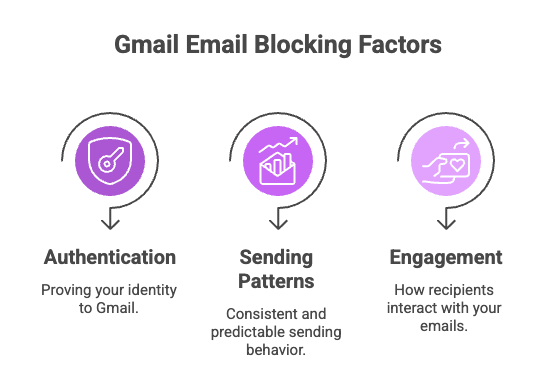
Gmail isn’t built as a neutral delivery system; it’s a reputation engine. Deliverability experts consistently point to three core signals it evaluates:
- Authentication (proving your identity)
- Sending patterns (how consistent and predictable you are)
- Engagement (how recipients interact with your emails)
When these signals don’t align, Gmail rarely blocks you outright at first; it quietly limits your visibility, pushing emails to spam or filtering them out of the inbox.
That’s why performance drops before most senders even realize there’s a problem.
Quick Checklist: Fix Gmail Blocking Emails
If Gmail is blocking or filtering your emails, fix this first. This is your baseline trust setup, not optimization, just stability.
- Use a trusted sending setup (avoid default hosting email)
- Set SPF, DKIM, and DMARC correctly
- Clean and segment your email list
- Enable bounce handling (hard + soft tracking via provider)
- Keep sending patterns consistent (no sudden spikes)
- Start sending only to engaged users
This doesn’t “boost” deliverability instantly, but it stops the immediate trust loss.
Now that you have put a halt to trust loss, let’s check out the detailed reason behind Gmail blocking you, and how you can prevent it.
The Reason Behind Gmail Blocking Your Emails
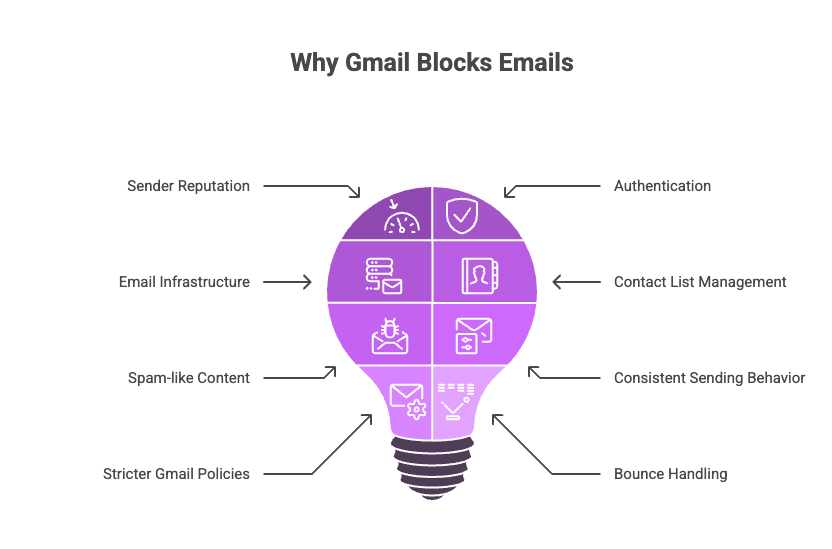
It’s usually never a content problem; it’s an infrastructure problem. Let’s look at the detailed reasoning behind Gmail blocking emails:
- Weak sender reputation: Every email you send builds or damages your reputation. Sending to inactive users, getting low engagement, or receiving spam complaints signals poor quality. Over time, Gmail stops trusting you, and even well-written emails fail to reach the inbox. Most people try to fix this with better subject lines, when the real issue is declining reputation.
- Missing authentication (SPF, DKIM, DMARC): Gmail requires authentication to verify your identity and ensure email integrity. Without properly configured SPF, DKIM, and DMARC, your emails may be rejected or silently pushed to spam.
- Poor email infrastructure: Sending from shared hosting servers often means low IP reputation and zero control over deliverability. One bad sender on the same server can affect everyone. Using a proper SMTP service shifts you to a trusted sending environment.
- Poor Contact List Management: Sending to invalid or outdated email addresses tells Gmail you don’t manage your list properly. This quickly damages trust and increases filtering. Automate your email list cleaning at a regular interval.
- Spam-like content: Gmail evaluates structure, not just if it contains spam trigger words. Too many links, heavy HTML, aggressive promotional tone, or poor formatting can trigger spam filters.
- Inconsistent sending behavior: Sudden spikes, irregular schedules, or mass emails to cold audiences look suspicious. Gmail favors predictable, consistent sending patterns. Maintain a regular email frequency.
- Stricter Gmail policies: Gmail has shifted from simple delivery to visibility control. Authentication, engagement, and consistency are now baseline requirements, not optimizations. Not maintaining Gmail Yahoo deliverability rules can result in being blocked.
- Ignoring hard bounce vs soft bounce characteristics: A hard bounce (invalid or non-existent email) damages your sender reputation immediately and must be removed from your list. A soft bounce (temporary issue like a full inbox or server error) may seem harmless, but repeated soft bounces also weaken trust over time.
The question is no longer “Can you send?” but “Should you be seen?” In short, the real problem most marketers miss:
- Gmail blocking emails is rarely about your content; it’s about your system
- Email deliverability is a system problem, not a campaign problem
How to Fix Your Gmail Blocking Emails Issue
What actually works is a system where your infrastructure, authentication, list quality, and sending behavior all work together in a consistent pattern.
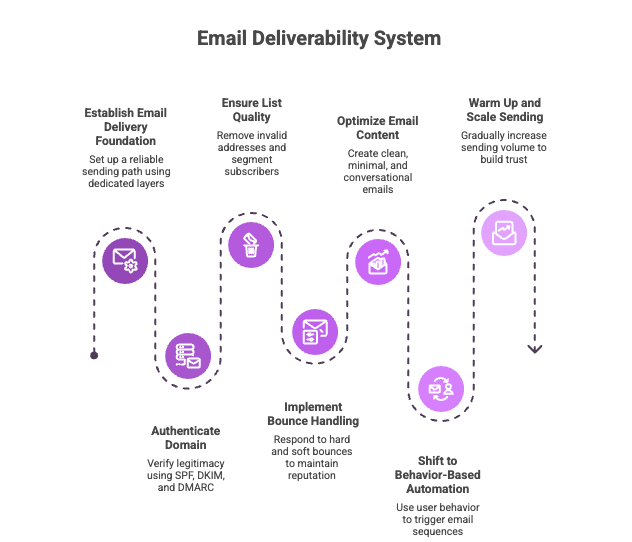
In the next section, we’ll break down exactly how to build that system step by step:
Step 1: Build a Proper Email Delivery System
The foundation of deliverability is not a specific tool; it’s a reliable and properly configured sending path.
For WordPress-based setups, this often means using a dedicated delivery layer like FluentSMTP to connect with trusted email service providers (like transactional or marketing email APIs). This helps ensure emails are authenticated, properly routed, and not dependent on unstable default hosting mail functions.
However, the broader principle applies to all senders:
- Your emails should go through a reputable sending service or infrastructure
- Delivery should be consistent, authenticated, and monitored
- You should avoid relying on unverified or unstable server-level email sending where possible
The goal here is to make sure Gmail receives your emails from a trusted, predictable, and properly authenticated source, regardless of the platform you’re using.
Step 2: Authenticate Your Domain
Once your sending infrastructure is stable, Gmail needs proof that you are legitimate. This is where email authentication becomes critical:
- SPF defines which servers are allowed to send on your behalf
- DKIM verifies that your content hasn’t been altered in transit
- DMARC tells Gmail how to handle unauthenticated emails
Without these, Gmail has no reliable way to verify identity, so even well-written emails are treated as risky. Authentication is not a setup step you “complete.” It’s your permanent identity signal inside Gmail’s trust system.
Pro-Tip: Learn the difference between SPF vs DKIM vs DMARC to implement them in your system successfully.
Step 3: Clean and Segment Your Email List
Even perfect infrastructure fails if you send it to the wrong audience.
Gmail evaluates engagement heavily:
- Who opens
- Who ignores
- Who never interacts
That means your list quality directly influences deliverability. You need to regularly remove invalid email addresses, inactive subscribers, and long-term unengaged contacts.
Instead of treating your list as one mass audience, you divide it into meaningful groups:
- Active and engaged users
- Warm or partially engaged leads
- Cold or inactive contacts
This allows you to prioritize engagement signals, which Gmail uses as one of its strongest indicators of inbox placement. A smaller, active list consistently outperforms a large, passive one, because Gmail rewards interaction, not volume.
Step 4: Enable Bounce Handling
Deliverability isn’t just about sending—it’s about responding to failure signals. Every email system generates feedback, and Gmail watches how you handle it.
There are two key types:
- Hard bounces → invalid or non-existent addresses
- Soft bounces → temporary issues like full inboxes or server delays
With FluentSMTP, bounce and delivery feedback from your email service provider can be passed back into your WordPress system, so they can be acted on instead of ignored.
That allows you to:
- Immediately remove or suppress hard bounces
- Monitor repeated soft bounce patterns over time
- Reduce repeated sending to risky or unstable addresses
So the idea is correct conceptually, but the mechanism is provider-dependent, not FluentSMTP-alone functionality. Without this layer, you continue sending to dead or unstable inboxes, slowly damaging your sender reputation without realizing it.
Step 5: Improve Email Structure
Gmail doesn’t just evaluate technical setup—it evaluates how your email behaves as content. That means structure matters as much as messaging.
High-performing emails tend to be:
- Clean and minimal
- Balanced between text and links
- Light on heavy HTML
- Written in a natural, conversational tone
Over-designed, overly promotional emails often fail because they resemble ads more than communication. The closer your email feels to proper communication, the more trustworthy it becomes in Gmail’s system.
Pro-Tip: Sometimes users have plain text email on, which allows only the plain text email version to land in their inbox. So if you are not adding a plain text version of your email, you are not prioritizing your audience’s preference.
Step 6: Shift to Behavior-Based Automation
Mass emailing is one of the fastest ways to lose inbox placement because it ignores how Gmail evaluates relevance and intent.
Gmail prefers emails that feel relevant, expected, and behavior-driven rather than generic broadcasts sent to everyone at once.
That’s why modern email marketing guidelines focus on behavior-based segmentation, where communication changes based on what the user actually does:
- A user signs up → onboarding sequence
- A user purchases → follow-up communication
- A user becomes inactive → re-engagement flow
- A user clicks but doesn’t convert → targeted reminder
When emails are structured this way, Gmail sees higher engagement signals—because relevance increases naturally with behavior.
Step 7: Warm Up and Scale Gradually (Trust Layer)
If your domain is new or your sending history is inconsistent, you cannot scale aggressively. Gmail doesn’t trust sudden volume spikes. It trusts patterns.
A proper warm-up process looks like:
- Start with small, highly engaged segments
- Maintain consistent sending frequency
- Gradually expand audience size
- Avoid sending large blasts to cold lists
This process is not about caution; it’s about building predictable sending behavior that Gmail can learn and trust. Trust is not granted instantly. It is reinforced over time through consistency.
Pro-Tip: Maintain email compliance rules. Almost all the issues stated earlier can be solved by maintaining email compliance.
Gmail isn’t Blocking You; it’s Filtering You
Gmail isn’t actively blocking emails at random; it’s filtering based on measurable trust signals.
If your emails aren’t reaching the inbox, it usually comes down to three things breaking somewhere in your system:
authentication, sender reputation, or engagement signals.
So the real question is:
“Which part of my email system is failing Gmail’s trust checks?”
Because inbox placement depends on consistency across your setup, not isolated fixes.
When you stabilize your infrastructure, maintain clean list hygiene, and shift toward behavior-based sending, Gmail has fewer reasons to filter your emails out of the inbox.
Samira Farzana
Once set out on literary voyages, I now explore the complexities of content creation. What remains constant? A fascination with unraveling the “why” and “how,” and a knack for finding joy in quiet exploration, with a book as my guide- But when it’s not a book, it’s films and anime.
Table of Content
Related Articles and Topics
-
SPF vs DKIM vs DMARC: Differences & Why They Are Important?
If your emails matter, authentication matters too. You can write a great campaign, set up…
-
Email Compliance Guide: Must Know Rules, AI Risks, and Top Brand’s Email Compliance Examples
Email is one of the most direct ways for brands to connect with their customers.…