

How to Start SMS Marketing with FluentCRM


Reaching customers through email alone is getting harder. Open rates are dropping, competition is fierce, and your message often gets buried. Besides email, businesses now need a faster, more reliable channel to communicate time-sensitive offers, reminders, and updates.
That’s why SMS marketing matters, and FluentCRM makes it easier than ever. With real-time texting, you can connect instantly and increase conversions without juggling multiple tools.
So, how do you get started with SMS marketing in FluentCRM?
Let’s break it down.
Why Choose SMS Marketing Over Email?
Unlike email, where average open rates continue to decline, and competition for attention is intense, SMS messages are opened within minutes, often instantly.
SMS marketing delivers messages instantly, while email often sits unopened for hours or days. For urgent updates, reminders, and high-intent offers, SMS consistently outperforms email in open and response rates.
This immediacy makes SMS one of the most powerful channels for time-sensitive communication, urgent updates, and high-intent offers.
Other reasons why businesses are now choosing sms marketing:
- People have less time to check emails. SMS cuts through the noise with instant visibility.
- SMS boasts near-instant open rates, making it ideal for urgent updates, flash sales, reminders, and real-time communication.
- Feels personal and conversational, helping build stronger, trust-driven customer relationships.
- Higher response and conversion rates compared to email or ads, especially for time-sensitive offers.
- Perfect for high-intent audiences since subscribers deliberately opt in.
- Automation + segmentation turn SMS into a conversion engine, delivering the right message at the right moment.
- Easy to combine with email campaigns for multi-channel strategies that reinforce messaging.
- FluentCRM unifies email, SMS, and automation in one platform, eliminating tool switching and operational complexity.
Quick Tip: SMS works at a different frequency than email. But knowing about your audience’s email frequency will give you a clear idea of your audience’s sms frequency.
How to Start SMS Marketing with FluentCRM
Getting started with SMS marketing in FluentCRM is simple. With just a few steps, you can set up, send, and automate texts to connect with your audience instantly.
Here is how you can start SMS Marketing with FluentCRM.
Step 1: Set Up SMS Integration
Setting up SMS Integration is the first step to enable your SMS feature in FluentCRM. You can follow these simple steps to get SMS ready inside FluentCRM:
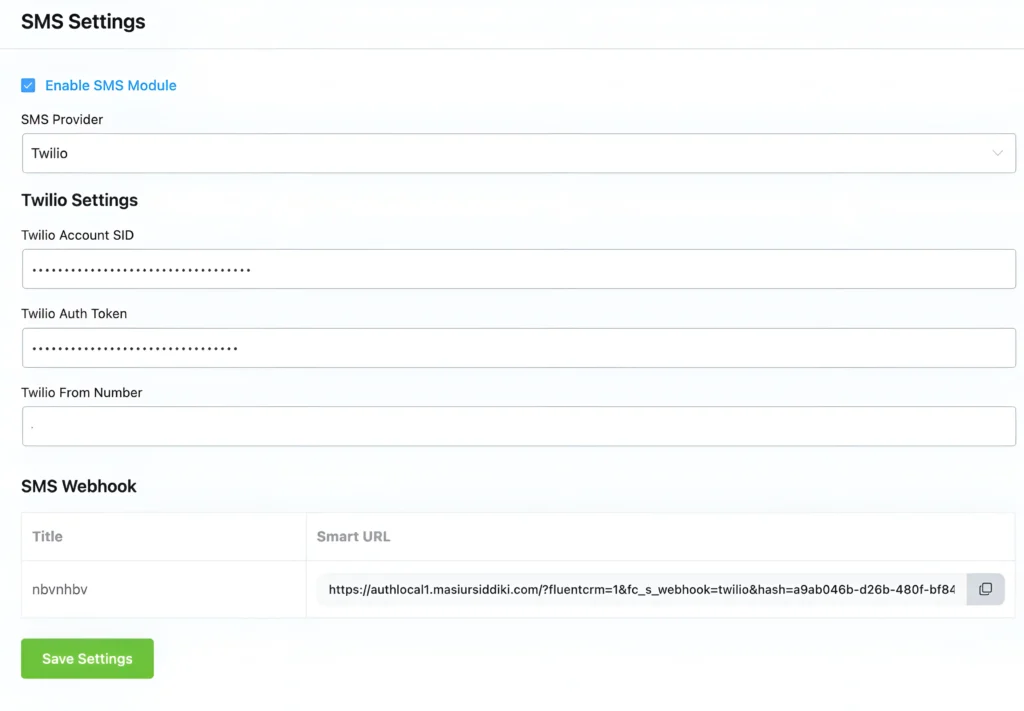
1. Enable SMS inside FluentCRM: Open FluentCRM Settings, enable the SMS Integration option
2. Choose your SMS provider based on cost and regional coverage. Choose Twilio or Amazon SNS, whichever fits you better.
3. Add Your API Credentials, Account SID, Auth Token, Twilio Phone Number (From Number)
4. Add an SMS webhook for a tight integration
Once done, SMS is fully connected and ready to use for automations, broadcasts, and workflows.
Step 2: Get Consent and Build Your SMS List
Before you send any text messages, make sure people actually want to receive them. Clear opt-in consent isn’t just a legal requirement; it’s how you build trust and ensure people engage instead of opting out.
The easiest way to collect consent is by using Fluent Forms with a phone field and an SMS-permission checkbox on your landing pages or sign-up forms. Tell subscribers what type of messages they’ll get, and offer something valuable like early access or exclusive discounts to encourage them to opt in.
Step 3: Send and Receive SMS Inside FluentCRM
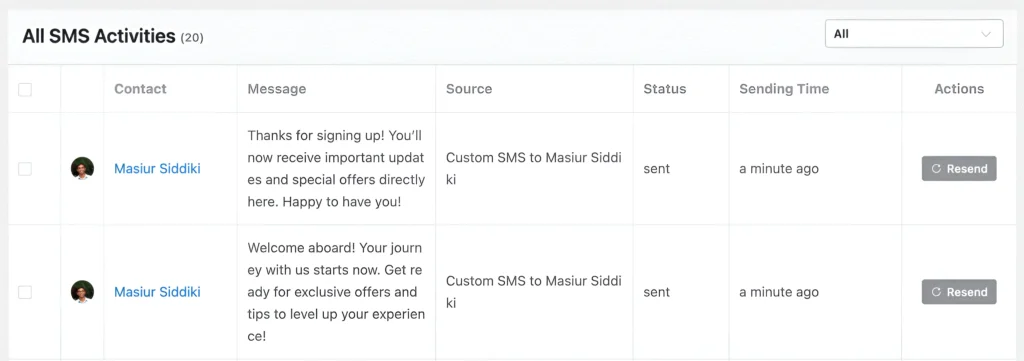
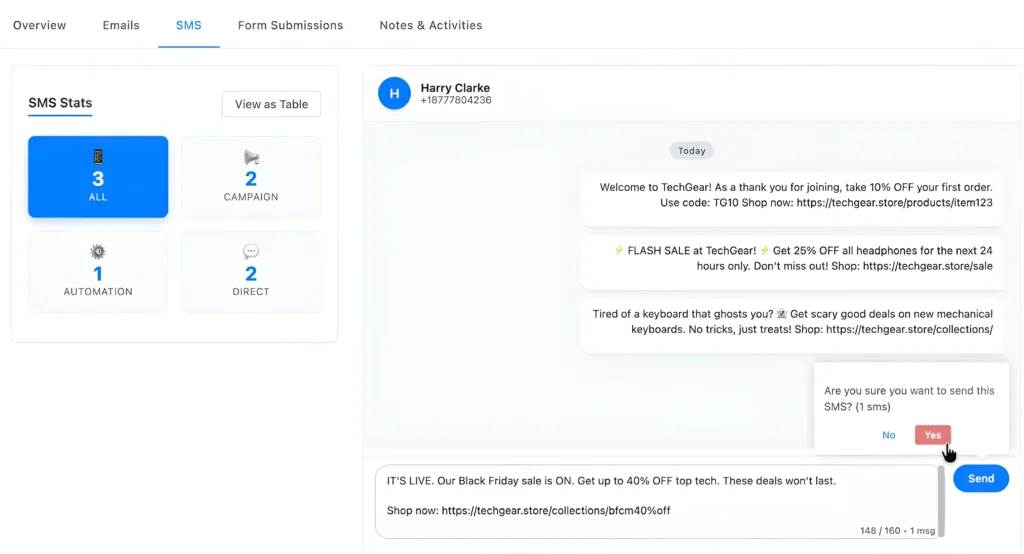
Once your SMS setup is ready, you can manage all conversations directly inside FluentCRM, without switching tabs or external dashboards. The Send & Receive SMS interface gives you a clean, chat-like view where you can see every message exchanged with a contact in real time.
Just open any contact profile, and you’ll find the full SMS history organized as a conversation thread, making follow-ups seamless and personal.
This is incredibly useful for:
- Sending quick order or delivery updates
- Event reminders or appointment confirmations
- Personalized offers and VIP customer engagement
Step 4: Create a Bulk SMS Campaign
Whether you’re announcing a flash sale, sharing an important update, or sending reminders, bulk SMS helps you reach people instantly and drive quick actions. Personalize your message with dynamic tags, keep it concise, and watch engagement soar.
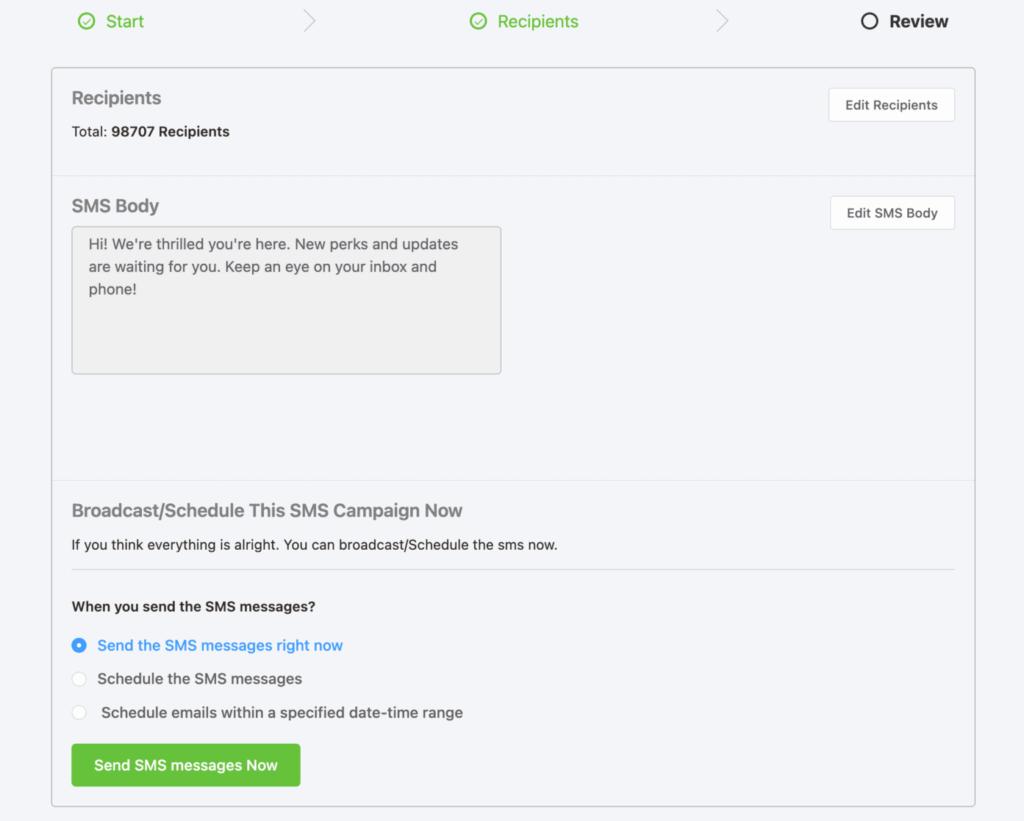
Here’s how to launch a bulk SMS campaign in FluentCRM, step by step:
- Navigate to SMS Campaigns and click Create New
- Give your campaign a name and move to the Recipients tab
- From here, choose who you want to target. You can segment by Lists & Tags, Dynamic Segments, or use Advanced Filters to pinpoint specific subscriber groups
- Next, craft your message and personalize it using dynamic tags for names, offers, or custom fields.
- Finally, decide whether to send it immediately or schedule it for the optimal time to maximize engagement.
And that’s it. Your bulk SMS campaign is ready to go.
Step 5: Automate Your SMS Marketing
You can always check manually how many sms a contact is getting, or how the sms are performing. But why do things manually when you can automate?
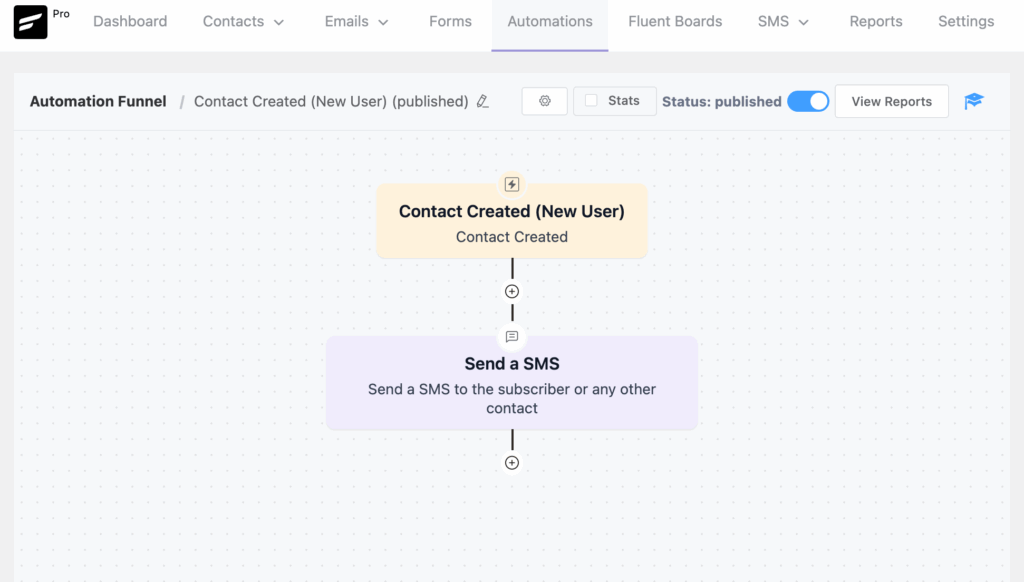
Here’s how you can build SMS automations in FluentCRM:
- From your FluentCRM dashboard, choose Automations and click Create New
- Choose a trigger to start the automation, such as a new signup, purchase, or tag added
- Add a Send SMS action and write a short, personalized message using merge tags like {first_name}
- Add delays or conditions to control timing and message flow
- Add follow-up actions if needed, such as another SMS, an email, or updating tags
- Run a quick test with a sample contact to make sure everything works smoothly
Quick Tip: For your SMS automation, you can take inspiration from email automation examples, which work for businesses.
Step 6: Track SMS Performance by Each Contact
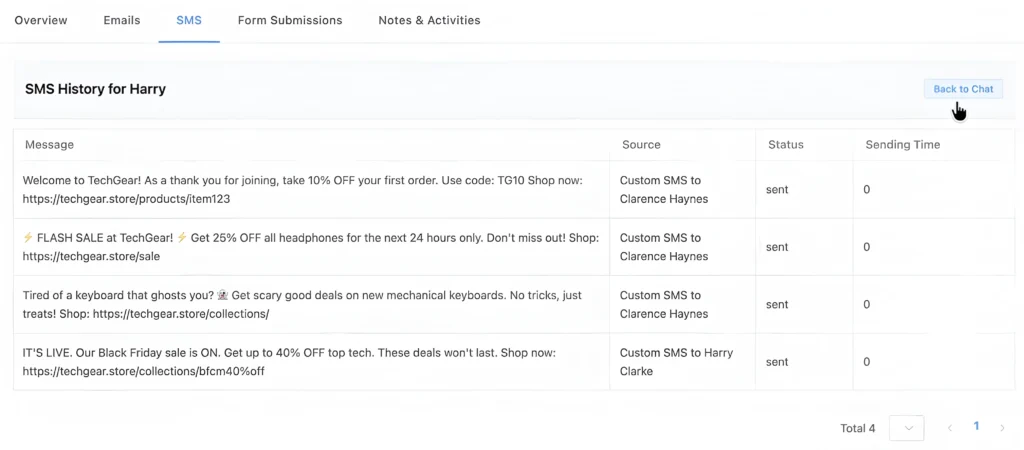
You can check your sms history from your contacts. SMS history will include every sms you have sent to a contact, sms status, and sending time as well.
You can check sms stats, including sms campaign, sms automation, sms direct from the sms section as well.
Quick Tip: FluentCRM version 3.00 is packed with more amazing features that you may need to implement very soon. Find out more here from the blog
Best Practices You Can Follow for SMS Marketing Success
To get the most out of SMS marketing, it’s important to create messages that feel personal, timely, and respectful of your audience’s attention.
Below are some best practices to help you build SMS campaigns:
- Get clear permission before sending, so your audience knows what to expect and trusts your brand.
- Keep messages short, clear, and relevant as SMS is a quick-read channel, not a place for long explanations.
- Use smartcodes (e.g., {first_name}) to make the message feel more personalized and tailored.
- Maintain a healthy frequency and respect people’s attention and inbox space.
- Use strong, action-focused CTAs to guide recipients toward the next step, like purchasing or claiming an offer.
- Share real value in every text, whether it’s an exclusive discount, a helpful reminder, or an important update.
- Include a simple opt-out option to build transparency and allow users to control their experience.
- A/B test, measure, and optimize continuously, experimenting with timing, message style, and audience segments to improve results.
If you are following this in your sms marketing strategies, you are good to go!
Start Your SMS Marketing Journey Today
SMS is the fastest, most direct way to reach people when it matters. And with FluentCRM, you don’t need extra tools or complicated setups. You can integrate SMS, send messages, automate workflows, and track everything from one clean dashboard.
FluentCRM combines SMS marketing with email automation, segmentation, and contact management, creating a complete CRM-driven engagement system.
Once you set it up, SMS becomes a natural extension of your email strategy. Perfect for quick updates, reminders, offers, and real conversations that feel personal.
Don’t wait to reach your audience where they are. Start using FluentCRM for SMS marketing today and send personalized, timely messages that drive real engagement and conversions.
Now you know how to get started, launch campaigns, and automate your texts inside FluentCRM. All that’s left is to try it for yourself!
Your audience is already checking their phones. With FluentCRM, your message gets there instantly.
Samira Farzana
Once set out on literary voyages, I now explore the complexities of content creation. What remains constant? A fascination with unraveling the “why” and “how,” and a knack for finding joy in quiet exploration, with a book as my guide- But when it’s not a book, it’s films and anime.
Table of Content
Related Articles and Topics
-
The WordPress Agency’s Guide to Client Communication and Reporting
Many WordPress agencies excel at the technical work, but often struggle with client communication. But…
-
15 Proven Black Friday Marketing Strategies That Work for Every Business
Black Friday isn’t just another sale. It’s the Super Bowl of business, where businesses either…



Leave a Reply