How to Choose the Right CRM for Your Business in 2026

Summarize with


Last Updated:
We know, searching for “best CRM” usually leaves you more confused.
When you started searching, everyone swore by a different tool, and there’s no single right answer. That’s because the best CRM isn’t a specific product; it’s whichever one actually fits how your team works.
This guide helps you figure that out. Whether you’re a small business owner ready to leave spreadsheets behind, or part of an enterprise sales team picking a platform that hundreds of people will depend on.
Key Takeaways
- Choosing the right CRM comes down to matching 9 core features against your actual budget and workflow.
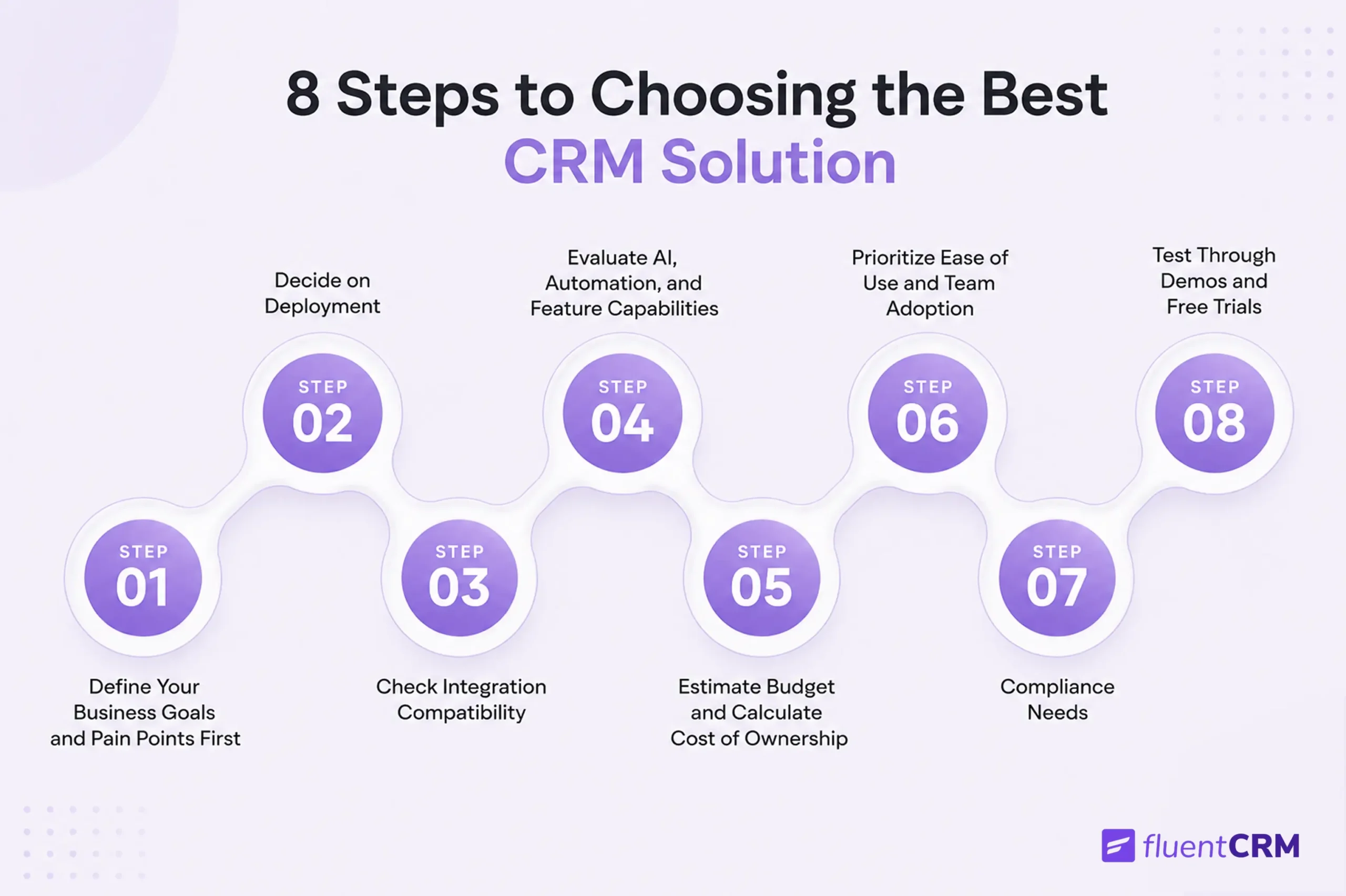
- The process involves 8 steps, starting with defining your goals and ending with a hands-on free trial before committing.
- The most common buying mistake is trusting a sales demo over a real trial with your own data.
- FluentCRM, a WordPress-native CRM, covers all 9 core features needed for a complete CRM.
- FluentCRM prices its Pro plan at $129/year per site (about $10.75/month) instead of charging per contact.
What is CRM Software?
A CRM, or Customer Relationship Management system, helps businesses track and manage relationships with customers and leads. It stores contact information, purchase history, and behavioral data so your team can engage each person based on full context.
Whereas an email marketing plugin puts that data to work. It lets you send targeted campaigns, build automated follow-up sequences, segment your audience, and measure how your emails drive revenue.
A combined CRM and email marketing plugin does both in one place.
Every contact record updates automatically based on purchases, course completions, and membership events. Every email you send is informed by the full history of that contact’s relationship with your business.
A CRM, or Customer Relationship Management system, stores and organizes every interaction your business has with leads and customers in one place. It can be contact details, emails, sms, calls, notes, deals, support tickets, purchase history, and more.
It’s a handy system that assembles scattered information from inboxes, spreadsheets, and sticky notes to a single dashboard.
Why People Choose CRM Software?
Businesses don’t adopt a CRM because it’s trendy; they adopt one because something in how they manage customers isn’t working as it should.
Here’s what typically pushes a team to make the switch:
- To give the whole team one shared view of every customer instead of scattered notes
- To stop losing leads that fall through the cracks in spreadsheets or inboxes
- To automate repetitive tasks like reminders, sequences, onboarding, and others
- To get real visibility into performance through a unified reporting dashboard
- To connect all areas of business support, appointment, lead generation, and others in one place
- To automatically nurture leads to the next stage
What are the Types of CRM Tools?
The question, “How to choose the right CRM,” comes with a prerequisite, and that is: What type of CRM do you need in the first place?
CRMs generally fall into four broad categories.
Most modern platforms blend elements of all four, but knowing which one matters most to you will narrow your search considerably.
Operational CRM
It focuses on day-to-day processes; capturing leads, managing pipelines, automating sales and marketing tasks, and logging customer interactions. It’s the category most small businesses start with, since it directly supports daily sales and service work.
Analytical CRM
Analytical CRM makes sense of the data your operational CRM collects. It spots patterns in customer behavior, segmenting audiences, and supporting forecasting once you have enough data to analyze.
Collaborative CRM
It breaks down silos between departments. Sales, marketing, and support work from the same customer record, so a support agent can see what a customer recently bought, and a salesperson can see if they have an open complaint.
Strategic CRM
It takes a longer view, focusing on customer lifetime value and long-term relationship building rather than individual transactions. It is more relevant for larger organizations managing complex, multi-layer relationships.
How to Choose the Right CRM: A Step-by-Step Guideline
Now that you know the basics, here’s a simple process to follow before picking a CRM.
Work through these steps in order, and you’ll end up with a much better choice.
Step 1: Define Your Business Goals and Pain Points First
Before you look at a single CRM product, get specific about what’s actually broken in your business. For example:
- Are leads falling through the cracks because nobody owns follow-up?
- Is your sales team spending hours on data entry instead of selling?
- Are your marketing teams manually onboarding new contacts?
Write these down as concrete problems, not vague aspirations.
For small businesses, this conversation might take an afternoon with your team. For enterprise-level organizations, it’s worth running a short discovery process across sales, marketing, and service leadership, since a CRM that solves sales’ problems but creates new ones for support isn’t a win.
Step 2: Decide on Deployment
Most CRMs today are cloud-based (SaaS); you log in through a browser, the vendor handles hosting and updates, and you pay a recurring subscription.
This is the right call for the vast majority of businesses because it’s faster to set up and doesn’t require in-house IT infrastructure.
On the other side, a self-hosted CRM comes with strict data residency requirements and a preference for owning business data outright. With WordPress-based businesses, it is preferable to keep everything inside a platform you already control.
Step 3: Check Integration Compatibility
Whichever route you choose, integrations matter more than almost any single feature.
A CRM that doesn’t integrate with your email, calendar, e-commerce platform, LMS, or marketing tools becomes yet another system your team has to update manually.
Before shortlisting any CRM, list the five or six tools your business can’t operate without, and confirm native integrations exist (or can you integrate them via API).
Step 4: Evaluate AI, Automation, and Feature Capabilities
AI features have moved from “nice to have” to a genuine differentiator in CRM software.
Look beyond the marketing language and ask what the AI actually does:
- Does it summarize customer interactions automatically?
- Fetch leads based on real behavioral data?
- Write and draft follow-up emails?
For smaller teams, basic automation such as task reminders, email sequences, and integrations often delivers more day-to-day value than flashier AI add-ons.
For organizations with a large email list, contact segmentation, email personalization, and omnichannel marketing should be mandatory to bring in more revenue.
Step 5: Estimate Budget and Calculate Cost of Ownership
CRM pricing is rarely as simple as the headline number suggests.
Most platforms charge per user per month, with entry-level plans often $10–$25, mid-tier plans $25–$80, and enterprise tiers climbing past $100 per user per month for advanced customization, automation, integration support, and more.
Although free plans are available and they can work well for very small teams, they typically cap users, contacts, features, or automations.
But the initial price isn’t always the full cost. Additional setup, training, and any paid add-ons.
Most importantly, check how pricing grows with your contacts or team size. Some platforms charge per contact, which can add up fast. It doesn’t allow scalability when your business starts growing.
Step 6: Prioritize Ease of Use and Team Adoption
A CRM with every feature imaginable is worthless if your team finds it confusing.
Surveys of CRM buyers consistently rate ease of use as the single most important factor in choosing a system, often ahead of price or feature depth.
During any demo or free trial, pay attention to
- How many clicks does it take to do one thing?
- How uniform does the overall system feel in terms of UI and UX?
- How quick the onboarding process kick in?
Step 7: Compliance Needs
Certain industries come with non-negotiable requirements.
For example,
- Healthcare businesses handling patient information typically need HIPAA-compliant data handling.
- Businesses operating in or selling to the EU need to consider GDPR rules around data storage, access requests, and deletion.
- Financial services firms often have their own record-keeping and security frameworks.
That’s why, before selecting CRM software, it’s better to identify whether they are maintaining compliance.
Step 8: Test Through Demos and Free Trials
Never make a final decision by reading an article or sponsored ad.
Make a list of two or three contenders, get hands-on with a free trial using your own data.
Have your team try the workflows they’ll use daily: importing real contacts, setting up basic email campaigns, building automation, and generating a report.
The goal is to surface problems now, while switching costs are low, not three months into a rollout.
What Features Most CRM Tools Should Have?
Regardless of your business size or industry, there’s a core set of features that separates a genuinely useful CRM from a glorified contact list.
When evaluating any platform, check it against this list:
- Contact Management: Keep every customer’s details and history in one place, so anyone on your team can look them up instantly.
- Lead Management: Captures new leads automatically and makes sure they get assigned and followed up on, instead of sitting untouched.
- Contact Segmentation: Group contacts using lists, tags based on behavior, interests, or status. The benefits of segmentation is, you can send the right message to the right people.
- Workflow Automation: Run automated workflows, like follow-up reminders and welcome emails, that get triggered by certain actions.
- Email and SMS Marketing: Build and send campaigns and follow-ups by email or text from the same place.
- Reporting and Analytics: Be it email, automation, or sms, get a full view of what’s working through simple dashboards.
- Third-party Integrations: Connect with the other tools you already use, like your email, appointment system, LMS, membership tool, or eCommerce store.
- Abandoned Cart Recovery: Automatically recover abandoned carts that shoppers left and bring in lost revenue.
- Brand Customization: Lets you make emails, forms, and pages look like your brand instead of a generic template.
Common Mistakes to Avoid When Choosing a CRM
Even when you know how to choose the right CRM, a few common mistakes can still trip up the decision:
- Choosing features over actual needs means paying more for a hard-to-learn tool
- Skipping input from daily users and deciding to implement a tool from leadership alone
- Underestimating implementation time for migration, setup, and training can derail.
- Ignoring how pricing scales means a plan that’s cheap today can get expensive fast
- Treating the demo as the decision ignores that a demo shows what a CRM can do, not how it performs with your real data and workflows.
Quick Comparison: Popular CRM Options at a Glance
Self-hosted and SaaS platforms differ in ways that don’t always show up in a feature list.
Here’s how a few popular options compare on the specific points that tend to matter most.
| Capability | FluentCRM | Hubspot CRM | Zoho CRM | ActiveCampaign | MailChimp |
|---|---|---|---|---|---|
| Unlimited contacts | ✓ | ✗ | ✗ | ✗ | ✗ |
| Unlimited Email Sending | ✓ | ✗ | ✗ | ✗ | ✗ |
| Self hosted | ✓ | ✗ | ✗ | ✗ | ✗ |
| Multi-Channel Support (Email + SMS) | ✓ | ✓ | ✓ | ✓ | ✓ |
| Native WooCommerce integration | ✓ | ✗ | ✗ | ✓ | ✓ |
| Built-in abandoned cart recovery | ✓ | Via integration | Via integration | ✓ | ✓ |
| Visual automation builder | ✓ | ✓ | ✓ | ✓ | ✓ |
| Built-in templates | ✓ | ✓ | ✓ | ✓ | ✓ |
| Free trails | ✓ | ✓ | ✓ (up to 3 users) | ✗ | ✓ |
A Complete CRM and Email Marketing Plugin for Your Business
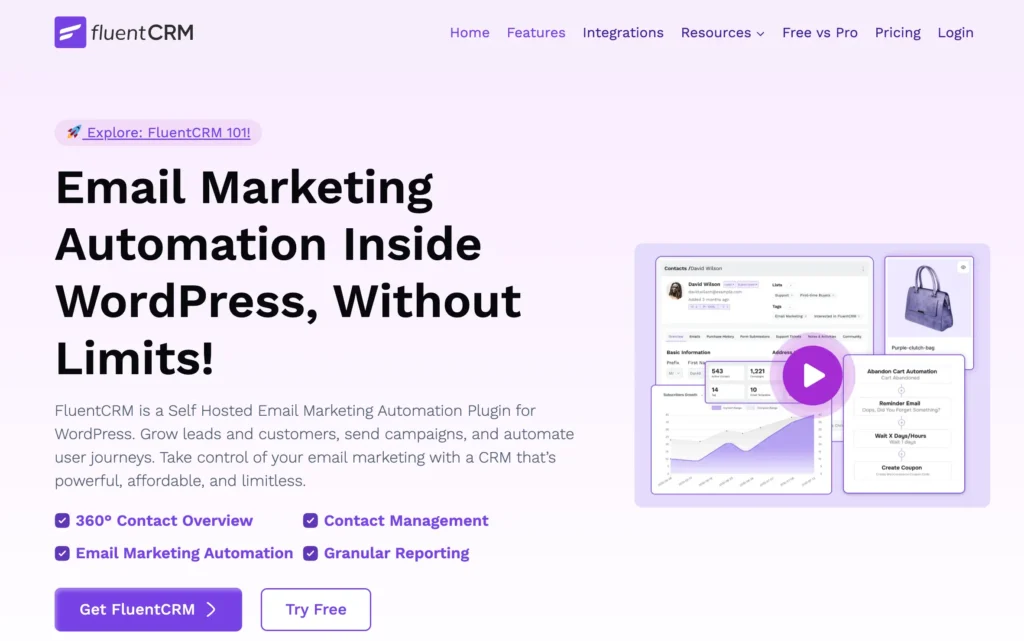
If you’re running your business on WordPress, FluentCRM holds up well against other email marketing and CRM tools.
Because it’s built directly into WordPress, 80,000+ businesses have trusted it to run their business.
| Capability | How FluentCRM Delivers It |
|---|---|
| Email Sending | No per-contact or per-send limits on the Free or Pro plans, unlike most SaaS competitors that cap sends by plan tier. |
| Email Editors | A WordPress-native Gutenberg editor alongside the standard drag-and-drop builder makes campaign building feel the same as the rest of the site. |
| Email Delivery | Multi-threaded sending, which pushes campaigns out faster than the single-threaded sending most competitors rely on. |
| Lead Management | Segments lead automatically as they come in, then nurture them through email sequences and regular newsletters without manual follow-up. |
| Automation Triggers | WordPress-specific or product-specific triggers and actions that allow making countless email automations effortless. |
| AI connectivity (MCP) | Native support for the MCP lets your favourite AI assistants manage contacts, emails, campaigns, and automations for your business. |
| Multi-channel Support | Email and SMS marketing can run from the same dashboard, without needing a separate tool for each channel. |
| Integrations | Native connections to 45+ tools of different categories, plus webhooks and a REST API for everything else. |
| Reporting | Dedicated CRM, automation, and campaign reports are broken out individually for better business decision-making. |
| Templates | Built-in templates for both emails and automation sequences, so campaigns can be customized and sent instantly. |
| Cart Recovery | Built-in cart recovery features to bring back lost sales, with no separate plugin needed |
| Ecosystem Compatibility | It is tightly integrated with in-house Fluent suite products that share a similar interface, layout, functionality, and workflow. |
Is FluentCRM Too Expensive to Afford?
Short answer: No, it tends to work out cheaper than it looks at first glance.
Pro licensing is sold per site, not per user or per contact, and every tier unlocks the same full feature set, so there’s no “basic vs. advanced” trade-off to navigate.
Moreover, when you pair it with FluentSMTP, you have a complete email marketing setup that can send unlimited emails without any complexity.
| Plan | Sites | Annual Price | What’s Included | Best For |
|---|---|---|---|---|
| Solo / Blogger | 1 | $129/year | All features, priority support | A single business running on one WordPress site |
| Small Business | 5 | $249/year | All features, priority support | Agencies or businesses managing a small handful of contacts |
| Agency | 50 | $499/year | All features, priority support | Agencies or larger operations managing many WordPress sites at once |
Note that the prices are annual, not monthly like most competitors. If we break that down, the Single Site License is roughly $10.75/month, often less than most comparable tools.
The Right CRM Is the One Your Team Will Actually Use
Knowing how to choose the right CRM comes down to finding the one that matches how your business actually works, fits your budget, and doesn’t end up abandoned six months in.
Before committing, make sure you’ve:
- Defined your goals and pain points
- Built your must-have feature list
- Gotten realistic about the total cost of ownership
- Tested everything with real data, not just a demo
For businesses built on WordPress, FluentCRM is worth evaluating early in that process.
Because it’s already an established crm and email marketing plugin powering over 80,000+ businesses. Along with all the key features that every size of business needs.
Join our community to connect with other FluentCRM users and get real answers along the way.
Frequently Asked Questions
Still have a question?
Tanzil Ebad Efti
Content Writer & Strategist
Words are my favorite playground. As a Creative Writer at WPManageNinja, I don’t just produce content; I tell stories. By mixing fiction and metaphors with real-life examples, I turn my writing into a creative journey that’s easy for readers to digest and relate to.