

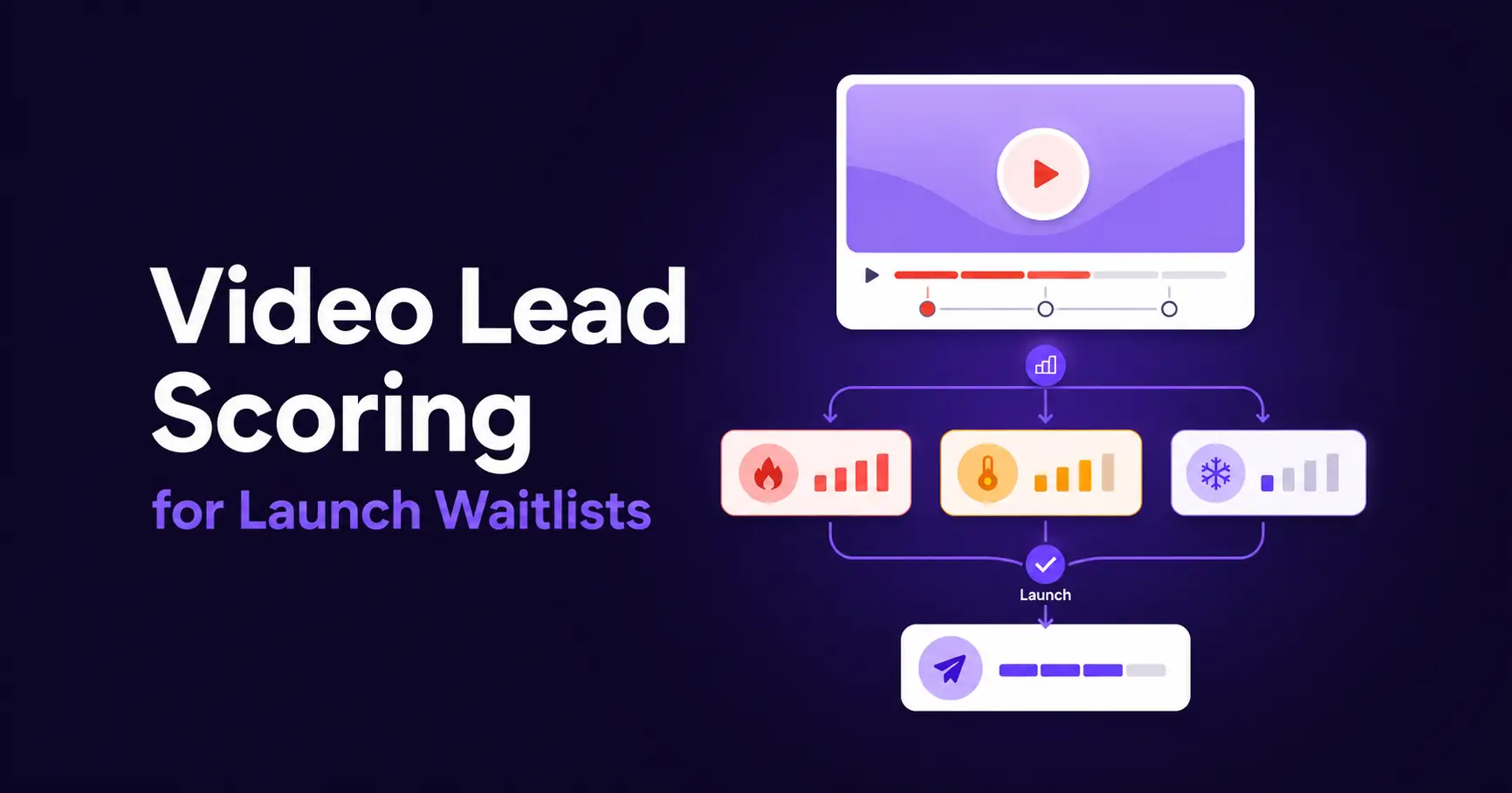
How to Use Video Lead Scoring for a Product Launch Waitlist [Complete Guide]

Summarize with


Last Updated:
You put together a teaser video for the thing you’re about to launch. It goes up on a landing page, the views climb, and a waitlist form underneath collects a steady trickle of signups.
Then launch day arrives, and you email that entire list the same message, whether someone watched the full reveal or bounced after 10 seconds.
Everything is fine, but there remains a problem!
The person who was ready to buy gets the same nudge as the mildly curious person, because nothing in your list tells you which one they were.
That’s the gap video lead scoring closes.
Instead of treating every signup the same, you let the video itself tell you how interested each person actually is, and then build your launch sequence around that signal rather than a flat list.
What is Video Lead Scoring?
Video lead scoring is the process of translating identifiable video behavior, such as reaching 50% or completing a video, into CRM engagement signals.
These signals can then place contacts into clear segments and change the follow-up they receive based on their behaviour.
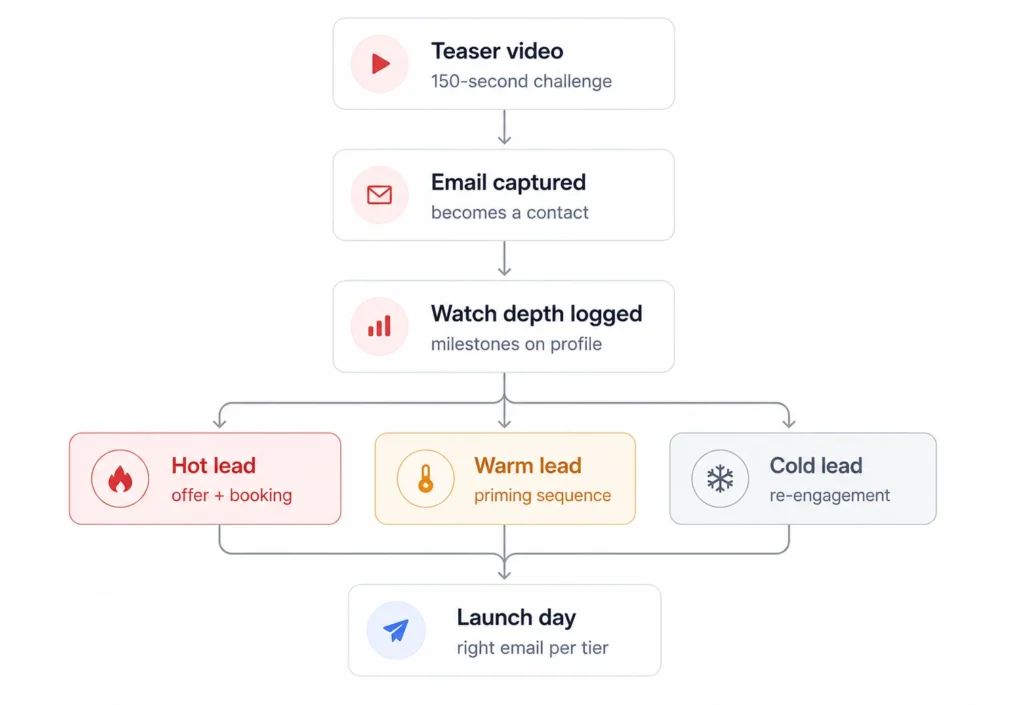
Launch teaser → In-video email capture → Identified contact → Watch milestone → Engagement tag → Launch-time branch → Tailored emailHere’s a relatable context that makes the overall Video lead scoring process more relatable:
Just as opening five emails predicts more interest than opening one. Finishing a 3-minute product reveal video predicts more interest than watching the first 10 seconds and clicking away.
What Does the Video Lead Scoring Setup Do?
When you launch a product, most of the time your waitlists never capture any engagement signal.
Everyone who signs up gets lumped into one list, with the person who’s ready to buy sitting right next to the person who forgot they joined five minutes later. On launch day, they all get the same email.
This setup builds the list differently. The teaser captures the email, and how far each person watches becomes a score attached to their contact record. Finishing the reveal signals high intent. Bailing early signals low intent.
That score can become a tag, a segment, or a trigger within your CRM system. With these, you can eventually build automations that send personalized emails instead of one flat blast to everyone.
For example:
- Hot leads get an early-access offer and a booking link
- Warm leads get a priming sequence
- Cold captures get a lighter re-engagement track
Basically, you still send launch emails but you just send the right one to each tier, built from behavior the video measured for you.
Where Video Lead Scoring Fits in Lead Generation?
Your waitlist is one part of a wider lead generation strategy. It captures interest before an offer becomes available and creates time to educate potential buyers before asking them to act.
Traditional lead scoring leans on signals such as email opens, page visits, or form fills; actions that are easy to track but only loosely tied to actual interest.
Video lead scoring adds a signal that’s harder to fake and easier to measure precisely: how far someone got before they stopped watching.
So, a teaser video makes sense when the offer benefits from being seen, taught, or demonstrated. Video format may change by audience, but the role of the video stays consistent.
| Audience | Useful teaser | Launch follow-up |
|---|---|---|
| Course creator | Sample lesson, outcome walkthrough, or student project preview. | Enrollment details, curriculum context, and course start date |
| Product or eCommerce business | Product demonstration, reveal, or use-case walkthrough | Purchase or preorder details, availability, and product questions |
| Membership business | Member-area tour, experience preview, or result walkthrough | Joining details, member benefits, and opening date |
Overall, the teaser should reveal enough value to earn the email request. It also needs meaningful watch milestones. Reaching 50% should represent more than leaving the video running, and the completion threshold should reflect the end of the useful content rather than a long outro.
What Watch Depth Can and Cannot Tell You?
Watch depth tells you how much of one video an identified contact consumed. In context, that is useful evidence of engagement.
It does not explain why the person watched. It cannot tell you whether they can afford the offer, whether the timing works, or whether they intend to buy.
Therefore, a completed view should mean more engaged with the teaser, not ready to purchase.
| What It Can Tell You | What It Can’t Tell You |
|---|---|
| Relative interest across your list. (90% watched signals meaningfully more investment than 15%) | Why someone stopped watching, or what they were doing during playback. |
| A pattern reliable enough across a list to build tiers and automations on. | Whether a drop-off means disinterest, or just a dropped call or distraction. |
| Who’s worth a conversation first. | A substitute for having that conversation. |
Read More: For broader acquisition tactics, see the guide to using video for lead generation. This article focuses on what happens after a viewer becomes identifiable and their watch behavior can inform CRM follow-up.
The Product Launch Waitlist Workflow (Step-by-Step Guide)
Let’s now move on to a practical workflow to understand what video lead scoring looks like in practice.
The workflow below runs on two tools working together. FluentPlayer tracks how far each viewer watches; FluentCRM turns that watch behavior into tags, scores, and automated follow-up.
Note that neither step requires custom code; both are Fluent ecosystem plugins tightly integrated on both sides.
Also, FluentCRM’s product waitlist automation template can be a good starting point for you for the welcome, pre-launch, and launch-day emails.
Choose the Right Teaser
The video is the signal, so choose it before touching the settings.
Use a real 3–6 minute reveal that creates curiosity without giving away the full payoff.
In this workflow, that’s “The 150-Second WordPress Store Challenge,” a 3:48 teaser showing a FluentCart store being built live in 150 seconds.
For a waitlist, finishing the video is the signal. So, remember this while choosing your video:
- A 20-minute deep dive kills completion
- 30-second teaser gives you too little watch-depth data.
One setting worth checking: Load Strategy. Since launch-page speed matters, set the video embed to When Scrolled so it doesn’t slow down the initial page load.
Connect FluentCRM + FluentPlayer
When FluentPlayer and FluentCRM are active on the same site, FluentPlayer detects the integration automatically.
Follow these steps:
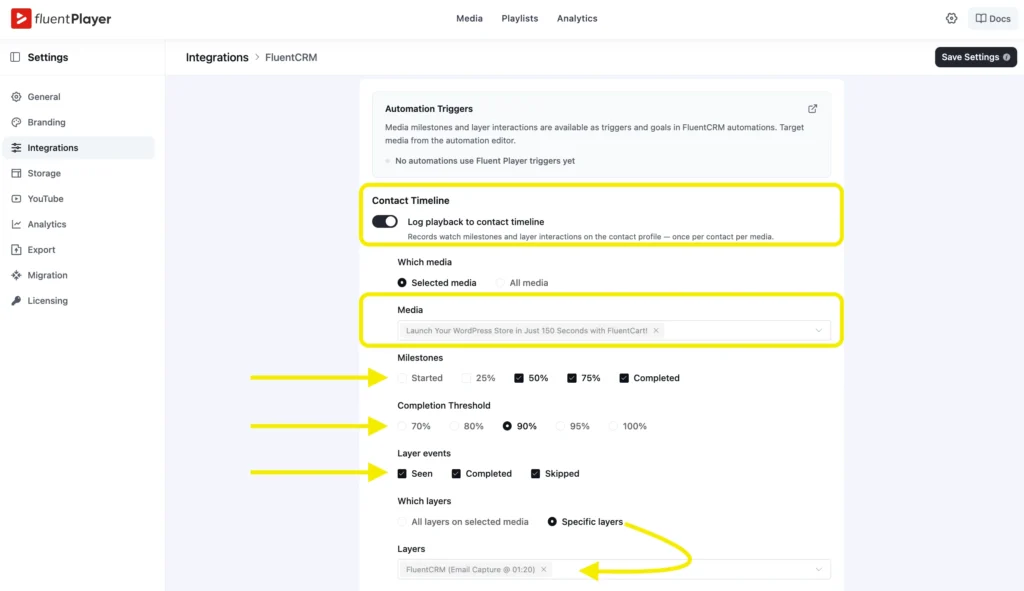
FluentPlayer → Settings → Integrations → FluentCRM → ConfigureTurn on Log playback to contact timeline.
Then choose:
- Which Media: Selected media
- Media: Your launch teaser
- Milestones: 50% and Completed
- Completion Threshold: The point that represents the meaningful end of your teaser
The available completion thresholds range from 70% to 100%.
If your final section contains an outro or credits, select the threshold that includes the complete value reveal without requiring viewers to watch empty closing time. Treat that choice as a hypothesis and compare it with real retention behavior.
FluentPlayer records each selected event once per contact and media item. Rewatching the same teaser does not keep adding duplicate entries for the same milestone.
Turn On Event Tracking First
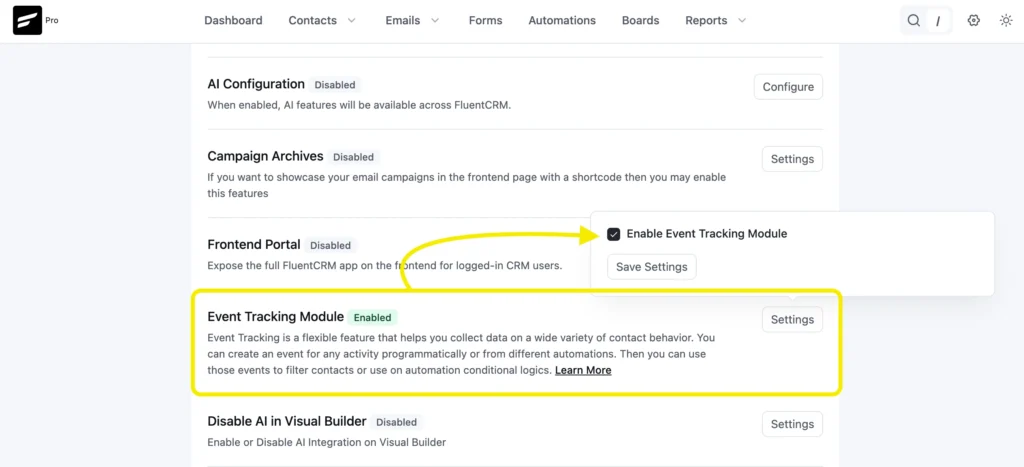
Event Tracking is off by default in FluentCRM. Leave it off, and every watch-depth setting in this workflow records nothing.
FluentCRM stores contact behavior through its Event Tracking Module, and the watch milestones from FluentPlayer ride on it.
Go to:
FluentCRM → Addons → Event Tracking Module → SettingsSelect Enable Event Tracking Module, then save the setting.
Capture the Waitlist Inside the Video
A plain YouTube embed plays the teaser and collects nothing.
FluentPlayer connects to YouTube, Vimeo, Bunny, Mux, Gumlet, Cloudflare, or a self-hosted file and adds a conversion layer on top of it.
One of those layers is an email capture form that pauses the teaser and asks for an email before the viewer sees the rest.
Add the Capture Layer to FluentCRM
To add it, open the teaser under FluentPlayer → Media.
In the right sidebar, expand Interactive Layers, click Add Layer, and lastly choose Email Capture.
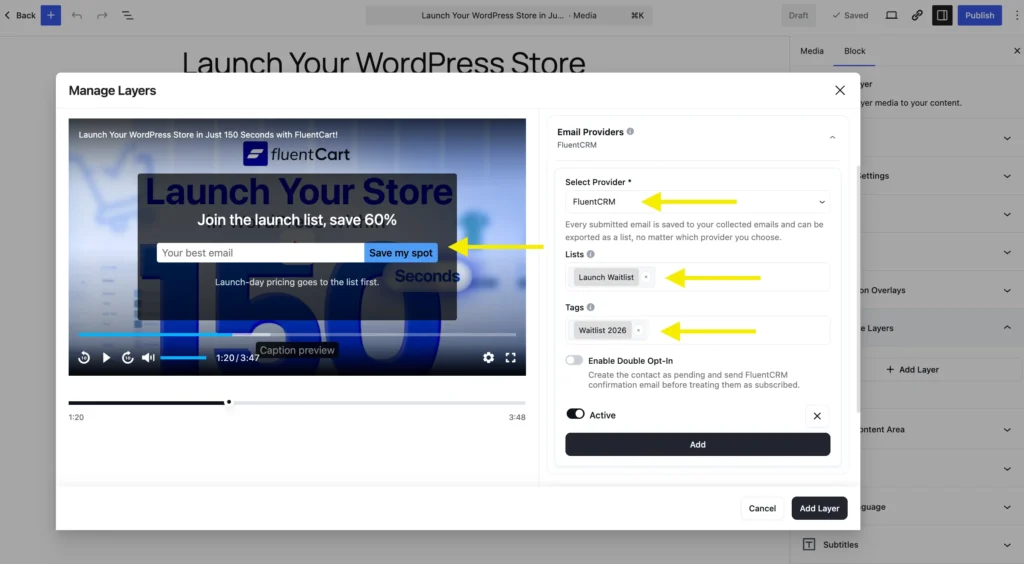
Under Email Providers:
- Select Add Provider.
- Choose FluentCRM.
- Assign the list used for this launch.
- Apply the tag launch-waitlist.
- Make sure the provider is active.
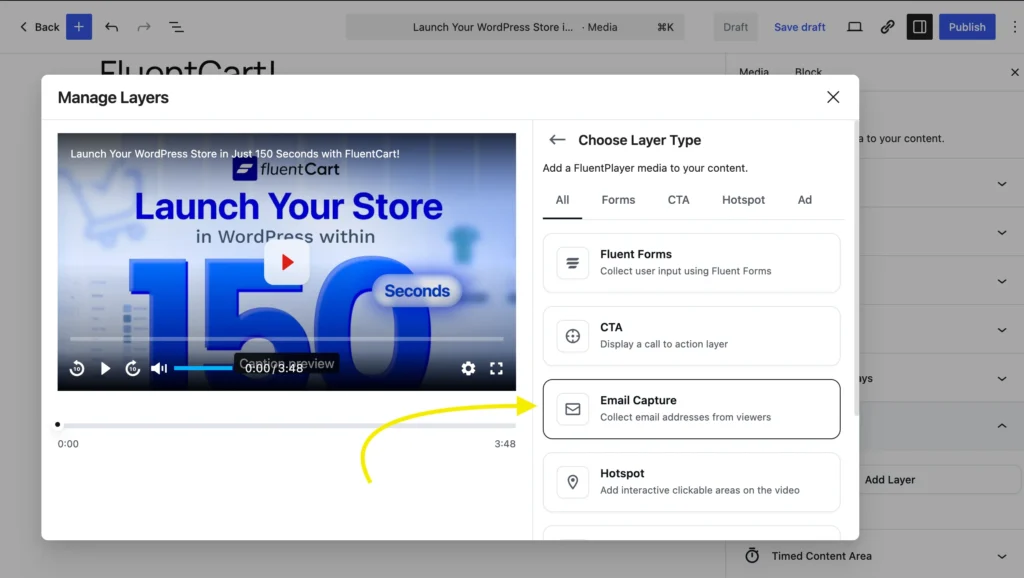
Inside the layer, expand Email Providers and pick FluentCRM.
There’s no API key to paste; the integration is native, so it connects the moment both plugins are active on your WordPress
site.
Then assign the routing. Send new signups to a dedicated list, something like “Store Challenge Waitlist,” and apply a tag such as challenge-waitlist-2026. The list is who you’ll email at launch.
The tag is how every other automation in this workflow finds these people later.
Choose Lead Capture Point
Placement affects your capture rate. Put the form around the 30 to 40% video completion mark. The form must show up after the teaser has delivered value but before its strongest moment.
Remember, Gate content too early, and you haven’t earned the email yet. Do it too late, and the viewer has already seen the payoff.
So, give people a clear reason to join, such as early access, a launch-day discount, or a first-buyer bonus. Keep it to one line so the value is obvious.
Pro Tips: Ask for the email only. Extra fields add friction.
Decide on Double Opt-In
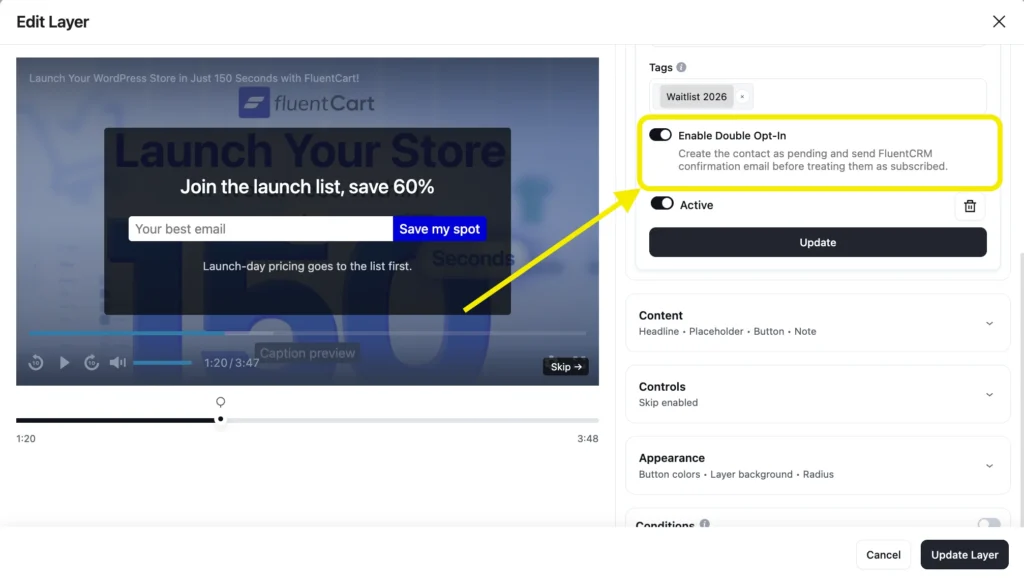
FluentCRM can require double opt-in. It keeps contacts pending until they confirm their email.
Although it helps protect deliverability and confirms consent, it adds friction and can reduce your final signup count.
Pro Tips: If inbox placement is the priority, keep it on. If growing the list matters more and your sending setup is solid, you can skip it.
Turn Watch Depth Into an Intent Score
Capturing an email makes someone a contact. Tracking how much they watch gives you a useful signal to score.
In FluentCRM’s FluentPlayer integration settings, turn on “Log playback to contact timeline.”
This records watch milestones and layer interactions on the contact profile once per contact per video, so rewatches don’t inflate the signal.
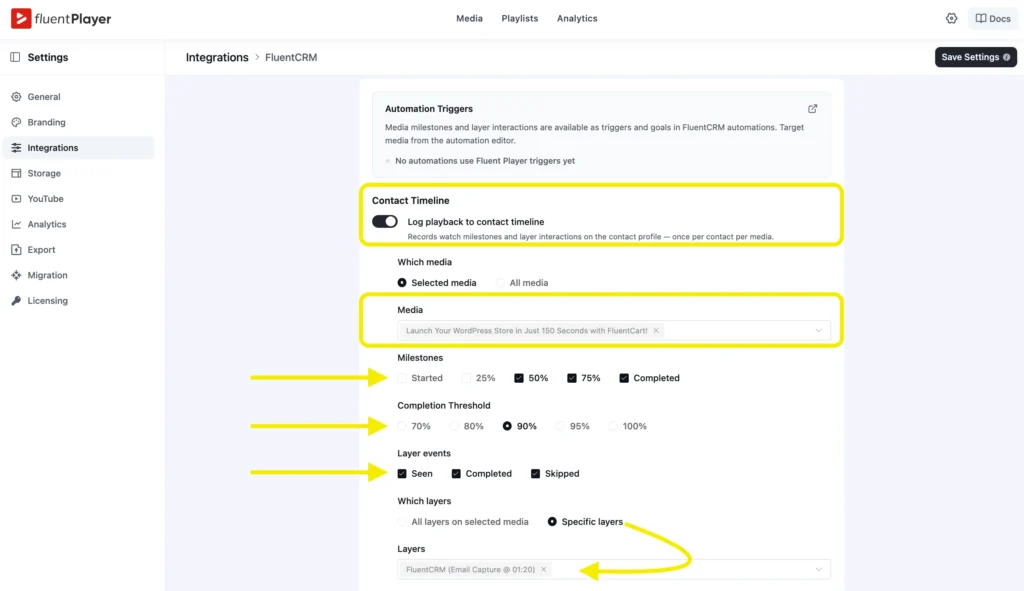
To set it up nicely, choose the watch milestones that matter for your campaign:
- Started
- 25% watched
- 50% watched
- 75% watched
- Completed
Completed should carry the most weight. Finishing the walkthrough is a strong sign of engagement.
Pro Tips: Set the completion threshold to 90%, not 100%. Most viewers skip the outro, so waiting for 100% can leave your hottest leads untracked.
Also, log selected media and apply it only to this teaser. That keeps your launch signal clean instead of mixing in activity from other videos.
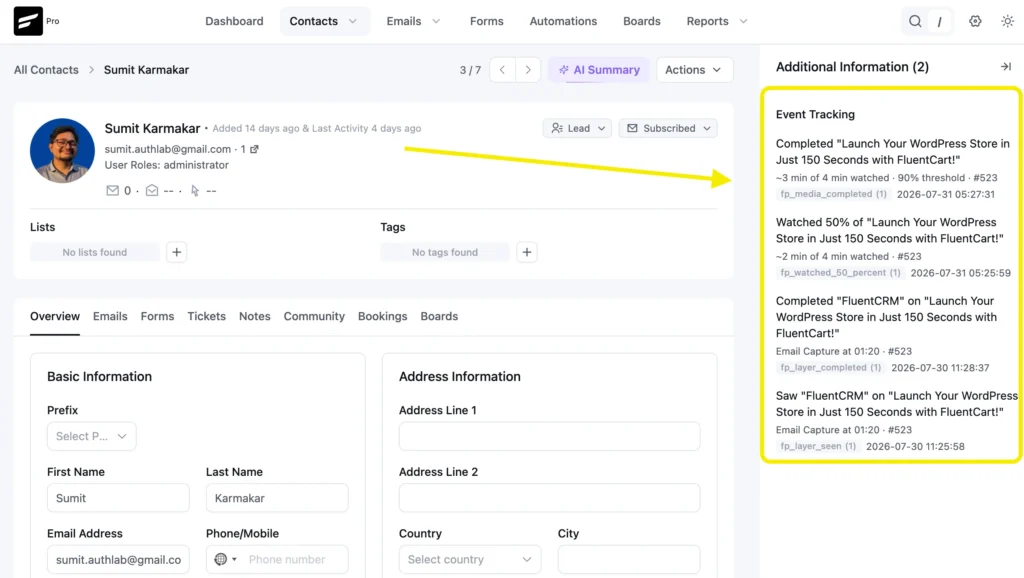
All these milestones are added to each contact’s profile.
Open a contact inside FluentCRM, and you can see the journey is completely under supervision: started, crossed 50%, finished.
Segment the Launch List by Intent
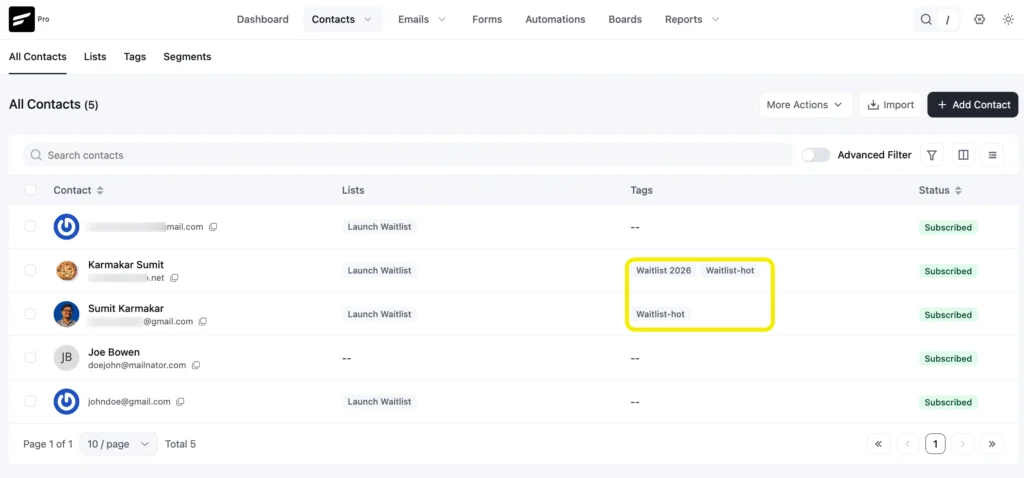
Segment the list into three tiers depending on the depth of engagement:
- Hot: Finished the teaser or watched 90%+, ready for a personal offer
- Warm: Watched 50%+ but dropped off; interested, but not convinced yet
- Cold: Joined the list but barely watched; captured, but unproven
FluentCRM applies the tags automatically based on these milestones, so you can check each tier before launch.
Build the Launch Automation
Watch milestones are a first-class trigger in FluentCRM, so a video event can start a funnel the same way a form submission does.
Choose & Configure Trigger
Start by creating a new automation funnel for Fluent Player.
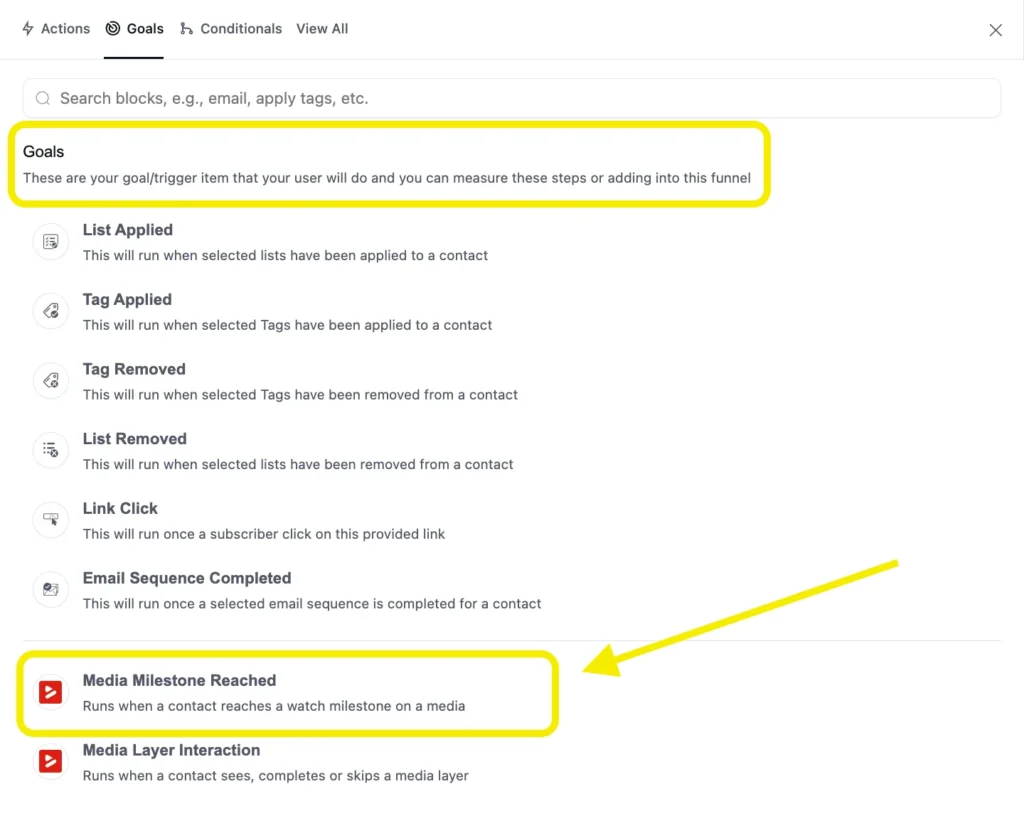
FluentCRM contains two dedicated triggers for FluentPlayer:
- Media Milestone Reached
- Media Layer Interaction
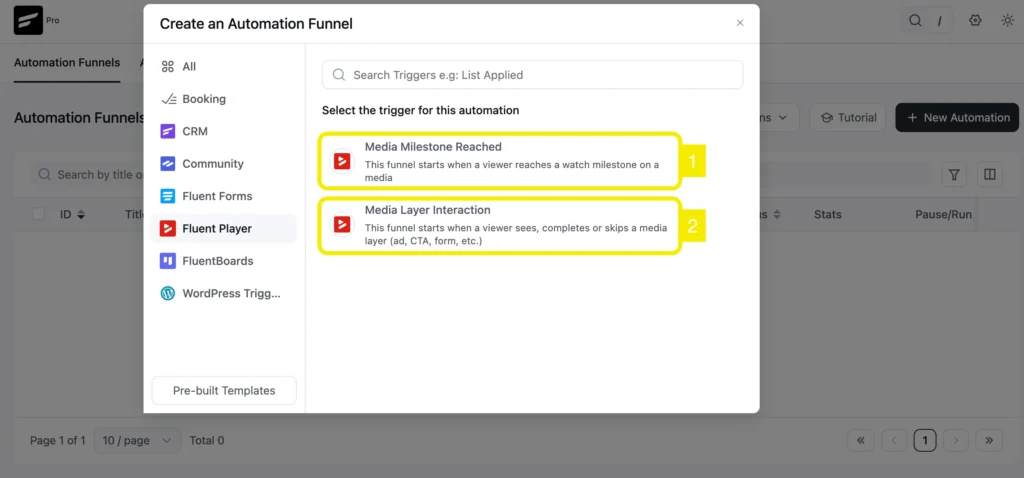
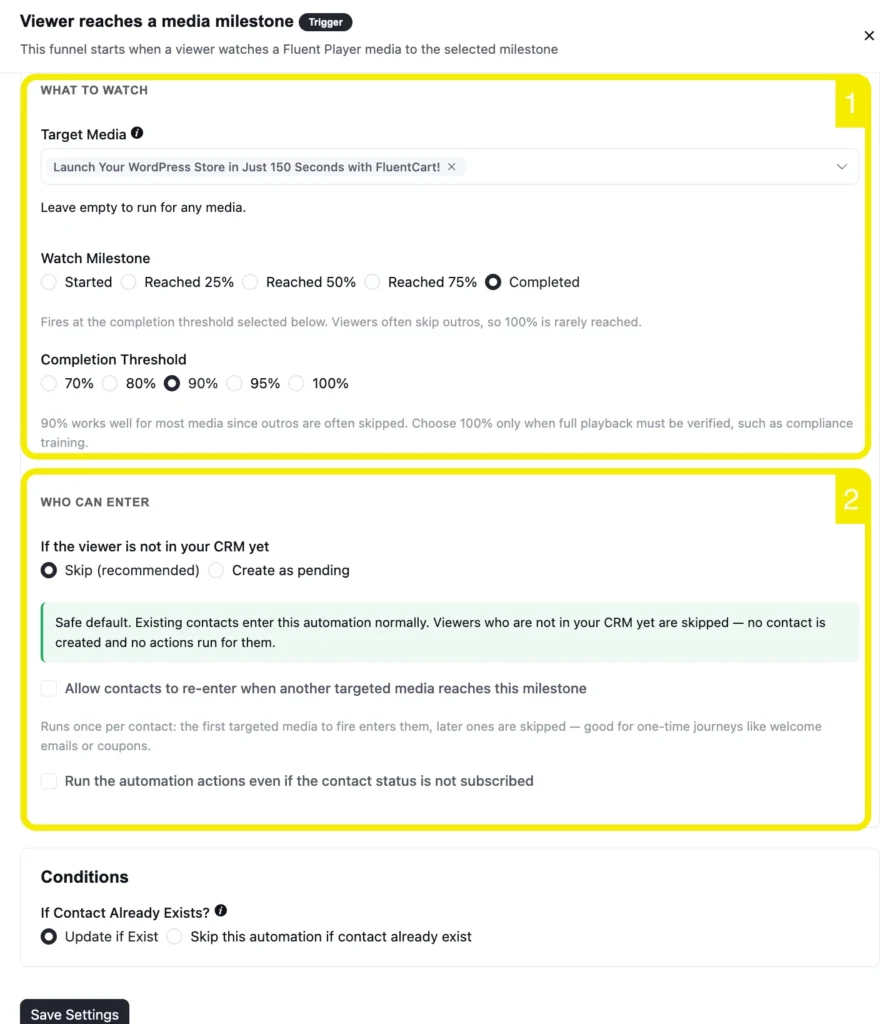
For this workflow, choose Media Milestone Reached.
Select the trigger, then set the milestone, configure who can enter, and set the condition.
Set Actions, Goals to Complete the Automation
Once your trigger is set, add the actions that shape each engagement path.
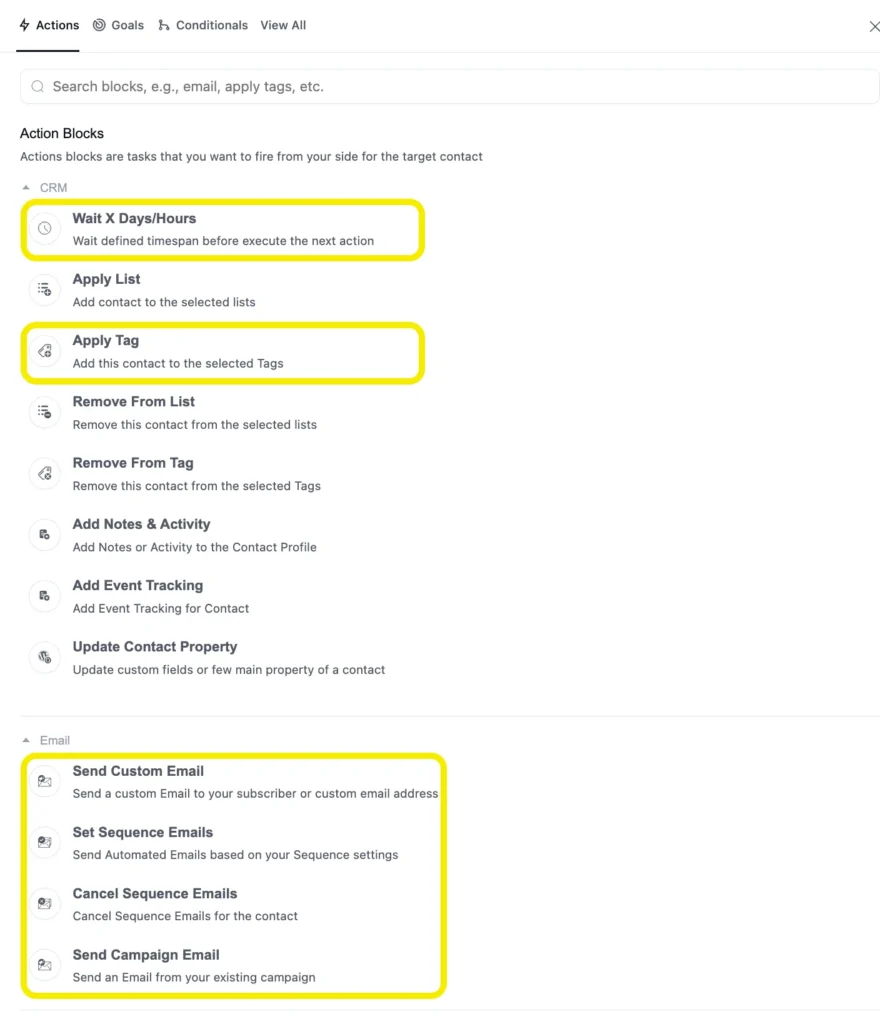
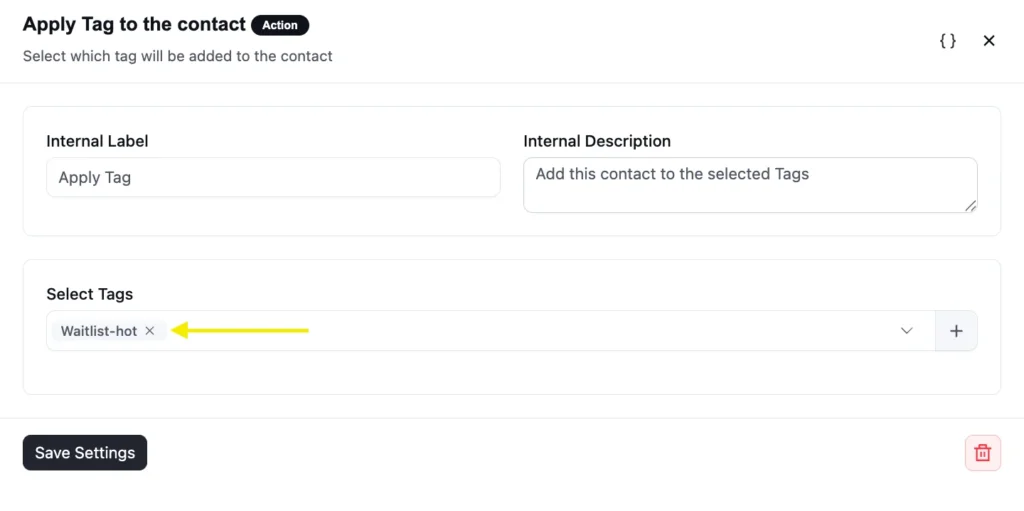
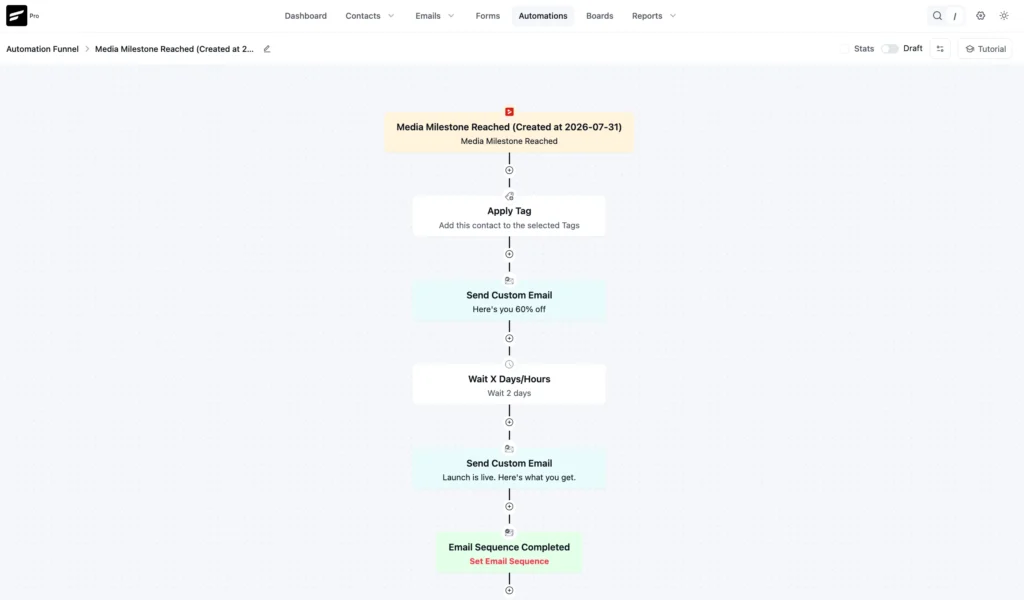
For hot leads, apply the Waitlist-hot tag, send an early-access email with the booking offer, then add a wait step before a second email closer to launch.
Set the Media Milestone Reached goal so viewers who reach 90% can move directly to the offer instead of going through the longer nurture sequence.
For warm leads, create a separate 50% milestone automation focused on building interest.
For cold leads, keep the follow-up light with one or two re-engagement emails and no hard pitch.
This is how your full workflow might look:
Personalize for People You Already Know
Some viewers are already in your CRM. They don’t need to hand over an email they already gave you.
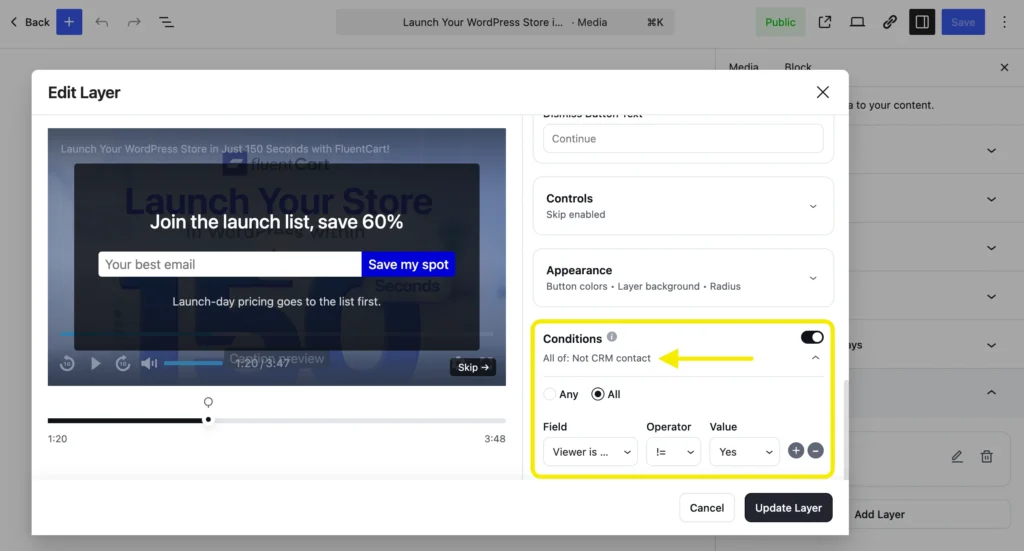
The email capture layer has a Conditions panel for this. Add a rule like “Viewer is not a CRM contact” so the form only appears for people who don’t have one.
For contacts you do have, show a different layer instead: a CTA overlay with smartcodes that reads something like:
- “You’re on the list, {{contact.first_name}}
- Want early access?” with the booking link attached
So, the same teaser now does two jobs. It recruits strangers onto the waitlist, and it moves known contacts toward the offer, decided entirely by who’s watching.
Confirm It’s Working & Keep Tracking
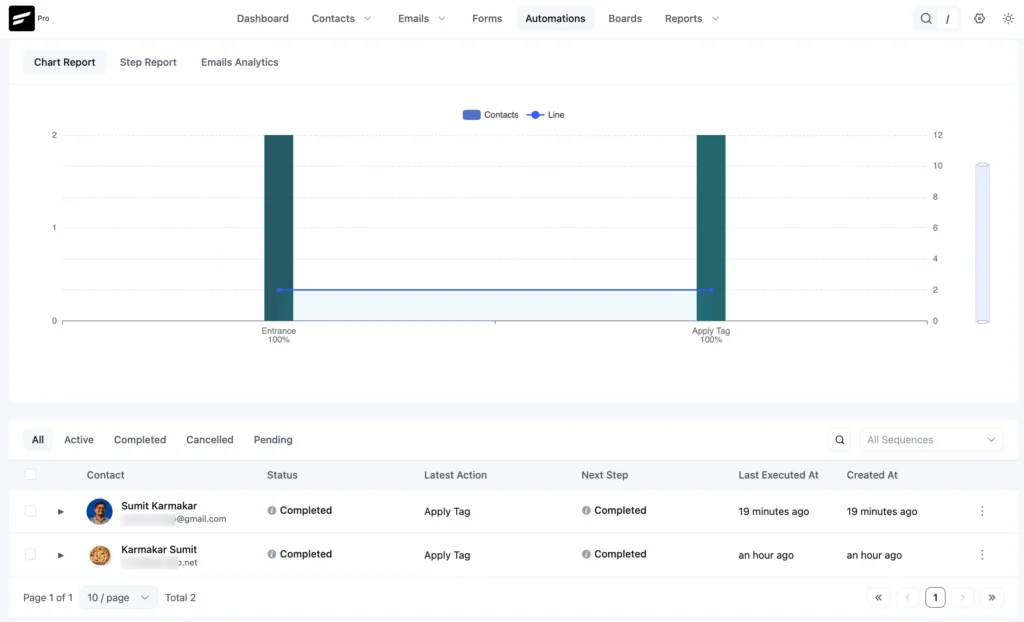
Before launch, test the full workflow with one known contact. You can also check the automation report and email performance to understand what’s performing and what’s not.
If hot leads convert significantly better than cold leads, your scoring worked and gives you a stronger starting point for the next launch.
Make Your Next Product Launch a Success
A teaser with a signup form gives you emails, but not much insight into who’s ready to buy.
Connect that same teaser to FluentPlayer and FluentCRM, and let video lead scoring turn your list into clear intent tiers.
Getting signups is easy. Knowing who’s actually ready is the challenge, and watch depth gives you that signal.
Use the same approach across your videos, and each one can become an ongoing lead-scoring engine rather than just another view count.
If you launch often, FluentPlayer Pro adds watch-depth analytics such as retention curves, audience drop-off, and completion data, helping you see which teasers truly hold attention.
Editorial Panel
Content Writer
FluentCRM Editorial Panel is a group of content writers experienced with digital tools, marketing, and business trends.
Table of Content
Related Articles and Topics
-
How to Create a Newsletter Archive on WordPress within 5 Minutes!
You send a newsletter to your subscribers, once they reach their inboxes and read it…
-
12 Lead Capture Landing Page Examples with Conversion Frameworks Used by Top Brands
Many businesses build landing pages, drive traffic, and place forms above the fold. Yet conversion…





