

Click Rate vs. Click-Through Rate: What’s the Difference?

Summarize with


Last Updated:
Open rate, click rate, click-through rate, click-to-open rate: an email marketer juggles a lot of engagement metrics. Among these, click rate and click-through rate are the two key indicators for measuring an email campaign’s performance.
However, they also get confused most often. This guide explores all about click rate vs. click-through rate so that you can learn how each is calculated, when to use it, and how to move it to measure your campaign’s performance.
Let’s get started!
A Quick Understanding or Open Rate, Click Rate and Click-through Rate
In most email platforms, click rate and click-through rate (CTR) mean the same thing: the percentage of delivered emails that earned at least one click. The metric people usually confuse them with is click-to-open rate (CTOR), which only looks at people who opened.
| Metric | Formula | What it tells you |
|---|---|---|
| Open rate | (Unique opens / Delivered) x 100 | How many recipients opened. Less reliable since Apple Mail Privacy Protection inflates opens. |
| Click rate / Click-through rate (CTR) | (Unique clicks / Delivered) x 100 | Share of everyone who received the email and clicked. The headline engagement number. |
| Click-to-open rate (CTOR) | (Unique clicks / Unique opens) x 100 | How compelling the content and call to action were for people who actually opened. |
Worked example: you deliver 10,000 emails, 2,000 people open, and 200 people click.
- Open rate = 2,000 / 10,000 = 20%
- Click rate / CTR = 200 / 10,000 = 2%
- Click-to-open rate = 200 / 2,000 = 10%
A quick terminology note: a minority of marketers use “click-through rate” to mean clicks divided by opens. That specific ratio is more precisely called click-to-open rate, and that is the label we use throughout this guide to keep things unambiguous.
What is Click Rate (CTR)?
Click rate is the percentage of delivered emails that got at least one click on a link. Most email tools label this same number “click-through rate,” so you can treat the two terms as interchangeable.
Because it is measured against everyone who received the email, it is the cleanest single indicator of whether a campaign actually drove action. A healthy click rate usually means:
- Your list is well targeted
- Your subject line earned the open
- And your content gave people a reason to click
What is Click-to-open Rate (CTOR)?
Click-to-open rate is the percentage of people who opened your email and then clicked. Because it removes deliverability and subject-line performance from the equation, CTOR isolates one thing: how persuasive the email itself was once someone was inside it.
Use CTOR when you want to judge the content, layout, and call to action independently of how many people opened.
What About Open Rate?
Open rate is the percentage of delivered emails that were opened. It used to be a headline metric, but Apple’s Mail Privacy Protection now pre-loads images and registers opens that never happened, which inflates the number.
Treat open rate as a directional signal, not a precise one, and lean on click rate and CTOR for real engagement.
When to Use Each Metric?
- Compare whole campaigns: Use click rate (CTR). It counts every recipient, so it is the fairest way to compare one send against another
- Judge the content and CTA: Use click-to-open rate. It tells you whether the email did its job for the people who opened
- Diagnose the top of the funnel: Watch open rate as a rough proxy, then confirm with clicks
Click Rate vs. Click-through Rate
Although click rate and click-through rate may sound similar, the calculation method, result interpretation, and effectiveness are different. Here’s why:
| Criteria | Click Rate | Click-through rate |
| Method of calculation | Measures the number of clicks per 100 emails delivered | Measures the total number of clicks per 100 emails opened. |
| Result Interpretation | It is the numerical factor that determines the overall success of your campaign. | It can provide detailed information about your email’s performance. |
| Effectiveness | It can’t clearly determine whether a campaign is working or not. | It can provide detailed information about your campaign’s performance. |
| Inaccurate Interpretation | External factors can impact click rate. CR will even consider those unable to check his inbox for various personal reasons and label them as uninterested in you. | You don’t have to worry about CRT because it only considers opened emails |
How to Calculate Open Rate, Click Rate, and Click-through Rate?
Before measuring how your campaign has been performing, you need to understand how each metric is calculated. Here’s how you can do that:
Open Rate
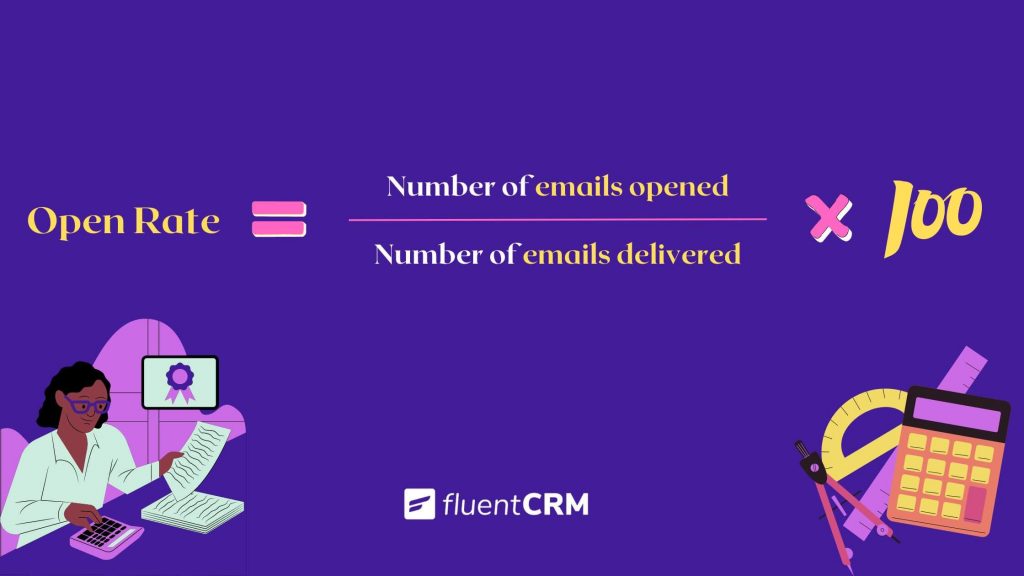
Calculating the open rate is easy math. You have to know the exact number of –
- Emails you sent
- People who opened your email
Divide the number of recipients who opened your email by the number of emails you delivered and multiply by 100.
Example: (Number of people who opened your email/ Total number of emails sent)*100
Click Rate (CTR)
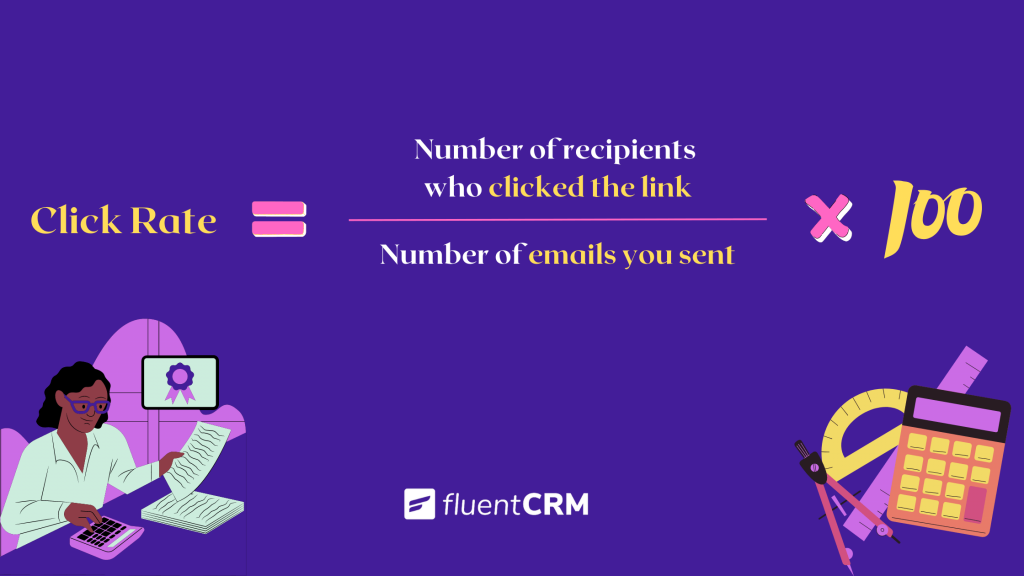
To calculate the click rate, you have to know the total number of –
- People who clicked your link
- Emails you sent
Divide the number of recipients who clicked the link by the number of emails you sent and multiply by 100. That is the click rate of your campaign.
Example: (Number of people who clicked your link/ Total number of emails sent)*100
Click-to-open Rate
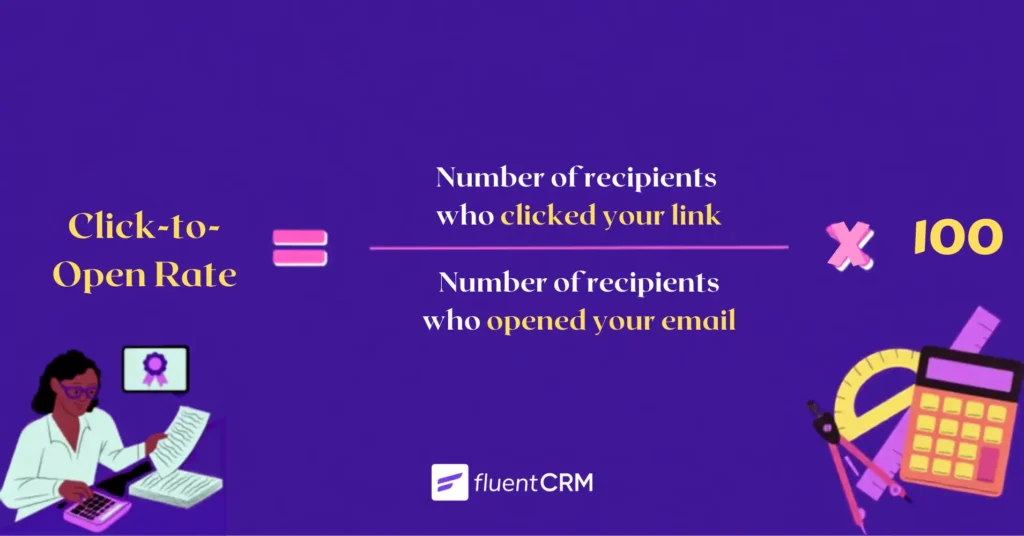
To calculate the CTOR, you have to know the exact number of –
- People who clicked the provided link
- People who opened your email
Divide the number of recipients who clicked your link by the number of recipients who opened your email and multiply by 100 to figure out the CTOR of your email marketing campaign.
Example: (Number of people who clicked your link/ Total number of people who opened your email)*100.
What is a Good Click Rate and CTR?
Every email marketing expert faces this question at least once in their career. What counts as a good click-through rate?
There is no universal number, because benchmarks vary widely by industry, list quality, and email type. As a rough guide, average email click rates commonly land in the low single digits and click-to-open rates in the low double digits, but a nonprofit newsletter and a flash-sale e-commerce blast are not playing the same game.
The more useful habit is to benchmark the email KPIs against your own history. Track your click rate campaign over campaign and by segment, and treat a rising trend as the real win.
How to Improve Your Opens, Clicks and Click-through Rates
If your recipients don’t open your email, they won’t read it. Improving clicks comes down to reaching the right people with a relevant message and one clear action. So here are some tips for boosting your email open, click, and click-through rates to meet your email marketing goals eventually:
Write an Appealing Subject Line
An attractive subject line is essential in determining whether your emails bounce back. According to the statistics, 47% of receivers rely on the subject line to open an email. Ensure that your subject line effectively attracts your clients without violating the spam law.
A/B Test Subject Lines Before Sending
Never be afraid to experiment with your subject line. A/B testing or split testing determines which subject line performs best across your contact list. To conduct a split test to understand which subject lines are likely to bring out the best outcome.
FluentCRM helps you to A/B test your email subject lines before running any email campaign. This way you can identify the better performing version and start sending your marketing or transactional emails.

Segment So the Message Fits
Not everyone will be interested in reading every email you send. You need to understand which segment of your contact list will be interested in the message you’re sending and personalize your emails accordingly. In FluentCRM, you can build these segments with dynamic tags based on how contacts actually engage, which lifts both click rate and CTOR because the message matches the reader.

Keep Your Contact List Clean
There’s no need to make multiple unsuccessful attempts to evoke the interest of those who aren’t interested in what you’re offering them. It will only irritate them and reduce your email deliverability rate. So don’t be afraid to eliminate inactive contacts. By keeping your contact list updated, you’ll also be able to measure email open rates correctly.
Dive into this article and discover the best email list cleaning services
Ensure Content Quality in the Email Body
The body is what convinces the recipients to take action. If your content isn’t appealing enough, the readers won’t take any action. So you should prioritize content quality to earn those click-through rates. A high-quality piece of content can yield great results.
Here’s what we suggest –
- Keep it short and concise. Your readers aren’t likely to read long emails, so get to the point as soon as possible.
- Ensure proper formatting, even if your emails are simple. Use headers and paragraphs to make your emails visually appealing and attractive. Your emails should look beautiful on all devices.
- Aim to inform the readers and engage them with punchlines, visuals, CTA’s, etc. Using a brochure maker is a great way to add some interactivity to your message.
- Be consistent with your writing tone, font, and visuals. No one likes getting lost while reading an email.
- Spelling and grammatical mistakes can impact your brand negatively. So always proofread your emails before pressing the send button.
- Have a clear CTA. Your email should drive the recipients to only one action. If you include multiple call-to-actions, the recipients might get confused.
- Test your emails. There are several email testing tools available on the internet. Check if your emails are likely to pass the spam check.
Avoid Sending To Many Emails
Even if someone has subscribed to your offerings, that doesn’t mean they would like to hear from you every day. Determine when and how frequently your customers expect emails from you and plan your email marketing accordingly.
Avoid Using Too Many Links
While you may want to get people to click on your links, doing so may also confuse your readers. Besides, links often trigger spam filters. So do not include too many links within your emails. Only include genuinely relevant links.
Use Clear and Innovative CTA
This is the essential part of your email. The Call-To-Action button drives the audience to take the action they desire. This is why it should look and sound attractive.
Avoid using generic CTA’s such as “Buy Now,” “Read More,” “Learn More,” etc.
Instead, aim for something relevant. For example, if you’re offering a course, a good CTA can be “Start Learning!”
Also, place your CTA where your recipients are most likely to look. Only then your CTA will drive click-throughs to your website.

Wrapping Up
Click rate and click-through rate are, in most tools, the same metric: clicks divided by delivered. Click-to-open rate is the one that is genuinely different, because it only measures people who opened. Track click rate to compare campaigns, watch click-to-open rate to judge your content, and use open rate as a rough guide. Then improve all three with sharper subject lines, tighter segmentation, and one clear call to action.
Frequently Asked Questions
Nader Chowdhury
Content Writer
Hi! My name is Nader Ahmed Chowdhury, and I enjoy writing about WordPress and email marketing. Starting with sharing random musings on social media 10-12 years ago, I’m now a digital marketing strategist for FluentCRM and WPManageNinja. And what do I do when I’m not blogging? Well, you may still find me writing something pointless on social media!
Table of Content
Related Articles and Topics
-
How to Create a Newsletter Archive on WordPress within 5 Minutes!
You send a newsletter to your subscribers, once they reach their inboxes and read it…
-
New Gutenberg Editor: The Email Builder WordPress Users Always Wanted in FluentCRM
If you’re a WordPress user, isn’t it satisfying to write in Gutenberg? You click the…





Leave a Reply