

FluentCRM 3.1.9: Huge Performance & MCP Improvements & Fixes for Bigger Impact!

Summarize with


Last Updated:
Big impact doesn’t always come from big features.
Sometimes it’s the quiet, behind-the-scenes work that matters most; the kind that keeps everything running the way it should, without you ever having to notice.
That’s what this release is about.
More than 80,000 people run their email marketing and automation on FluentCRM every single day. With that much real-world usage, heavy data loads might occasionally cause a feature or two to behave differently than expected.
This release is one of those fixes. No big features to shout about, just a set of performance and stability improvements that keep things running smoothly for everyone, every day.
What’s Inside FluentCRM 3.1.9?
- Sticky notes for documenting automation decisions
- New MCP Tools for Contacts
- A FluentCRM contact widget inside FluentCart
- Empty and Not Empty operators for tags, lists, and companies
- Search and filtering improvements across sequences, tags, imports, and email activity
- A reworked sending pipeline for faster, more reliable campaign delivery
- SMTP connection reuse across bulk sending sessions
- Tighter, permission-aware MCP tools for AI assistants
- A broad security, performance, and workflow-stability pass
Sticky Notes in Automation Editor
An automation can show you what happens without explaining why. You may have built an automation months ago and didn’t even recall why you added that three-day delay or a tag.
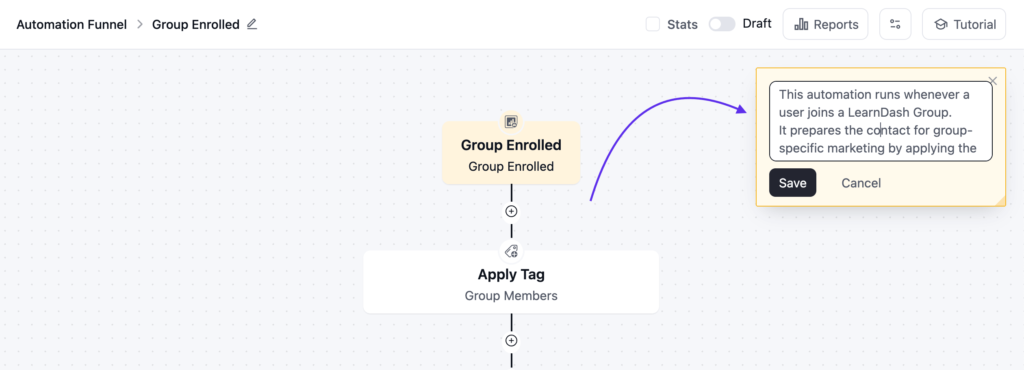
From now on, Funnel sticky notes let you keep that context inside the automation.
Simply go to Automation > Single Automation; you will see a small note-like icon at the top right corner under tutorial.
With that, add a floating note in the funnel editor to document an assumption, dependency, handoff, or decision. It’s a small tooltip preview for your team so they can see the context.
MCP: a much sharper connection between your CRM and your AI assistant
MCP support let you connect an AI assistant to FluentCRM and ask questions about your own
CRM data. Two weeks of real-world use showed us exactly where it was thin — assistants had
to guess at your tags, they couldn’t express the kind of filters your team uses every day,
and “show me this email” looked uncomfortably similar to “send this email.”
FluentCRM 3.1.9 rebuilds most of that surface.
Your tags and lists are now first-class
Two new tools, list-tags and list-lists, expose your full tag and list registry —
searchable, paginated, and resolvable by ID, slug, or title. No more inferring taxonomy from
a handful of contact records.
Both support two opt-in metrics that make cleanup work possible:
subscribers_count— how many contacts are attached.last_used_at— the last time the tag or list was newly applied to someone.
That second one is the interesting one. You can now ask your assistant “which tags haven’t been used in the last year?” and get a real answer instead of a guess.
Real filtering, not just the basics
The new get-contact-filter-schema tool hands an assistant the complete reference for
advanced filters — every filterable property, its operators, value types, and a worked
example. It’s the same condition-group engine behind the Advanced Filter UI in your
admin, so anything your team can build by hand, an assistant can now build too: OR groups,
engagement and activity conditions, custom fields, relative dates.
Fewer round trips
list-contacts accepts an emails array — look up as many as 100 known contacts in a
single call instead of one request per person. Addresses with no matching record come back
in a not_found list, so nothing disappears silently.
Elsewhere, expensive data is now opt-in rather than always-on: campaign stats, contact
custom fields, segment counts, and embedded email bodies inside automations are only
returned when actually asked for. Assistants stay faster and spend far less of their context
window on data nobody requested.
Spot automations that have quietly retired
list-automations can now return last_enrolled_at — the last time a contact actually
entered that funnel. Published status alone can’t tell a working automation from a broken
one, and neither can a low in-progress count. This can. The new list-funnel-subscribers
tool then shows you exactly who’s sitting in a given funnel and at what status.
Preview an email without sending one
render-email-preview is now a separate, read-only tool. It renders the final HTML and
resolves your SmartCodes using the exact sender and footer settings a live send would use —
but it delivers nothing, creates no record, and enrolls no one.
Actual delivery lives in send-test-email, which is explicit about being a real send. Two
different intentions, two different tools.
Clearer signals before anything changes
Every write tool now declares what it actually does — whether it modifies data, whether it
operates in bulk, and whether it reaches outside your site. Compatible MCP clients read those
signals and ask for your approval on the operations that deserve it, instead of treating a
tag rename and a contact deletion as the same kind of request.
Everything is permission-scoped
get-crm-context returns a compact, permission-scoped picture by default, and clients can
request only the sections they need. Email previews now require both email and contact
read permission, since a rendered preview resolves real contact details. Across the board,
an assistant sees what the connected user is allowed to see — nothing more.
Stricter, more honest input handling
Date boundaries reject invalid, rolled-over, zero, and ambiguous values instead of quietly
coercing them into something that looks like a valid answer. Filter fields, nested inputs,
and status values are validated against real enums. When a request doesn’t make sense, you
get an error — not a confident, wrong result.
If you are not using FluentCRM MCP yet, we have 2 minutes setup guide for you here: https://docs.fluentcrm.com/mcp-for-ai-agents.
You may need to restart your AI agent (Claude / Codex) to get the new tools registered in FluentCRM MCP.
FluentCRM Contact Widget on FluentCart
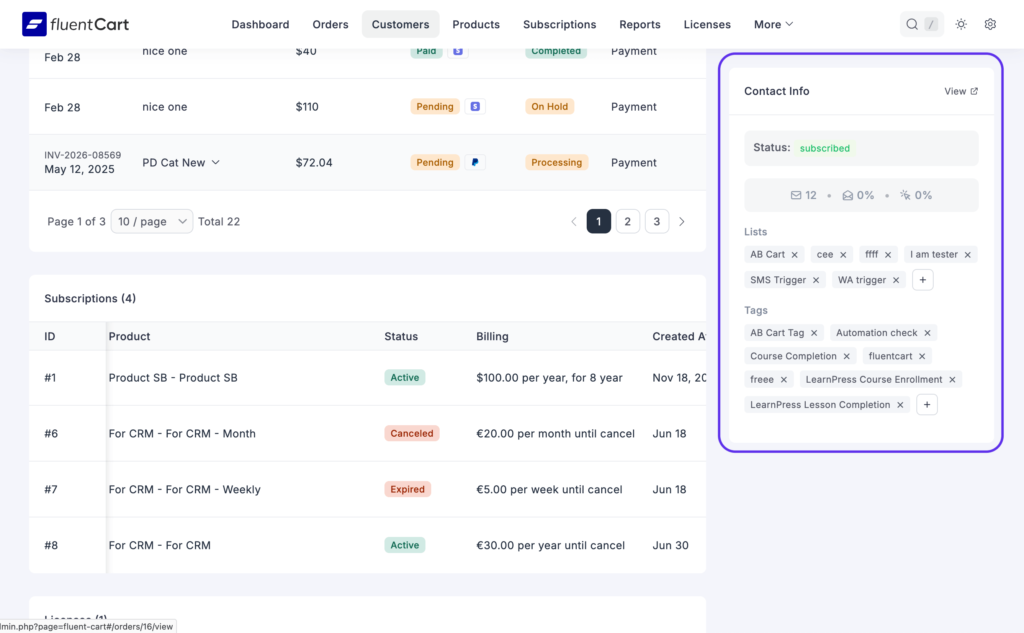
When you are reviewing a FluentCart customer, you may also need to know whether that person is subscribed, how they engage with your emails, and which lists or tags they belong to.
The new FluentCRM Contact widget brings that context into the FluentCart customer page.
From the sidebar, you can see:
- Customers FluentCRM contact status
- Their CRM name when it differs from the FluentCart customer name
- Total emails sent
- Open and click rates
- Assigned lists and tags
Lists and tags appear as removable chips. You can search for an existing list or tag, create one inline when needed, and attach it without leaving the customer record.
It is a small example of what a connected WordPress stack should feel like: the information you need, in the workflow where you need it.
Empty & Not Empty Operators for Lists, Tags & Companies
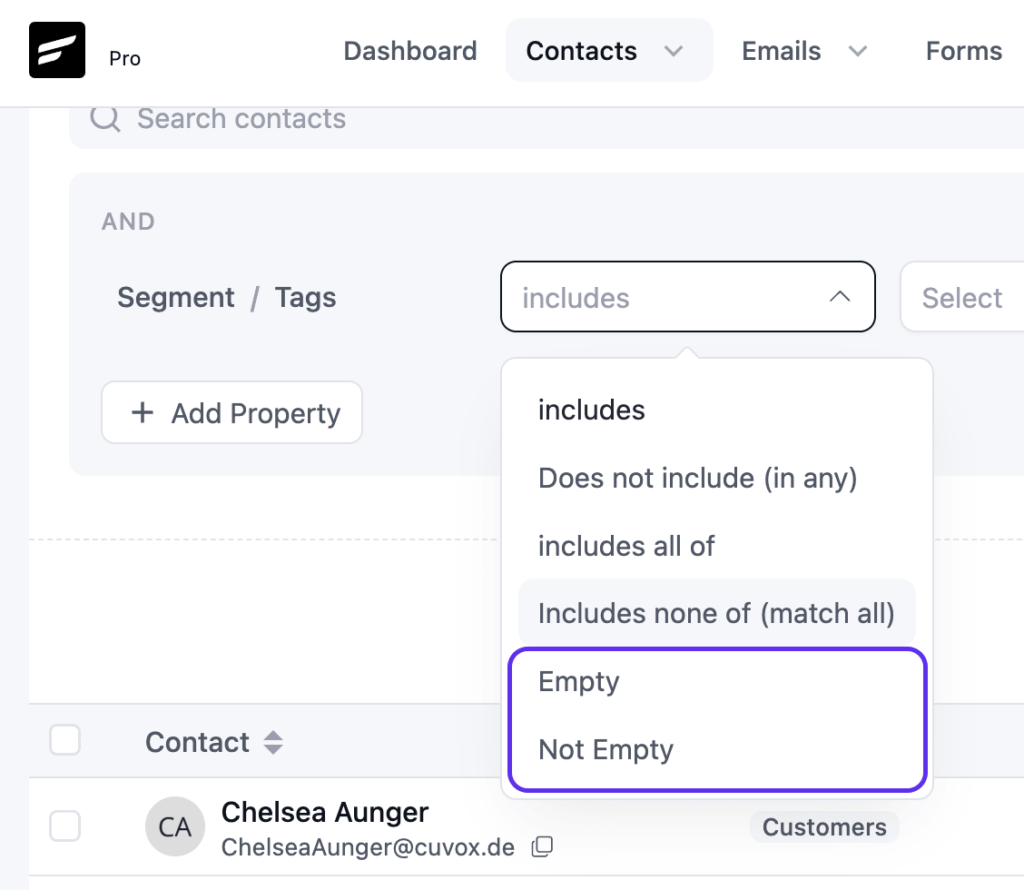
Finding contacts with no tags or lists used to be unnecessarily difficult. An empty “Does not include” filter did not produce a useful result, leaving teams to select every existing value individually.
FluentCRM 3.1.9 adds Empty and Not Empty operators for Tags, Lists, and Companies.
Use Empty to find contacts with nothing assigned, or Not Empty to find contacts with at least one value. These operators work through the shared filtering system, including:
- Contacts advanced filters
- Campaign recipient selection
- Dynamic segments
- Contact exports
- MCP contact tools
This makes it much easier to find contacts that need classification, audit list hygiene, or build segments around whether relationship data exists at all.
Faster Email Sending, Even at High Volume
When you send to a large list, FluentCRM splits the job into batches and hands them off to background workers to send in parallel.
The problem before was that adding more workers didn’t always help; two workers could end up reaching for the same batch of contacts, risking duplicate emails or missed ones.
That’s now fixed: Each worker gets its own dedicated portion of the list from the start, so multiple workers can safely run at the same time with zero overlap.
On large lists, this can turn a send that used to take hours into one that finishes in a fraction of the time.
Alongside that core fix, a few more improvements help large campaigns run smoothly from start to finish:
- Automatic recovery: If a worker times out or crashes mid-batch, another worker picks up its unfinished emails right away, instead of the campaign getting stuck
- Fewer delays with FluentSMTP: The connection to your sending service stays open for the whole batch instead of reconnecting before every email
- Quicker start: The recipient list is built faster before sending even begins
- Leaner database: Stored email content is cleared once a message is sent, cancelled, or failed, instead of piling up over time
If you are sending tons of emails and want to speed up more you can read this technical documentation here: https://developers.fluentcrm.com/modules/email-sending-speed.html
Workflow and Stability Improvements
Many of the remaining changes in 3.1.9 are smaller on their own, but together they make daily work more predictable:
Elementor submissions can move an unsubscribed contact back to pending before sending a new double opt-in email.
- Email sending pipeline reworked for safe parallel workers, ensuring faster sending
- Improvement: More Useful Search and Email Editing
- Weekly cleanup now clears stored email bodies for sent, cancelled, and failed emails to free up database space.
- Fixed: Gmail horizontal scrollbar on the Plain Left email design.
- Fixed: Missing Order By options in the Latest Posts block.
- Fixed: Test email address validation and campaign title uniqueness checks.
- Inline-image spacing has been corrected.
- The Plain Left email design no longer creates a horizontal scrollbar in Gmail.
- Order By options have returned to the Latest Posts block.
- Elementor submissions can move an unsubscribed contact back to pending before sending a new double opt-in email.
- Security: Hardened permission checks and input handling for non-admin roles across contacts, notes, imports, and webhooks.
Stronger Foundations for What Comes Next
FluentCRM 3.1.9 is intentionally focused on foundations.
The sending pipeline, MCP permission model, automation context, and manager-role boundary all sit underneath the workflows you depend on every day. Strengthening them now gives us a safer, more reliable base for future improvements.
The WhatsApp module remains disabled while we continue reviewing provider handling and incoming-message workflows. We will announce it separately when it is ready for customers to use.
Much of this release began with reports from people running FluentCRM in production: a cancellation edge case, an unnecessary SMTP delay, an automation nobody could explain, or a filter that needed one more operator.
Thank you for continuing to share those details with us. You can update FluentCRM from your WordPress dashboard, and we would especially like to hear how 3.1.9 performs on your larger sends and more complex automations.
Coming Soon!
At FluentCRM, every update exists for the same reason: to help you get the best possible experience out of the platform.
3.1.9 is mostly foundation work for something bigger that is about to release.
WhatsApp messaging is the next thing on our side of the fence. The module is in the codebase and not switched on yet, but it is coming, and we will say so clearly when it does! So, stay connected.
Thank you for being part of FluentCRM. We’ll keep working in the background so you can keep moving forward.
In Case You Missed
The last few FluentCRM releases have been closely connected.
FluentCRM 3.1.8
- Email sending now respects the configured maximum sending cap.
- Abandoned cart totals, provider recovery notices, and FluentCart coupon fallback fixes.
- Reflected XSS issues fixed in admin flows.
FluentCRM 3.1.7
- Email sending cap centralized; funnel table sorting by created and updated dates.
- FluentCart checkout opt-in fixes for modal checkout and list names.
- Email footer, template import and Gutenberg editor rendering fixes.
FluentCRM 3.1.6
- Database index migration failure fixed.
- Automation wait times now support months as a unit.
FluentCRM 3.1.5
- FluentCart checkout subscription opt-in with lists, tags and double opt-in.
- CSV export for FluentCRM system logs / CRM logs with date range options.
- Global link color picker in the Gutenberg email editor, plus company quick-create in contact addition.
Shahjahan Jewel
Hello, this is Jewel, CEO & Head of Ideas at WPManageNinja. I am obsessed with WordPress since 2009. My aim is to be a user-centric developer first, and a serial entrepreneur second. You will find me discussing various tech issues and trying to come up with scalable solutions on different forums when I am not busy coding.
Table of Content
Related Articles and Topics
-
FluentCRM 3.2.0: WhatsApp Messaging, Faster Campaigns, and Better Email Workflows
When we added SMS marketing to FluentCRM, one question kept coming back: “Can we do…
-
Signed releases and public checksums for FluentCRM Pro
FluentCRM Pro 3.1.13 shipped on 24 August 2026. It is the first FluentCRM release your…



