

FluentCRM 3.3: Campaign Calendar, FluentCart Order Previews, Faster Automations and More

Summarize with


Last Updated:
If you send emails, text messages, and WhatsApp messages from FluentCRM, every one of those campaigns already lives in the same plugin, on your own WordPress site. But seeing them together was a different story, though, because answering a simple question like “what’s going out next week?” meant opening the email list, then the SMS list, then the WhatsApp list, and piecing the schedule together in your head.
Many businesses owners told us about a similar gap. Their FluentCart orders and their contacts sit on the same website, and yet looking up a single order still meant leaving the contact’s page and losing your place in the conversation.
FluentCRM 3.3 is now available, and it closes both gaps.
You can now see every campaign on one calendar, check how your SMS and WhatsApp messages are performing, follow up with the exact people a campaign reached, and open FluentCart orders without leaving a contact’s profile. Larger automations also sends faster, and a new set of safety checks works in the background to protect your contacts.
What’s new in FluentCRM 3.3?
- A calendar that shows all your email, SMS, and WhatsApp campaigns
- Reports for your SMS and WhatsApp messages
- Tag, export, or resend to the people who received a campaign
- Choose how much open and click tracking each campaign uses.
- View FluentCart orders without leaving a contact’s page.
- Add FluentCart customer details, like total spent, to any email.
- Faster automation sends to large lists.
- New safety checks to protect your contacts.
- Smaller improvements and fixes.
See All Your Campaigns in One Calendar
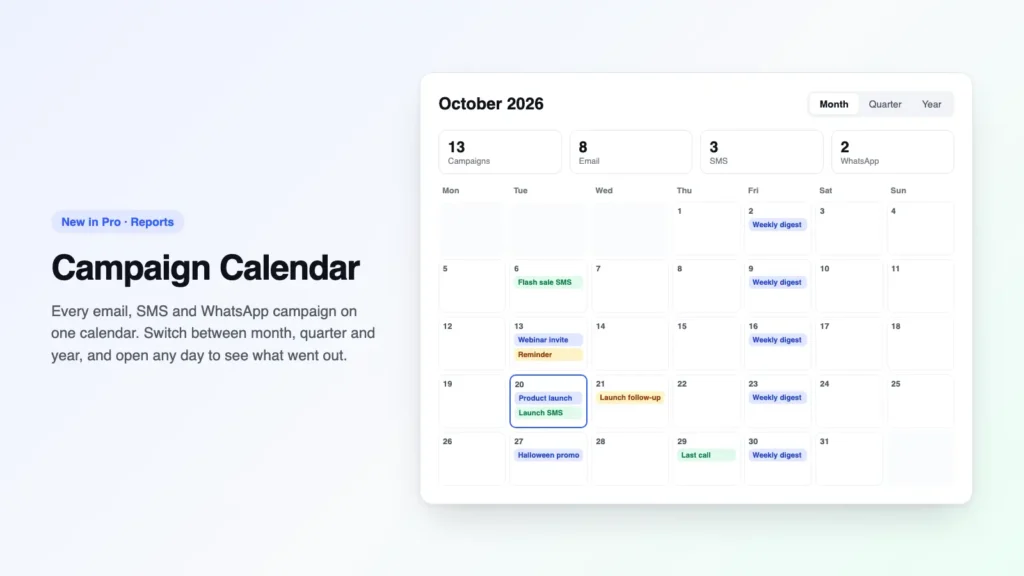
When you plan a busy month, it’s surprisingly easy to send two campaigns to the same people on the same day without noticing, simply because your email, SMS, and WhatsApp campaigns each lived on their own screen.
The new Campaign Calendar brings all of them into one view. Open Reports and choose Calendar, and you’ll see every campaign on the day it went out or is scheduled to go out, along with your drafts and recurring campaigns.
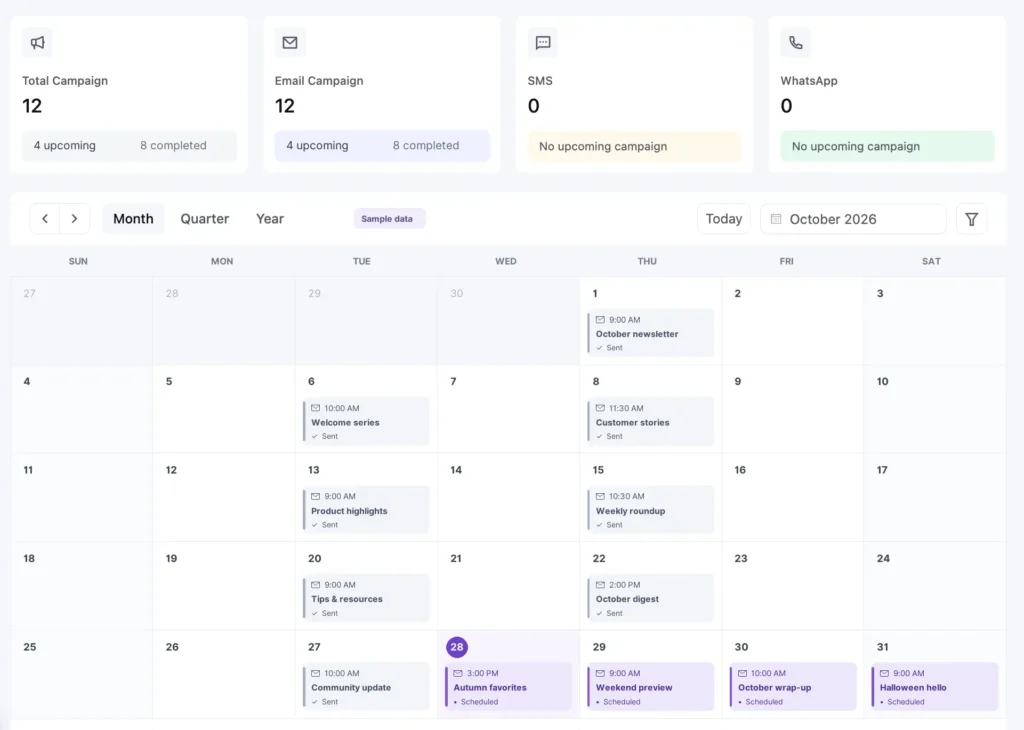
- Month view shows each day’s campaigns with the send time, status, and number of recipients.
- Quarter and year views use color to show your busy days and quiet days at a glance.
- Click any day to see everything on it, then open a draft to keep editing or open a sent campaign’s report.
- Totals at the top show how many campaigns you have, and you can filter down to a single type, like SMS only.
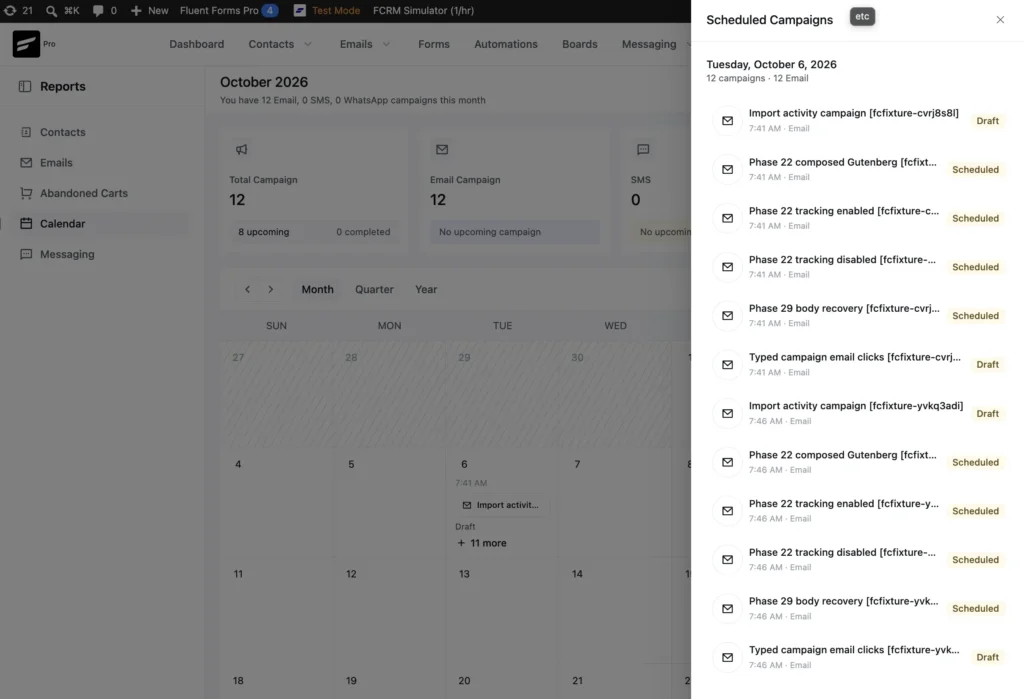
You can use it to plan next month’s sends, catch the days when the same audience is hearing from you too often, or look back at everything you sent last quarter. The Campaign Calendar comes with FluentCRM Pro, and your SMS and WhatsApp campaigns appear on it once you’ve turned those channels on.
See how your SMS and WhatsApp messages are doing
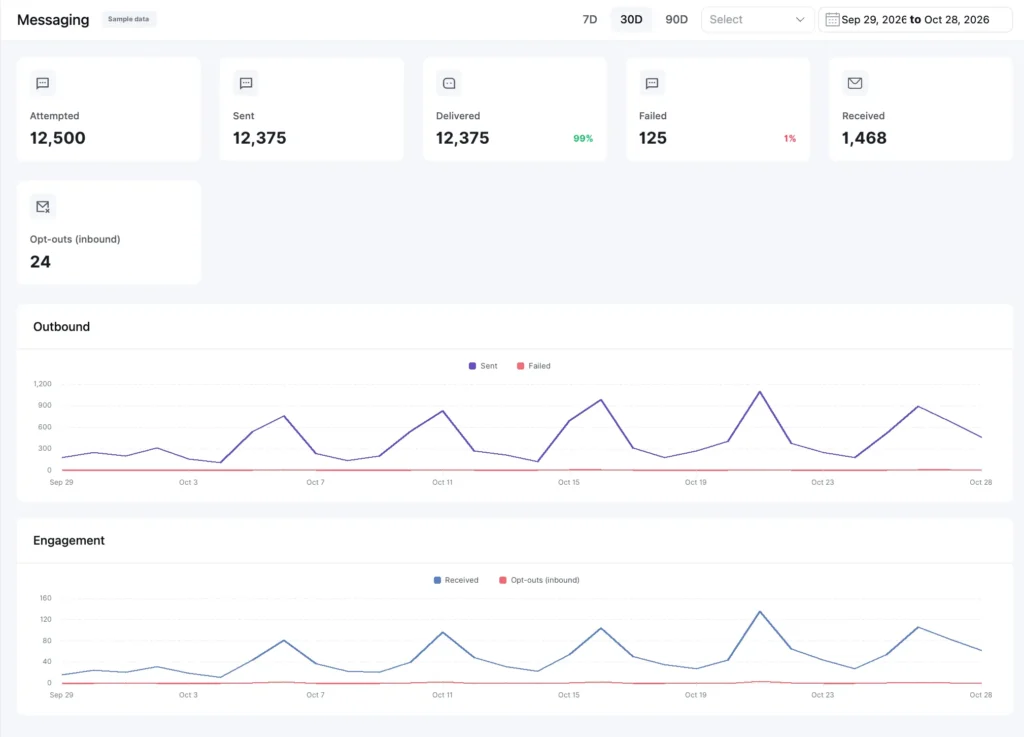
FluentCRM has always reported on email, but when we launched text messages, it didn’t get the same treatment. That made it hard to tell whether your SMS and WhatsApp messages were actually reaching people.
Reports now include a Messaging section. Pick a date range, and you’ll see how many messages you sent, how many were delivered, and how many people replied to unsubscribe. The charts work the same way as your email charts, so comparing your channels side by side feels familiar from the first click.
Follow Up with the People a Campaign Reached
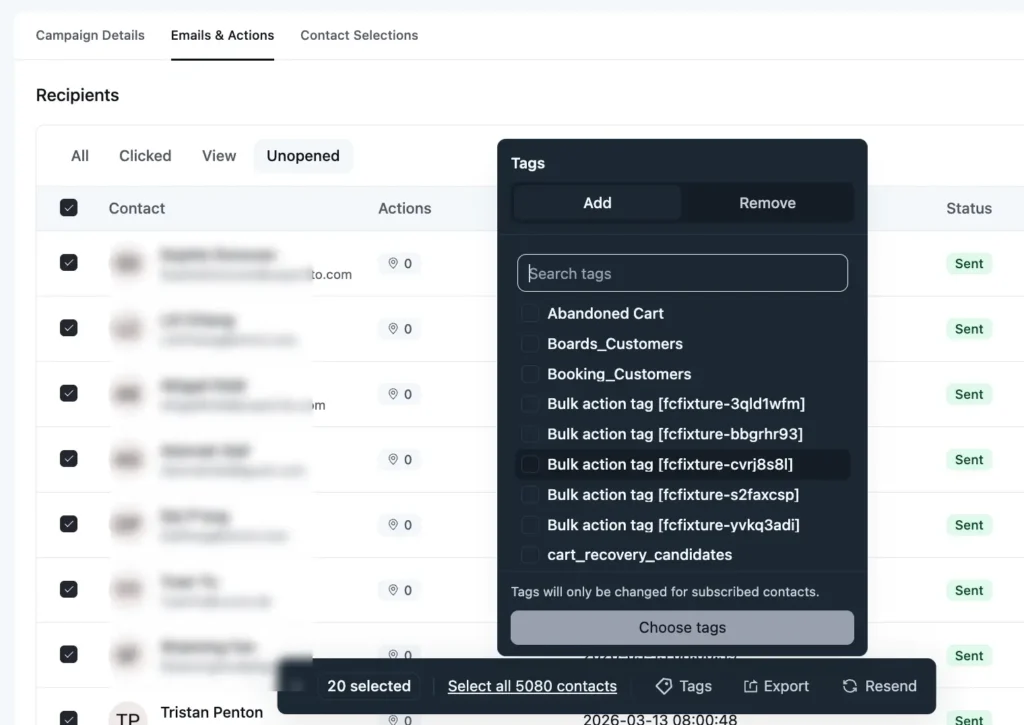
Sending a campaign is rarely the last step, because you usually want to act on part of the audience afterward, whether that means tagging everyone who clicked your pricing link or downloading a list of everyone who opened the email.
Open any campaign and go to the new Emails & Actions tab to do exactly that. You can select people one by one, a whole page at a time, or everyone who matches a filter. Then you can :
- Add or remove tags
- Download them as a spreadsheet
- Or send the email to them again.
Before a resend goes out, FluentCRM shows how many emails you’ve selected and skips any that can’t be sent.
Choose How Much Tracking Each Campaign Uses
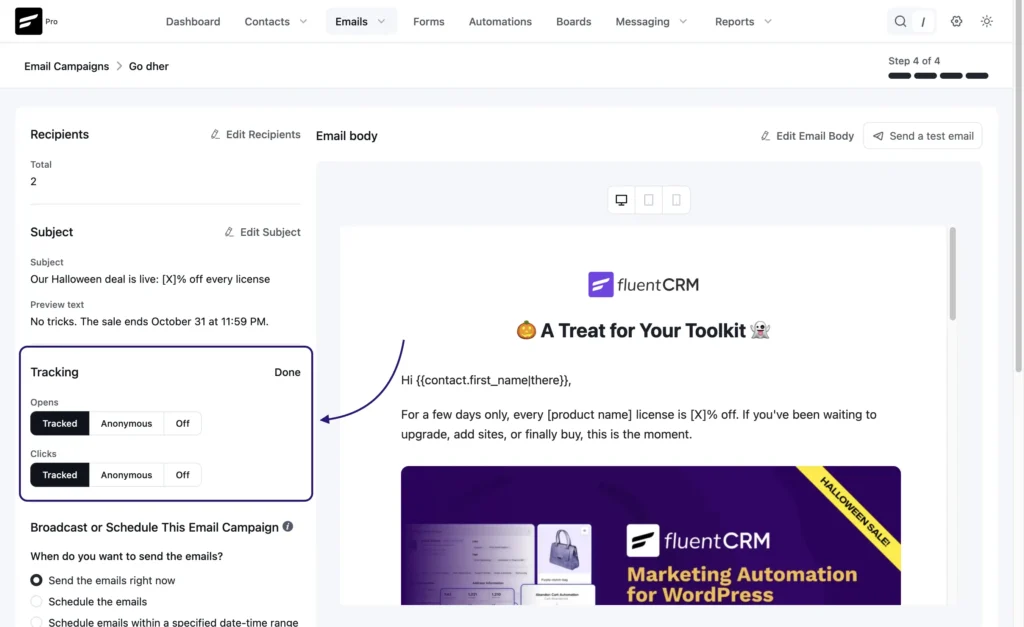
Not every email you send has the same privacy needs. A regular newsletter might track opens and clicks as usual, while a transactional-style announcement going out the same week should carry no tracking at all, and until now tracking was set once for the whole site, so both emails had to follow the same rule.
Step 4 (Review) of the email campaign editor now includes a Tracking item, where you can set Opens and Clicks to Tracked, Anonymous, or Off for each campaign.
- Stricter, never looser. A campaign can use less tracking than your site’s compliance setting but never more, so any option above the site level is disabled, and the server enforces the same rule.
- Clicks and opens stay separate. When opens are set to Anonymous or Off, a tracked click no longer marks the email as opened.
- Nothing changes unless you choose. Any campaign you leave untouched behaves exactly as it did before.
This gives you a simple way to apply a stricter privacy rule to a single send without lowering tracking for every other campaign on your site.
Every integration in one place
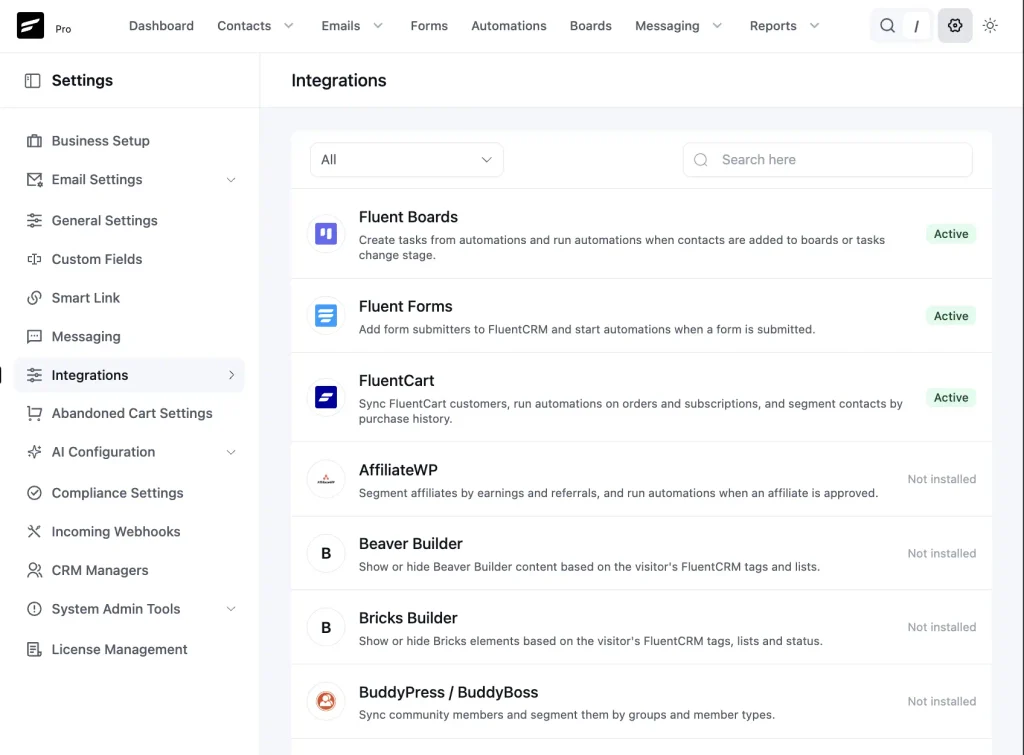
Previousy, our Integrations used to show only the integrations FluentCRM Pro registers, and a fixed promo list on free installs. It now shows the full catalog: free, Pro, and Fluent ecosystem integrations, each with a clear status. You can also use a category dropdown to filter the list by types such as E-Commerce, LMS, Membership, Page Builders, Fluent Ecosystem, and Others.
- Manage for integrations you can configure
- Active when the plugin is running
- Not installed when it isn’t
- A Pro badge for Pro-only integrations
View FluentCart orders from a contact’s page
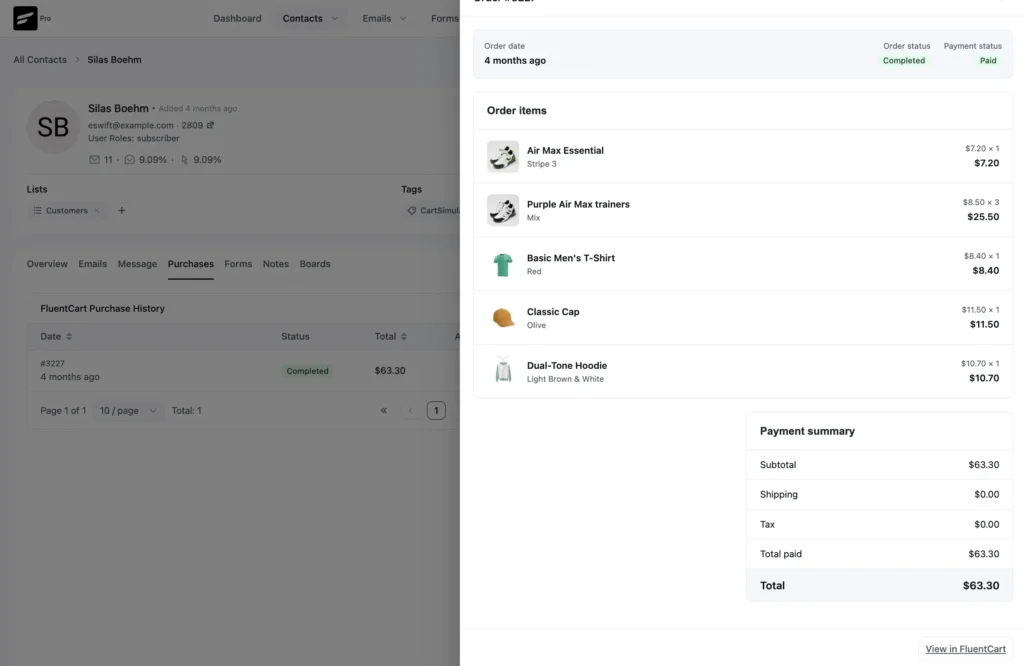
Picture a customer replying to one of your emails with a question about their order. Until now, clicking that order on their contact page took you to a different screen, so you lost your place right when you needed the context most.
Each order in a contact’s purchase history now has a View button that opens the order in a side panel, right on the contact’s page. You’ll see the products with their images, the order and payment status, and the total, and if something needs to change, a link takes you straight to the full order.
Add FluentCart customer details to any email
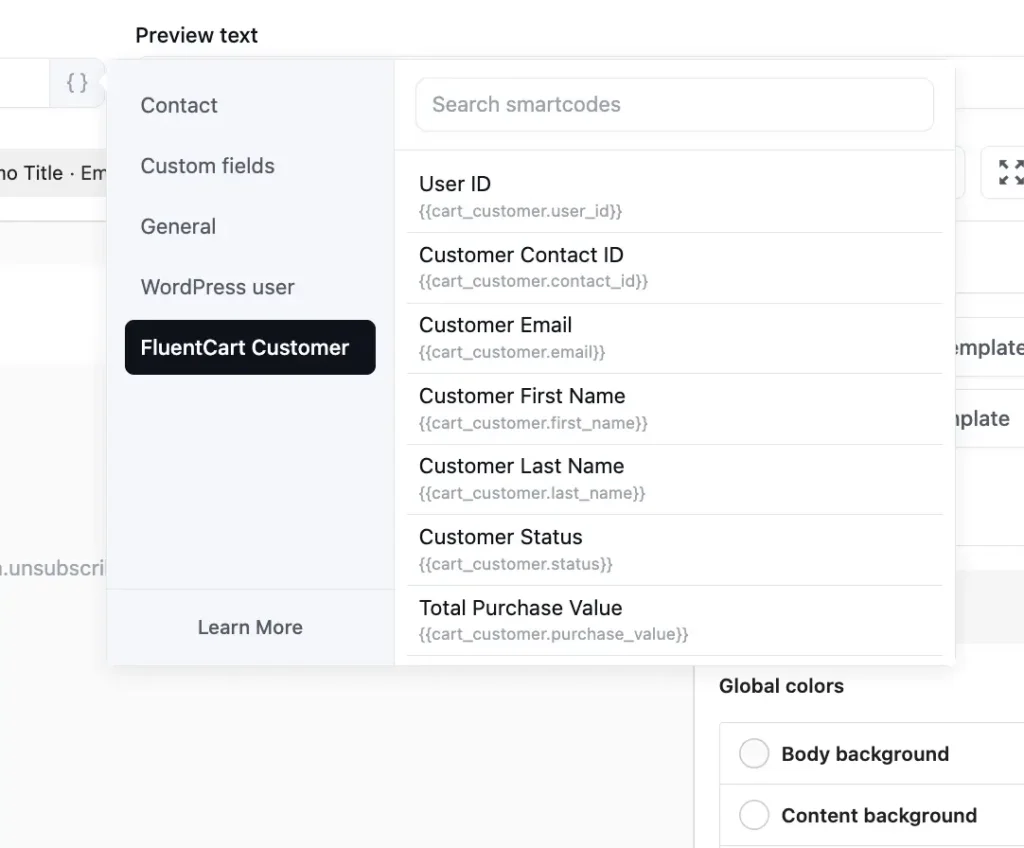
FluentCart customer smartcodes used to work only inside automations, which meant you couldn’t send a one-time thank-you campaign that mentioned how much each customer had spent with you.
The FluentCart Customer smartcodes now work in every email, including campaigns, templates, automations, and emails you send to a single contact. We also made the values more accurate, so total spent now matches what FluentCart shows, and purchase dates follow your website’s time zone and date format.
Automation Sends Now Happen Faster
When an automation sent an email to a very large list, FluentCRM used to prepare those emails in small batches every few minutes, and all that waiting between batches is what made big sends slow. FluentCRM now keeps working until every email is ready.
In our sandbox testing, an automation email to 283,000 contacts finished in under 4 hours instead of almost 7, and you don’t need to change a single setting to get that speed. Along the way, we also fixed an issue where FluentCRM could cut short scheduled tasks that belong to other plugins.
New safety checks for your contacts
Your contacts are stored on your own website, and helping you keep them safe is part of our job. Following a security review in October, we added a new layer of checks:
- The right account, the right contact. When someone changes the email address on their website account, FluentCRM verifies it before connecting that account to a contact.
- Emails go only where they should. FluentCRM now makes sure every email reaches only the contact it’s meant for.
- Carts stay with their owner. Only the shopper who left a FluentCart cart can pick it back up.
- Safer email content. Emails built in the block editor get extra checks before they’re sent.
These checks run on their own, so there’s nothing for you to set up. Please update both FluentCRM and FluentCRM Pro on every site you manage.
Smaller improvements
- Filter companies by your own fields. If you’ve added custom fields to companies, like industry or account manager, you can now filter your company list by them and update all the matching companies at once.
- Clear all filters in one click. On the contacts list, a single click now removes every filter while keeping your sorting and columns exactly as they were.
- Tidier bulk actions. The bar that appears when you select several contacts is easier to use and no longer shrinks on large screens.
- Last name is optional. Contacts can update their email preferences without typing a last name.
- Restrict Content Pro name updated: The plugin is now called Kadence Memberships, so FluentCRM lists it as “Kadence Memberships (formerly Restrict Content Pro)” to keep it easy to find.
Fixes
- No more repeat welcome emails: When a WooCommerce subscription renewed, some automations could start over and send the welcome emails again, and that no longer happens.
- Your automation work stays put: Saving an automation no longer erases its email content or its starting conditions.
- Correct dates: FluentCart purchase dates and WooCommerce subscription renewal and trial-end dates now show the right day for your time zone, and reports now include the last day of the date range you pick.
- Your language: FluentCRM now shows more of its messages in each user’s own language instead of only the website’s language.
- Also fixed: WhatsApp template approvals from Twilio now update correctly, and we cleaned up a few buttons and screens.
Full changelog
Security
- Added a check before connecting a website account to a contact after an email change.
- Made sure emails go only to the intended contact.
- Made sure only a cart’s owner can pick up an abandoned FluentCart cart.
- Added extra checks to emails built in the block editor.
New
- Campaign Calendar with month, quarter, and year views
- Reports for SMS and WhatsApp messages
- Emails & Actions tab to tag, download, or resend to a campaign’s recipients
- Per-campaign Opens and Clicks tracking controls (Tracked, Anonymous, or Off) in the campaign editor’s Review step, limited to the site’s compliance setting.
- View FluentCart orders from a contact’s page.
- FluentCart Customer smartcodes in every email.
- Filter companies by custom fields.
- Clear all filters on the contacts list in one click.
Improvements
- Big automation sends finish faster.
- The Integrations page lists every supported plugin and shows which are active.
- Easier bulk actions for selected contacts.
- Last name is optional on the email preferences form.
- Restrict Content Pro is now shown as Kadence Memberships.
Fixes
- WooCommerce subscription renewals no longer resend welcome emails.
- Saving an automation no longer erases its email content or starting conditions.
- FluentCart customer smartcodes show the right values and dates.
- WooCommerce subscription renewal and trial-end dates show the right day.
- Reports include the last day of the selected date range.
- More messages appear in each user’s own language.
- WhatsApp template approvals from Twilio update correctly.
- Fixed a FluentCRM issue that could cut short other plugins’ scheduled tasks.
- Small layout fixes for buttons, filters, and campaign stats.
Thank You for Helping Shape FluentCRM
FluentCRM 3.3 is about seeing more of what you’ve already built, with all your campaigns on one calendar, reports for your text messages, and your store orders sitting right next to your contacts. Many of these changes started as a support ticket or a feature request from you, so thank you, and please keep them coming.
In case you missed recent updates
FluentCRM 3.2.6
- Safer personalized emails and stronger team permissions
- Quick filters and better search for contacts
- Previews for your double opt-in email and confirmation page
FluentCRM 3.2.5
- Add new Fluent Forms contacts to companies automatically
- Filter contacts by completed lessons in LearnDash, LifterLMS, LearnPress, and TutorLMS
- A Campaign Archives block, and imports that only update existing contacts
FluentCRM 3.2.0
- SMS and WhatsApp messaging with one shared inbox
- Create and manage WhatsApp and SMS templates in FluentCRM
- Create FluentCart coupons from automations
Shahjahan Jewel
Hello, this is Jewel, CEO & Head of Ideas at WPManageNinja. I am obsessed with WordPress since 2009. My aim is to be a user-centric developer first, and a serial entrepreneur second. You will find me discussing various tech issues and trying to come up with scalable solutions on different forums when I am not busy coding.
Table of Content
Related Articles and Topics
-
FluentCRM 3.2.6: Stronger Security, Better Contact Workflows, and Important Developer Updates
Your contacts, your email history, and your store data live in your own WordPress install.…
-
FluentCRM 3.2.5: Lesson-Based LMS Filter, New Campaign Archive Layouts, Massive System Improvements & Fixes
Not every improvement needs a headline feature. Sometimes, a few thoughtful changes within the existing…




