

What is Email Segmentation? A Simple Guide to Targeting the Right Subscribers

Summarize with


Last Updated:
Ask any email marketer a simple question: When was the last time you sent a “20% off your first order” email to your whole list?
If they have done it at least once, they will tell you what a mess it created afterwards!
Typically, new subscribers would love these emails.
But your loyal customers, the ones who’ve already paid full price three or four times, wonder why you’re treating them like strangers. Some might ask for the same deal. Some just unsubscribe.
Sending the email isn’t the problem; sending it to the wrong contact segment is. Your email should not land in the wrong people’s inboxes.
And, when you have a large email list, one message can’t fit all of them.
That’s exactly what email segmentation solves. Instead of one email for everyone, each group gets the email that actually makes sense for them.
This guide is all about what email segmentation is and how to bring out the best outcome for your business using email segmentation.
TL;DR
- Email segmentation means splitting your list into smaller groups.
- You can split based on who people are and what they do, so each group gets emails that fit them.
- Lists, tags, and custom fields keep contacts organized when each one has a single, clear job.
- Dynamic Segments update themselves, so every campaign reaches the people who match today
- Group subscribers by clicks rather than opens, protect your best customers from too many emails, and clean up your segments every few months.
- FluentCRM allows sorting contacts automatically based on purchases, form entries, course activity, and email clicks.
What is Email Segmentation?
Email segmentation is the practice of dividing your email list into smaller groups of subscribers who share something in common, such as their interests, behavior, purchase history, or stage in the customer journey.
When you launch campaigns, each group then receives emails written for its needs instead of one generic message sent to everyone.
Here is a simple example:
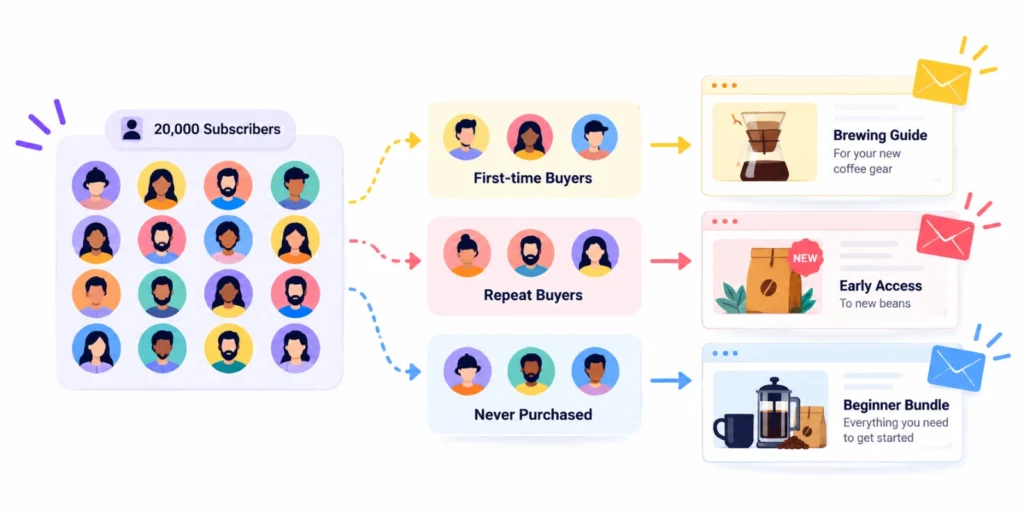
An online store selling coffee gear has 20,000 subscribers. Instead of one weekly promo, it sends three versions:
- First-time buyers get a brewing guide for the product they just bought
- Repeat buyers get early access to new beans
- Subscribers who never purchased get a beginner bundle offer
Same week, same store, three very different emails. Each one has a much better chance of being opened, read, and acted on.
Email Segmentation vs. Personalization
These two terms often get tangled up, but they do different jobs.
- Segmentation decides who receives an email.
- Personalization decides what each person sees inside it, like their first name, the product they viewed, or the city they live in.
And when you run your campaigns, you need both.
Segmentation puts the right email in front of the right group, and email personalization makes it feel written for one reader. Personalizing an email that went to the wrong segment is still a wrong email with a friendly greeting.
Email Segmentation vs. List, Lead, and Contact Segmentation
You will see these terms used as if they mean the same thing. They overlap, but each has a slightly different focus.
| Term | What it focuses on |
|---|---|
| Email Segmentation | Groups built to decide who gets which email |
| List Segmentation | How you organize your email list into smaller groups |
| Lead Segmentation | People who haven’t bought yet, grouped by how ready they are |
| Contact Segmentation | Everyone in your CRM, not just email subscribers |
Although they differ in scope, all four share the same purpose: getting the right message to the right people instead of sending one message to everyone.
To put it simply, a list tells you where a contact belongs. A segment narrows that group down to the people a specific campaign is meant for. That’s also the core reason behind segmenting your contacts in the first place.
Why Email Segmentation Matters More as Your List Grows?
When you have 200 subscribers, you probably know a lot of them. You might not need an extensive email segmentation tool to organize your contacts; you can just hand-pick while sending your emails.
But it won’t work when your list reaches 20,000.
Nobody can hand-pick thousands of people for every campaign, so sending one email to everyone slowly becomes your go-to option.
And that habit quietly hurts three things at once:
Relevance Drops as the List Gets More Mixed
A growing list is rarely one audience. It consists:
- Buyers and browsers
- New signups
- People from different countries
- People who joined for completely different reasons
So, every new lead source adds another group with different expectations, and one generic email typically fails to meet that expectation.
Inbox Providers Judge You by Engagement
Your emails are constantly being monitored. Providers like Gmail, Yahoo, and Outlook watch how people react to your emails.
Every time your email gets ignored, deleted, or gets spam complaints, it all counts against you.
Gmail and Yahoo now also expect bulk senders to keep spam complaints under 0.3%.
That’s why emailing people who stopped caring a long time ago is the quickest way to get close to that line.
When you segment by engagement, it lets you send more often to people who want your emails and less often to people who don’t, which eventually protects your sender reputation for the whole list.
Sending to Everyone Gets Expensive
Most email platforms charge based on how many contacts you have or how many emails you send. So every email to someone who’ll never open it is money spent hurting your own results.
Types of Email Segmentation
There are many types of segmentation in marketing, but email programs mostly rely on the eight below. Each one uses a different kind of data.
| Type | Data it Uses |
|---|---|
| Demographic Segmentation | Age, gender, job title, income |
| Geographic segmentation | Country, city, time zone, language |
| Psychographic segmentation | Values, interests, lifestyle |
| Behavioral segmentation | Site visits, downloads, link clicks |
| Engagement-based Segmentation | Email clicks, replies, inactivity |
| Purchase-based Segmentation | Orders, products, spend, recency |
| Lifecycle Segmentation | Lead, new customer, repeat customer, churned |
| Firmographic & Technographic Segmentation | Company size, industry, tools used |
Now, you know the types; that’s the easy part. Keeping your contacts organized as your list grows is where the real work starts, and that’s what the next section covers.
How to Segment Your Email List at Scale
Segmenting a list of 500 people takes an afternoon. Segmenting a list of 50,000 is a different job altogether.
At that size, you’re no longer picking people for one campaign. You need segments that stay accurate on their own, every day, even when nobody is watching them. That comes down to a handful of habits, and the right tool makes each of them much easier.
If your business runs on WordPress, FluentCRM fits naturally here.
Your customer data already lives on your own site, and FluentCRM doesn’t cap how many contacts you can keep.
So instead of deleting old customers or cold leads to save money, you can keep them and segment them.
Decide What Each Segment Is For
Before you create any segment, ask one simple question: what do I want this group of people to do?
Buy again, upgrade, or just start clicking again?
Without that answer, segments pile up fast, and most go unused.
Here’s how a goal points you to the right group:
- Want more repeat orders? Focus on people who bought once, about a month ago.
- Want more upgrades? Focus on free users who haven’t paid yet.
- Want better deliverability? Focus on people who stopped clicking.
Once you know which groups you need, the next question is how to label people so they land in the right one.
That’s where lists, tags, and custom fields come in.
Get to Know Lists, Tags, and Custom Fields
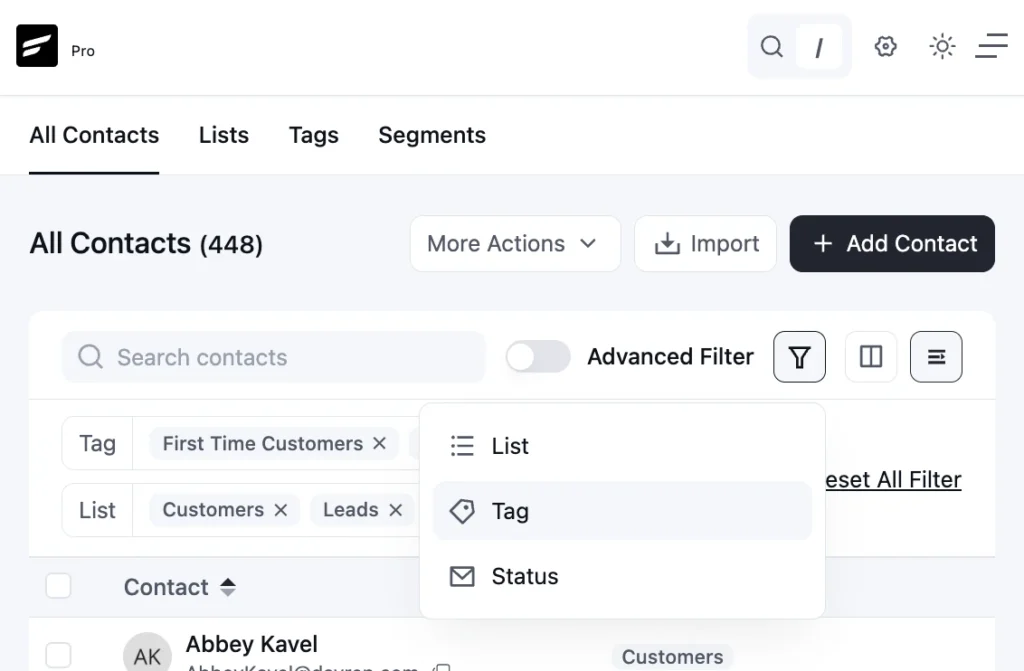
Every email tool, FluentCRM included, gives you three simple ways to label contacts:
- Lists: The big groups people belong to, like “Newsletter” or “Customers.” Think of them as folders. They rarely change.
- Tags: Labels based on what someone does or cares about, like “bought a coffee grinder.” Think of them as sticky notes. One person can have many, and they change often.
- Custom fields: One piece of information per contact, like birthday, company size, or plan.
Trouble starts when these get mixed up.
The trick is to let each one do just one job.
- A list says why someone joined
- A tag says what they did
- A custom field says something about who they are.
Stick to that, and finding the right people later takes seconds instead of guesswork. It also keeps your contact organization clean, no matter how big your list gets.
Automate How Contacts Get Sorted
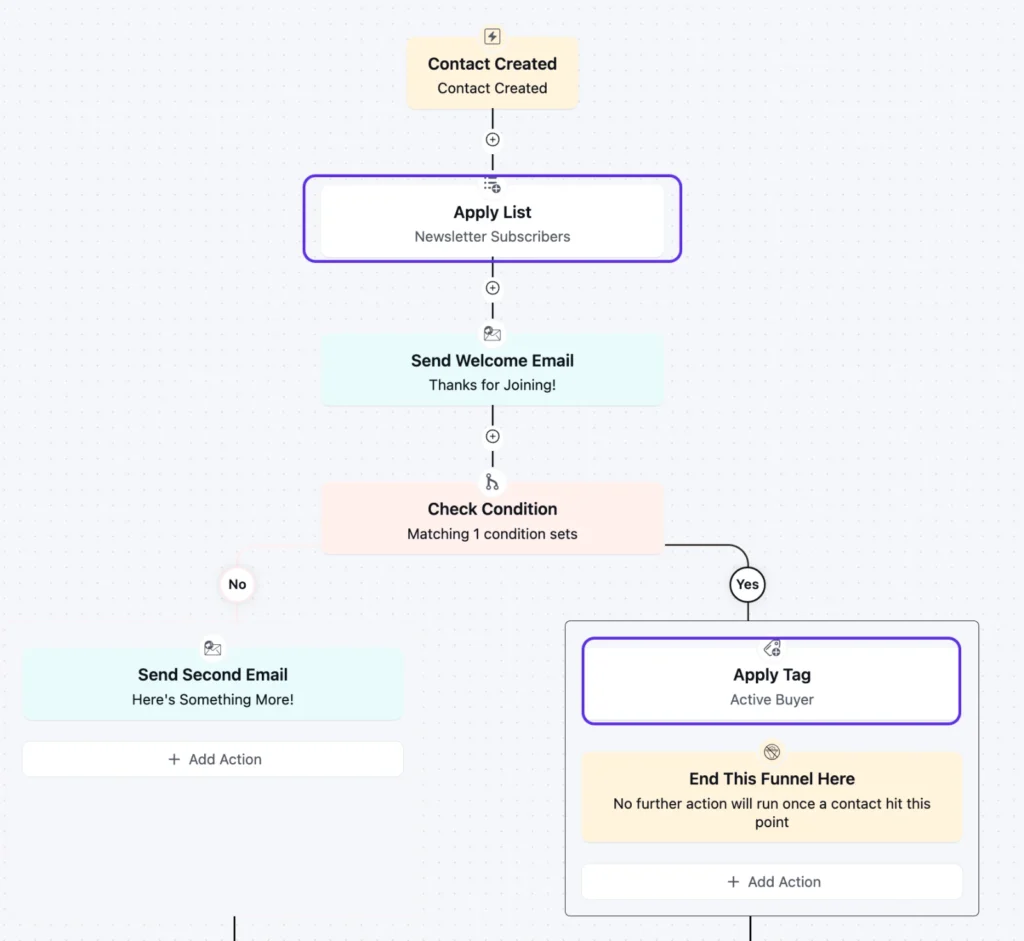
Automation means your email tool moves people into the right lists and tags for you, based on what they do.
You can sort contacts by hand, but it’s an unrealistic task to sort thousands of people. Automation can do that job for you, if you set it up correctly.
You just need to set up a few simple rules once, and they keep running in the background. FluentCRM has a built-in automation feature that lets you do all that.
For example:
- Someone buys a product: They get a “purchased” tag and join your Customers list.
- Someone fills out a form: Their answers add the right interest tags.
- Someone joins a course: They’re tagged as a student of that course.
- Someone clicks a link about a product: They get an interest tag for it.
- Someone stops clicking for 90 days: They move into an inactive group.
- Someone asks for a refund: The “purchased” tag comes off, so they don’t get a “still thinking about it?” email for something they already bought.
Once someone lands in the right group, triggered emails can reach them while they’re still interested.
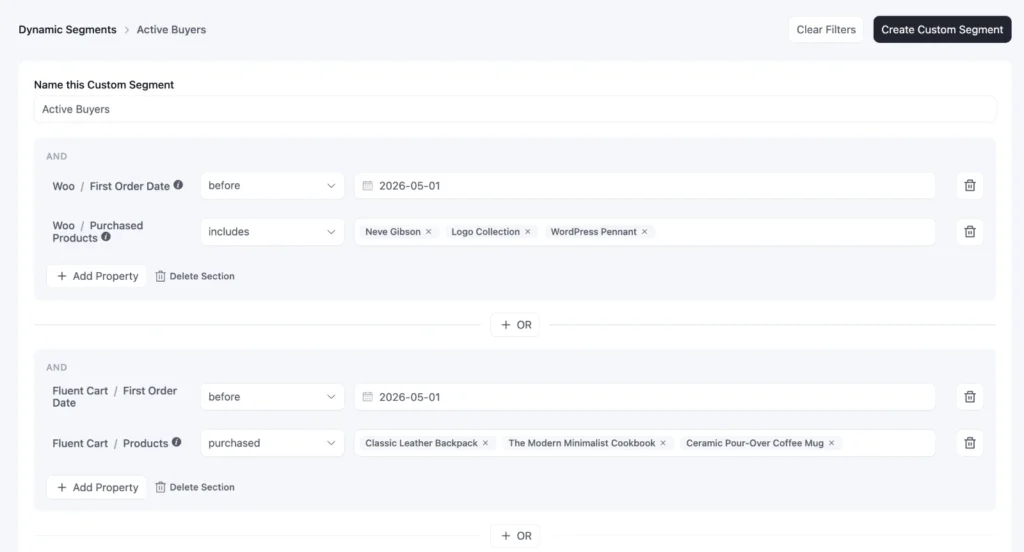
Build Segments That Update Themselves
Say you want to email your best customers: people who’ve spent over $200 with you and clicked an email in the last month. You could pull that group together by hand today.
But by next week, it’s already out of date.
That’s where Dynamic Segments help. You set the rules once, like “spent over $200” and “clicked in the last 30 days,” and the segments check the contact list on their own and find everyone who fits.
After that, the group looks after itself.
Here’s why that helps:
- Less manual work: No exporting, filtering, or double-checking lists before every send.
- Always up to date: Every campaign you send selecting that segment reaches the people who match today, not last month.
- Fewer mistakes: People who no longer fit stop getting emails that don’t apply to them.
Group Subscribers by How Engaged They Are
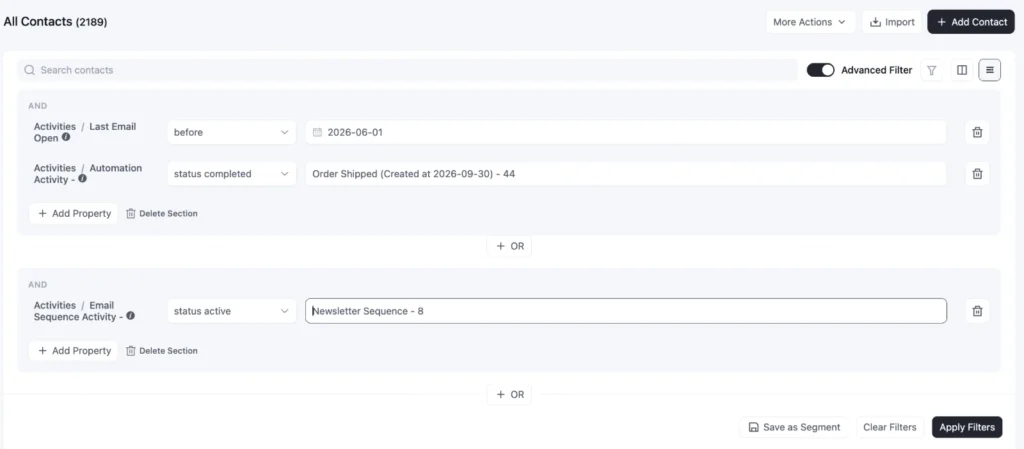
Think about two subscribers. One clicked your last three emails. The other hasn’t clicked anything since spring. Sending them the same number of emails doesn’t make sense for either.
That’s why you need to group people by engagement.
A simple setup works well.
- People who clicked in the last month get your regular emails.
- People who’ve been quiet for a few months get fewer, better ones.
- People who haven’t clicked in six months get a short goodbye series before you stop emailing them.
FluentCRM tracks when each contact last clicked, so you can group them and create dynamic segments that update on their own.
Your email activity data does the sorting, and if contacts fall through the cracks, then a few friendly win-back emails give quiet subscribers one last chance to come back.
Make Sure No One Gets Too Many Emails
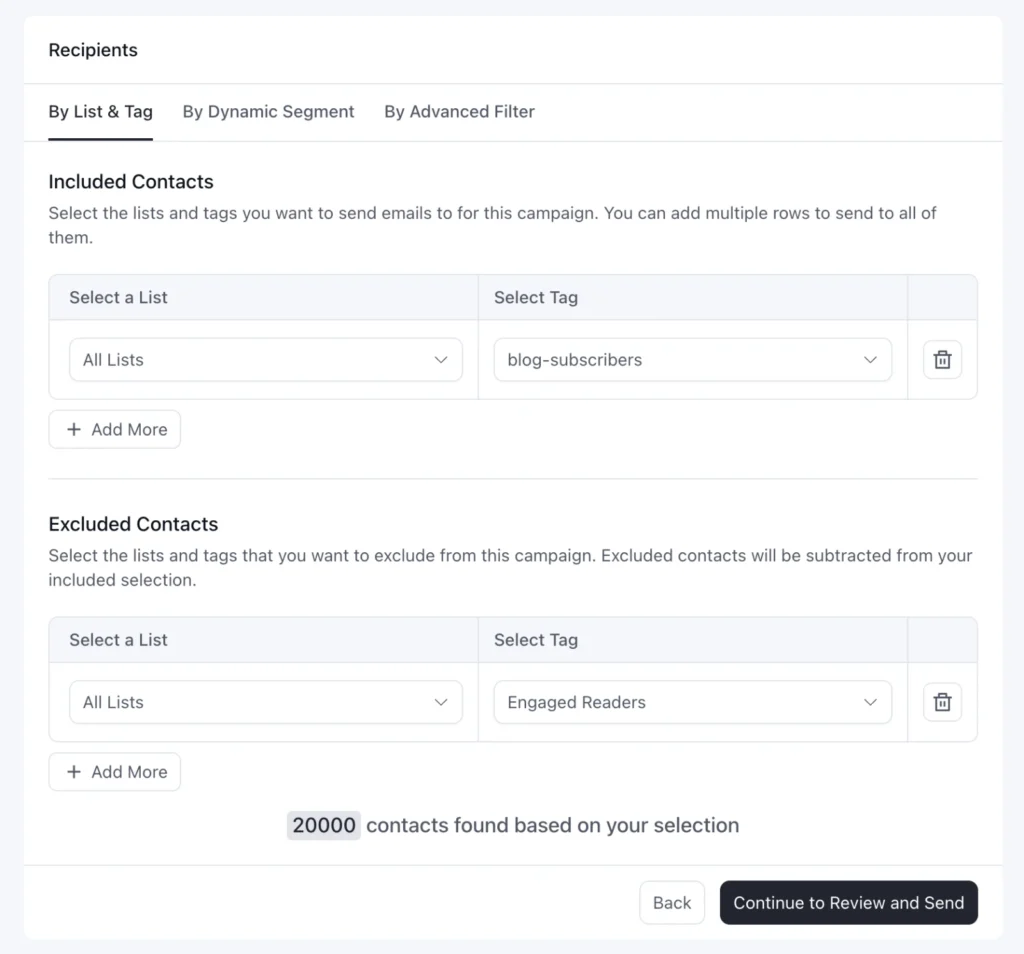
Here’s something nobody warns you about. Your best customers end up in many segments at once: repeat buyers, recent clickers, VIPs, new-arrival fans. If each segment gets its own campaign this week, that loyal contact gets all of them.
A few is simple: Leave people out of campaigns that don’t suit them, like skipping a discount for someone who just bought.
Let important emails, like order updates and onboarding, come before promotions. And keep a rough limit on how many marketing emails one person gets each week.
In FluentCRM, every campaign lets you choose which lists and tags to include and which to leave out, so these rules are easy to stick to.
Measure and Clean Up Regularly
Building segments is only half the job. The other half is checking whether they’re actually earning their place.
The simplest way to tell is to look at how much each campaign earned per person who received it. That makes a small segment and a big one easy to compare.
Also, keep an eye on unsubscribes too, because a segment that keeps unsubscribing is telling you something. Your overall engagement metrics will show the bigger picture.
Then, every few months, do a quick tidy-up. Remove tags almost nobody has, retire segments you no longer use, and merge duplicates like VIP and vip.
A handful of segments you trust beats a hundred you don’t.
FluentCRM’s campaign reports make these checks easy.
Common Email Segmentation Mistakes You Shouldn’t Skip
Email segmentation mistakes rarely show up right away.
They build up quietly as your list grows, until one day your clicks drop or customers start complaining.
Here are the ones to watch for:
- Creating segments with no plan: If a segment doesn’t feed a campaign or automation, it’s just clutter.
- Making segments too small: A group of 30 people isn’t worth its own campaign, and the results are too small to learn from.
- Letting tags get messy: Five versions of the same tag means five chances to email the wrong people.
- Trusting opens: Many apps count opens automatically now. Use clicks and purchases instead.
- Forgetting to remove people: Someone who already bought shouldn’t keep getting “don’t miss out” emails.
- Ignoring overlap: Without a few simple rules, your best customers get the most emails.
- Changing too much at once: Try one new segment at a time, so you know what actually made the difference.
- Setting it and forgetting it: Old segments and unused tags pile up and make every campaign harder to build.
Start Targeting the Right Subscribers Today
Email segmentation isn’t a one-time setup. It’s an ongoing loop:
- People join your list and take action
- Those actions sort them into the right groups
- Each group gets emails that actually fit them
The businesses that get the most out of email aren’t the ones sending the most. They’re the ones sending the right message to the right people, again and again.
So, you don’t need to build everything at once.
Start with clear lists and tags, then add one engagement segment based on clicks. Once that’s running, add the next segment that serves a real goal.
If your business runs on WordPress, FluentCRM gives you everything you need in one place, from automatic tagging to Dynamic Segments that update themselves, without charging more as your list grows.
Start with one segment today, and the rest will follow.
Tanzil Ebad Efti
Content Writer & Strategist
Words are my favorite playground. As a Creative Writer at WPManageNinja, I don’t just produce content; I tell stories. By mixing fiction and metaphors with real-life examples, I turn my writing into a creative journey that’s easy for readers to digest and relate to.
Table of Content
Related Articles and Topics
-
How to Segment Email List Based on Email Activity
If you sent a newsletter campaign last month, could you name the group of people…
-
How to Organize Contacts Using Lists, Tags & Custom Fields in FluentCRM
If you had to send an email right now to every contact who has shown…




