FluentCRM 3.3.5: Audit Log, Smarter Contact Filters, One-URL AI Connections and More

Summarize with


Last Updated:
When one person runs a CRM, they know why a campaign got paused. When five people share it, someone eventually asks “who stopped this campaign?” or “why did this contact leave the automation?”, and until now FluentCRM had no answer to give you.
Finding the right contacts had a similar friction. The everyday filters, like status or when someone joined, weren’t in one place, and if you’d built a dynamic segment of your best customers, you couldn’t simply pull it up on All Contacts and export it.
FluentCRM 3.3.5 is now available, and it brings accountability and focus to your CRM.
You can now see who did what in a new Audit Log, filter All Contacts from one tidy popover, filter and export by dynamic segment, see rates and revenue on sequence reports again, and connect AI apps with a single URL. We also fixed Fluent Forms double opt-in, kept every email link on HTTPS, and shipped a round of security hardening.
What’s new in FluentCRM 3.3.5?
- An Audit Log that shows who did what in your CRM
- Connect AI apps to FluentCRM with one URL
- More quick filters for All Contacts
- Filter and export contacts by dynamic segment
- Open, click, and unsubscribe rates, plus revenue, back on sequence reports
- Skip posts in the Latest Posts block and keep campaigns out of your archive by label
- No more second confirmation email for Fluent Forms double opt-in
- HTTPS links in every email
- Security hardening, smaller improvements, and fixes
See Who Did What with the New Audit Log
Sharing a CRM with your team works well until something changes and nobody remembers doing it. A campaign gets paused the night before it was due, a contact disappears from an automation, or a permission changes, and the only way to find out was to ask around.
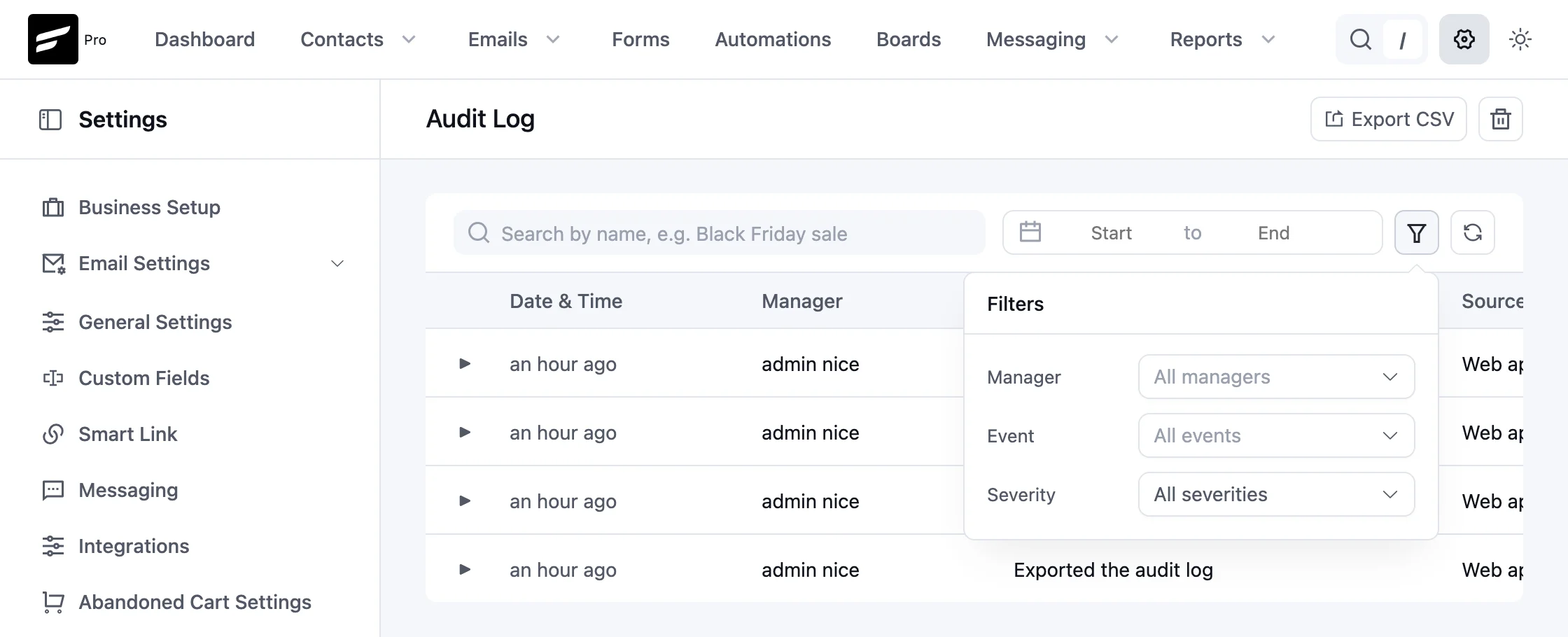
The new Audit Log, under Settings > System Admin Tools > Audit Log, lists the actions your CRM managers take, newest first. Every row shows when it happened, who did it, what they did, where it came from (like the web app), and how serious it is. It records:
- Campaigns scheduled, sent, paused, unscheduled, or deleted
- Automations created, activated, paused, or deleted, plus step changes and contacts removed
- Bulk contact actions
- Changes to CRM manager permissions
- Changes to FluentCRM settings
With FluentCRM Pro, the log also covers SMS and WhatsApp campaigns, message templates, recurring campaigns, email sequences, contact and data exports, messaging provider settings, and your license.
- Find the entry you need. Search by name, pick a date range, and narrow by Manager, Event, and Severity. Expand any row to see the details.
- Share it. Export CSV downloads exactly the entries your filters show, so you can hand a teammate the history of one campaign or one week.
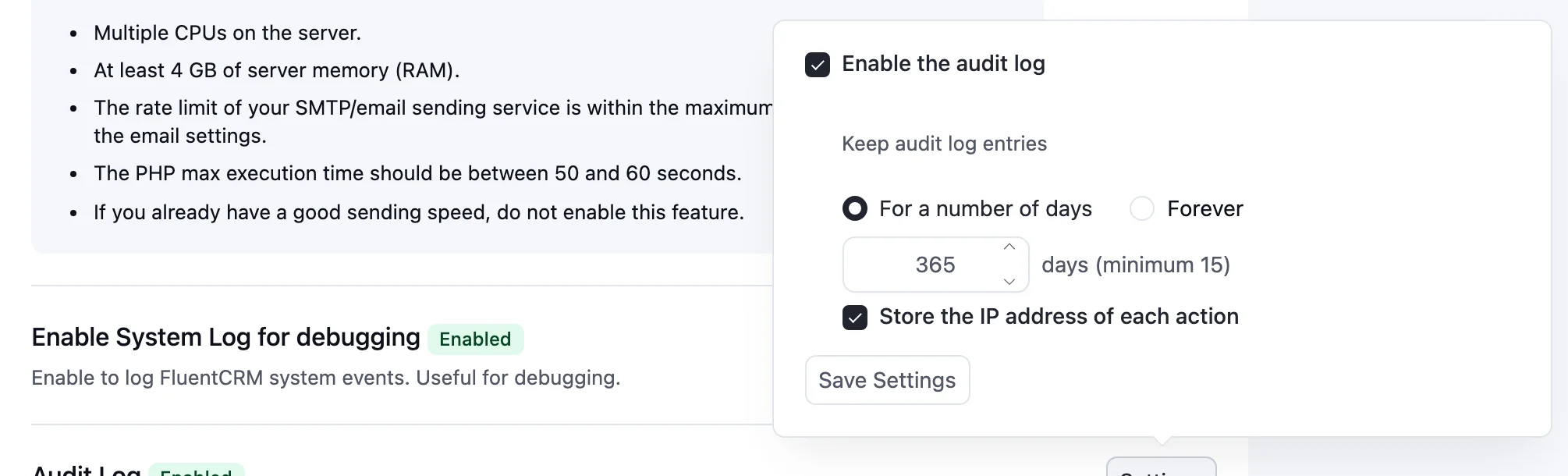
- Keep only what you need. Choose how long to keep entries, from 15 days to forever, and whether to store the IP address of each action. Site administrators can also clear entries older than 15, 30, or 90 days, or a date they pick.
The Audit Log is off by default. To turn it on, go to Addons, find Audit Log, click Settings, and tick Enable the audit log. Recording starts as soon as you save.
Connect AI Apps with One URL
Connecting an AI app to your CRM used to mean creating an application password and pasting a config snippet, which was just enough friction to put people off trying it.
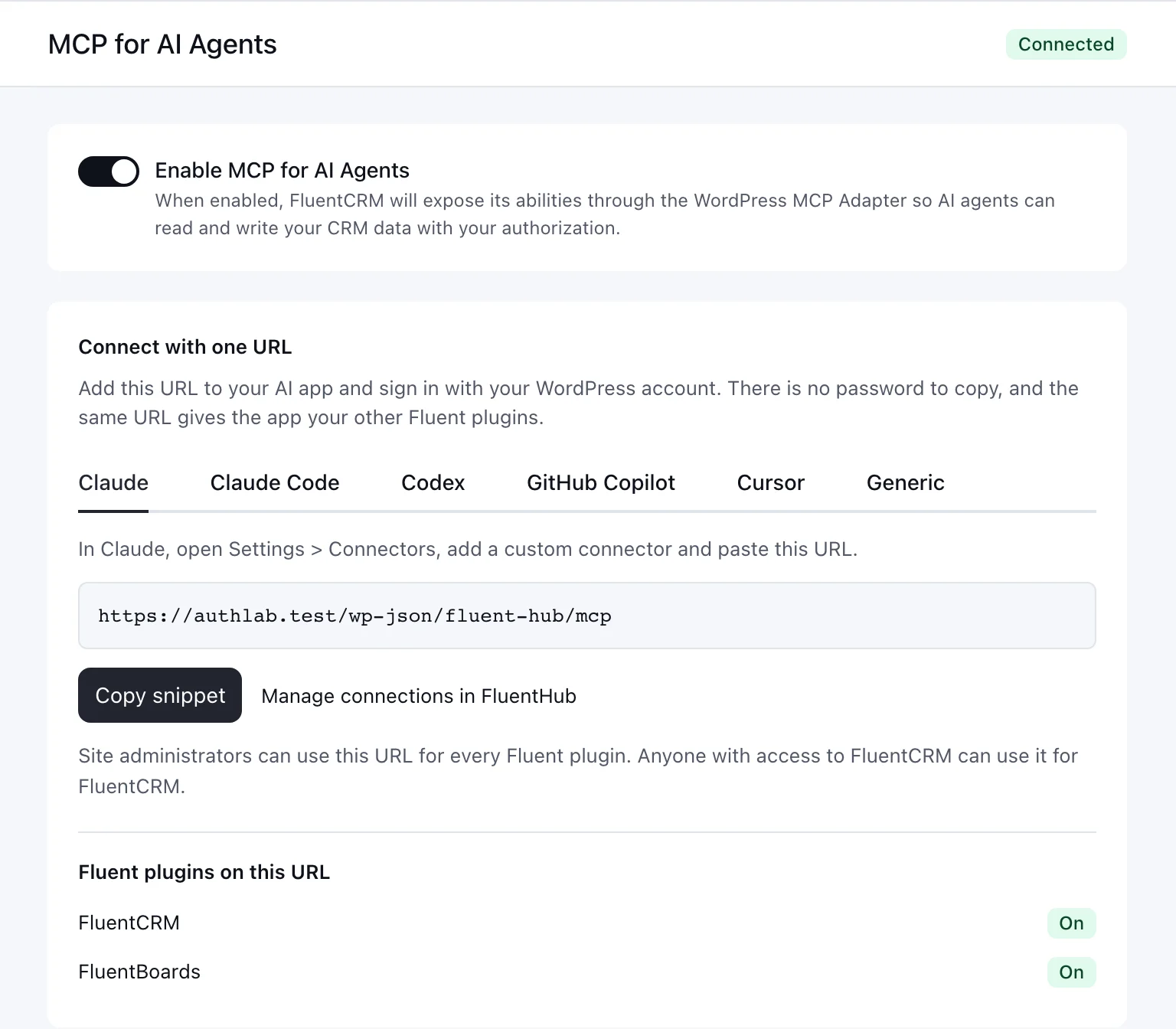
With FluentHub active, Settings > AI Configuration > MCP for AI Agents now leads with a Connect with one URL card. Add the URL to your AI app, sign in with your WordPress account, and you’re connected, with no password to create or copy.
- Setup steps for your app. Tabs for Claude, Claude Code, Codex, GitHub Copilot, Cursor, and a Generic client show exactly where the URL goes.
- Every Fluent plugin on the same URL. The card lists which Fluent plugins the URL reaches, like FluentCRM and FluentBoards, and an administrator can turn one on right there.
- Your team keeps their own permissions. Anyone with access to FluentCRM can connect, and every tool still checks that person’s FluentCRM permissions. Site administrators can use the URL for every Fluent plugin.
- Application passwords still work. You’ll find them under Use an application password instead, and the snippet now names the connection after your site, so two sites can sit side by side in one AI app.
We also gave the MCP tools a review pass. They now return clearer errors so the AI can correct itself, refuse to overwrite an HTML email design with plain text, use fewer tokens, and only schedule a campaign with a full date and time.
Heads up: one tool is renamed. update-contact-automation-status is now update-funnel-subscriber, so update any saved prompts or allow-lists that use the old name.
More Quick Filters for All Contacts
Most days, you don’t need the Advanced Filter to find the contacts you’re after. You just want a quick way to say “subscribed people who joined this week.”
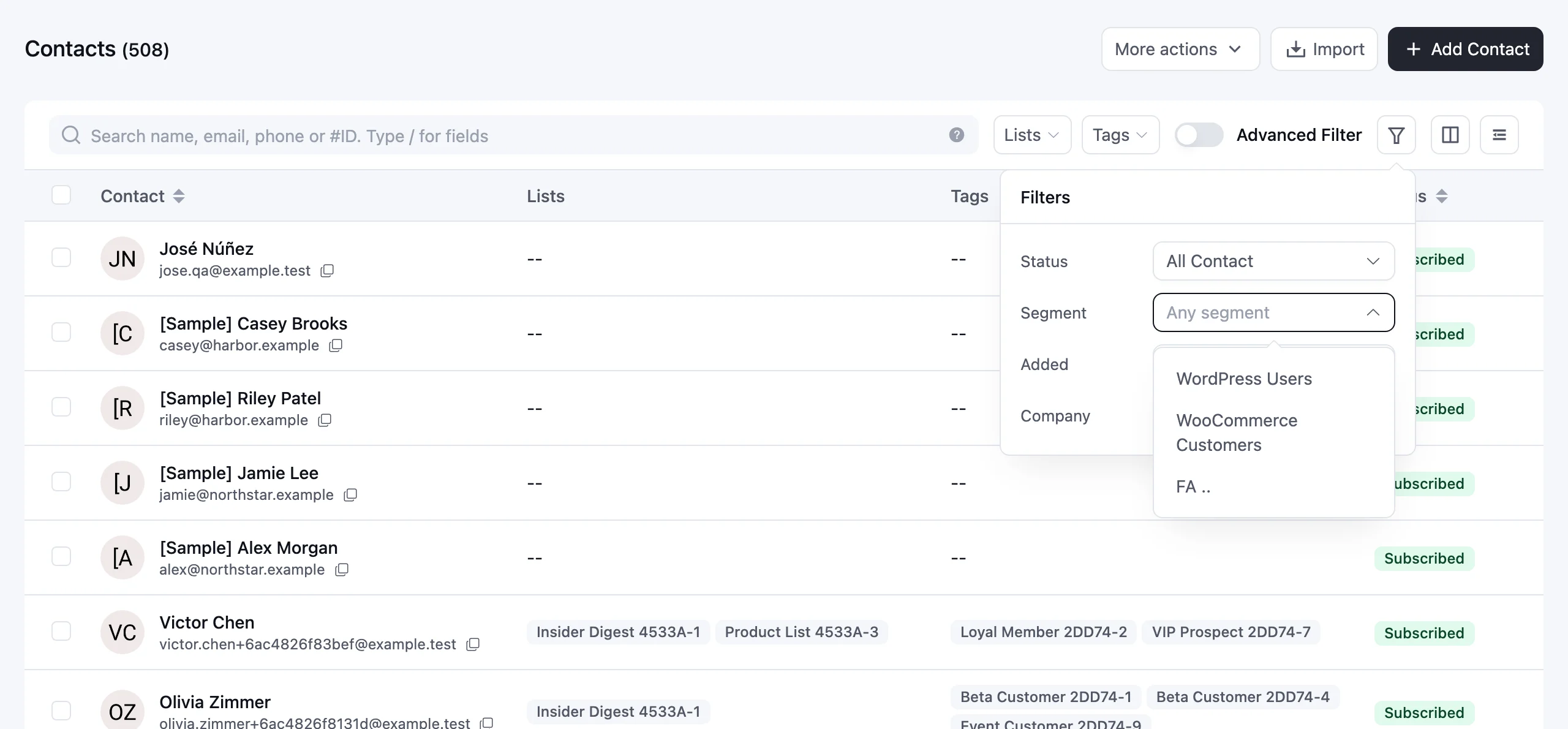
All Contacts now has a filter button right next to the Advanced Filter switch. From there, you can filter by dynamic segment, contact status, date added, company, and purchase history:
- Dynamic segment: show only the contacts in one of your dynamic segments, then narrow further with lists, tags, or status.
- Contact status: Subscribed, Pending, Unsubscribed, and the rest, each with its contact count.
- Date added: contacts added today, in the last 7 days, or in the last 30 days.
- Company: contacts at a specific company, when the company module is on.
- Has purchase history: contacts with orders, when your WooCommerce or Easy Digital Downloads data is synced to FluentCRM.
A dot on the button tells you when any of these filters are on, and Reset clears just them. They work alongside search, Lists, and Tags, and they carry through to status counts and select-all bulk actions. Exports follow your segment, status, and company filters too. The segment and purchase history filters come with FluentCRM Pro.
Filter and Export by Dynamic Segment
Dynamic segments are where many of you keep your most valuable groups, like repeat customers or your most engaged readers. Now you can put them to work right from All Contacts.
Pick a dynamic segment under Segment, and All Contacts shows only that segment’s contacts. From there, you can:
- Narrow it down with search, lists, tags, status, date added, or company.
- Act on the whole segment. Select all, then add tags, add to a list, start an automation, or run any other bulk action on just those contacts.
- Export it. The CSV keeps your segment, search, lists, tags, status, and company filters.
For example, take your “Repeat customers” segment, narrow it to the “Newsletter” list, and export just those contacts. Filtering by dynamic segment comes with FluentCRM Pro.
Sequence Reports That Add Up Again
When we redesigned the email sequence screen, it showed sent, opened, and clicked counts but left out the percentages, which made it harder to spot which emails in a sequence were pulling their weight.
In 3.3.5, each sequence email shows open, click, and unsubscribe rates beside the counts, plus revenue when it’s available. If a campaign uses anonymous tracking, opens and clicks appear as event totals, since they can’t be tied to individual contacts.
We also fixed sequence emails that ignored the sender name and email set on the sequence, so they now go out with the sequence’s own sender settings. Email sequences come with FluentCRM Pro.
More Control Over Your Newsletters
- Skip posts in the Latest Posts block. A new Skip posts control sits next to Show posts. Feature your newest article in one block at the top of the email, then add a second block below with Skip posts set to 1 so it starts with the next article. Existing blocks keep starting at the first post, and the control is disabled for random order.
- Keep campaigns out of your archive by label. Campaign Archive settings can now exclude campaigns by label, so internal or test campaigns tagged with a label like “Internal” stay off your public archive page. There’s also a copy button for the archive shortcode.
Both controls come with FluentCRM Pro.
Fluent Forms Double Opt-in, Fixed
If you use Fluent Forms’ own double opt-in, your subscriber has already confirmed their email address. FluentCRM used to miss that confirmation, created the contact as pending, and sent a second confirmation email, which is an easy way to lose a brand-new subscriber.
In 3.3.5, a confirmed Fluent Forms submission subscribes the contact directly, with no second email. And replaying a form feed or processing a payment later no longer resubscribes someone who unsubscribed, bounced, or complained.
HTTPS Links in Every Email
On some HTTPS sites, campaigns sent from cron could carry http:// tracking, web preview, and unsubscribe links, plus an http List-Unsubscribe header. Links, webhooks, and background requests now stay on HTTPS. Gmail and Yahoo require an HTTPS one-click unsubscribe, so this fix also protects your deliverability.
Security Hardening
Your contacts are stored on your own website, and helping you keep them safe is part of our job. This release includes fixes from our ongoing security review, including a report through Patchstack:
- Safer admin links. Admin links are checked before they reach the REST API, so a crafted link can’t make a signed-in administrator’s browser send a request it shouldn’t.
- Safer confirmation pages. SmartCode output is escaped on the double opt-in confirmation page, and the unsubscribe redirect accepts only http and https URLs.
- Safer automation notes. In FluentCRM Pro, notes written by the Add Notes/Activity automation action are sanitized, and messaging campaign routes accept numeric IDs only.
These protections work on their own, so there’s nothing for you to set up. Please update both FluentCRM and FluentCRM Pro to 3.3.5 on every site you manage.
Smaller Improvements
- Current tags in campaign recipients. Campaign recipients tables now show each contact’s current tags.
- Full automation names. The bulk automation picker shows full names instead of cutting them off.
- No accidental design loss. Switching email editor types asks you to confirm first.
- More integrations, with logos. The integrations catalog lists more integrations, now with their logos.
- Settings for managed hosts. Managed hosts can manage the From, Reply-to, and footer settings for you, and Global Email Settings shows a notice in place of those fields when they do.
Fixes
- CSV imports keep descriptions: List and tag imports save descriptions, and keep existing ones when the column is missing.
- Safer bulk deletes: Email template “Select all” uses the search you submitted, and All Activities bulk delete only removes rows you can see.
- Automations save reliably: Automations save correctly with older settings formats, and Save Settings works again after a step save is rejected.
- Dates in your time zone: Contacts imported from ActiveCampaign, MailerLite, ConvertKit, Mailchimp, and Drip keep their signup date in your site’s time zone, and admin-started message threads are dated in site time.
- Dynamic segments: Segments sort correctly by title, show 0 instead of n/a when empty, no longer freeze the editor when a field fails to load, and count correctly on databases with mismatched email collations.
- Also fixed: Contacts stay in sync after a password reset confirms a changed email, admin links with encoded routes open the right screen, recurring campaigns check the day interval on every sending condition, and the Latest Posts preview refreshes when you change the excerpt length.
For Developers and Hosts
- New hooks let hosts hide admin screens, the review card, and AI connectors.
- The
FLUENTCRM_DISABLE_BULK_EMAILconstant now stops every email FluentCRM sends, including double opt-in and test emails, not only queued campaign email. - Integrations can tag the one-off WhatsApp messages they send.
- Passwords FluentCRM generates when it creates a WordPress user are now marked as generated.
Full changelog
Security
- Hardened admin request routing so unsafe REST request URLs are refused.
- Escaped SmartCode output on the double opt-in confirmation page, and limited unsubscribe redirects to http and https URLs.
- Sanitized notes from the Add Notes/Activity automation action, and limited messaging campaign routes to numeric IDs.
New
- Audit Log for manager actions, with filters, CSV export, retention, and IP settings. Turn it on in Addons.
- Filter All Contacts by dynamic segment and export the results.
- Skip posts in the Latest Posts block.
- Exclude campaigns by label from the campaign archive.
- Connect AI apps to FluentCRM with one URL through FluentHub.
Improvements
- All Contacts filter popover with Status, Segment, Added date, Company, and Purchase history.
- Current tags in campaign recipients.
- Full automation names in the bulk automation picker.
- A confirmation before switching email editors.
- More integrations with logos, and a copy button for the campaign archive shortcode.
- MCP tools give clearer errors, keep an email’s design when editing it, and use fewer tokens. update-contact-automation-status is renamed to update-funnel-subscriber.
Fixes
- Fluent Forms double opt-in no longer sends a second confirmation email.
- Sequence reports show rates and revenue again, and sequence emails use the sequence sender settings.
- Email links, webhooks, and background requests keep HTTPS.
- CSV import descriptions are saved.
- Bulk delete selection in email templates and All Activities.
- Automations save with older settings formats.
- Dynamic segment sorting and counts.
- Recurring campaign day validation.
- Latest Posts preview refreshes correctly.
- Imported contacts and admin-started message threads are dated in site time.
Thank You for Helping Shape FluentCRM
FluentCRM 3.3.5 is about accountability and focus, with a clear record of who changed what, faster ways to reach the right contacts, and sequence reports that tell the whole story again. Many of these changes started as a support ticket or a feature request from you, so thank you, and please keep them coming.
FluentCRM 3.3.5 and FluentCRM Pro 3.3.5 are available now from your WordPress dashboard. As always, take a backup before updating a production site.
In case you missed recent updates
FluentCRM 3.3
- A Campaign Calendar for all your email, SMS, and WhatsApp campaigns
- Reports for your SMS and WhatsApp messages
- View FluentCart orders without leaving a contact’s page
FluentCRM 3.2.6
- Safer personalized emails and stronger team permissions
- Quick filters and better search for contacts
- Previews for your double opt-in email and confirmation page
Shahjahan Jewel
Hello, this is Jewel, CEO & Head of Ideas at WPManageNinja. I am obsessed with WordPress since 2009. My aim is to be a user-centric developer first, and a serial entrepreneur second. You will find me discussing various tech issues and trying to come up with scalable solutions on different forums when I am not busy coding.
Table of Content
Related Articles and Topics
-
FluentCRM 3.3: Campaign Calendar, FluentCart Order Previews, Faster Automations and More
If you send emails, text messages, and WhatsApp messages from FluentCRM, every one of those…
-
FluentCRM 3.2.6: Stronger Security, Better Contact Workflows, and Important Developer Updates
Your contacts, your email history, and your store data live in your own WordPress install.…