

7 Highly Effective Onboarding Email Examples with Real-Life Templates [+ Why They Convert & Pro-Tips]


First impressions matter more than we like to admit.
Onboarding emails are usually the first real interaction someone has with a brand after signing up, and that moment can shape everything that follows. A thoughtful onboarding sequence can turn curious users into confident, engaged customers.
But how to do that? We will break that down in this blog.
Let’s begin.
What is an Onboarding Email?
Onboarding emails are a structured series of automated messages delivered to new users after sign-up, designed to guide them through initial setup, communicate the product’s core value, and accelerate the user’s journey toward meaningful engagement.
They guide users with clear next actions, educate them on key features and benefits, and activate them by turning interest into real product usage.
Welcome Email vs. Onboarding Email
There is a common misconception that welcome email and onboarding email are the same thing.
Well, it’s not.
A welcome email is the first, immediate message after signup and is focused on making a great first impression, saying thank you, and setting the brand tone.
Onboarding emails, on the other hand, are a multi-email sequence that follows. They deliver tutorials, feature highlights, tips, and guidance that help users move from “just signed up” to fully engaged, confident users.
In short, the welcome email says hello, and onboarding emails show users what to do next.
Quick Tip: If your business is WordPress-based, you already know that WordPress sends a welcome email every time someone signs up. But it lacks your brand tone and messaging. If you want to send a custom welcome email to your WordPress users, this is the blog you need to check out.
Why Most Onboarding Emails Fail (And What Great Ones Do Differently)
The early moments after a signup are critical. This is when interest is highest, and users form their first real judgment about your product. Unfortunately, most onboarding emails miss the mark, and that’s why so many new users churn before they ever experience real value.
Here are the key reasons onboarding emails fail:
- Information Overload: Bombarding users with too much info at once creates confusion and decision paralysis. Instead of guiding, it overwhelms.
- No Clear “Quick Win”: Users need to see a small success fast. If they don’t experience real value within the first day or two, they disengage.
- Generic Messaging: One-size-fits-all sequences ignore why a user signed up or what they actually want to achieve, leading to irrelevant content.
- Poor Timing & Cadence: Sending too many emails too quickly or waiting too long disrupts flow, doesn’t align with user behavior, and reduces engagement.
Quick Tip: Sending an unauthenticated email is like sending an email without an address, as the email will definitely land in spam. So, ensure you have checked all boxes of email authentication in your onboarding email.
Great onboarding emails do exactly the opposite. Great onboarding email:
- Teach value that moves users closer to success
- Lead with outcomes, not features
- Deliver a quick win fast
- Use segmentation and personalization
- Balance timing with context
To summarize, bad onboarding feels like a lecture; great onboarding feels like a path.
Quick Tip: Writing great emails gets very easy when you know how not to write a bad email. For that, you can check out bad email examples, which you should never send.
7 High-Converting Real-Life Onboarding Email Examples
Let’s dive into 7 real-life onboarding email examples that actually work. We’ll break down what makes each one work and how you can apply the same strategies to your own emails.
1. Welcome & First Win
The goal of these onboarding emails is to offer immediate value with an emotional connection. Usually these the first onboarding email in the onboarding email sequence.
These onboarding emails include:
- Warm welcome
- What they can achieve
- One tiny action
Email Example
Subject: Welcome aboard, let’s get your first win 🎉
Hi {{first_name}},
We’re really glad you’re here.
You’ve just taken the first step toward building smarter, more meaningful relationships with your audience, and that’s impactful.
Let’s make your first win happen right now:
Create your first contact list.
It takes less than a minute, and it unlocks everything that follows.
If you need help, we’re right here with you.
You’ve got this 💛
— The EngagioCRM Team
Real Life Email Example You Can Follow
A real-life onboarding email template you can follow from the ‘welcome onboarding email’ category is this:
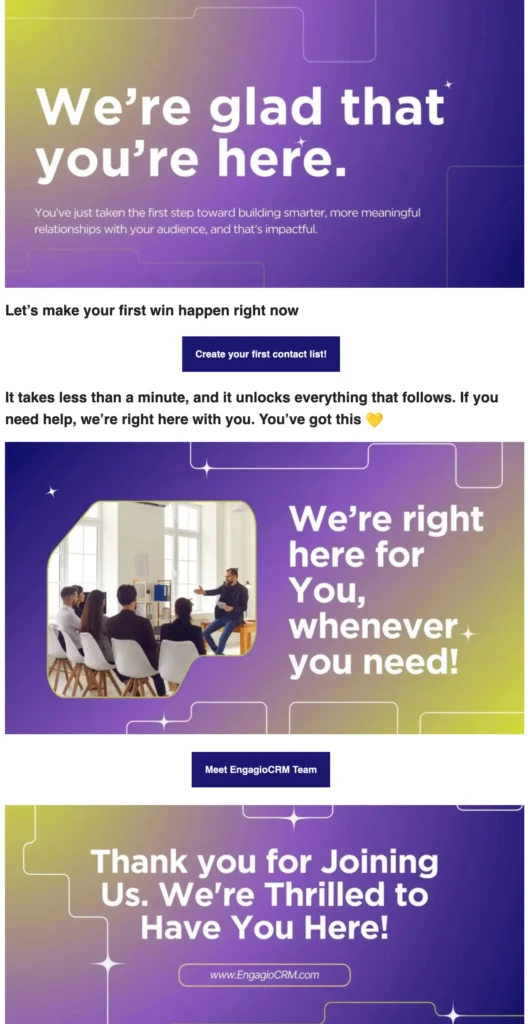
Why This Email Works?
- The email maintains an overall brand color and tone
- The messaging of the email is very welcoming
- Email has a clear CTA to guide the audience to their next step
- First CTA entices the audience to start using the product right away
- Presents an image of the team, so that the audience feels familiar with them
Quick Tip: If you’re not using mobile optimization properly, you are enraging a lot of your users. So, make sure you know all the do’s and don’ts of mobile optimization and check several times before sending any email.
2. Product Activation
Usually, the goal of this kind of onboarding email is to get users accustomed to the product as soon as possible. These emails can be used as the second email in an onboarding email sequence.
These emails include:
- Quick setup guide
- Visual or short tutorial
- Primary feature highlight
Email Example:
Subject Line: Ready for a Fast Win?
Hi {{first_name}},
Ready for your next win? Let’s set up your first automation.
Step 1: Create a simple email campaign
Step 2: Add a trigger (like a form submission or tag)
Step 3: Connect it to your contact list
It takes about 3 minutes. Here’s a quick visual walkthrough to guide you
👉 [link]
Once this is live, you’ve officially activated EngagioCRM.Let’s keep the momentum going 💛
Real Life Email Example You Can Follow
Product activation onboarding email is widely used for digital products and software businesses. One real-life example you can take inspiration from:
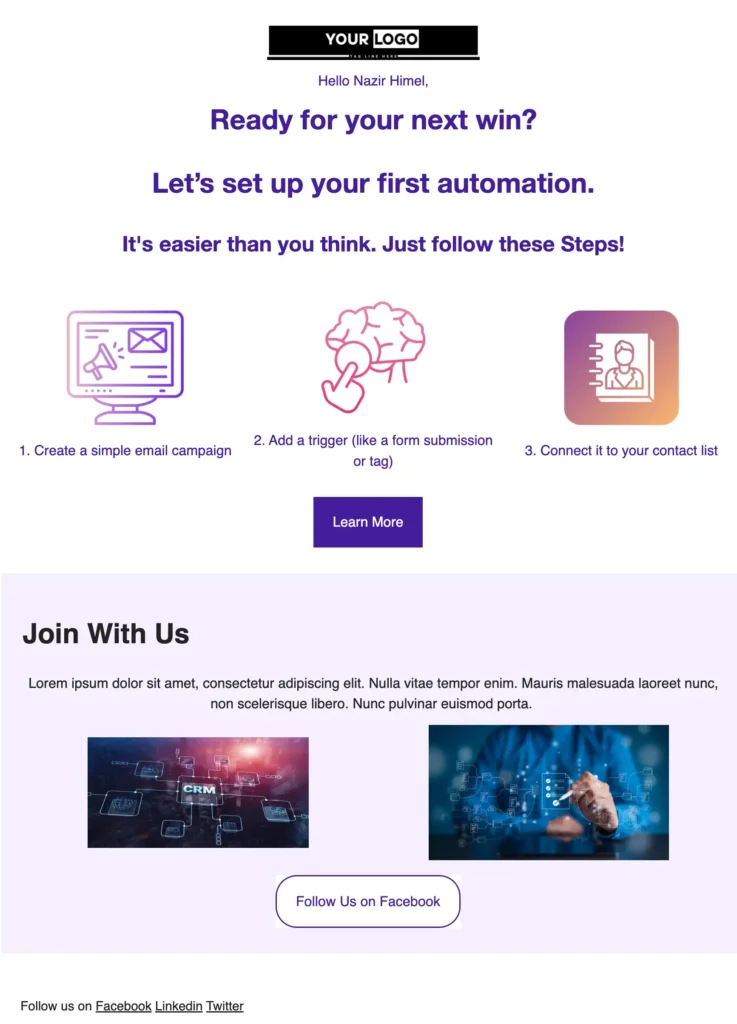
Why This Email Works?
- Guides the user step by step on how to activate the product
- Starts with a message that implies activating this product is a ‘Win.’
- Presents with impactful images, with clear instructions
- Presents images that go with the brand tone and value
- Shows how the product is adding value behind the scenes for the users
3. Education & Use-Case
The goal of this type of onboarding email is to help users experience their first real “aha moment”. It’s the point where the product’s value truly clicks with the users.
These emails are typically sent after their first setup, when users are familiar with the basics and ready to see how the product solves their specific problems. These emails include a real-world use case story that users can relate to, a key feature highlight that directly addresses that problem.
Real Life Email Example You Can Follow
Use case onboarding email is usually used in the second or third step in an onboarding email sequence. But many use it as the first email of the sequence.
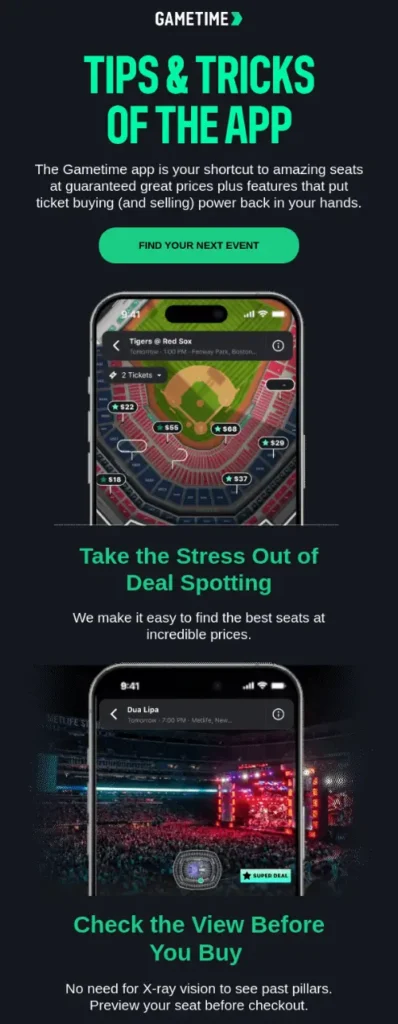
Why This Email Works?
- The messaging of this email is how users can use the product more efficiently
- Presents with the tips and tricks, a detailed bird’s-eye view of the product
- Messaging implies how the product is offering value in the audience’s life
- This onboarding email reassures the audience one more time with the product
- Maintains a clear brand color tone and concise messaging of the brand
4. Trust & Social Proof
If the usual onboarding email is just a casual hi, then this onboarding email is what makes that hi into an everlasting bond. Trust & social proof-toned onboarding email reduces doubt and strengthens confidence in the product.
These onboarding emails are designed to reassure users that they’ve made the right decision by showing real people achieving real results. They eliminate hesitation and reinforce the product’s value through proof, not promises.
These emails include:
- A relatable customer story
- Clear, measurable results
- A simple explanation of why your product works
Real Life Email Example You Can Follow
To develop trust and showcase social proof in your onboarding email sequence, you can follow this template:
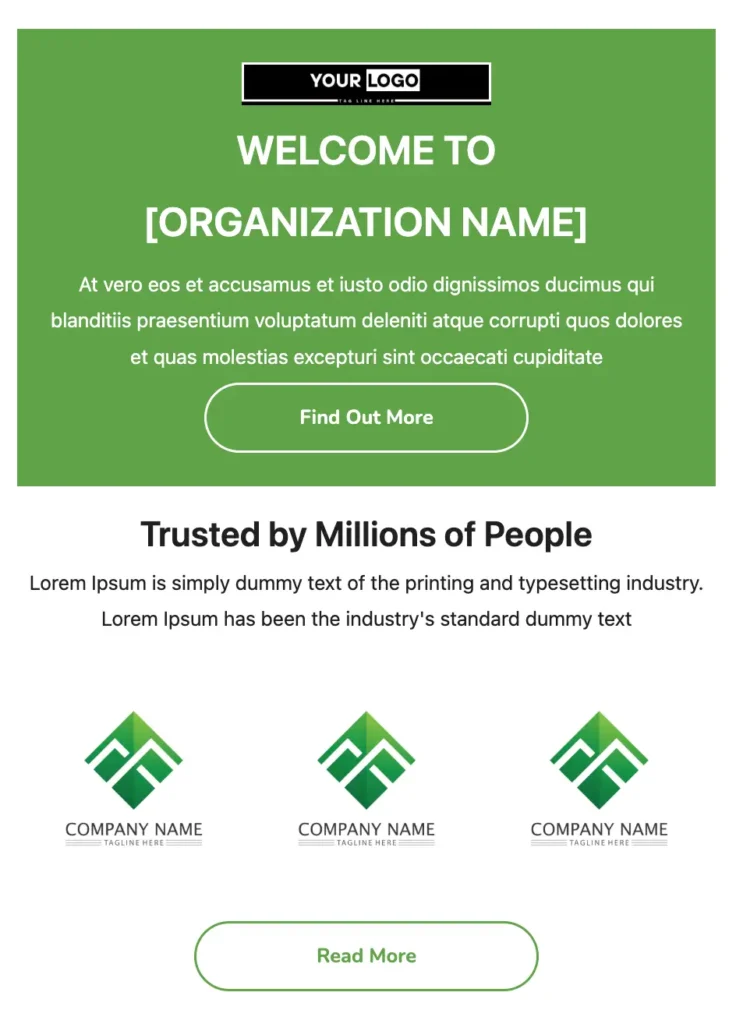
You can use the template, or download the template directly from here.
Why This Email Works?
- Shows social proof of other companies that were benefitted by this organization
- Adds a CTA that entices recipients to find out more about the organization’s journey
- Adds a clear unsubscribe link, in case the readers do not want to receive emails anymore email
- Adds a CTA button to read more about the organization to develop trust further
5. Advanced Resources
Deepen product adoption by helping users get more value from what they already have. These onboarding emails are sent after users are comfortable with the basics and ready to level up their usage.
These emails include:
- Hidden features users may not have discovered yet
- Best practices for using the product more effectively
- Pro resources like advanced guides, templates, or tutorials
These emails help transform regular users into confident power users.
Real Life Email Example You Can Follow
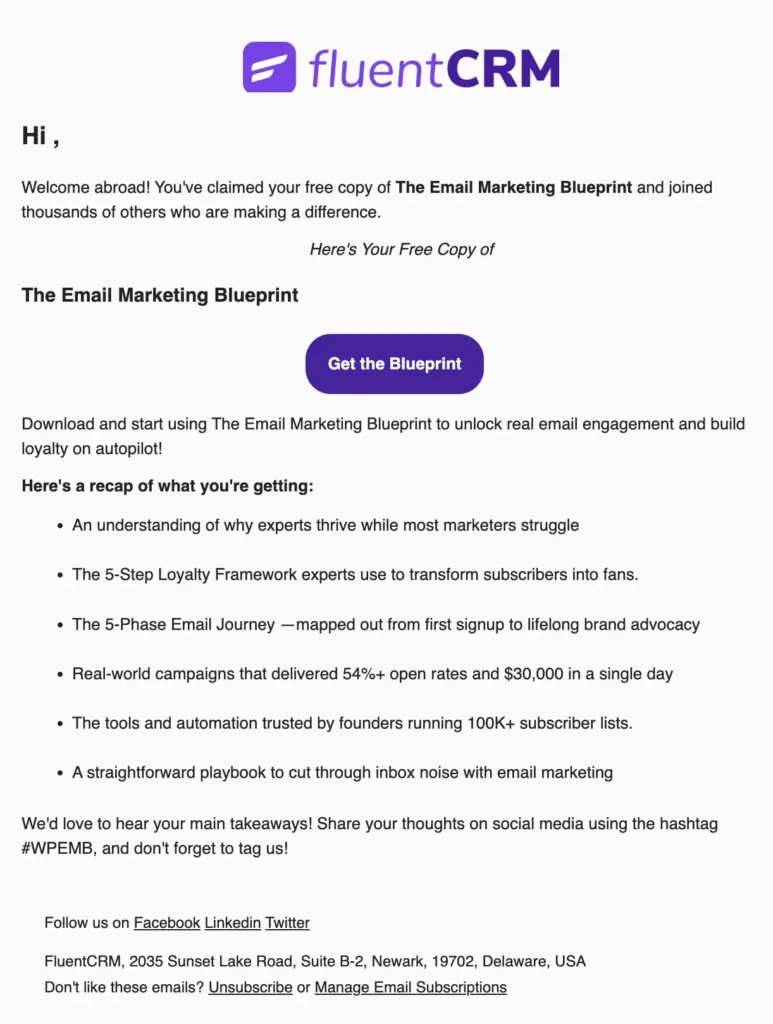
By providing value or resources, a brand can hook its audience immediately, but offering value can be tricky. Here’s how you can share resources in your onboarding email example:
Why This Email Works?
- As this is a plain-text email, this onboarding email focuses solely on the messaging
- Offers value like ‘Email Marketing Blueprint’ right away to the new sign-ups
- Explains what the audience might be getting in clear, concise points
- Encourages them to share their opinion on their social media with the specific hashtag
- Adds a clear unsubscribe option below, so that the audience can unsubscribe easily
Quick Tip: Gmail and Yahoo requires to put one click unsubscribe option in every brand mail now. If your email doesn’t have a list unsubscribe header, your email may end up in spam automatically.
6: Feature Deep Dive
Help users fully understand and unlock the value of a key feature, encouraging deeper engagement with the product. These emails are usually sent after users have completed the basics and are ready to explore more advanced functionality.
These emails include:
- A detailed explanation of a single feature
- Step-by-step instructions or a mini tutorial
- Examples or use cases showing how the feature solves real problems
- Optional visuals or short videos to make learning quick and easy
Real Life Email Example You Can Follow
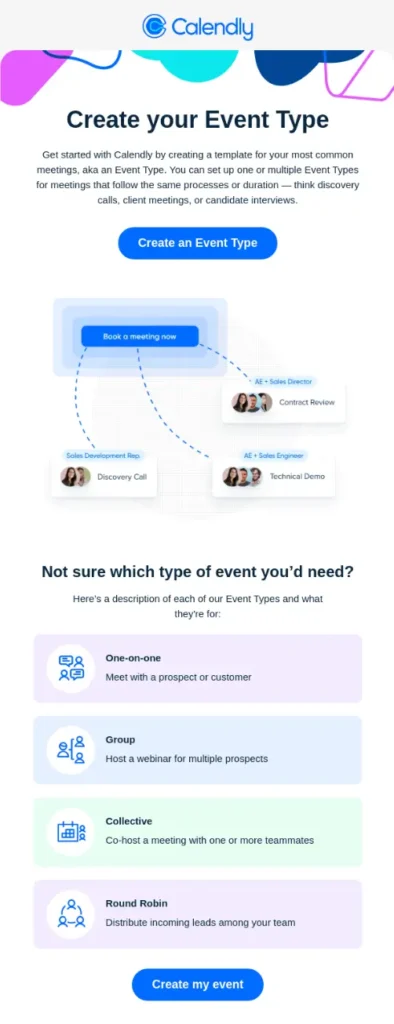
A feature-only onboarding email can come across as too boring, if not balanced carefully. To find the right balance, you can take inspiration from the email example shown here:
Why This Email Works?
- Gives a concise message on how this product can benefit the audience
- Offers guidance based on the type of meeting the user needs
- Adds a clear CTA to create an event, right after signing up
- Starts with an image that presents the exact value the product is offering
- Adds links to ‘Help Center’, ‘Community’, if the audience wants to reach further
7. Connection Building
These emails focus on creating a real connection with the users. The kind that builds trust, loyalty, and long-term engagement.
They’re usually sent once users are getting comfortable with the product and starting to see value, helping strengthen the connection between your brand and your audience.
These emails include:
- A personal founder message or warm brand voice
- Clear access to support channels for guidance and reassurance
- A thoughtful feedback request that makes users feel valued
Real Life Email Example You Can Follow
Building connections is one of the toughest tasks ever, especially in onboarding emails. To execute it properly, a brand needs to know its audience really well. Here is an onboarding email example from Montec, focused on building a connection.

Why This Email Works?
- Prioritizes users’ hobbies by introducing them to the community
- Engaging with the community builds trust and connection fast
- A clear CTA ‘Join Us’ entices users to know more about the service
- Asksa question “Here for the Gear’ and offers to ‘Create Your Look’
- Clear image and messaging showcase the brand’s value and goal
Quick Tip: First criteria of sending this onboarding email is to have a community. In case you don’t have a community, or you are just beginning your community journey, and you are looking for professionals’ strategy to grow your community, this is the blog you should read.
Advanced Onboarding Strategies to Keep Users Engaged
Once the basic sequence (welcome, activation, education, trust) is in place, you can take your onboarding from standard to smart. This is where emails start adapting to each user’s behavior and needs, instead of sending the same messages to everyone.
- Behavioral triggers: Send triggered emails based on user actions instead of a fixed schedule. For example, trigger a “next step” email as soon as a user completes a setup step, giving guidance exactly when it’s needed.
- Conditional paths: Send different email sequences based on user behavior. new users see one path, active users another, so everyone gets relevant content.
- User role-based onboarding: Customize emails by user role, experience, or goals, like giving project managers workflow tips while showing designers feature shortcuts to make the experience personal and meaningful.
- Lifecycle automation: Automate emails from signup to advanced usage, guiding users forward without manual effort and keeping them engaged long-term.
- Re-engagement campaigns: Send targeted re-engagement emails, tips, reminders, or feature highlights to inactive users, reducing churn by re-engaging them.
These advanced strategies go beyond basic emails. Instead of just welcoming users or showing them a feature, they actively guide each user toward success in a way that fits their behavior, needs, and pace.
Quick Tip: If you see that your audience is not engaging enough after signing up, you can implement these proven email engagement strategies and nurture connection.
Common Onboarding Email Mistakes that Kill Conversions
Onboarding emails can make or break a user’s experience. Yet, many businesses unknowingly sabotage their own sequences.
Here are the most common pitfalls and how to avoid them:
- Too many CTAs: It’s tempting to show everything at once, but multiple calls-to-action overwhelm users.
- Talking about features instead of benefits: Users don’t care about every button or setting; they care about ‘what they can achieve’. Lead with results, not technical details.
- Bad timing: Sending emails too soon can feel pushy, while sending them too late risks losing momentum. The key is to match your emails to the user’s journey and maintain a consistent email frequency.
- No clear next step: Without guidance, curiosity fades, and engagement drops. Make the path forward explicit, simple, and achievable.
- Lack of personalization: Generic emails scream “mass marketing” and fail to connect. Use what you know about your users: their behavior, goals, or preferences to tailor messages that feel relevant.
When you fix these mistakes, your onboarding emails transform from noise into a growth engine that turns first-time signups into loyal, long-term customers.
Quick Tip: A trick to send a good onboarding email is personalization. The more email personalization rules you follow, the more relevant your onboarding email will feel to the audience.
Turn First Clicks into Lasting Loyalty
Effective onboarding is about guiding users from day one, showing value quickly, and keeping them engaged throughout their journey. Every email should have a purpose:
- to Educate
- Activate
- Build trust or
- Inspire action
Small, thoughtful improvements, like timing emails to user behavior, personalizing content, or highlighting the right features, can dramatically increase retention, reduce churn, and boost revenue.
In short, your onboarding sequence isn’t just for communication; it’s one of your most powerful growth levers.
Samira Farzana
Once set out on literary voyages, I now explore the complexities of content creation. What remains constant? A fascination with unraveling the “why” and “how,” and a knack for finding joy in quiet exploration, with a book as my guide- But when it’s not a book, it’s films and anime.
Table of Content
Related Articles and Topics
-
Email Compliance Guide: Must Know Rules, AI Risks, and Top Brand’s Email Compliance Examples
Email is one of the most direct ways for brands to connect with their customers.…
-
How Businesses Can 3X Their Email Conversions in Halloween [+ Case Study, Challenges & Solution]
Your Halloween revenue can be 3x higher. This is not just theory. Halloween email marketing…



Leave a Reply