

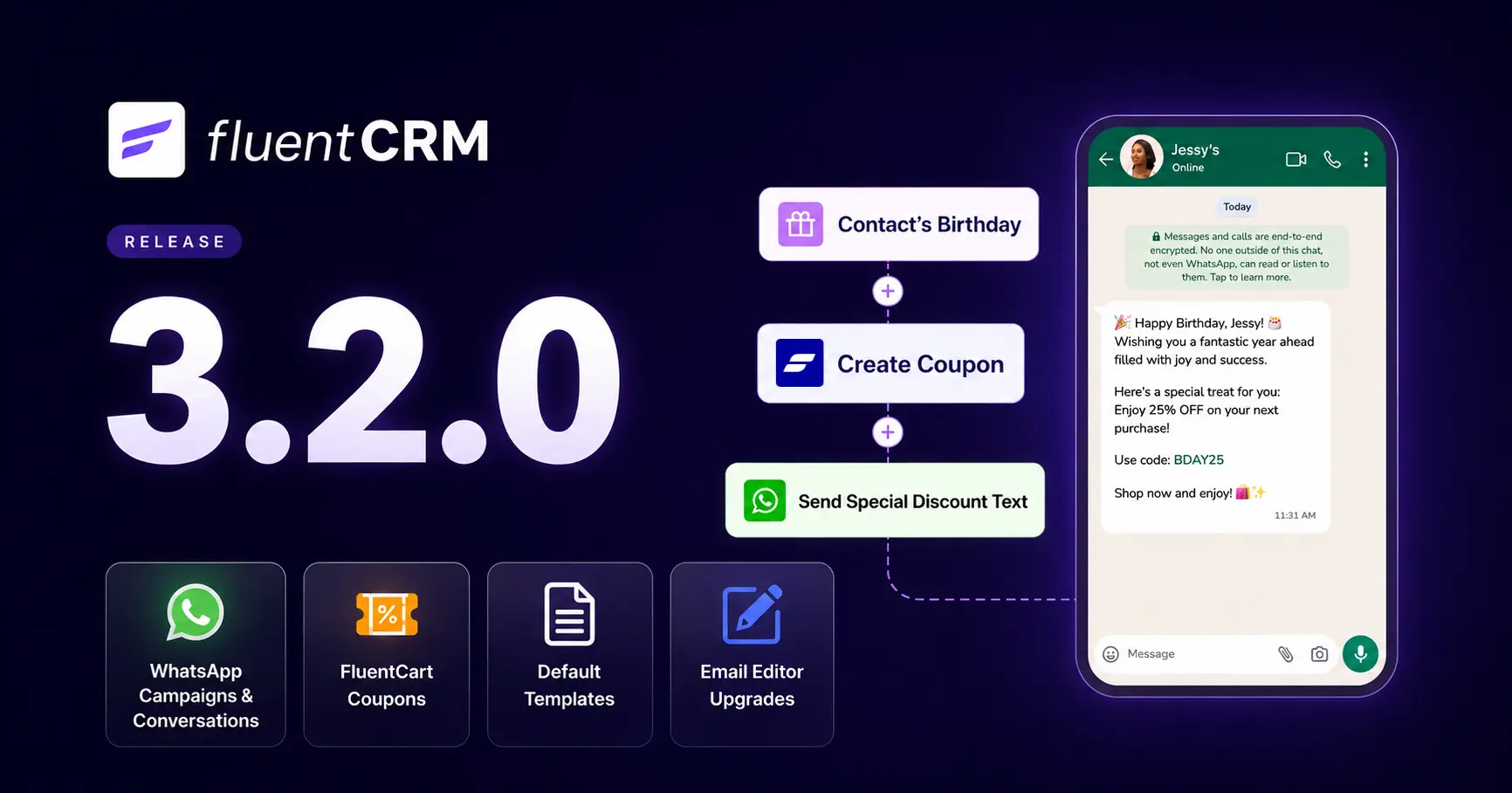
FluentCRM 3.2.0: WhatsApp Messaging, Faster Campaigns, and Better Email Workflows

Summarize with


Last Updated:
When we added SMS marketing to FluentCRM, one question kept coming back: “Can we do this over WhatsApp instead?”
SMS works well, but outside the US, costs can add up, delivery carriers vary, and messages can easily go unopened. For many contacts, WhatsApp is where conversations actually happen.
We had already started building the WhatsApp Module. But a messaging channel is not finished when it can send a message. Provider setup has to be reliable, replies need somewhere to land, and consent rules have to remain clear.
So, we kept WhatsApp turned off while we worked through those details.
Today, FluentCRM 3.2.0 makes WhatsApp available as a messaging channel with FluentCampaign Pro. You can use it for campaigns, automated messages, and one-to-one conversations without separating those interactions from the rest of the contact record.
This release also brings faster campaign sending, more flexible contact management, better email-building tools, a new FluentCart coupon action, and a broad collection of workflow, compatibility, security, and reporting improvements.
Here’s what’s included.
What’s Included in FluentCRM 3.2.0?
- WhatsApp campaigns, automation, and one-to-one conversations
- A FluentCart Create Coupon automation action with coupon SmartCode support
- Ability to select a default template to start fast and ensure brand consistency
- Theme colors and Media & Text block support in the email editor
- Select All for contacts in FluentCampaign Pro dynamic segments
- Replace, add, and subtract modes for bulk custom field updates
- Faster sending for large campaigns
- Clearer licensing states, stronger role and policy boundaries
- Workflow fixes across the plugin
WhatsApp Messaging for the Whole Customer Journey
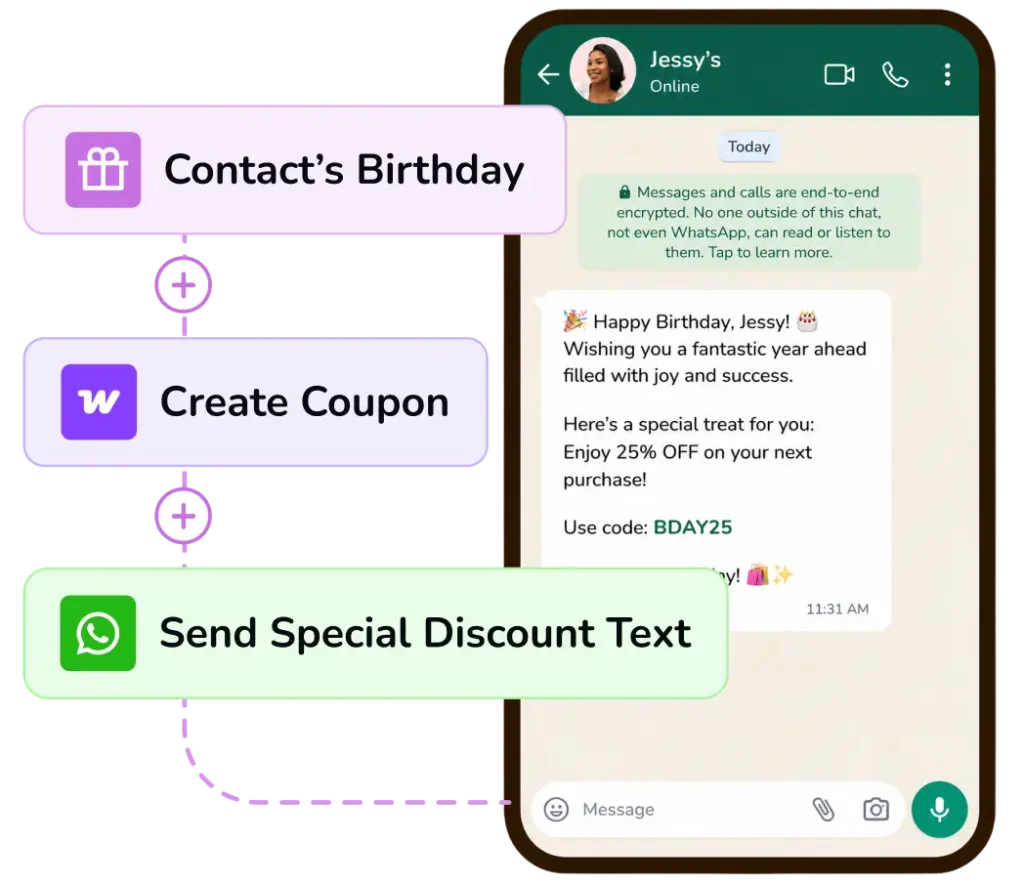
Email remains essential, and SMS is useful when a short message needs immediate attention. WhatsApp adds something different: a channel many customers already use for ongoing conversations.
The important part is not simply adding another Send button. A useful messaging channel has to support three distinct jobs.
- Automations should handle predictable moments
- Campaigns should reach a relevant group
- One-to-one messaging should give a real person somewhere to continue the conversation.
FluentCRM 3.2.0 brings those jobs together.
Manage WhatsApp and SMS from One Familiar Inbox
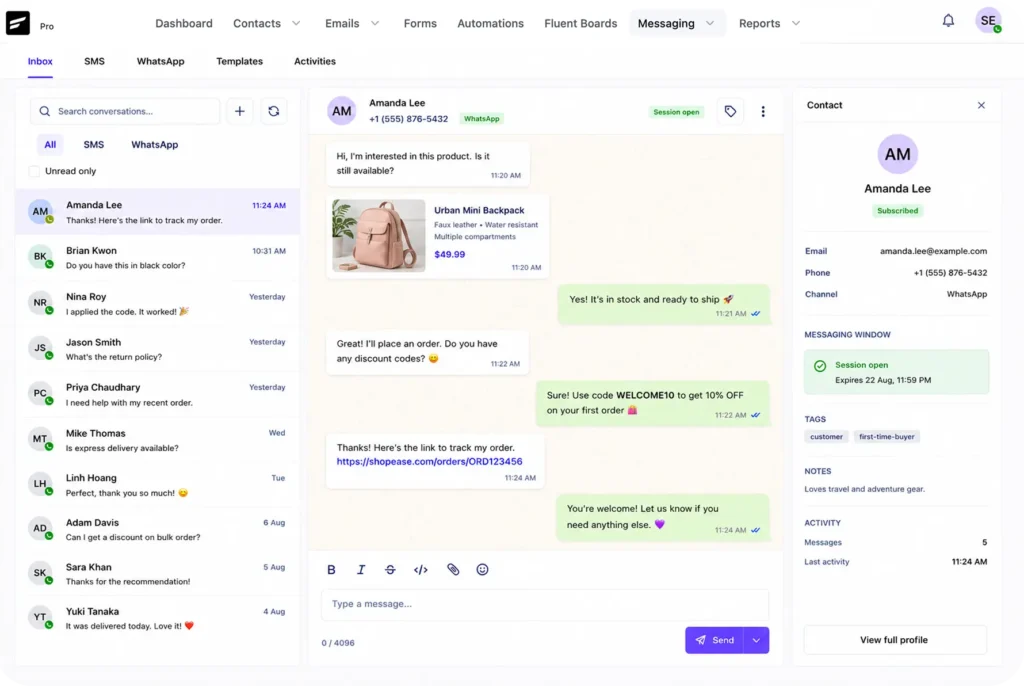
FluentCRM brings WhatsApp and SMS conversations into one central messaging dashboard.
You can view your contacts, open conversations, and manage messages in a familiar chat-like window without switching between tools.
With this, you can start a new conversation directly from the dashboard using a phone number and choose whether to send the message through WhatsApp or SMS.
For a sales team, that might mean starting a quick conversation with a new lead after finding their phone number.
On the other hand, a business could use the same dashboard to send an SMS update or continue a WhatsApp conversation with an existing customer.
Send WhatsApp Campaigns to Relevant Contacts
A WhatsApp campaign follows a familiar process:
Create the Campaign > Choose the Message > Select the Audience > Review > Send
You can use an approved WhatsApp template and map its variables to contact data for personalization. When a conversation is already open, you can also use a free-form message with FluentCRM SmartCodes.
Templates are connected to the provider that approved them, so the campaign works with the templates available for your current WhatsApp setup.
The goal is not to turn every email campaign into a WhatsApp broadcast, it is to give you another way to reach an opted-in audience when the message suits the channel.
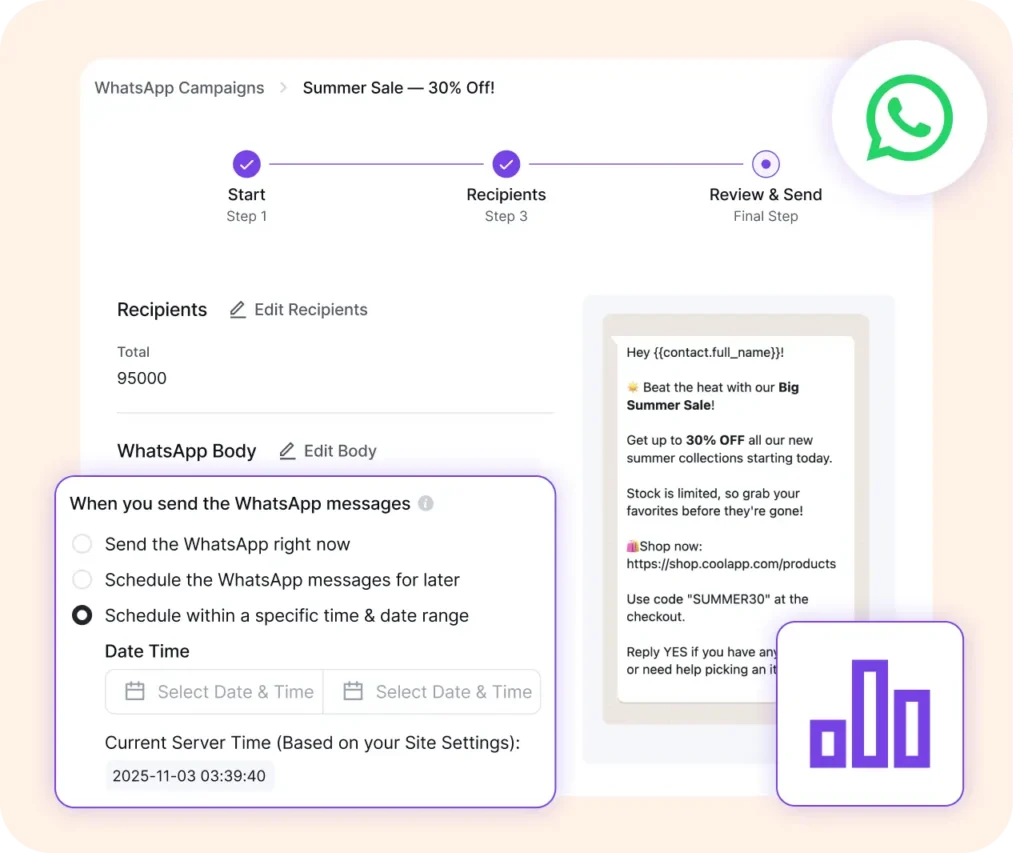
A course creator might announce an important schedule change to enrolled students. A store can share a timely offer with a relevant customer segment. A membership business can remind members about an upcoming renewal or event.
Each example starts with the same principle: a specific audience and a message worth receiving.
Add WhatsApp to Your Automations
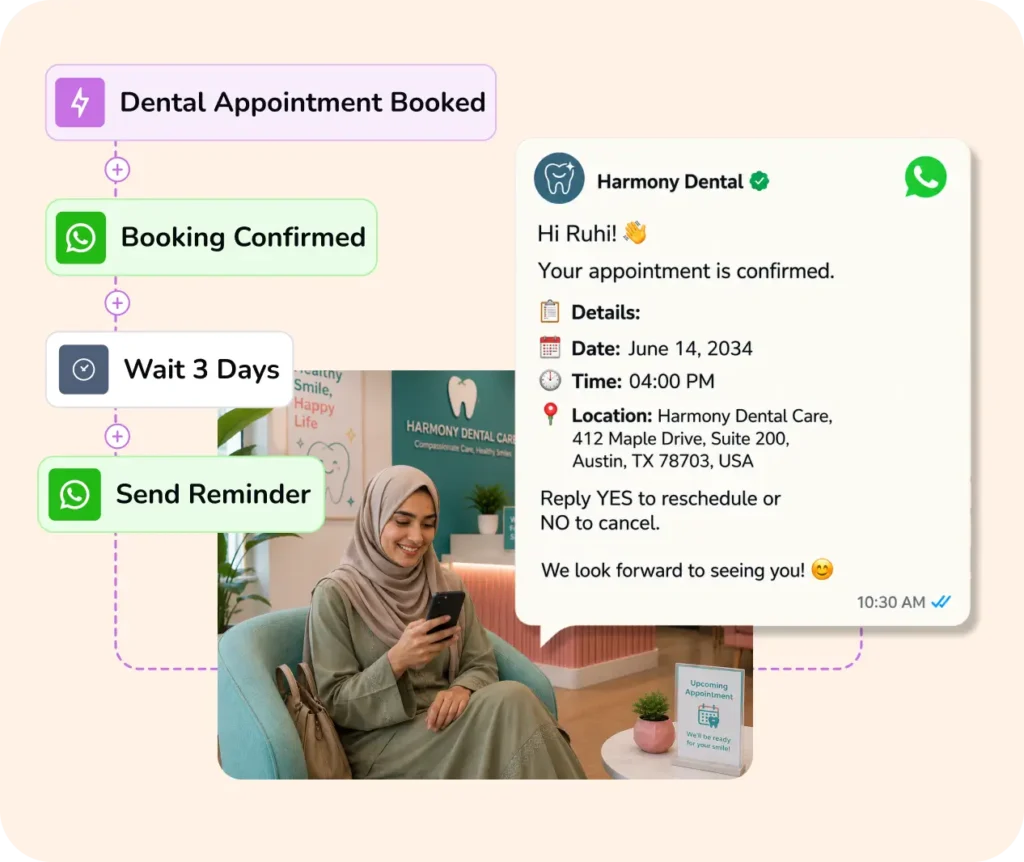
Campaigns cover planned broadcasts. Automations handle the moments your contacts create through their own actions. The Send a WhatsApp Message action lets the automation continue through WhatsApp.
With this, whenever something worth following up happens, you can use that moment to send a welcome, confirmation, reminder, or follow-up without sending every message manually.
For an education business, that might mean sending the next step after a student enrolls. On the other hand, a store could follow an order-related event with a useful update.
Continue One-to-One Conversations on WhatsApp
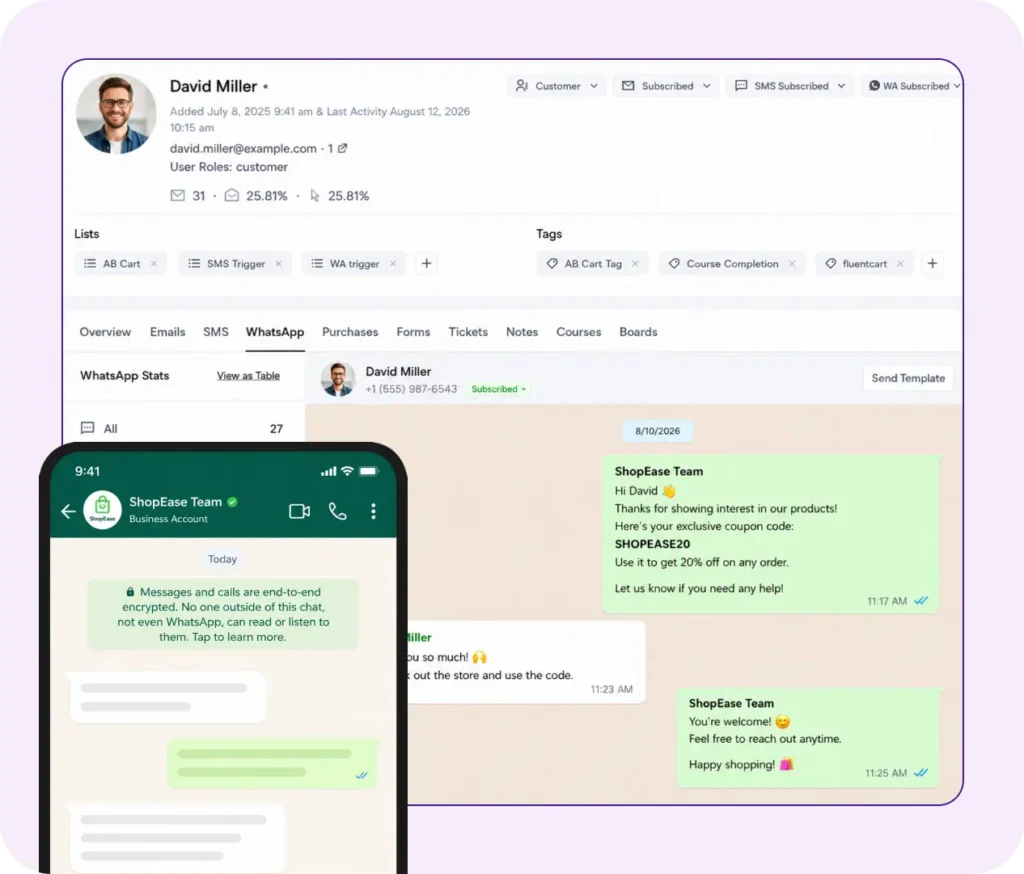
Not every conversation belongs in a campaign or automation. Customers reply with questions, send additional information, or need help that only a person can provide.
FluentCRM now gives each contact a WhatsApp conversation area. Incoming replies stay connected to the contact record, alongside the information and activity your team already uses.
You can review the conversation, reply while the messaging window is open, and see whether the contact is subscribed, unsubscribed, or pending for WhatsApp.
The conversation view also reflects WhatsApp’s 24-hour rule.
During an open conversation window, you can respond with free-form messages. Outside that window, you need an approved template to start the conversation again. Showing that status where your team writes the message helps prevent an avoidable send failure.
Contacts can send images and files, and those incoming items remain part of the conversation too!
Connect Through Twilio or Meta Cloud API
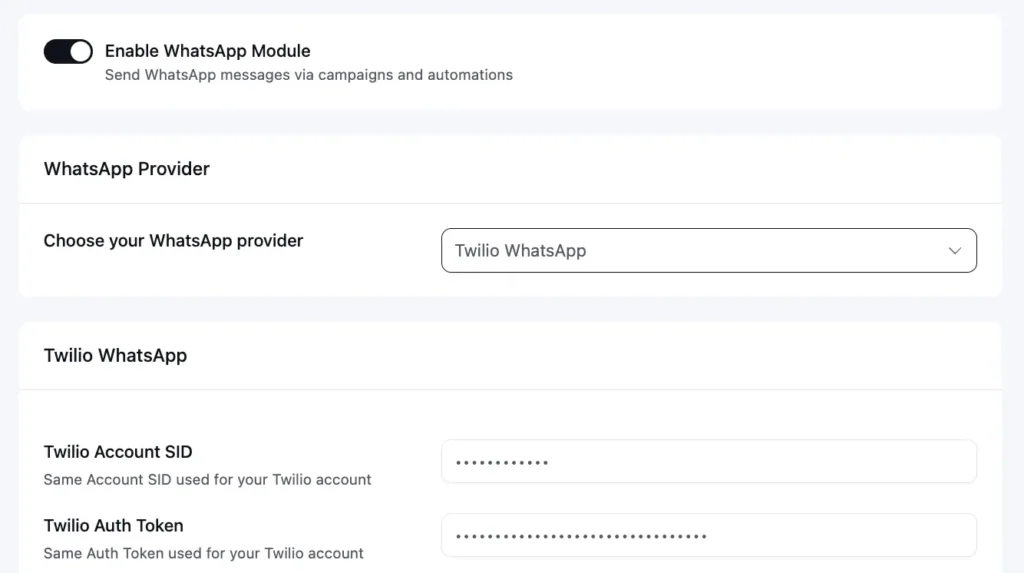
WhatsApp messaging requires a provider connection. For now FluentCRM supports Twilio and Meta Cloud API (WhatsApp Business), so you can use the provider that fits your existing setup.
You choose the provider, add its credentials, and test the connection before enabling the module. The connection also brings delivery updates and incoming replies back into FluentCRM.
Send Campaigns to One-Time Recipients
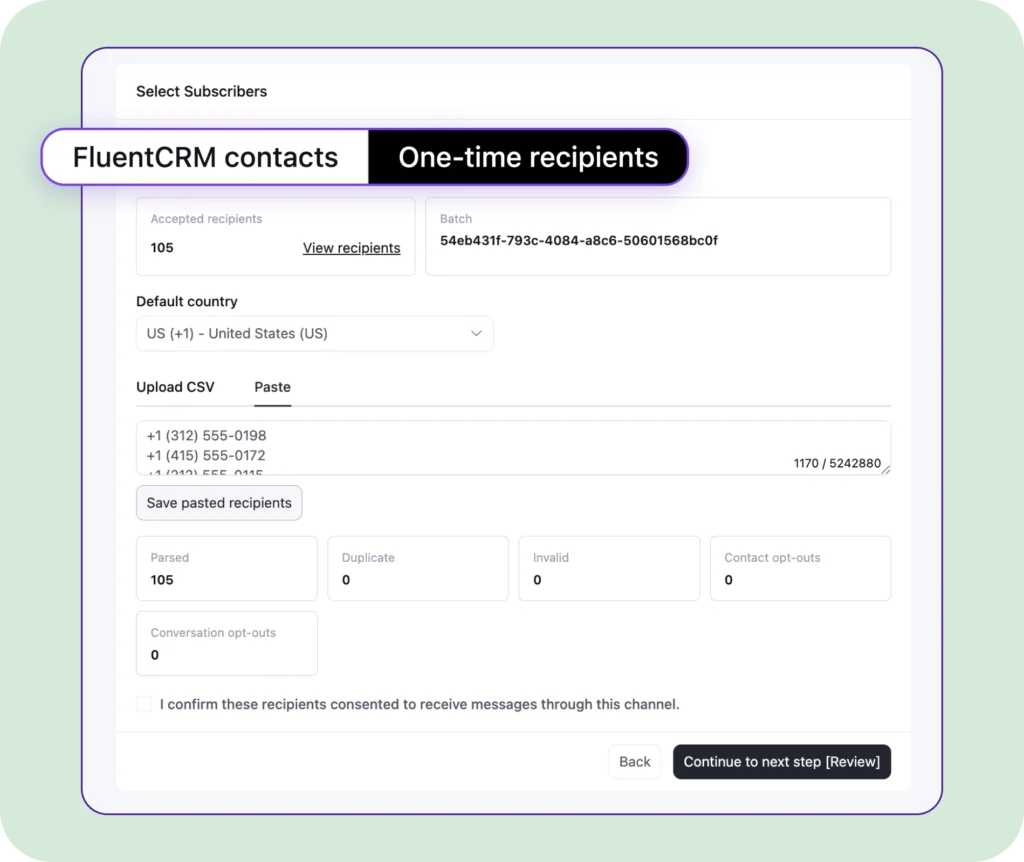
Not every person you want to message needs to be added to your contact list first. FluentCRM lets you send WhatsApp messages to one-time recipients directly from your campaigns using their phone numbers.
With this, you can add recipients in different ways. Upload a CSV file with multiple phone numbers, or enter the numbers directly into the campaign.
When adding contacts manually, simply separate each number with a comma or press Enter to place each number on a new line.
For a business, that might mean sending a quick update to someone who made a one-time inquiry. A service provider could also use it to share a confirmation or important information with a person who doesn’t need to be added to the regular contact list.
Gain WhatsApp Consent & Opt-in
For WhatsApp, the consent remains separate from email consent. Existing email subscribers are not automatically treated as WhatsApp subscribers, and contacts must explicitly opt in before receiving WhatsApp marketing messages. This separation protects the meaning of consent on each channel and gives your team a clearer audience to work with.
To obtain consent, you may use a consent checkbox on your form. Read more about getting consent here: https://developers.facebook.com/documentation/business-messaging/whatsapp/getting-opt-in
Messaging: New Home for WhatsApp and SMS
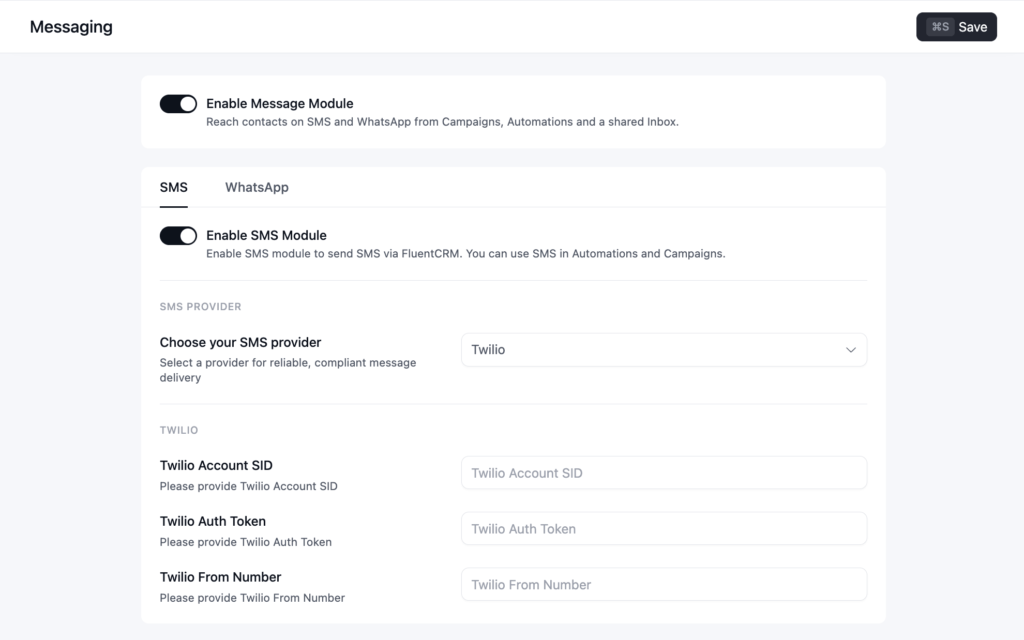
With WhatsApp messaging now part of FluentCRM, SMS and WhatsApp messaging are brought together under a single Messaging panel.
Settings that were previously available under SMS are now organized here, making it easier to manage both messaging channels from one place.
To get started, simply enable the Messaging toggle from the settings. Once enabled, the Messaging option will appear in the navigation bar, giving you quick access to SMS and WhatsApp features whenever you need them.
Create Channel-Wise Templates for Future Use
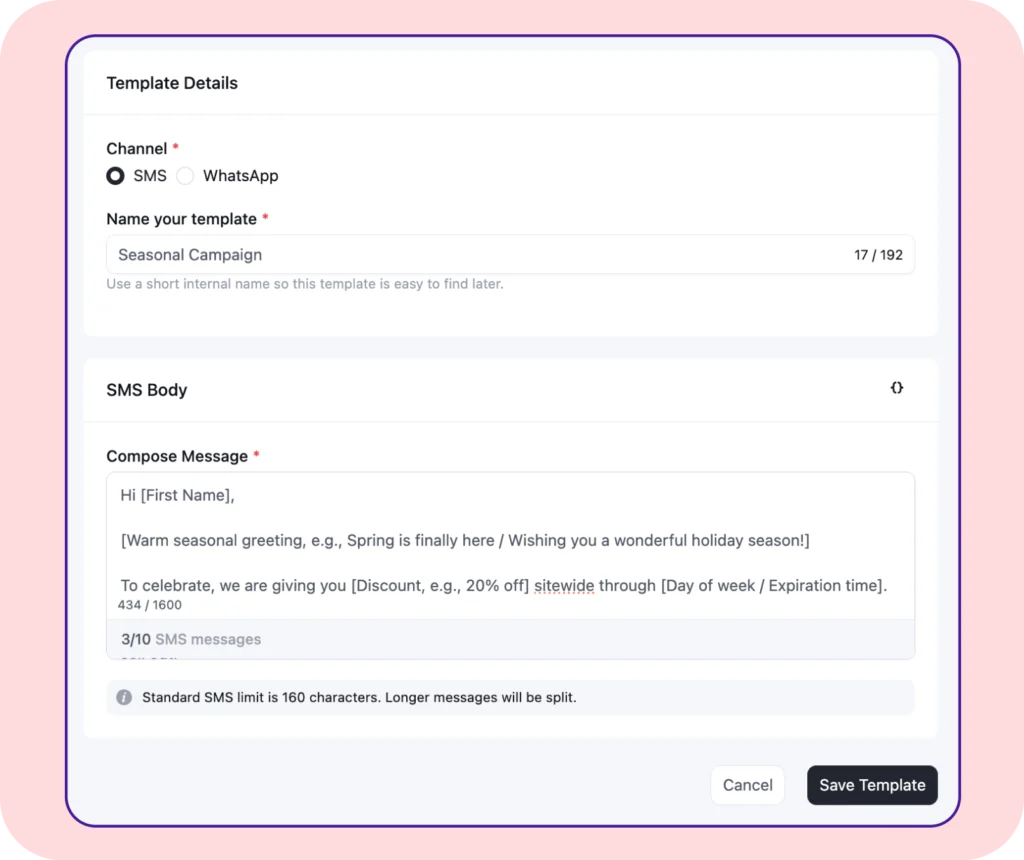
People often use the same types of messages while sending seasonal campaigns, and for that, they have to write the same thing over and over again.
From now on, you can create custom reusable message templates for both WhatsApp and SMS. So you can keep frequently used messages ready for your next campaign.
With this, you can create and save messages separately for each channel and reuse them whenever needed. Instead of writing the same message from scratch.
Build Better Emails with Less Rework
WhatsApp is the headline, but several updates in 3.2.0 remove friction from the email work teams do every week.
Use Your Theme Colors in the Email Editor
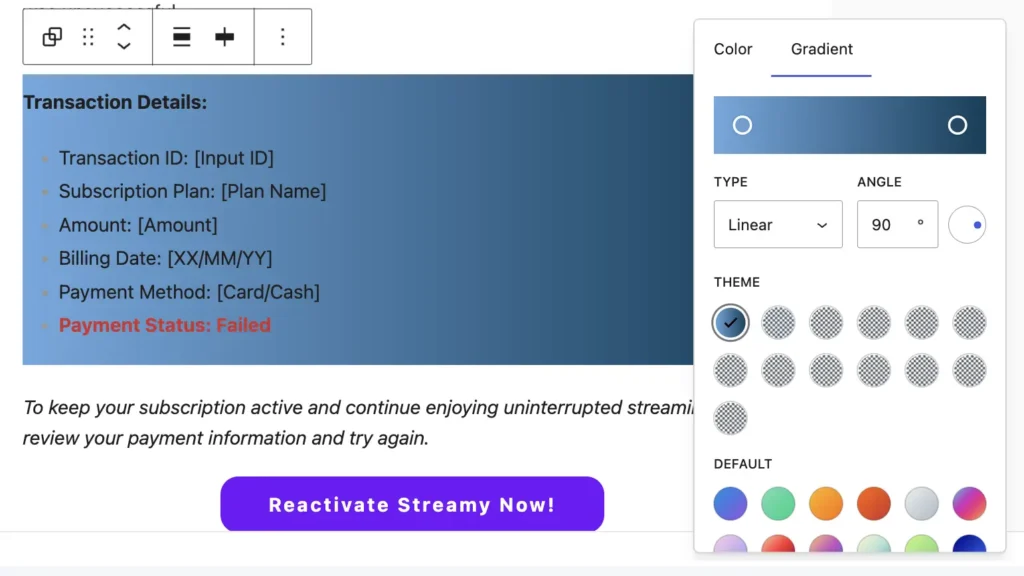
Rebuilding your brand palette inside every tool is tedious, and copying color values by hand makes it easy for designs to drift.
FluentCRM now makes your active WordPress theme colors available inside the email editor. You can select them while designing an email and keep campaign colors aligned with the site your audience already recognizes.
The selected colors are carried into the final email rather than depending on styles that only exist on your website. That means the editor can reflect your WordPress design system while still producing email-ready output.
Create Richer Layouts with the Media & Text Block
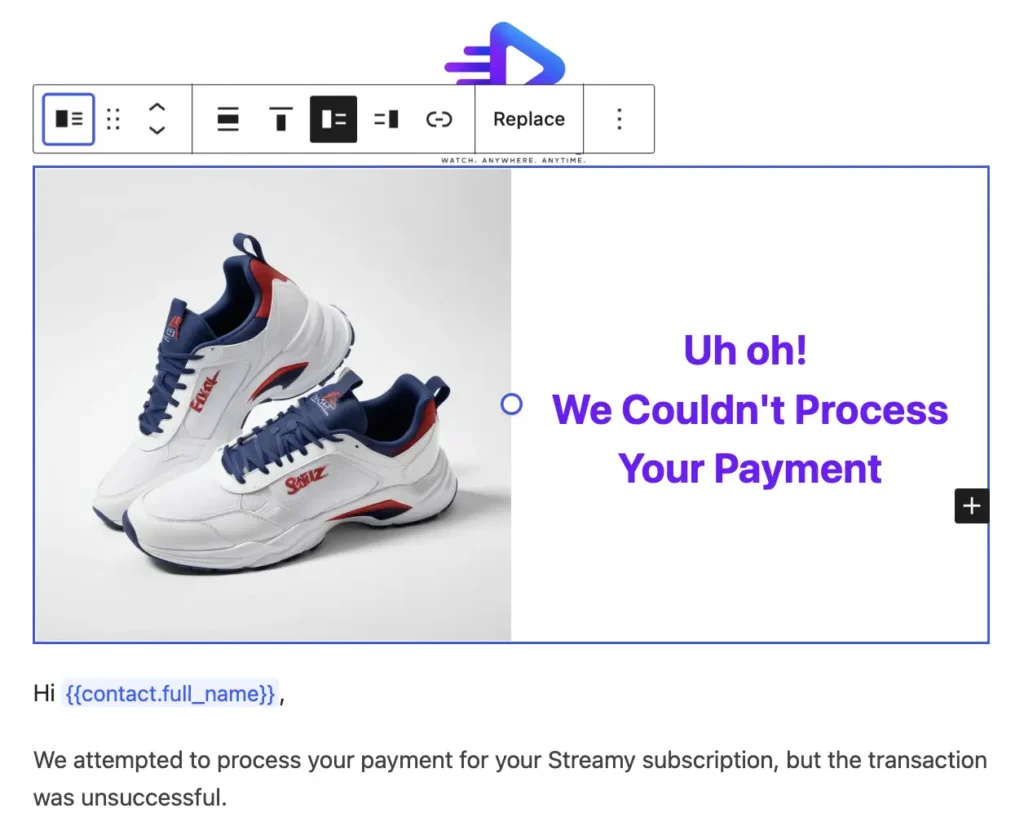
The Media & Text block now works in FluentCRM emails. You can place media beside written content for product highlights, course announcements, event information, or any section that benefits from a visual and an explanation working together.
It is a familiar WordPress block, now available without rebuilding the same layout from separate columns.
Manage Large Contact Groups More Safely
Small contact-management limitations become expensive when a list grows. Two changes in this release make bulk work faster while giving you more control over what gets changed.
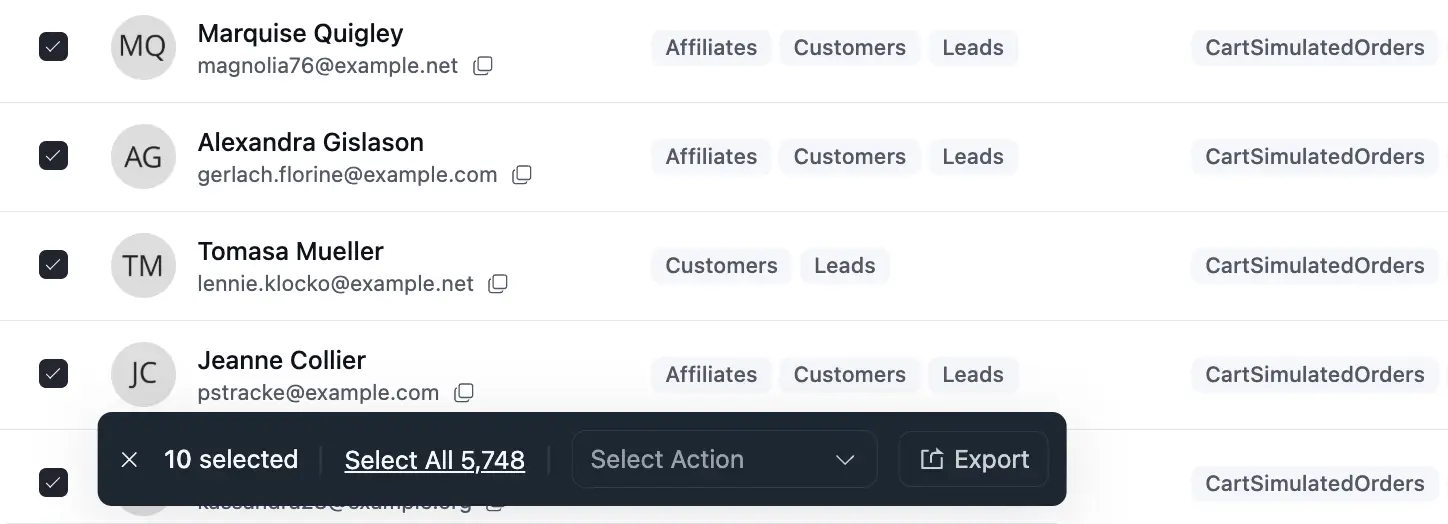
FluentCRM’s dynamic segments now support Select All, so you can act on the complete filtered audience without selecting one page at a time.
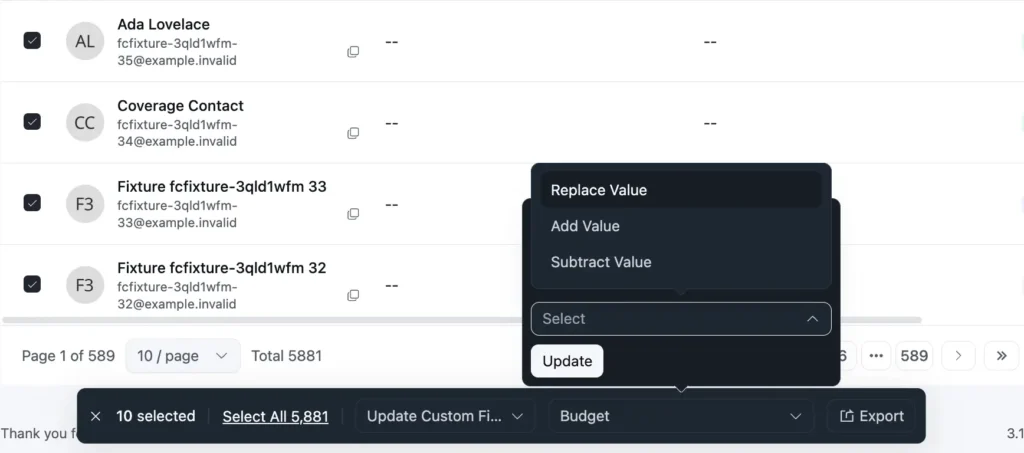
Bulk custom field updates also gain Replace, Add, and Subtract modes.
Instead of overwriting an existing multi-value or numeric field every time, you can choose the operation that matches the update you intend to make. That is useful when adding another value to a group of contacts, removing one that no longer applies, or adjusting a numeric field without replacing its current value.
The release also improves smaller contact workflows.
Phone numbers in local formats are accepted correctly, tag searches return results beyond the first page, and configured default contact statuses are respected for WooCommerce and Easy Digital Downloads purchases.
Offer Personalized FluentCart Coupons from an Automation
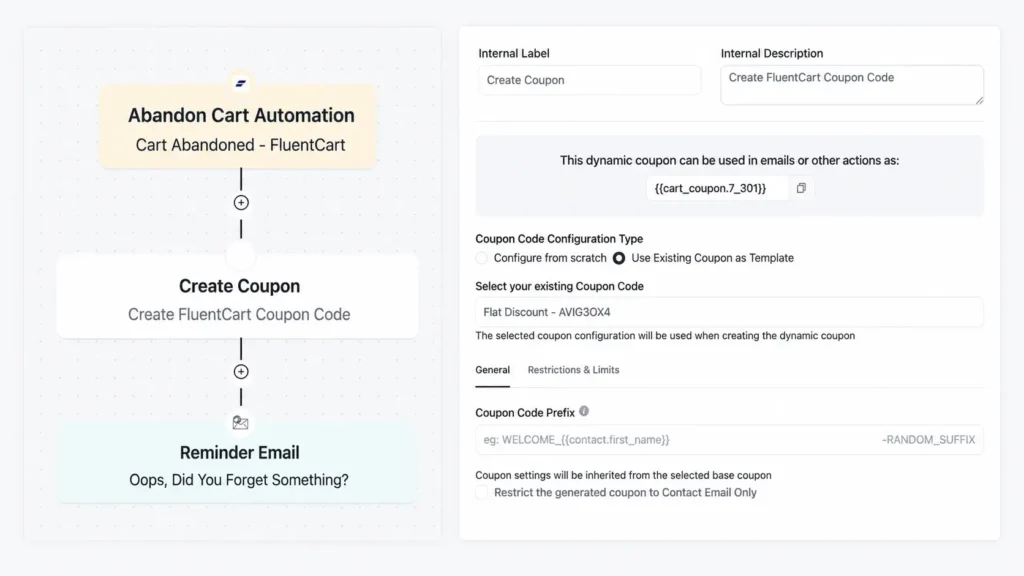
For FluentCart users, FluentCRM 3.2.0 adds a new Create Coupon automation action.
This means you can create a coupon from new settings or use an existing FluentCart coupon as the starting point or create one from scratch.
When created, FluentCRM generates a unique code for the contact and makes it available through the {{cart_coupon.*}} smartcode, so the offer can be placed into the message that follows in the automation.
This is especially useful when the offer should belong to a specific customer journey. For example: A store can create a coupon during a retention, loyalty, or follow-up workflow without preparing a separate code for every contact in advance.
The important outcome is simple: the coupon and the message can be created as part of the same automation instead of becoming another manual handoff.
Faster Sending and More Predictable Daily Work
Large campaigns place more pressure on every part of the sending process. FluentCRM 3.2.0 improves that path so campaign sending can move through large recipient lists more efficiently.
We are deliberately not attaching a percentage to that improvement because results depend on the site, database, sending provider, and workload. The practical goal is faster, more dependable processing when a campaign is large.
The license screen has also been redesigned around clearer states. A license in its grace period is shown as such instead of looking fully active, and activation or deactivation actions provide clearer feedback.
Other Improvements
Several other improvements make FluentCRM fit the rest of the WordPress site more naturally:
- Event tracking dates follow the site’s configured date format.
- Tag and list names are checked against supported lengths before they are saved.
- Active WooCommerce subscriptions are included when data is re-synced.
- Non-subscribed contacts can be invited to opt in again through supported forms and LMS integrations.
- Inputs, buttons, and administrative screens receive additional dark mode polish.
- Strengthened role and policy boundaries across FluentCRM, helping ensure actions and protected areas respect the access assigned to each user.
- Campaign revenue updates correctly after a re-sync
- Rrefunded WooCommerce orders no longer break or distort revenue totals
- Raw HTML campaign content saves correctly
- Several SmartCode, image-link, bounce-recording, and browser-view issues have been fixed.
Start with One Useful WhatsApp Workflow
FluentCRM 3.2.0 is available now. You can update it from your WordPress dashboard.
If you are enabling WhatsApp, start with one automation or one carefully selected audience. Confirm the opt-in path, connect your provider, test the message, and make sure someone is ready to handle replies.
A smaller first workflow will teach you more than a broad campaign sent before the process is ready.
Thank you for the feature requests, bug reports, and detailed examples that continue to shape FluentCRM. After you update, let us know what works well and where the workflow still creates friction. If you need help, the FluentCRM support team is always happy to assist!
Full Changelog
FluentCRM 3.2.0 — August 20, 2026
New
- Added the WhatsApp module, with messaging and automation capabilities
- Added the FluentCart Create Coupon automation action with {{cart_coupon.*}} smartcode support. The action is included in FluentCRM core and requires FluentCart.
- Added theme colors to the email editor.
- Added Media & Text block support in emails.
- Added Select All for contacts in FluentCampaign Pro dynamic segments.
- Added Replace, Add, and Subtract modes to bulk custom field updates.
Improvements
- Redesigned the license screen with a distinct grace-period state and clearer status information.
- Updated event tracking dates to follow the site’s configured date format.
- Added length checks for tag and list names before saving.
- Improved sending performance for large campaigns.
- Improved dark mode styling across inputs, buttons, and administrative screens.
- Allowed non-subscribed contacts to be invited to opt in again through supported forms and LMS integrations.
- Included active WooCommerce subscriptions when data is re-synced.
- Strengthened role- and policy-based security boundaries.
Fixes
- Fixed bounces from ToSend not being recorded
- Fixed the `fluent_crm/default_email_design_template` filter not being applied to templates created from scratch
- Fixed raw HTML campaign content not saving in the editor
- Fixed `https://` being incorrectly added to SmartCode button links
- Fixed image links being lost when replacing an image from the media library
- Fixed styling issues on the View in Browser email page
- Fixed outdated campaign revenue remaining after re-syncing a campaign report.
- Fixed a fatal error and incorrect campaign revenue totals for refunded WooCommerce orders.
- Fixed the configured default contact status not being honored for WooCommerce and Easy Digital Downloads purchases.
- Fixed phone numbers in local formats being rejected.
- Fixed tag searches returning empty results when searching from page 2.
- Fixed incorrect counts in automation step reports.
- Fixed additional security issues.
- Included additional maintenance improvements and bug fixes.
In Case You Missed
The last few FluentCRM releases have been closely connected.
FluentCRM 3.1.9
- New MCP abilities for tags, lists and contact filters, plus batch contact lookups and automation enrollment data.
- Sticky notes in the automation editor
- FluentCRM contact widget for the FluentCart customer page
- Empty / Not Empty operators for tags, lists and companies in advanced filters.
FluentCRM 3.1.8
- Email sending now respects the configured maximum sending cap.
- Abandoned cart totals, provider recovery notices, and FluentCart coupon fallback fixes.
- Reflected XSS issues fixed in admin flows.
FluentCRM 3.1.7
- Email sending cap centralized; funnel table sorting by created and updated dates.
- FluentCart checkout opt-in fixes for modal checkout and list names.
- Email footer, template import and Gutenberg editor rendering fixes.
FluentCRM 3.1.5
- FluentCart checkout subscription opt-in with lists, tags and double opt-in.
- CSV export for FluentCRM system logs / CRM logs with date range options.
- Global link color picker in the Gutenberg email editor, plus company quick-create in contact addition.
Shahjahan Jewel
Hello, this is Jewel, CEO & Head of Ideas at WPManageNinja. I am obsessed with WordPress since 2009. My aim is to be a user-centric developer first, and a serial entrepreneur second. You will find me discussing various tech issues and trying to come up with scalable solutions on different forums when I am not busy coding.
Table of Content
Related Articles and Topics
-
FluentCRM 3.3: Campaign Calendar, FluentCart Order Previews, Faster Automations and More
If you send emails, text messages, and WhatsApp messages from FluentCRM, every one of those…
-
FluentCRM 3.2.6: Stronger Security, Better Contact Workflows, and Important Developer Updates
Your contacts, your email history, and your store data live in your own WordPress install.…




