

How to Build a Course Certificate Automation Funnel in FluentCRM [+Setup Guide]

Summarize with


Last Updated:
A student clicks “Finish Course,” the progress bar hits 100%, and a small message appears: “Congratulations, you’ve completed this course.”
Then, no follow-up, no certification update, nothing. Just a quiet dead end at the exact moment a student is at their most proud, and most persuadable state.
If your course platform hits this same wall, then you’re losing the most important engagement potential. And it barely matters which LMS plugin is running your business underneath.
That’s the gap FluentCRM’s certification automation funnel is built to close.
Here’s how to build one, and what to watch out for.
Key Takeaways
- A certification funnel turns a one-time “you’re done” screen into tagging, a certificate email, and a next-course offer.
- The same certificate automation works across LMS plugins, since FluentCRM’s block names stay nearly identical.
- FluentCRM can’t see quiz pass/fail, only course completion, so build around “Course Completed.”
- The build needs only a handful of blocks: a trigger, two waits, two tags, two emails.
- Certified alumni are a durable segment worth reusing later for referrals, renewals, or feedback.
Why Does the Certification Moment Deserve Its Own Funnel?
By the time someone reaches the certification point, three things are already true:
- They’ve already paid for the course once
- They trusted the teaching enough to actually finish it, rather than dropping off
- They now have proof of completion, because certification is what they get for finishing
Put together, that’s not a cold subscriber you’re trying to convince. It’s someone who already paid, already trusted the material enough to finish it, and now holds proof that it worked.
That combination makes them one of the warmest leads your course business will ever produce.
Course creators must not let that moment pass.
Every LMS shows its native completion screen, maybe fires a generic notification, and the relationship should not go quiet after this, because that’s the right time when it should be getting louder.
So, a certification funnel exists to catch that exact window:
- Acknowledge the win properly
- Hand over the certificate without friction
- Once the moment has settled, offer the logical next step while interest is still fresh.
It’s the same logic behind a good student onboarding sequence, just running at the other end of the course instead of the beginning.
The Building Blocks Any CRM Needs for This Certificate Automation Funnel
Regardless of which LMS plugin or CRM plugin you use, building a certificate automation requires the same handful of pieces.
The names may differ slightly platform to platform, but the shape doesn’t change.
| Block | What It Does |
|---|---|
| Trigger | Starts the funnel the moment a course is marked complete |
| Wait | Buffers a few minutes so the LMS finishes generating the certificate |
| Tag | Marks the contact as certified for that specific course |
| Delivers the certificate and congratulates the student | |
| Wait | Lets the achievement land before anything else is offered |
| Email + LMS action | Offers the next course and enrolls the student into an alumni group |
This is essentially what LMS workflow automation looks like once you narrow it down to a single moment in the student journey: completion.
Where the Naming Differs by Platform
From here on, every screen, trigger, and action name in this guide comes from FluentCRM. That’s the CRM doing the driving throughout.
Because FluentCRM connects natively to LearnDash, TutorLMS, LifterLMS, LearnPress, Academy LMS, and FluentCommunity, the trigger and action names stay nearly identical across all of them; only the plugin sitting underneath changes.
For example:
- A “Course Completed” trigger behaves the same way whether it’s watching LearnDash or TutorLMS
- An “Enroll to Group” action works the same regardless of which platform is managing the group.
The only real adjustment when switching platforms is double-checking that your specific plugin’s version of each block is selected, not rebuilding the logic from scratch.
A Real Limitation Worth Knowing Before You Build
Here’s the honest part most guides skip: “Course Completed” is a course-level signal, not a quiz-level one.
It’s tempting to assume you can branch a certification funnel on whether a student passed the final exam versus just finished the course.
In practice, most CRM-to-LMS integrations, FluentCRM included, don’t expose individual quiz scores or pass/fail results as a conditional. What they can see is whether the course itself has been marked done.
That’s not really a flaw, just a limit worth planning around.
If your course requires passing a quiz to complete at all, the “Course Completed” trigger already implies that requirement was met, since the LMS itself won’t mark the course finished otherwise.
What You’ll Need Before Building This Course Certification Automation
A few basics need to be in place before any course certificate automation like this one will actually work.
- LMS Plugin: An installed and active LMS plugin, with at least one certification course already built.
- CRM Connection: A CRM with LMS triggers and actions, connected to that plugin in FluentCRM, this lives under Settings, then Integration Settings.
- Integration Sync: The integration turned on, with existing students synced so no one who enrolled or completed earlier is left out.
- Certificate: A certificate already configured and tested inside the LMS itself, since the automation only links to it rather than generating it.
- Course length: A rough idea of how long the course typically takes, since the wait windows depend on it.
Once those are confirmed, the trigger and action names covered below should already be visible inside your automation editor.
Building the Course Certification Automation Inside FluentCRM [Step by Step]
Here’s how the whole thing comes together inside a CRM’s automation editor.
Pick Your Trigger
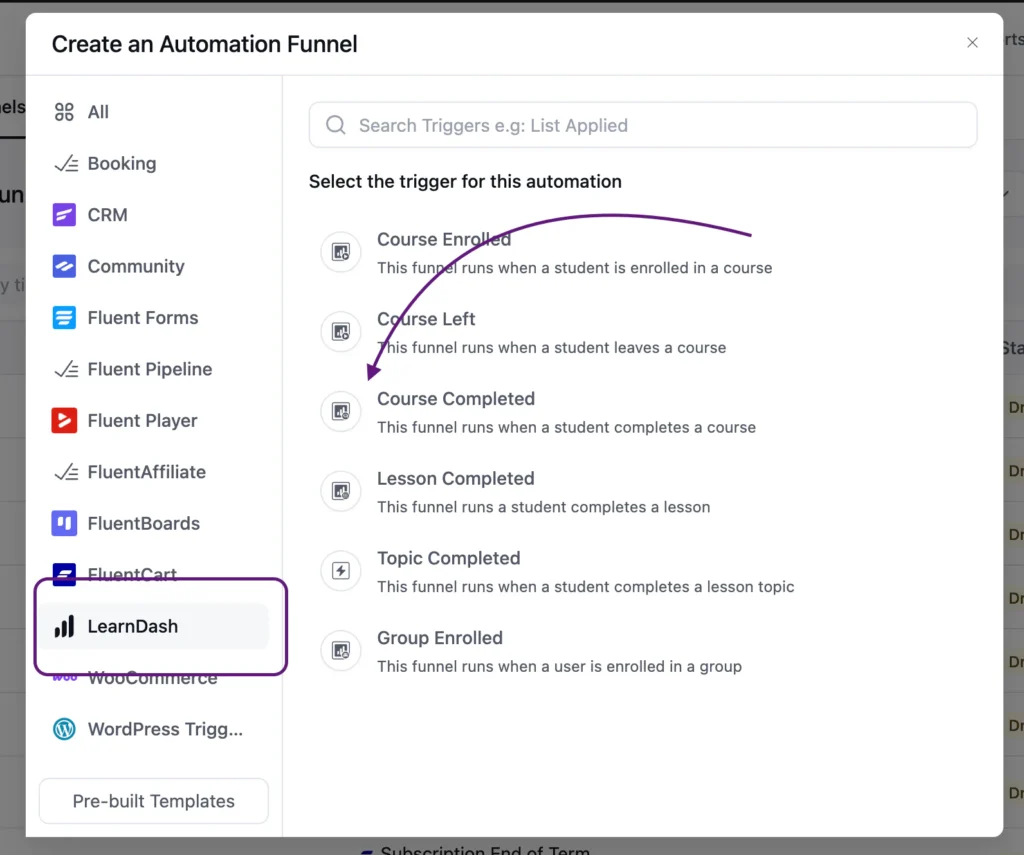
Choose “Course Completed” from your LMS’s trigger group, here we use the trigger for LearnDash.
After that, set the target course to your specific certification course.
Add a Short Wait
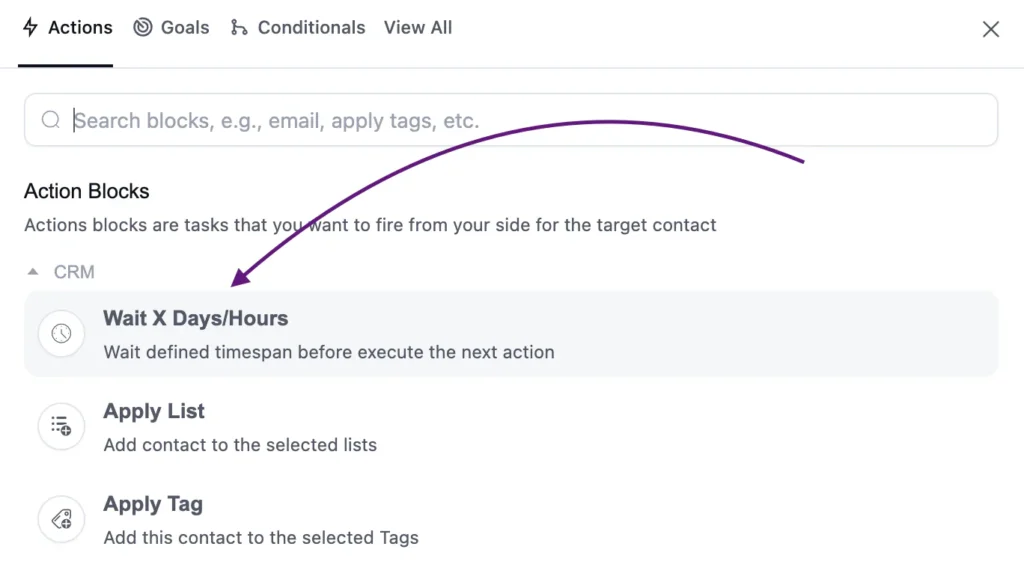
Ten minutes is usually enough. Certificates are often generated a moment after completion rather than instantly, and this buffer keeps the next email from racing ahead of the actual certificate file.
Apply a Tag
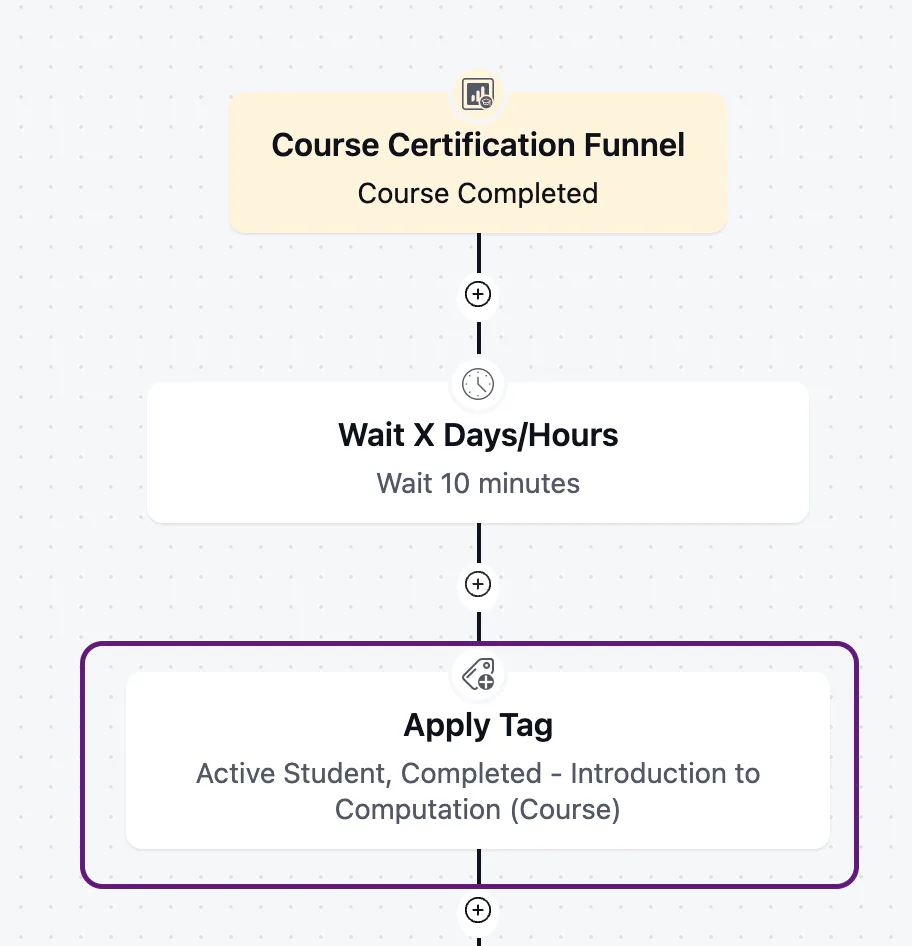
Apply two tags here, not one.
- A shared “Active Student” tag goes on every contact who completes any course, so it builds an overall picture of who’s actively engaging across your entire catalog.
- A course-specific tag like “Completed – [Course Name]” tracks that one certification on its own. Together they let you see both the big picture and the per-course detail, without one view crowding out the other.
Send the Certificate Email
Lead with the certificate link, not a sales pitch.
Congratulate the student by name, mention the course by name, and give them one clear, low-friction next step, like viewing their certificate or joining an alumni space.
Here’s a sample email template you can use:
Hi {{contact.first_name}},
You did it! You’ve officially completed [Course Name] and your certificate is ready.
[Download Your Certificate →]
This certificate represents [X hours / skills covered / what it qualifies them for], so it’s worth holding onto, and worth sharing if you’re proud of it (you should be).
Congratulations once again for this brilliant achievement.
With love,
[Your name / Team name]
Add a Longer Wait
Seven days is a reasonable default, 3 days can also work. This is the gap between celebrating the win and asking for anything, and it’s worth adjusting up or down once you see how your specific course’s students behave.
Send a Next-Step Offer & Enroll Into an Alumni Group
An email like “Next Course Offer for Certified Alumni,” welcoming the student into the alumni side of things by name, points to the next course or a related offer. The LMS action running alongside it enrolls them in an alumni group for ongoing content, separate from the paid course structure.
Hi {{contact.first_name}},
Welcome to the alumni circle. Completing [Course Name] puts you in a small group of people who actually finished what they started, and that’s worth something.
You’ve also been added to our alumni group, where you’ll get ongoing content and updates separate from the course itself. Keep an eye out there.
A lot of alumni ask us what to learn next after finishing this course.
For most people, the answer is [Next Course Name], it picks up exactly where you left off.
[Explore Next Course Name →]
No pressure if now isn’t the right time. Your alumni access doesn’t expire, and we’re glad to have you here either way.
With love,
[Your name / Team name]
Closing the Funnel Properly
End with an explicit end block rather than letting the automation trail off. It’s a small habit, but it prevents any accidental fall-through if you add more steps to this automation later.
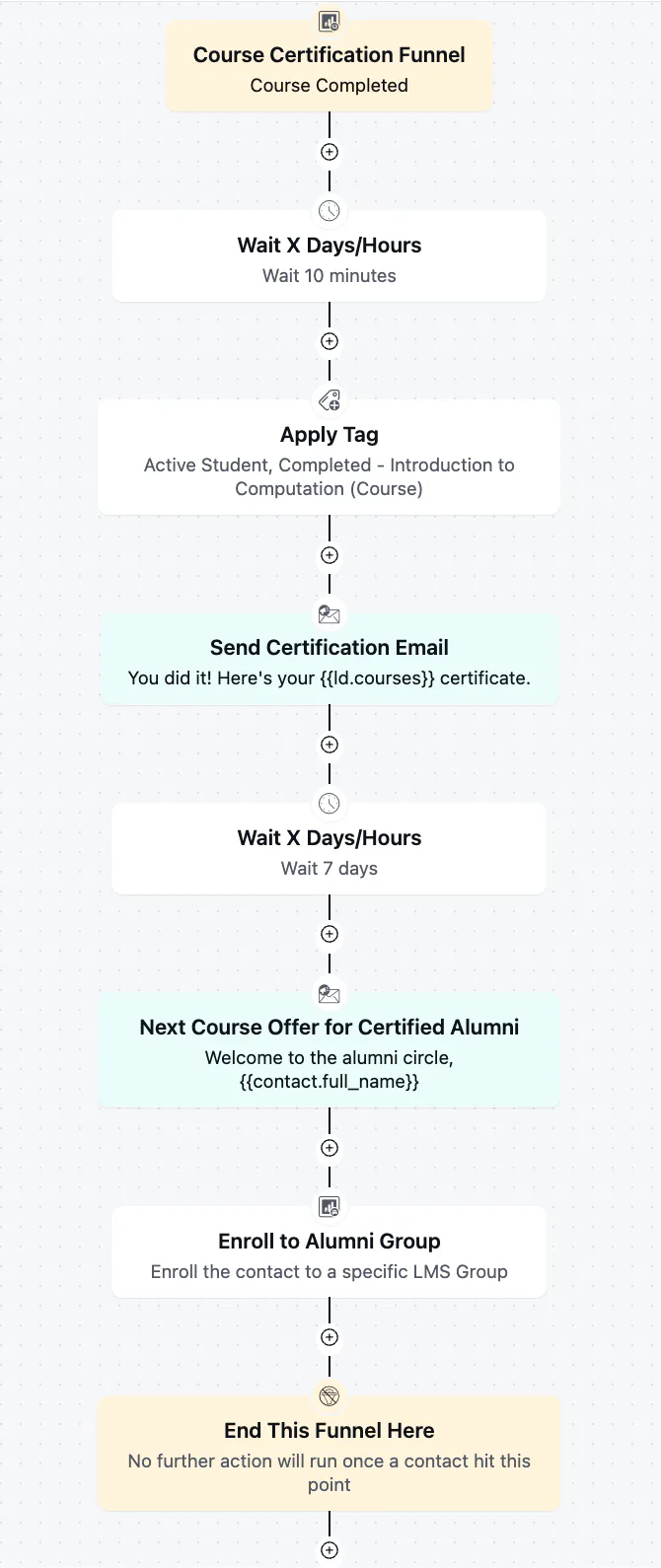
A Sample Certification Funnel Timeline
If you’re unsure how to space things out, here’s a reasonable starting point:
| Step | Timing | Purpose |
|---|---|---|
| Completed trigger | Immediate | Starts the funnel the moment the LMS marks the course done |
| Wait | 10-15 minutes | Buffers certificate generation |
| Tag + list | Immediately after wait | Segments the contact as certified |
| Certificate email | Immediately after tagging | Delivers the win and the certificate link |
| Wait | 3–7 days | Lets the achievement settle before any offer |
| Next-course email | After the second wait | Offers the logical next step |
| Alumni group enrollment | Same time as the email | Keeps the student engaged post-course |
Note: These are starting numbers, not fixed rules. A dense professional-certification course might warrant a longer gap before the upsell; a short skills course might do fine with three days. Adjust once you have real open and click data to look at, the same instinct behind tuning other trigger moments elsewhere in the student journey
Common Mistakes to Avoid
A few small missteps turn this from a helpful funnel into a forgettable one:
- Sending the certificate email instantly, before the certificate link is even ready.
- Pitching the next course in the same email as the certificate.
- Reusing a generic “completed” tag across every course instead of one per course.
- Assuming this funnel can tell who barely passed from who excelled.
- Never revisiting the wait windows as course length changes.
Extending This Funnel Beyond Certification
The tags built in this funnel don’t have to stop working once the certificate email goes out.
Certified alumni are a durable segment, and a few other workflows can build directly on top of the one you just made.
Turning Alumni Into Referral Sources
Someone who finished a course and got certified is in a strong position to recommend it to someone else.
A simple follow-up campaign, sent weeks after the certification funnel ends, can ask certified alumni for a referral or a written testimonial while the experience is still fresh enough to describe well.
Reminding Alumni Before Access or Certification Expires
If a certification has a renewal period, or course access is time-limited, the same certification tag becomes the audience for a renewal reminder campaign.
This is a separate automation from the one built here, but it reuses the exact segmentation this funnel has already created.
Feeding a Course Feedback Request
A short feedback or review request, sent to the same tagged group a few weeks after certification, tends to get more thoughtful responses than one sent immediately, since students have had time to actually apply what they learned. It also gives you a running source of testimonials for the certification course’s sales page.
None of these require rebuilding this funnel. They’re separate automations that simply point at the tags this one already produces.
Let the Certification Moment Do More
Every completed course is a small, quiet win that most course platforms let pass without comment. A single native completion screen isn’t built to carry that moment anywhere, and left alone, it doesn’t.
That’s what building this certificate automation actually buys you: the certification moment stops being a dead end and starts being a properly acknowledged achievement, and a warm lead for whatever you sell next.
Build it once, point it at your certification course, and let it run quietly in the background for every student who reaches that same finish line after you.
Tanzil Ebad Efti
Content Writer & Strategist
Words are my favorite playground. As a Creative Writer at WPManageNinja, I don’t just produce content; I tell stories. By mixing fiction and metaphors with real-life examples, I turn my writing into a creative journey that’s easy for readers to digest and relate to.
Table of Content
Related Articles and Topics
-
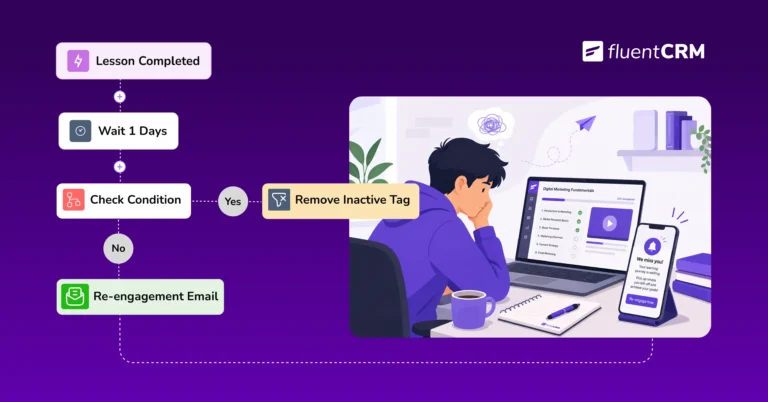
How to Recover Inactive LearnDash Learners to Improve Student Engagement Using FluentCRM
Imagine a student who blazed through the first three lessons in two days, then went…
-
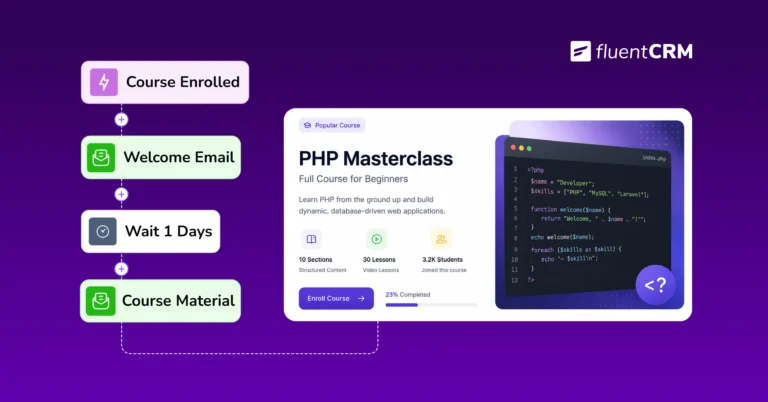
LMS Workflow Automation: What is it, Benefits & The Right Tool for it? [+Setup Guide]
Every time someone buys your course, you do the same thing manually: add them to…




