

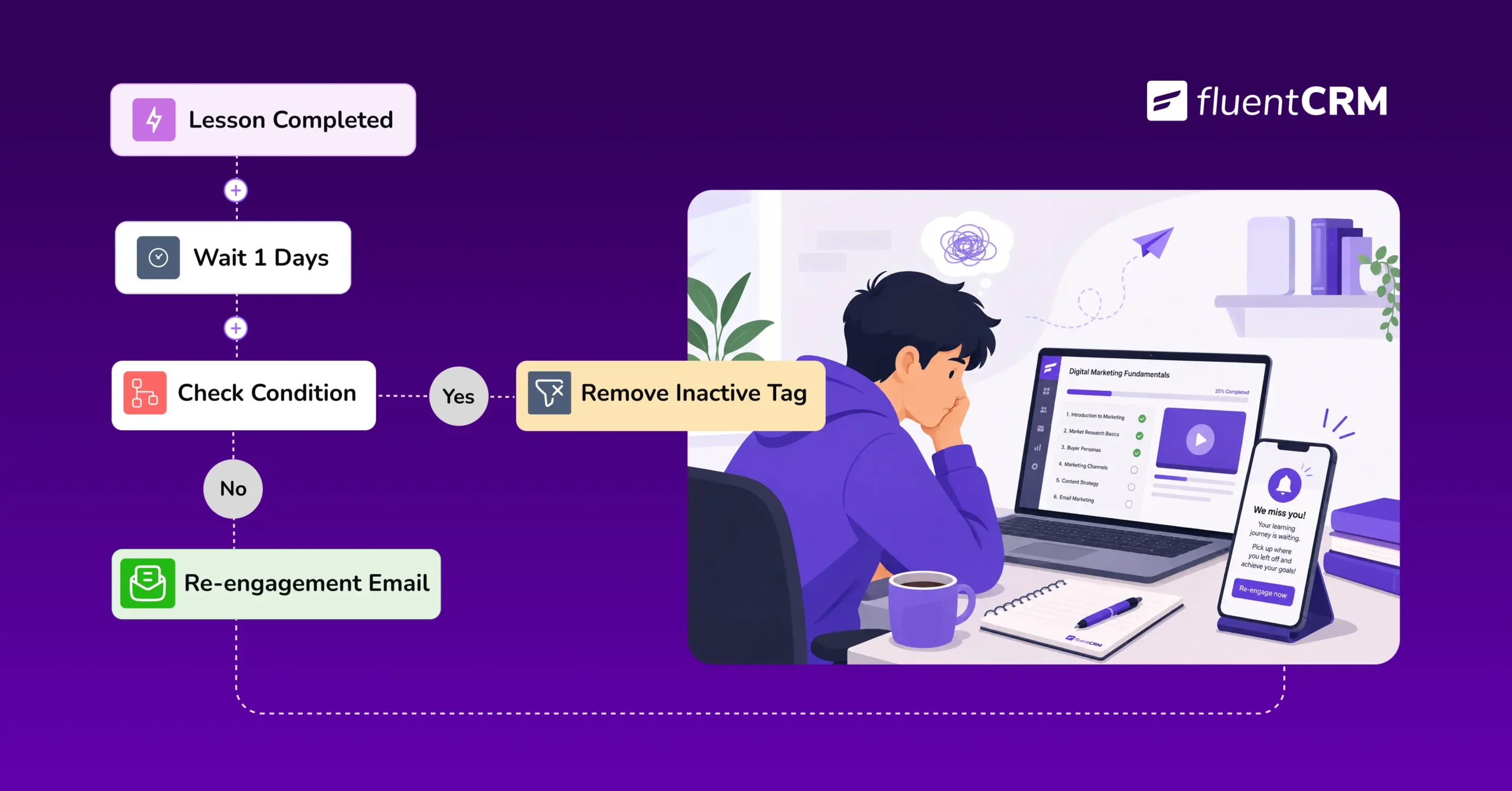
How to Recover Inactive LearnDash Learners to Improve Student Engagement Using FluentCRM

Summarize with


Last Updated:
Imagine a student who blazed through the first three lessons in two days, then went quiet; no completion, no login, just gone.
Sometimes, you didn’t do anything wrong, and neither did she. Life got busy, or lesson four looked harder than lesson three, and the course quietly slipped off her list.
So, how to re-engage learners before they disappear for good is exactly what this guide is about.
Why Student Engagement Goes Silent?
Every course loses some students to silence, not to refunds, not to complaints, just quiet disengagement.
A student who used to log in every few days stretches it to once a week, then once a month, then stops altogether, and by the time anyone notices, they’ve been gone for weeks.
This is a common pattern that every course-selling platform encounters.
And every LMS platform has its own workflow automation funnel to tackle such a situation.
Before you can fix it, it’s necessary to know exactly which learners you should consider as inactive.
What Counts as an “Inactive” Student?
An inactive student is still enrolled and still has full access. They just stopped engaging: no logins and no lessons completed in two or three weeks.
And this usually happens for a few ordinary reasons:
- Life gets busy.
- A lesson feels harder than expected.
- The course loses its early excitement.
None of that means they don’t want to finish; it just means nobody reminded them to come back.
How FluentCRM Detects Inactivity
Here’s the honest answer: FluentCRM doesn’t have a direct “inactive student” trigger you can switch on.
Instead, you build the check yourself out of three pieces it already gives you: the Lesson Completed trigger and a Wait step.
The trick is to prepare a workflow with a Lesson Completed trigger, so the automation checks in after every lesson a student finishes, rather than just once at the start.
After a wait period, it checks, then nudges to keep going. If they still don’t respond, adding an “Inactive” tag gives you a running list of who’s at risk.
This works because FluentCRM connects to LearnDash directly, so the lesson and completion data are already there to build on. Default LMS notifications sometimes can’t do all this, since they don’t loop back to check what a student actually did.
Why Re-Engaging Learners Improves Student Engagement
Winning back even a handful of inactive students changes more than a completion percentage.
Every course creator already senses that a quiet student represents a loss; what’s less obvious is how many different ways that loss actually shows up.
Here’s how it improves student engagement:
- Improves your course completion rate, increasing course completion stats and encouraging new buyers.
- Saves your reviews and testimonials, keeping the feedback that comes from students who actually finish.
- Recovers lost revenue, reducing refund requests from students who never finished.
- Opens the door to future sales, turning finished students into buyers of your next course.
- Costs less than acquiring new customers, saving the ad spend it takes to replace them.
In short, most inactive students just need one well-timed nudge to pick back up where they left off, which is exactly what a good onboarding sequence does at the start of a course, and a re-engagement automation does in the middle.
Building Your First LearnDash Re-Engagement Automation with FluentCRM
You don’t need a complicated setup to catch most inactive students. An automation with five or six pieces is enough to get started, and if you’ve built any other FluentCRM automation before, this one will feel familiar.
- Pick your trigger. Use “Lesson Completed”; it checks in after every lesson instead of just once at enrollment.
- Add a Wait step. 7 days for a short course, 14 to 30 for a longer one.
- Add a Condition step. Check whether “Course Completed” is still no.
- Branch the outcome. Yes means they’re progressing; let it end quietly. No routes them into your re-engagement sequence.
- Write one or two short emails. Remind them what they were working on, link back to where they left off, and ask a real question instead of “we miss you.”
- Test it, then turn it on. Enroll as a test student, don’t finish anything, and confirm the email fires before it touches real students.
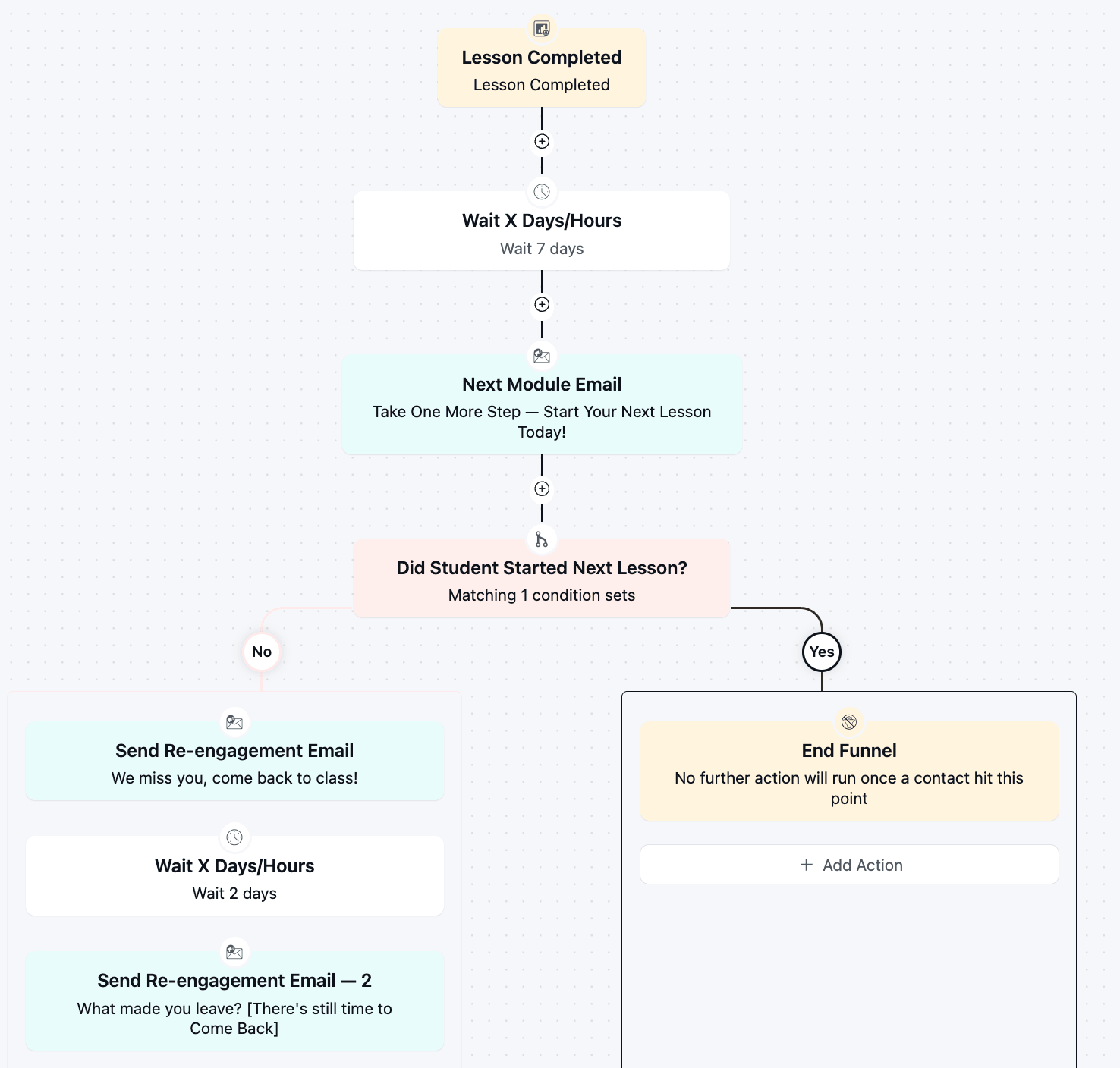
Once it’s running, don’t treat it as finished. Check back after a month: if almost everyone is branching into the re-engagement sequence, your wait window is probably too short.
If almost no one is, it might be too long, or too generous a definition of “progress.” A small adjustment here and there is normal.
Once the first one is working, the same steps apply to every other course you sell; only the wait window really needs to change from course to course.
There’s no need to rebuild the logic each time; just clone the automation, point it at the new course, and adjust the timing to match.
Common Mistakes to Avoid
A few small missteps turn these automations from helpful to annoying:
- Setting the wait window too short, as it interrupts students who are still working at a normal pace.
- Sending one generic blast that doesn’t tell students what to do next.
- Re-engaging forever; stop after two or three ignored follow-ups.
- Forgetting to test the condition means your automation won’t even function the right way.
Read More: 6 Practical Use Cases of LearnDash Automation Triggers Every Course Creator Should Set Up.
Recover Student Engagement, One Automation at a Time
Every course you sell will lose some students to quiet disengagement; that part isn’t avoidable. What is avoidable is losing them without ever trying to bring them back.
Re-engaging your LearnDash learners doesn’t need a dramatic rescue plan; it takes a simple automation setup that will nudge students who forget to engage.
And recovering student engagement is something FluentCRM handles for you.
Because we know every course you save from finishing empty is one more student who becomes a review, a referral, or a repeat customer instead of a statistic in your dashboard.
Tanzil Ebad Efti
Content Writer & Strategist
Words are my favorite playground. As a Creative Writer at WPManageNinja, I don’t just produce content; I tell stories. By mixing fiction and metaphors with real-life examples, I turn my writing into a creative journey that’s easy for readers to digest and relate to.
Table of Content
Related Articles and Topics
-
How to Build a Course Certificate Automation Funnel in FluentCRM [+Setup Guide]
A student clicks “Finish Course,” the progress bar hits 100%, and a small message appears:…
-
LMS Workflow Automation: What is it, Benefits & The Right Tool for it? [+Setup Guide]
Every time someone buys your course, you do the same thing manually: add them to…




