

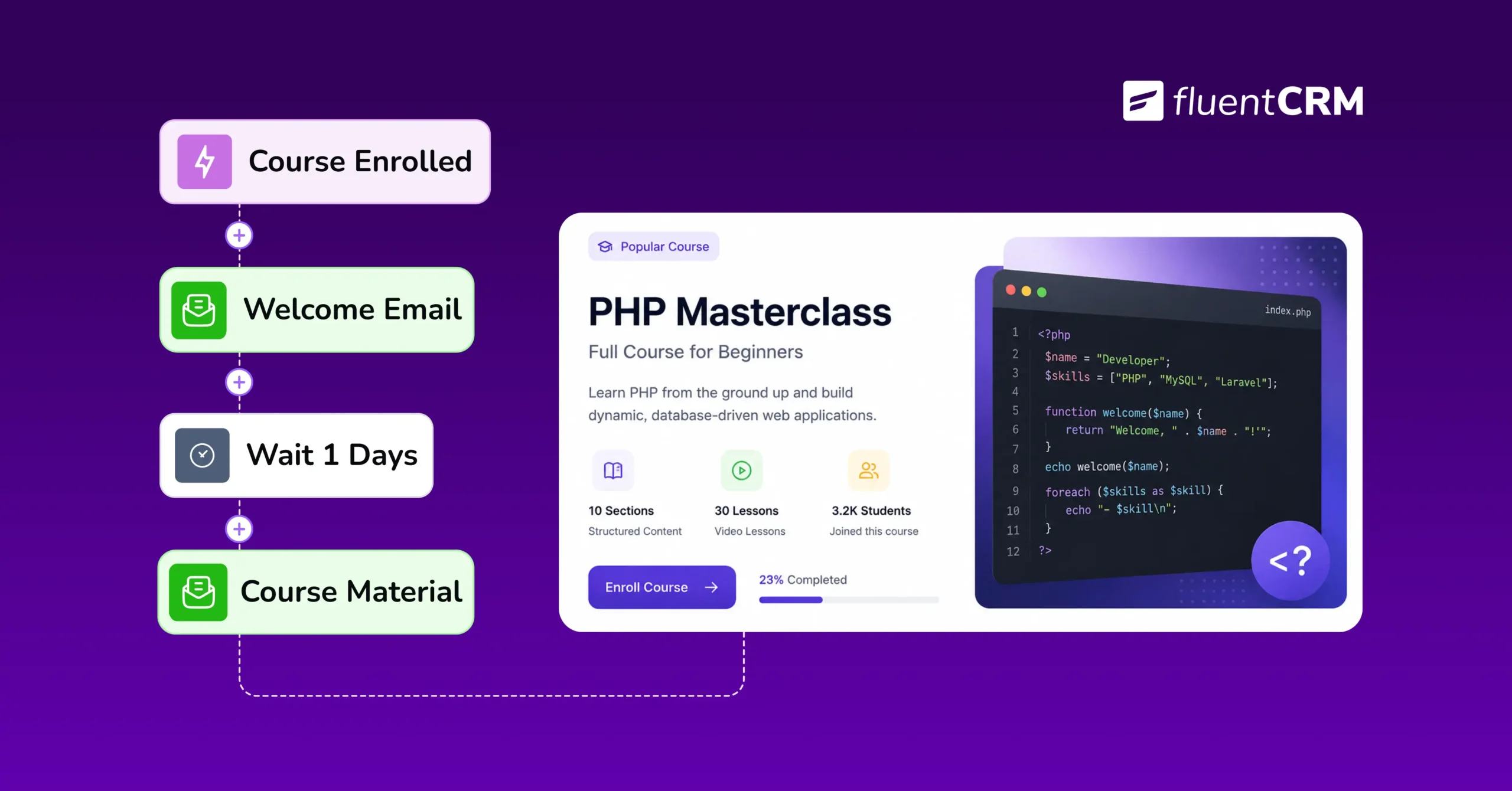
LMS Workflow Automation: What is it, Benefits & The Right Tool for it? [+Setup Guide]

Summarize with


Last Updated:
Every time someone buys your course, you do the same thing manually: add them to your list, send the welcome email, and hope you remember to follow up later. That’s not something that’s supposed to kill your valuable time.
If you run LMS workflow automations, it takes that tedious manual labour off your plate.
LMS automation’s functionality is simple: set the rules once for any action (who gets welcomed, who gets a certificate, who loses access), and automations trigger automatically after each action for every student, without you doing it by hand again.
This guide covers what LMS workflow automation actually is, why it matters more for independent course creators, and which tools make LMS integration and automation possible on WordPress.
Key Takeaways:
- Your LMS and a connected CRM handle student tasks automatically instead of by hand.
- Saves hours a week, improves completion, grows and protects revenue, and keeps the experience consistent.
- Enrollment, inactivity check-ins, certificates, upsells, membership renewals, and access removal; everything can be automated.
- A CRM connects natively to your LMS, whether that’s LearnDash, TutorLMS, LifterLMS, LearnPress, Academy LMS, or FluentCommunity.
- A few clicks inside WordPress, no code, similar steps across every supported platform to set it up.
- Avoid automating everything at once, don’t “set and forget,” and don’t send everyone the same message.
- Pick one workflow; a student onboarding sequence is easiest, connect your LMS, and build from there.
What is LMS Workflow Automation?
LMS workflow automation is the use of trigger-based rules, typically run through a CRM connected to your LMS, to automatically handle repetitive student tasks.
For example:
- A student enrolls, and they’re automatically welcomed.
- A course gets finished, and a follow-up goes out on its own.
- A membership ends, and a subscription renewal notification gets sent.
Once course creators set up their LMS automations, they keep running for every student, whether you have 10 or 10,000 students.
It’s worth mentioning that most LMS plugins already have a built-in system for sending a few emails or SMS messages, a receipt, and an access confirmation, but they don’t track everything a student does along the way.
That’s exactly what a connected CRM adds. Once your LMS is linked to one, the CRM tracks that activity and sends the right automated notifications to each student based on what they actually do, without leaning on the LMS’s built-in tools to make it happen.
Why It Matters for WordPress Course Creators & Coaches
When you run a course business on WordPress through LearnDash, TutorLMS, LifterLMS, or a similar plugin, there’s no way you can chase down inactive students or manually email everyone who just finished module three.
That’s exactly why LMS automation matters more here, not less:
- It replaces the workload of manual follow-up to every student
- It keeps students engaging with gentle nudges and keeps the revenue engine running
- It keeps you just as attentive at student five hundred as you were at student one
- It frees up the hours you’d rather spend teaching, coaching, or building the next course
Benefits of LMS Workflow Automation
It’s not always about the automation; rather, it’s what LMS automation workflows free up time and what they fix.
Here’s what changes once the busywork runs itself:
- Saves Time: Onboarding sequence emails, reminders, and access changes usually eat hours every week. When automated once, it saves about two or three hours a week for good.
- Improves Engagement: Students don’t quit because a course is bad; they quit because life gets in the way. A regular nudge will keep them coming back.
- Grows Revenue: Completion-triggered upsells, cross-sell and win-back sequences turn one-time buyers into repeat ones, at no extra ad cost.
- Protects Revenue: Without renewal reminders, memberships lapse quietly; you only notice the revenue drop after it happens.
- Stays Consistent: Every student gets the same quality follow-up, whether they enrolled today or six months ago.
- Reduces Mistakes: Forgetting to remove access or mistagging a student by hand are errors automation simply can’t let happen.
- Adds Visibility: Once enrollment and progress are tracked automatically, you see exactly where students drop off.
- Builds Relationships: A well-timed nudge makes your course feel attentive, not automated.
- Scales Without Staff: The workflow that handles your first 50 students handles your next 5,000, with no extra setup.
What Can a CRM Plugin Help You Automate?
In practice, automation shows up at a handful of predictable moments in every student’s journey.
Your LMS plugin, whether that’s LearnDash, TutorLMS, LifterLMS, LearnPress, Academy LMS, or a community inside FluentCommunity, handles the course itself: the lessons, the quizzes, the certificates.
When a CRM has built-in LMS triggers, it connects those plugins, watching for moments and actions to act on them automatically.
Most CRM connects well with all those aforementioned plugins. Although the trigger names might slightly vary from platform to platform, the functionalities are almost universal.
Here’s what a CRM lets you automate:
- At Enrollment: Tag students by course, send a welcome sequence, and turn on their access automatically.
- During the Course: Check in if a student goes quiet, celebrate each lesson they finish, and follow up if they fail a quiz.
- At Completion: Send a certificate, tag them as a graduate, and offer their next course while interest is highest.
- Around Membership and Access: Remind students before a membership renews, remove access automatically if it lapses, and try to win them back afterward.
- Community and Admin: Welcome new members in FluentCommunity, and alert an instructor when a student looks stuck.
Read More: Practical Use Cases of LearnDash Automation Triggers
LMS Integration: How FluentCRM Connects to Your LMS Platforms
As we mentioned before, none of the above plugins work inside a CRM without LMS integration.
Integration acts like a connection; your LMS and FluentCRM share information the moment something happens.
Automation is what you do with that connection; the rules and actions that run once the two are talking to each other.
That’s why you need the first before you get the second.
FluentCRM connects natively to six platforms: LearnDash, TutorLMS, LifterLMS, LearnPress, Academy LMS, and FluentCommunity. “Natively” is the important part. Because FluentCRM is built for WordPress, and so are these plugins, there’s no third-party connector sitting in between reading your data.
When you turn the integration on inside your WordPress dashboard, enrollments, progress, and completion data start flowing into FluentCRM. When this happens, you are ready to automate whatever LMS automation workflow you’re planning to set up.
Setting Up LearnDash in FluentCRM
Most LMS plugins similarly connect to FluentCRM, so this LearnDash walkthrough should give you a good idea of what to expect no matter which platform you use.
Before you start, make sure FluentCRM Pro and LearnDash are both installed and active on your WordPress site.
Here’s what the setup actually looks like:
- In FluentCRM, go to Settings, then Integration Settings, and choose LearnDash.
- Set your defaults: which contact list new students should join, which tags to apply, and their subscription status.
- Click Sync LearnDash Students to pull in everyone who’s already enrolled, not just future sign-ups.
- Reload the page and save your settings.
- Set up a course, go to its Settings tab, and set up tags that should apply automatically when someone enrolls in or completes that specific course.
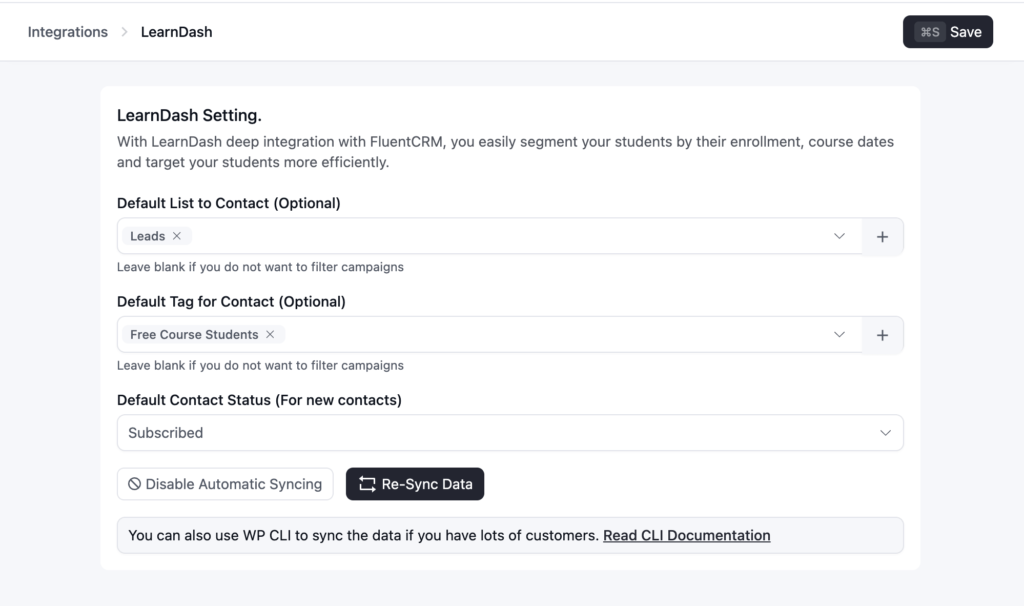
Once that’s done, the LearnDash data is now inside FluentCRM, and you can start building your first automation the same day.
Read Documentation: LearnDash Integration with FluentCRM
How to Set Up Your First LMS Automation inside FluentCRM
Since we just showed how to set up LearnDash, let’s use that same example to build your first automation.
You don’t need to automate everything at once, and you shouldn’t try to. Start with one workflow, get it working well, then build the next one.
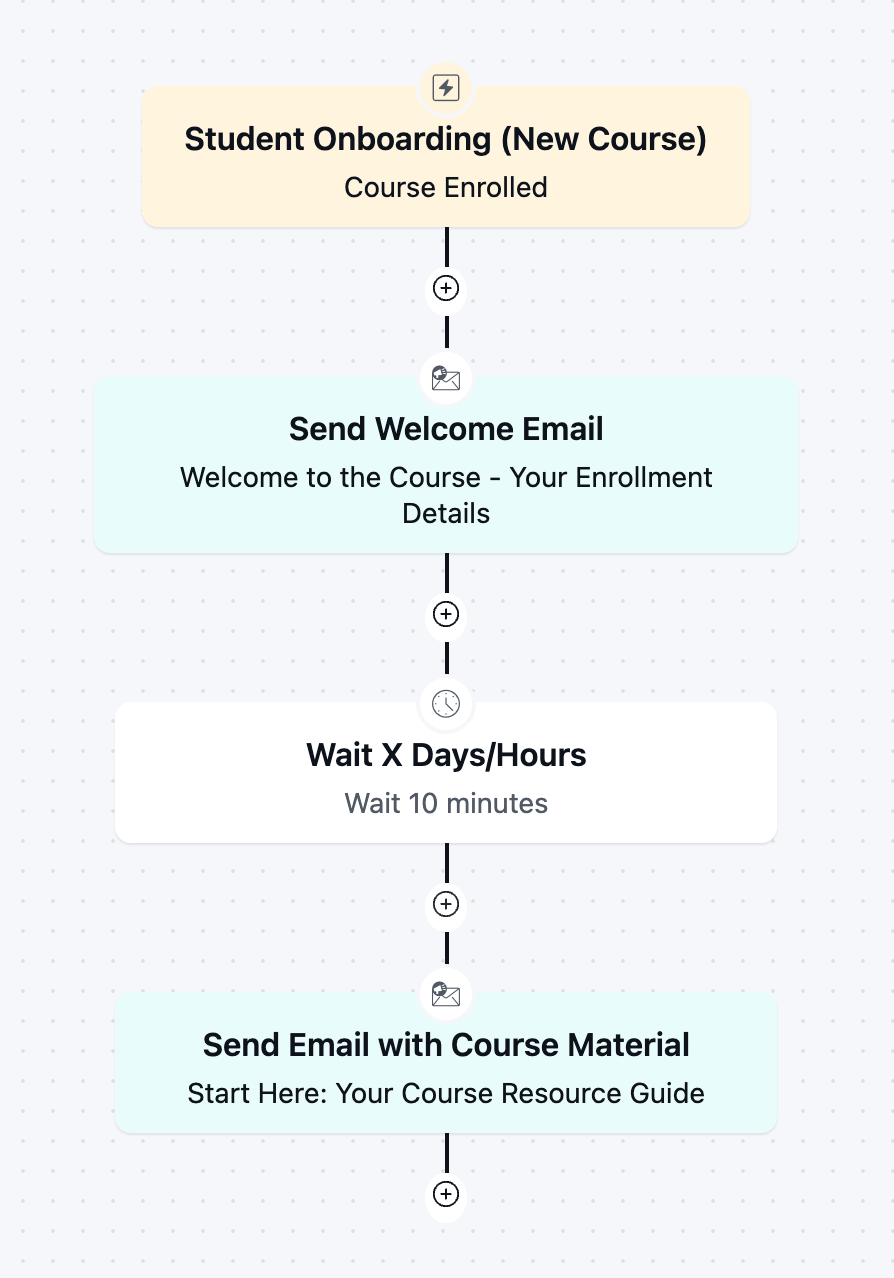
- Pick Your Starting Workflow: For most course creators, the highest-leverage first automation is a student onboarding sequence. It touches every single student, it’s the easiest one to see results from quickly, and it sets the tone for how the rest of the course will feel.
- Choose Your Trigger: In LearnDash, that’s “Course Enrolled” for an onboarding sequence, or “Course Completed” for an upsell.
- Set the Actions: Decide what should happen after the trigger fires: tagging, an email sequence, adding them to a list, or all three.
- Test it on Yourself First: Enroll in your own course as a test student and watch the sequence run before it touches real students.
- Turn it on, then Revisit it: Let it run for a few weeks, then check where students are dropping off, open rates, and click-through, and adjust the timing or message accordingly.
Read Full Walkthrough: Building an Automated LearnDash Student Onboarding Sequence
Common LMS Automation Mistakes to Avoid
Automation solves real problems, but it introduces a few new ones if you’re not careful.
These are the mistakes that show up most often once a course business starts automating.
- Automating everything on day one usually means rebuilding half of it a month later; start narrow instead.
- Treating LMS automations as “set and forget” lets sequences go stale; revisit them every few months.
- Sending the same message to everyone feels generic; segment by email, automation, or course activity.
- Letting your tools stop talking to each other is the real reason automations mysteriously break.
- Forgetting what happens when access ends costs trust; refunds and lapses need their own workflow too.
Automate Repetitive Learning Management Tasks
The repetitive parts of running a course business- welcoming students, tracking progress, cleaning up access- were never the reason you started selling courses.
LMS workflow automation takes away that manual workload for good, so they stop competing with the parts of the business you actually care about.
Start with the one repetitive task that costs you the most time or students, connect your LMS, and let it run from there.
Tanzil Ebad Efti
Content Writer & Strategist
Words are my favorite playground. As a Creative Writer at WPManageNinja, I don’t just produce content; I tell stories. By mixing fiction and metaphors with real-life examples, I turn my writing into a creative journey that’s easy for readers to digest and relate to.
Table of Content
Related Articles and Topics
-
How to Build a Course Certificate Automation Funnel in FluentCRM [+Setup Guide]
A student clicks “Finish Course,” the progress bar hits 100%, and a small message appears:…
-
How to Recover Inactive LearnDash Learners to Improve Student Engagement Using FluentCRM
Imagine a student who blazed through the first three lessons in two days, then went…




