

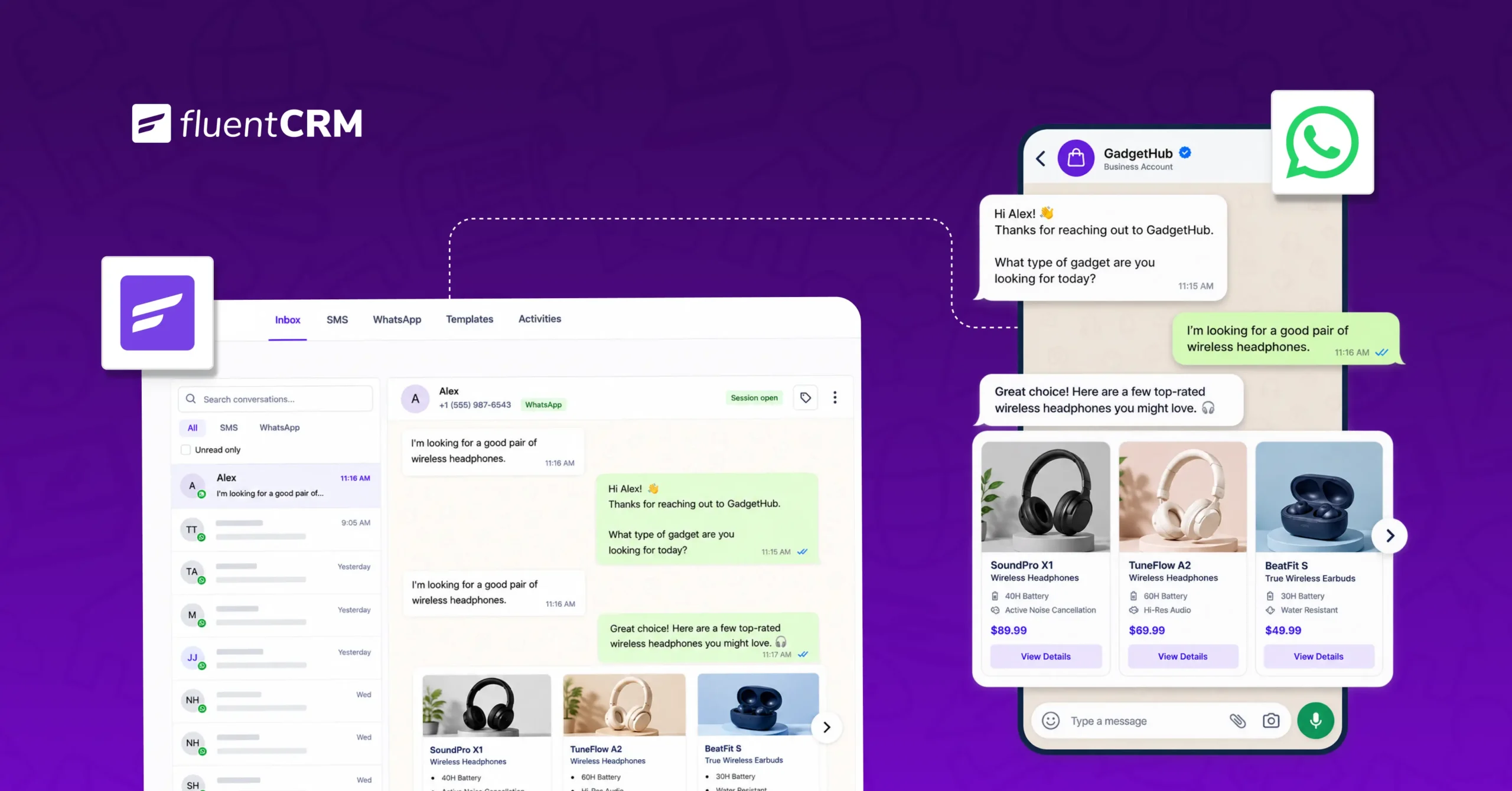
How to Drive More Engagement with WhatsApp Marketing Inside WordPress

Summarize with


Last Updated:
You might be sending emails to your contacts regularly. It might be:
- A weekly newsletter
- An order confirmation
- A welcome sequence for new customers
All of them work, and they should keep working.
But sometimes every business owner wants to send a certain kind of message that needs to be seen in the next ten minutes, not the next few hours.
That’s the gap WhatsApp marketing fills.
If you run a WordPress site, whether it’s a WooCommerce store, a coaching business, or a clinic that takes bookings, you already have most of what you need to make everything work.
This guide will show you how WhatsApp marketing works for faster, more personal customer engagement, right from your WordPress dashboard and alongside the email and SMS you already rely on.
What is WhatsApp Marketing?
WhatsApp marketing is the use of WhatsApp messages to automatically send relevant notifications to customers based on their actions, such as order updates, appointment reminders, cart reminders, and more. It works as part of a broader marketing strategy, alongside channels like email and SMS.
Why WhatsApp Marketing Belongs Next to Email and SMS?
Every channel you use to reach customers does something the others don’t.
- Email is great for telling stories, building relationships, and sharing detailed content
- SMS works best for short, direct, and time-sensitive updates
On the other hand, WhatsApp messages feel more personal and conversational, making it ideal for real-time customer conversations. People check it the way they check a message from a friend or a colleague, because for most of them, that’s exactly what it’s used for.
But that doesn’t make email or SMS less useful.
A thoughtful newsletter still builds trust over time; a short SMS reminder still gets the job done for simple, one-line updates. WhatsApp adds something different: a space for quick, personal, two-way conversations when customers need to respond.
Think of it less as choosing one channel and more as using the right one for each moment. Email can share helpful product tips; WhatsApp can deliver instant shipping updates. Each channel plays to its strengths.
The Difference Between a WhatsApp Chat Button and Real WhatsApp Engagement
Search for “WhatsApp for WordPress,” and almost everything you’ll find is a tutorial on adding a click-to-chat button to your site.
That’s a reasonable first step, but it’s worth being clear about what it actually does for your business, because it isn’t the same thing as WhatsApp marketing.
| Click-to-Chat Widget | WhatsApp Marketing | |
| Who starts the conversation | The visitor | You, based on what they’ve done |
| When it’s used | Only while someone is on your site | Anytime, triggered by an action or a schedule |
| What it does for you | Opens a chat window | Sends reminders, updates, and campaigns automatically |
| What it uses to decide | Nothing | Purchase history, tags, appointments, activity |
| How far it scales | One conversation at a time | Hundreds or thousands of customers |
How WhatsApp Marketing Improves Customer Engagement
Once WhatsApp is part of your marketing, a few habits separate the businesses that see real replies and repeat business from those whose messages get ignored or, worse, muted.
Sending Messages at the Right Moment
A reminder that shows up right after a customer leaves items in their cart, or the day before their appointment, feels helpful.
But that same message sent a week later, with no connection to what the customer actually did, just feels like noise.
The businesses getting the best engagement are the ones tying messages to real customer actions, not just a weekly send schedule.
Personalizing Every Message
A first-time customer and someone who’s ordered from you five times shouldn’t be getting identical messages.
An ideal business always segments their list based on customer interaction. Once the list is set, businesses send targeted WhatsApp messages to the audience based on their actions such as:
- What they’ve bought
- How often they’ve bought
- How engaged they are
With this personalization technique, messages will feel like they were written for that one person instead of blasted out to everyone.
Making it Feel Like Real Conversation
WhatsApp is built for real-time, chat-like conversations, making it more interactive than email or SMS.
If your marketing relies mostly on one-way email messages, you could be missing a valuable opportunity to engage with customers directly. WhatsApp fills that gap by turning messages into real-time, two-way conversations where customers can reply, ask questions, or take action right away.
Keeping Messages Less Frequent
WhatsApp is built for personal conversations, not constant marketing blasts. Sending several promotional messages every week can quickly overwhelm customers, no matter how high your open rates are.
Keeping messages relevant and using WhatsApp messages occasionally would keep maximum engagement intact.
Send fewer, more meaningful messages, and always make it easy for customers to opt out. This helps keep conversations useful instead of turning your number into one customers ignore.
Make WhatsApp Marketing Work Inside WordPress Without Adding Another Tool
If you’re already running your marketing through a CRM, the idea of adding WhatsApp marketing on top of Email and SMS can feel like signing up for one more tool to manage.
Also, a separate WhatsApp platform usually means managing
- A separate contact list
- A separate place to build automations
- A separate login to check every day
For a lot of business owners, that alone is reason enough to keep putting it off.
This is where a CRM built to handle more than just email comes in.
FluentCRM’s WhatsApp marketing is being built to sit right next to the email and SMS marketing you’re already running, so WhatsApp becomes another channel inside the same dashboard rather than a new tool bolted on the side.
With FluentCRM, you can manage, automate, and send personalized campaigns to your existing contacts and dynamic segments.
Here’s what FluentCRM’s WhatsApp Marketing lets you do to drive instant engagement:
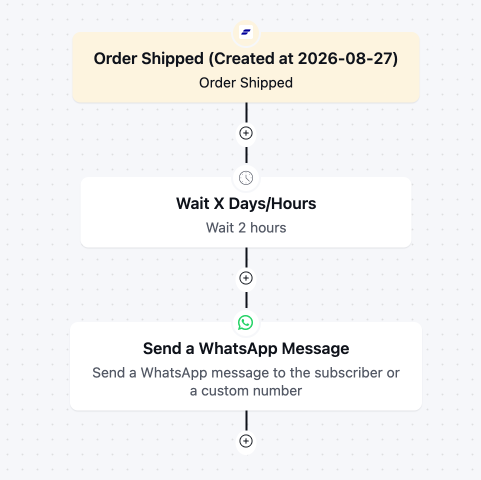
Run Time-Sensitive Messages
Use the WhatsApp message trigger to automate timely notifications based on customer actions.
Welcome new leads as soon as they sign up, send a cart abandonment reminder when someone leaves items behind, or notify students when they enroll in a course; all without sending each message manually.
Send Bulk Campaigns
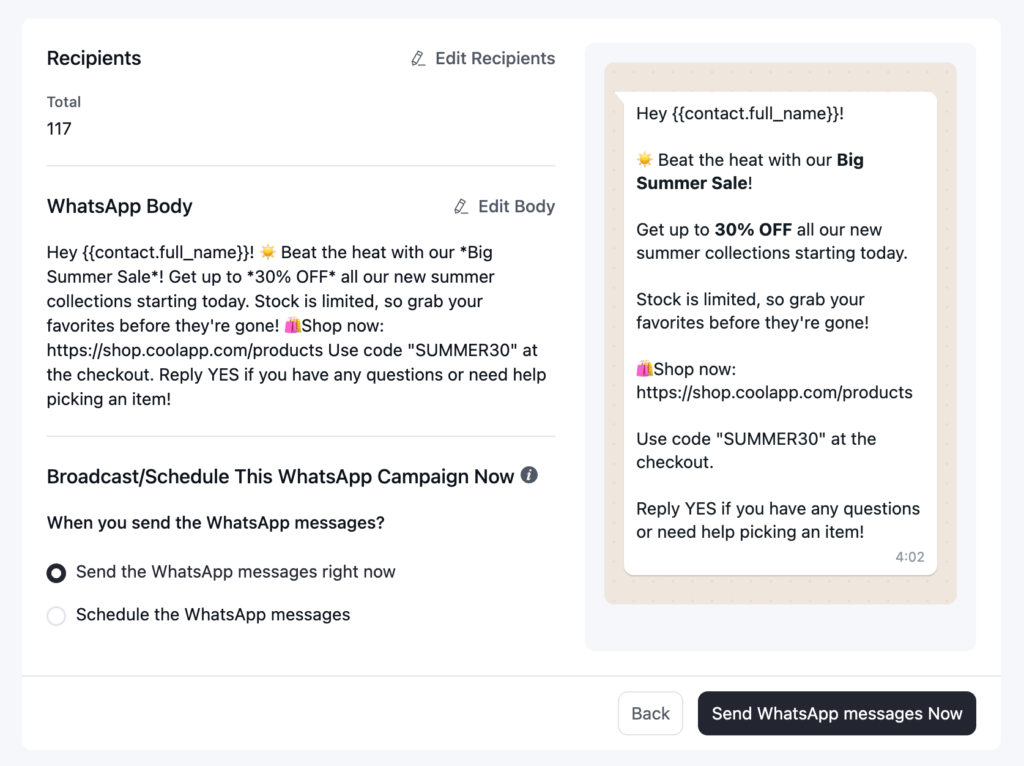
If your business sends bulk campaigns, then you can also send them via WhatsApp message.
Pick a segment and write your message once to reach every matching contact in a single send.
Announce a sale to your regular shoppers or send a seasonal update to your whole list, scheduled for whenever customers are most likely to read it.
Experience a True Chat-Like Vibe
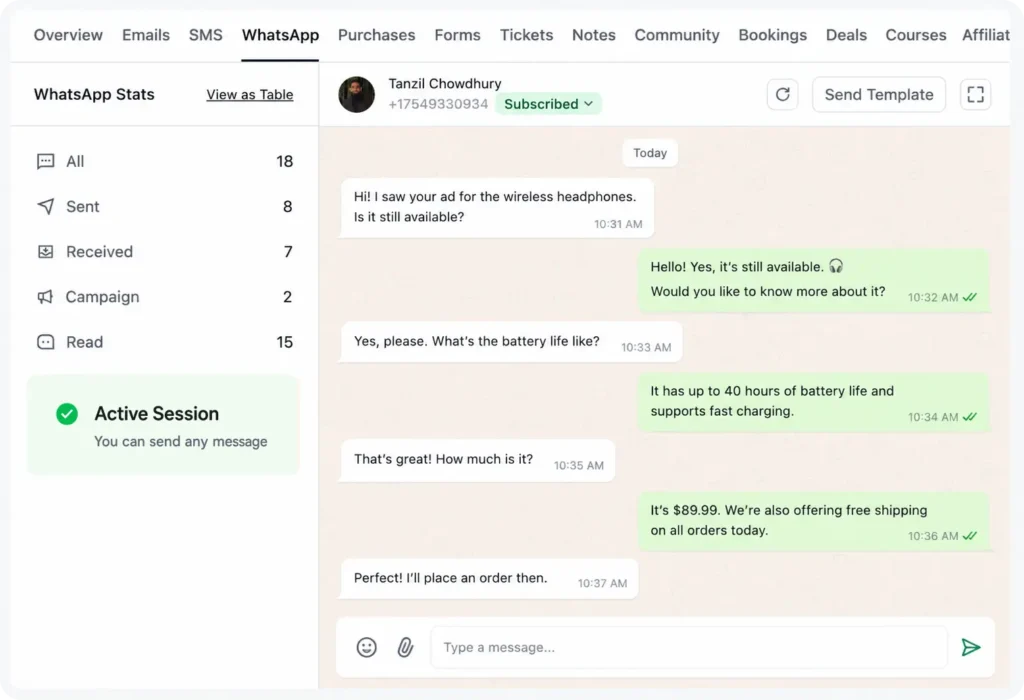
One-way messages can feel impersonal. With two-way conversations, business owners can chat directly with customers, answer their questions, and build a more personal connection.
Also, image and file sharing options make WhatsApp conversations feel more natural from the WordPress dashboard.
Make Messages Feel Personal
Personalization helps drive better engagement.
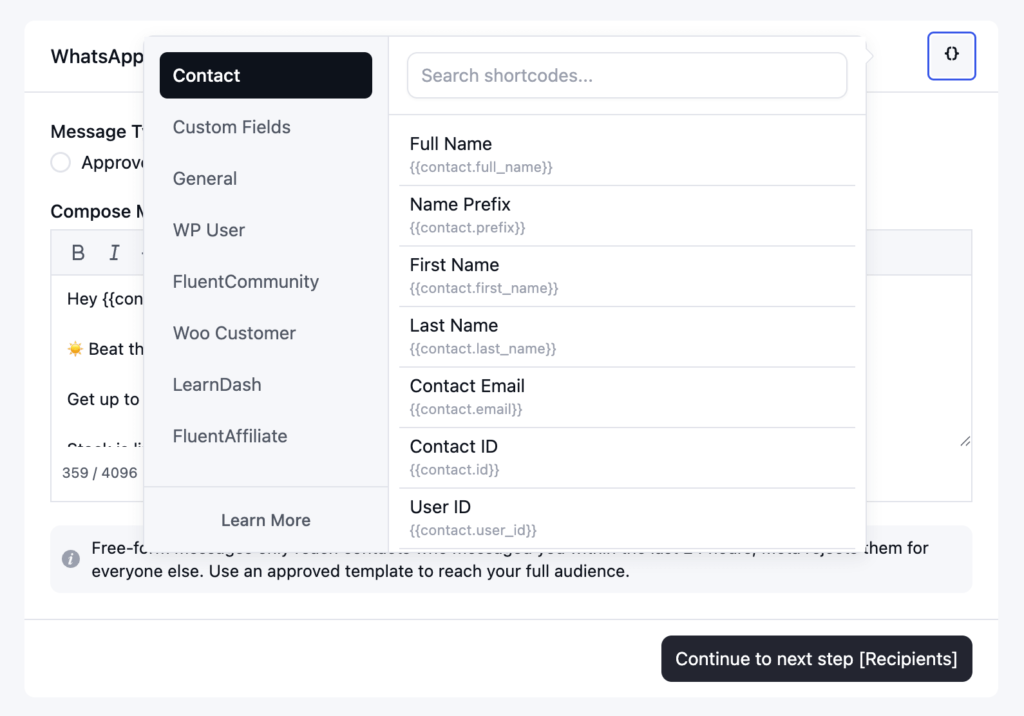
With SmartCodes support, you can add customer details to individual messages or bulk campaigns, making every message feel more personal.
When details like a customer’s name, order total, or billing information are added, the message feels tailored to the person receiving it.
WhatsApp Marketing Use Cases by Business Type
Every business will find a slightly different starting point for running their WhatsApp marketing.
Here’s where WhatsApp tends to drive the most engagement with minimal extra effort for some businesses:
| Business Type | High-Engagement Use Case |
| E-commerce | Cart recovery, order and shipping updates, restock alerts |
| Course creators and coaches | Enrollment confirmations, progress check-ins, cohort reminders |
| Service businesses | Appointment confirmations and reminders, rescheduling replies |
| Lead gen and local businesses | Quick replies to inquiries, quote follow-ups, booking reminders |
Common Mistakes that Quietly Kill Engagement
A few habits show up again and again in businesses that struggle to get traction on WhatsApp.
These reasons are not related to a technical glitch; they are so basic, but usually the real reason a channel with this much potential ends up ignored, muted, or blocked.
The good news is that every one of them is easy to fix once you know to look for it:
- Sending the same message to your entire customer list. It saves time, but it makes a personal channel feel impersonal.
- Messages that are too promotional. Long, sales-heavy copy doesn’t read well in a messaging app.
- Frequently sending without the consent of a user feels like spam.
- Never replying when a customer actually responds, it kills engagement and makes customers go away.
- Sending messages outside of approved templates when required because Meta requires approved templates for messages sent outside an active conversation window.
What to Monitor to Know It’s Working?
Once WhatsApp is part of your marketing, a handful of numbers tell you whether it’s actually earning its place alongside email and SMS.
Here’s what you need to monitor:
| Metric | What It Tells You |
| Delivery rate | Whether messages are reaching customers at all |
| Read rate | How many people are actually seeing your messages |
| Reply rate | Whether customers are engaging, not just reading |
| Outcome rate | Whether it’s leading to bookings, sales, or completed sign-ups |
Note: Reply rate is usually the number worth watching most closely. A high read rate is nice, but replies are the clearest sign that WhatsApp is doing great in terms of engagement.
Make WhatsApp Part of Your Marketing
You don’t need to overhaul your marketing to start using WhatsApp for engagement.
Pick one moment that already matters in your business, a cart reminder, a booking confirmation, or a quick reply to inquiries, and get that one working automatically before expanding further.
Tools that connect WhatsApp to the same customer records you use for email and SMS, like FluentCRM, make this easier by keeping everything in one place instead of asking you to manage a separate system.
But the starting point is the same no matter what you use: know the moment that matters most to your customers, and let that moment trigger the message.
Tanzil Ebad Efti
Content Writer & Strategist
Words are my favorite playground. As a Creative Writer at WPManageNinja, I don’t just produce content; I tell stories. By mixing fiction and metaphors with real-life examples, I turn my writing into a creative journey that’s easy for readers to digest and relate to.
Table of Content
Related Articles and Topics
-
5 Best Design Tools in 2026 for Designers, Marketers, and Creative Teams
Every design tool wants to be the one app you never leave, and none of…
-
WhatsApp Marketing Strategy: A Complete Guide for Businesses in 2026
Some customer moments need more than email. A purchase confirmation, an important update, or a…





