

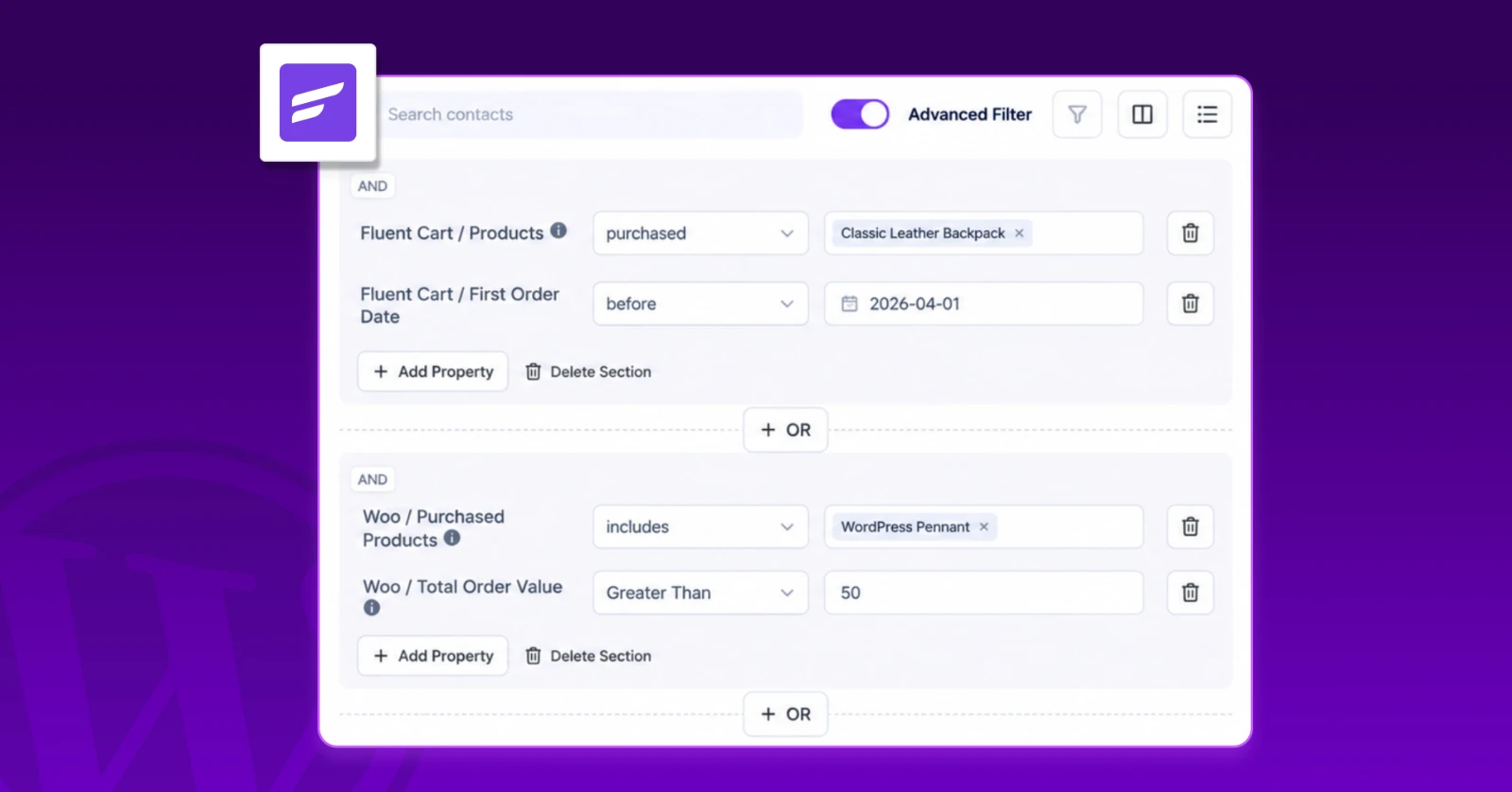
Product Activity-Based Customer Segmentation Ideas for Every WordPress Business (& How to Build Them)

Summarize with


Last Updated:
Search for segmentation ideas, and most of what you’ll find falls into one of two areas.
Either it walks you through segment types like demographic and psychographic, or it hands you a list built for online stores: VIP shoppers, cart abandoners, repeat buyers.
Both are useful, if you run a store and already know the theory.
But what if
- You sell courses?
- Run a paid community or an affiliate program, or a SaaS product?
You end up reading about just one type of business model, which eventually won’t work for you.
Because each business type’s collects different data about its customers, and that data decides which segments are worth building.
So this guide is built around every business model, along with the exact Advanced Filter conditions to build it in FluentCRM.
TL;DR
- Your business model decides which segments are worth building.
- Each business model collects different data: orders, lessons, spaces, referrals, or product usage.
- You can segment contacts using lists, tags, and status, or advanced filters for activity-based segmentation.
- Advanced Filter reads customer activity across plugins like WooCommerce, FluentCart, LearnDash, and FluentCommunity.
- Segment contacts by business type (eCommerce, Course sellers, community managers, and more).
- For sharper and more advanced segments, mix product activity with contact’s email engagement.
- Save any filter as a Dynamic Segment that updates itself.
Why the Right Segments Depend on Your Business Model?
Every business model leaves a different trail of data behind each customer interaction. Here’s what each business type sees:
- Online/eCommerce Store: Orders, spend, products, and coupon activity
- Course Creator/LMS: Enrollments and lessons completed
- Membership Site: Levels, upgrades, and cancellations
- Online Community: Spaces and courses members join
- Affiliate Program: Referrals, earnings, and payout status
- SaaS/Digital Product: Feature usage and product activity
This data is where your best segments come from. The problem is that it usually sits inside other plugins, where most email tools can’t reach it.
FluentCRM runs on the same WordPress site as those plugins, so it can read that data and filter it directly.
How FluentCRM Lets You Segment Contacts
FluentCRM gives you two levels of segmentation. One sorts contacts into broad groups. The other zooms in on what each contact actually did.
Basic Segmentation: Lists, Tags, and Status
This is where most people start, and for good reason.
It doesn’t matter which plugin a contact comes through. A form, a store, a course, or a booking page: if it’s integrated with FluentCRM, that contact eventually lands in FluentCRM with a list, a tag, and a status attached.
That’s how FluentCRM organizes contacts. And right from the Contacts dashboard, you can filter them by:
- Lists: The broad groups people belong to, like “Newsletter” or “Customers”
- Tags: Labels for what someone did or cares about, like “Downloaded Guide” or “Interest: SEO”
- Status: Whether a contact is subscribed, pending, unsubscribed, or bounced
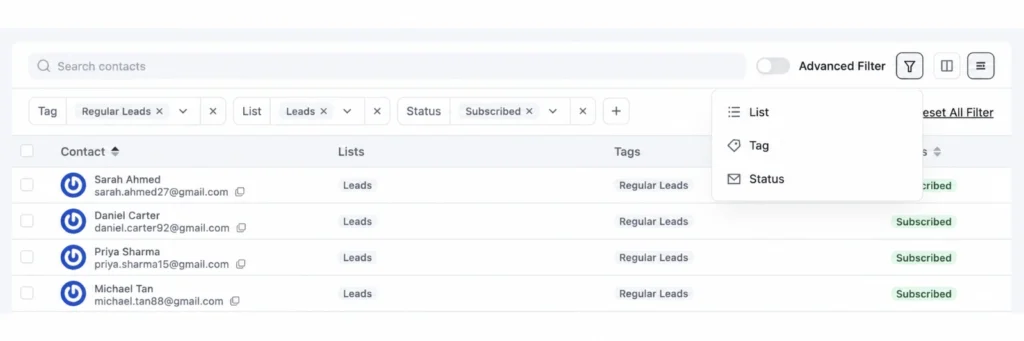
However, lists, tags, or status only tell you which bucket someone is in. They don’t tell you how that contact interacted afterwards.
That’s where the second level comes in.
Advanced Filter: Granular Segmentation
This is where segmentation gets personal. Lists and tags tell you where a contact belongs. Advanced Filter tells you what they actually did.
Advanced Filter tells you the story that tags and lists cannot explain because it sees:
- Contact Activity: How someone interacts with your emails and workflows, like opens, clicks, campaigns, automations, and sequences.
- Product Activity: What someone does in the plugins connected to FluentCRM, like WooCommerce, FluentCart, LearnDash, FluentCommunity, FluentAffiliate, or custom actions through Event Tracking and more.
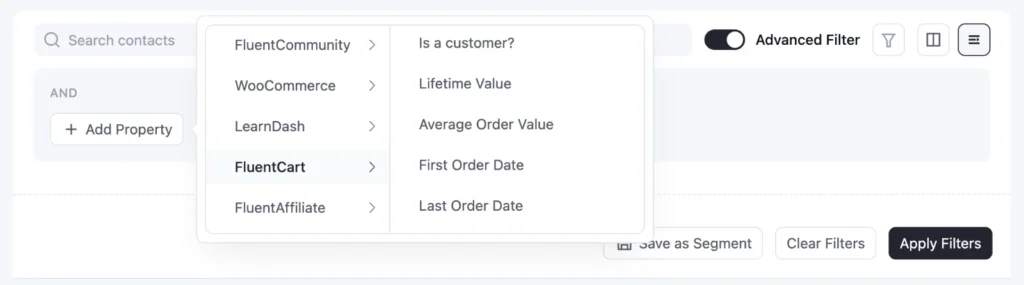
You can combine these conditions with AND/OR logic, and save any filter as a Dynamic Segment that keeps itself up to date.
So if you want to segment contacts based on what they do across your store, courses, community, or any other part of your business, Advanced Filter is the tool you’ll be using.
Every idea in the rest of this guide is built with it, organized by business model.
Product Activity-Based Segmentation Ideas by Business Type
Imagine a store owner or a course seller with thousands of contacts running their business inside WordPress.
They know people are buying and enrolling, but they can’t tell who bought which product, or who actually started the course after the onboarding email.
Once FluentCRM is connected to their system, whether that’s WooCommerce, FluentCart, SureCart, LearnDash, or any of the 45+ plugins it integrates with, that missing picture fills itself in: every purchase and every lesson is right there on the contact’s profile.
Once connected, with Advanced Filter you can filter contacts based on their activity.
Here’s what that product activity-based segmentation looks like for your business type:
Segmentation Ideas for eCommerce Stores
If you run an online store, your best segmentation data is sitting in your order history:
- What people bought
- How much they spent
- When they last checked out
FluentCRM picks up that data from plugins like WooCommerce or FluentCart.
WooCommerce Segmentation Ideas
If your store runs on WooCommerce, FluentCRM already knows every order your customers have placed.
Here’s how to turn that order history into customer segments worth emailing.
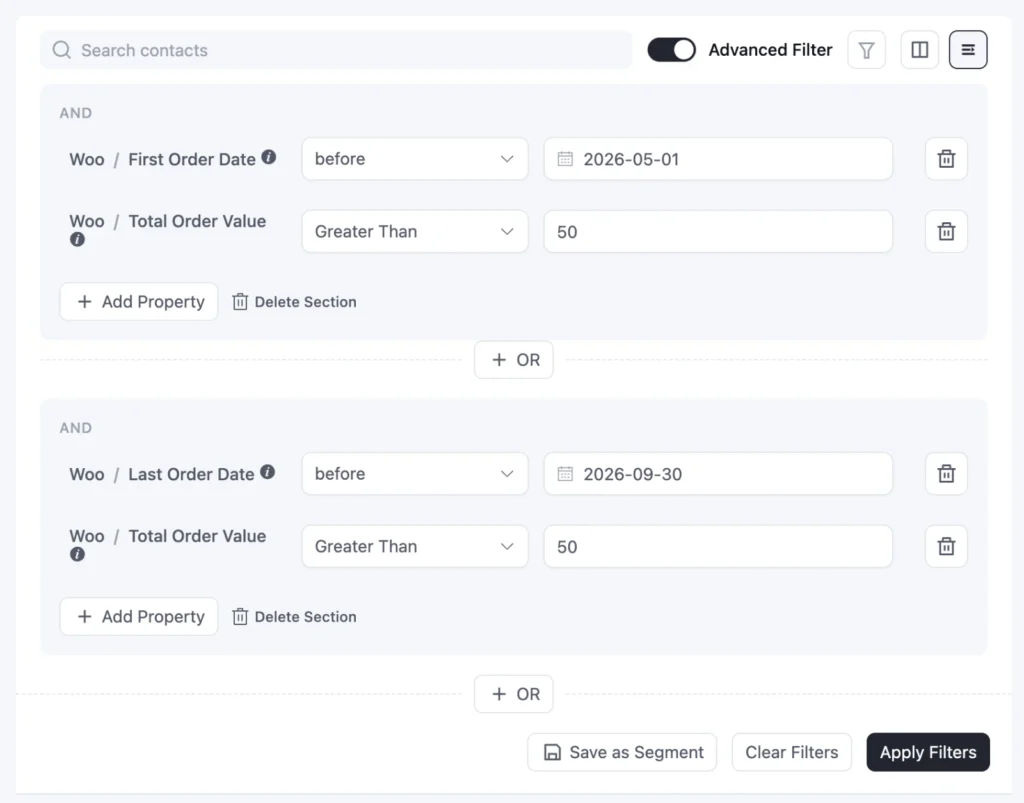
Segment by Order History
Filter contacts by their order dates, count, and value. It shows where each customer stands.
For example, A recent First Order Date finds new customers, and high Total Order Value plus Total Order Count finds your VIPs.
Likewise, a Last Order Date more than 90 days ago shows who’s drifting. They’re not lost yet, so you can send a friendly win-back email to them instead of a random email.
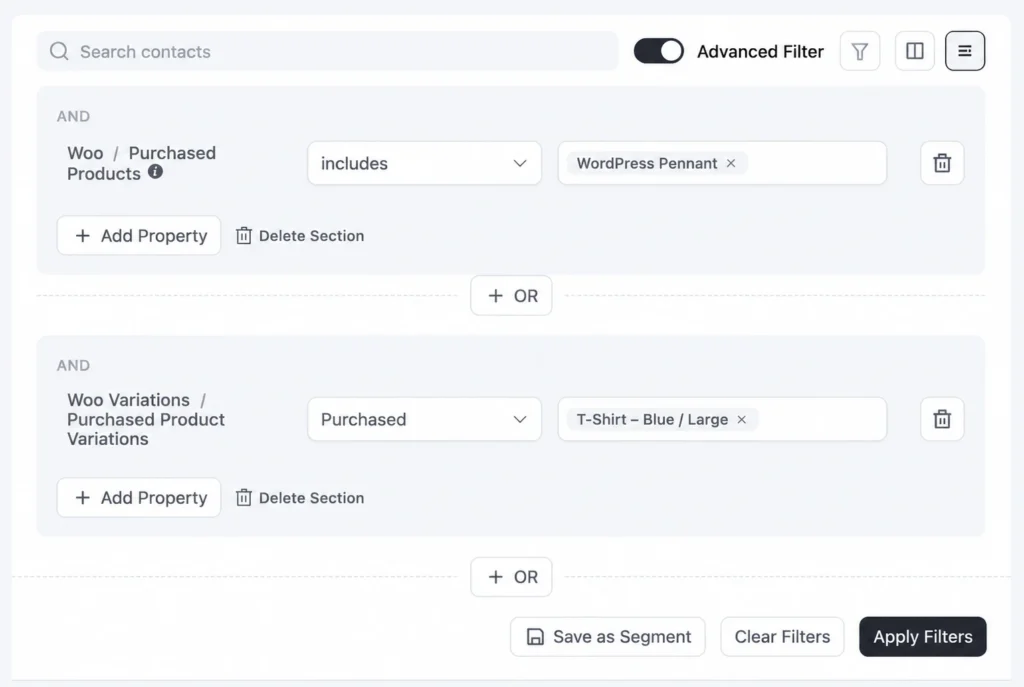
Segment by Product Purchase
What someone buys says a lot about what they’ll want next.
Your contacts’ product purchases, variations, categories, and product tags say a lot about their interaction with your store.
Say, a customer who bought your espresso machine but not the grinder. You can just filter them by Purchased Products, and guess what?
These people are just one email away from a second order.
Categories and variations specific segmentation works similarly, so your skincare product buyers never get your kitchenware launch email.
Segment by Coupon Purchase
Some customers only ever check out with a discount code.
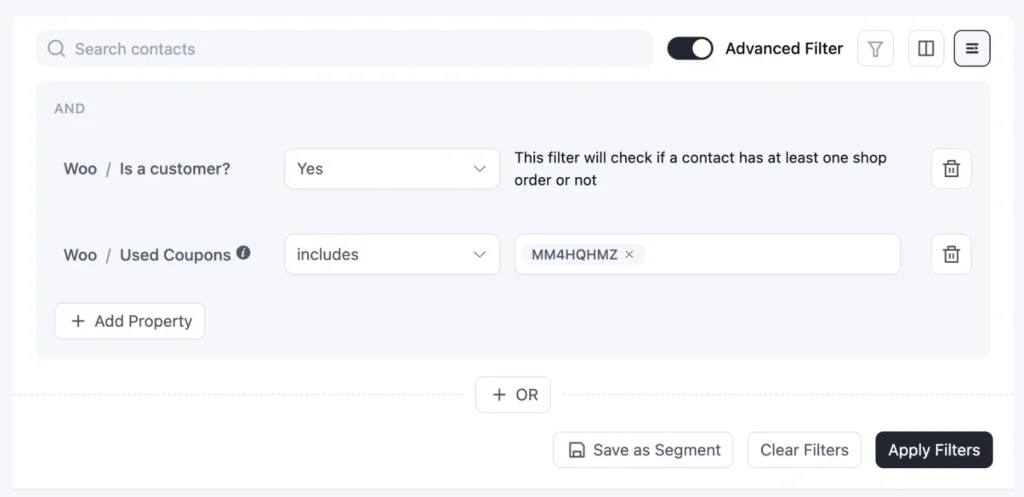
Used Coupons shows you exactly who they are, say, everyone who used BLACKFRIDAY or SAVE20. They’re the right audience for a flash sale, and the wrong one for a full-price launch.
Segment by Customer Status
Not every subscriber has turned into a customer yet.
Sometimes you just need to check whether someone is still sticking with your store or just moved on, and with the Is a Customer filter, you can easily segment those inactive contacts.
FluentCart Segmentation Ideas
If you run your eCommerce business on FluentCart, then congrats, you are one step ahead of others.
FluentCart is a part of the same Fluent ecosystem as FluentCRM, built by the same team to work together. So there’s no extra connector to set up and nothing to sync: every order flows straight into FluentCRM the moment it happens.
And the segmentation doesn’t stop at orders. FluentCRM also knows how much each customer is worth to you over time.
Here’s how to turn that into customer segments worth emailing.
Segment by Customer Value
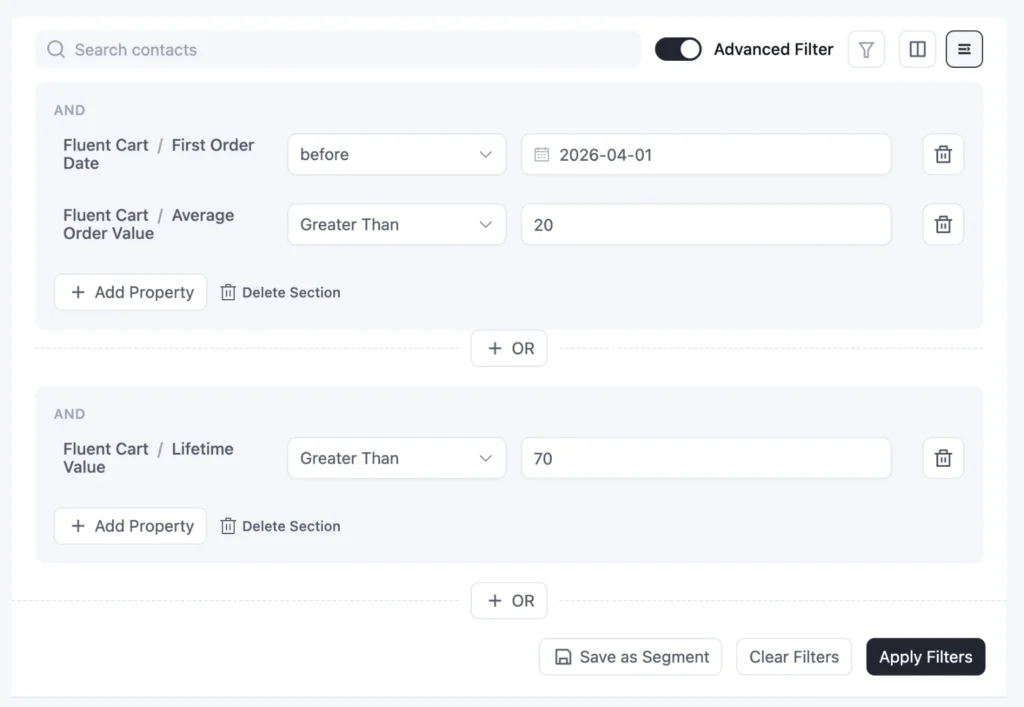
FluentCart gives you two numbers that make value-based segments easy:
- Lifetime Value: The total a customer has spent with you across every order
- Average Order Value: How much a customer typically spends in a single order
To simplify it, suppose a Lifetime Value above 1,000 shows your best customers over time, not just on one big order.
And a high Average Order Value points to people who are buying more at once, which makes them perfect for bundles.
And what if a valuable customer goes quiet? You’ll know right away if you just filter it with Last Order Date.
Segment by Product Purchase
This one shines if you sell software, templates, or plans. Because with FluentCart you can sell physical, digital, or hybrid products.
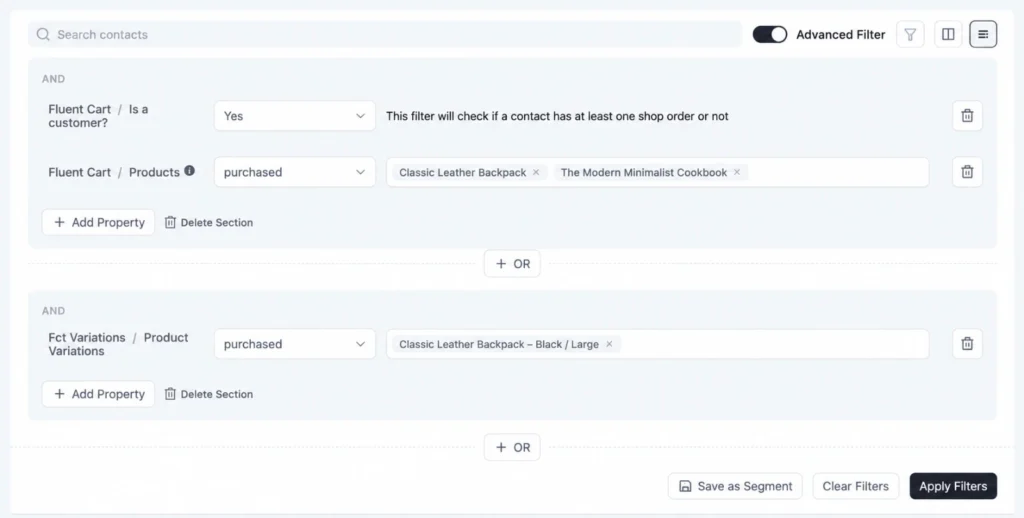
Someone who owns your core product but never bought the add-on is your upsell list, and Products finds them in a click.
Also, Product Variations goes a step further, so a 5-site license holder never gets the same message as a single-site buyer.
With Purchased Categories, everything zooms out a little.
If someone keeps buying from your signature item category, they’re the first people who should hear about a new item that comes into stock.
Segment by Coupon Purchase
Discounts bring in a certain kind of buyer.
With Used Coupons, you can see who checked out with your LAUNCH50 code and treat them differently from full-price buyers.
Send them your next flash sale, and keep them out of your premium launch emails.
How These Segmentation Ideas Help eCommerce Businesses
Put together, these segments cover almost the entire customer journey of an online store.
• More Repeat Orders: New customers and “bought A, not B” buyers receive campaigns that build on what they already own, which turns a first purchase into a second one.
• Healthier Margins: Coupon hunters and VIPs sit in separate groups, so discount emails go to the people who need them, not the ones who’d happily pay full price.
• Less Churn: Quiet customers and slipping high-value customers get a re-engagement email before they’re gone for good.
• Bigger Baskets: Big-basket shoppers and add-on buyers see bundles and upgrades they’re actually likely to buy, which turns out to be a good segment for upselling and cross-selling email.
That’s the practical side of eCommerce customer segmentation: fewer wasted offers, and more revenue from customers you already have.
Once you run your email marketing campaigns based on your pre-built dynamic segments, you give your valuable contacts a sense of a personalized experience.
Segmentation Ideas for Course Creators and LMS Sites
Selling a course is only half the job. The real growth comes from students who finish one course and happily buy the next.
That’s why course creators need to segment on progress, not just purchase.
LearnDash Segmentation Ideas
If your course business runs on any well-known LMS plugin, such as LearnDash, TutorLMS, or LifterLMS, once you connect FluentCRM to it, it will start collecting your learners’ data.
Here’s how everything comes into action.
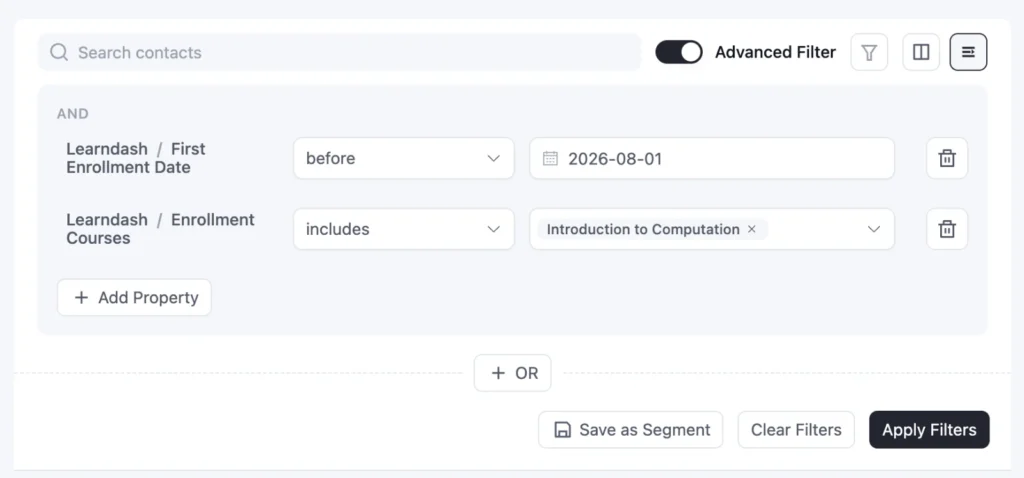
Segment by Enrollment
Which course someone joined, and when, tells you a lot about what they need next.
Say a student finished your beginner course but never joined the next one. Enrollment Courses finds them, and since they already trust your teaching, a simple “ready for the next step?” email is often enough.
Also, timing is important. A recent First Enrollment Date shows who needs a warm welcome, and Enrollment Groups keeps cohort updates going only to that cohort.
Segment by Course Progress
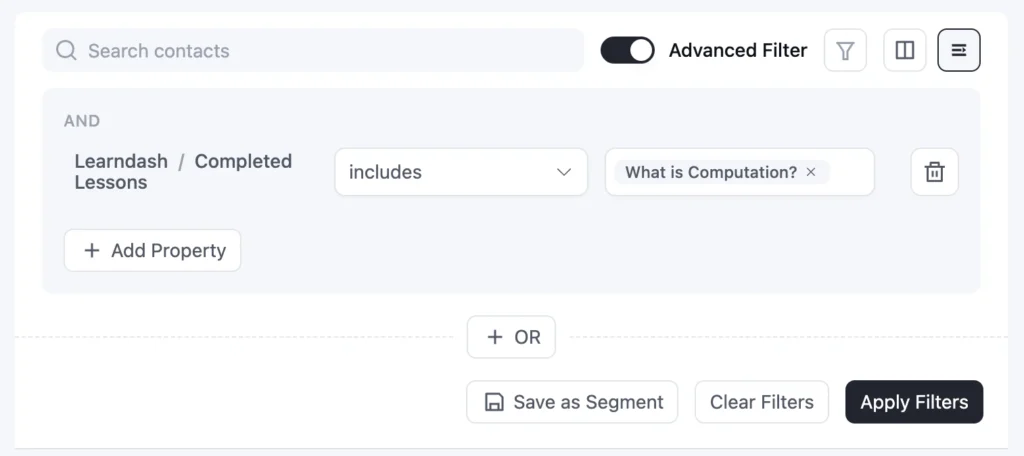
Signing up is one thing. Actually showing up for the lessons is another.
Most students don’t quit on purpose. They sometimes get busy while they are on their first lesson.
So, Completed Lessons shows who hasn’t reached lesson three yet, so a friendly nudge can land right where they got stuck.
And the students who made it to the end?
They’re your warmest audience for the advanced course. This also works with LifterLMS, TutorLMS, and LearnPress too.
Segment by Student Status
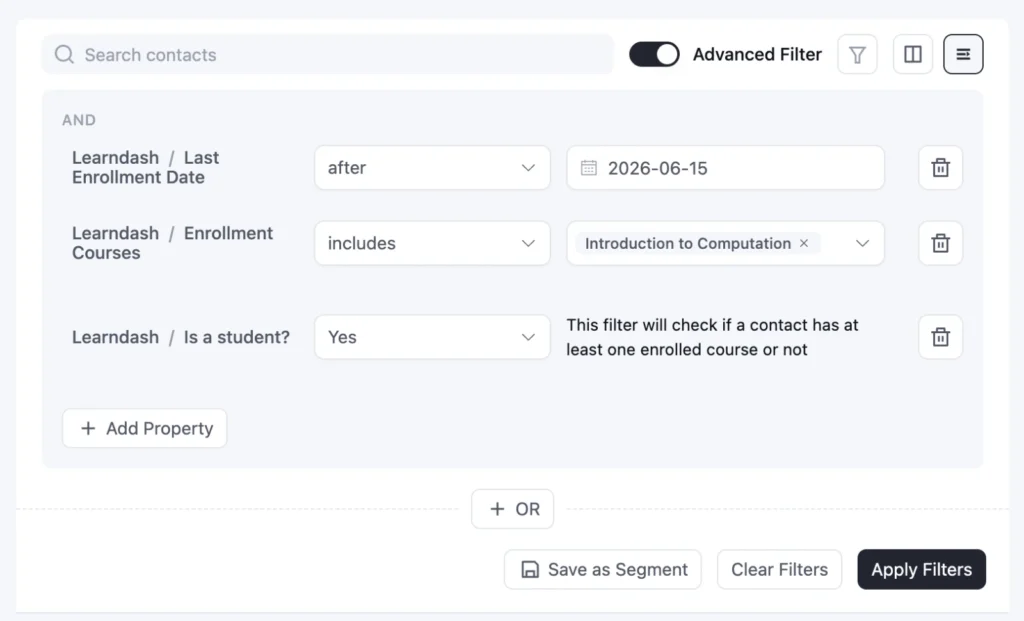
Some people love your newsletter but haven’t taken a course yet.
Is a student? points them out, and a free mini-course is often the easiest way to bring them in.
How These Segmentation Ideas Help Course Creators
After starting a course, most students get busy, miss a lesson, and quietly drift off. These segments help you catch them at the right moment.
- Higher completion rates: Stuck students get a nudge at the exact lesson where they stopped, not a generic “keep going” email.
- More second-course sales: Students who finished the key lessons, or took Course A but not B, hear about the next course while they’re still motivated.
- A stronger first week: New students get a clear starting point, which makes them far more likely to stick around.
- More first enrollments: Newsletter readers who aren’t students yet get an easy, low-risk way in.
The same progress data also helps you bring back inactive learners before they’re gone for good.
Segmentation Ideas for Online Communities
Communities tend to have much bigger contact lists than most businesses.
Members join for free, sign up for events, and drop into different spaces, so the list grows fast.
If you send everything to everyone, your most interested members get buried under messages that were never meant for them.
FluentCommunity Segmentation Ideas
FluentCommunity is also part of the same Fluent ecosystem, so it works together with FluentCRM without any difficulties.
So, whenever a new member joins a space or a course enrollment happens, it shows up in FluentCRM on its own.
Here’s how you could segment contacts.
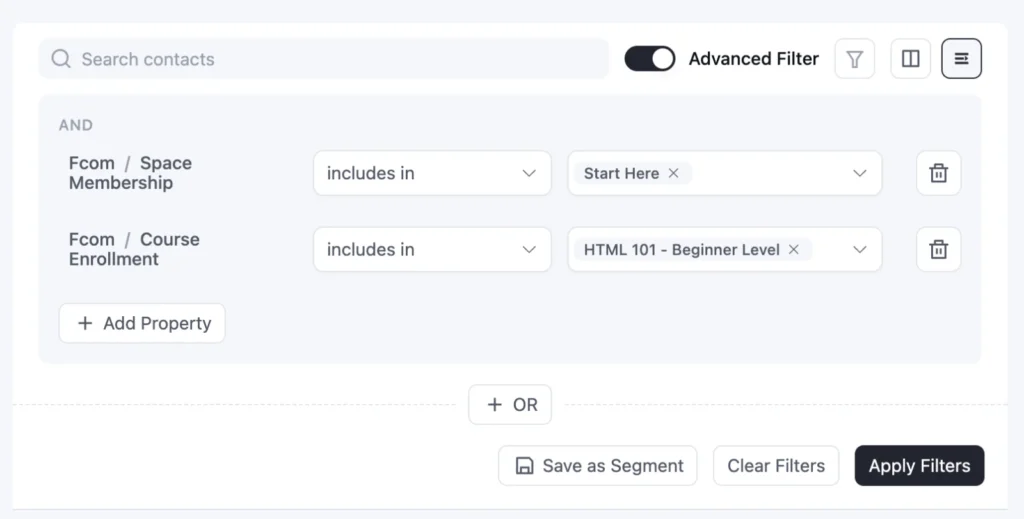
- Segment by Space Membership: Find members by the spaces they’ve joined. Send a live session invite only to your Founders Circle, or point Beginners members to the Advanced space they haven’t joined yet.
- Segment by Course Enrollment: Find members by the community courses they’re taking, and send course updates only to the people enrolled.
How These Segmentation Ideas Help People Who Run Community Platforms
Send every announcement to every member, and people quickly learn to ignore you.
This segmentation will make your message feel more personalized to the people.
- Better event turnout: Space-specific invites reach the members who’ll actually show up.
- Deeper engagement: Members in one space get guided to the next one, so they keep finding new reasons to stay.
- More active course students: Community course updates go only to the people taking the course.
- A growing community: Newsletter readers who haven’t joined yet get a friendly invite inside.
It’s how creators keep their community email automation feeling personal, even as the community grows.
Segmentation Ideas for Affiliate and Partner Programs
Most affiliate programs share the same quiet problem: plenty of sign-ups, very few referrals.
It’s rarely a lack of interest. New partners just don’t know where to start, which is why each stage needs its own personalized campaigns.
FluentAffiliate Segmentation Ideas
FluentAffiliate is part of the Fluent ecosystem too, so FluentCRM already knows who’s an affiliate, who’s active, and who’s actually sending referrals by the time you connect it.
Here’s how to turn that into customer segments worth emailing.
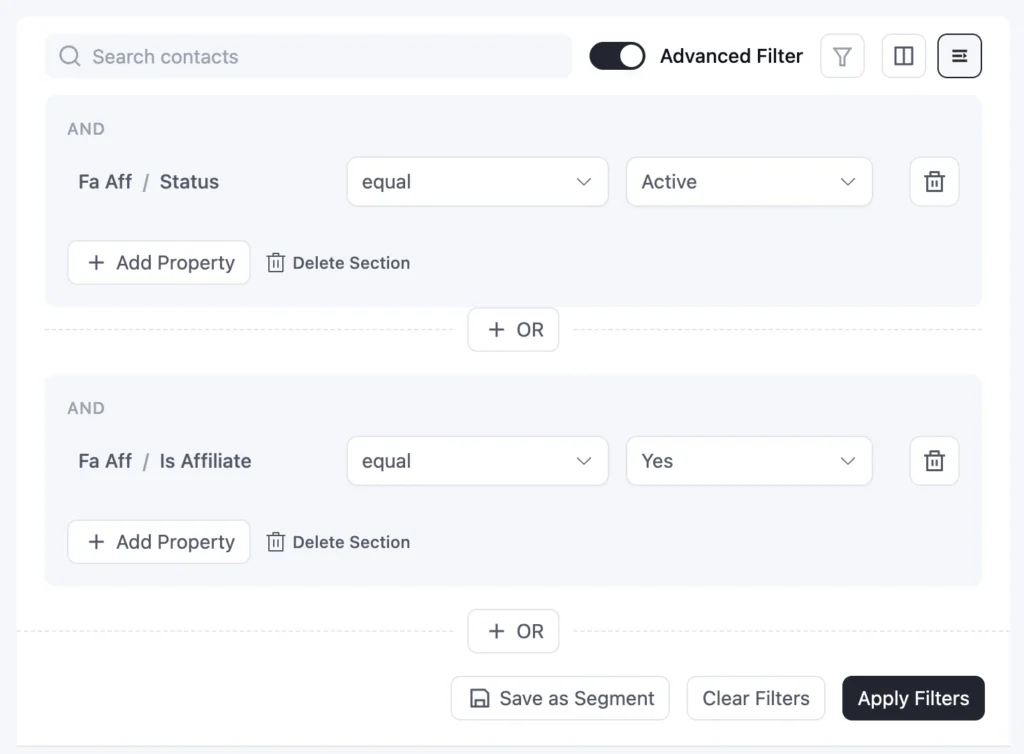
Segment by Affiliate Status
Every partner is at a different point in your program.
Pending applicants are waiting to hear back. Filter by Status, and a quick “we got your application” email keeps them warm while you review.
Flip it around with Is Affiliate, and you’ll spot repeat customers who aren’t partners yet, people who’d happily promote you if you asked.
Segment by Performance
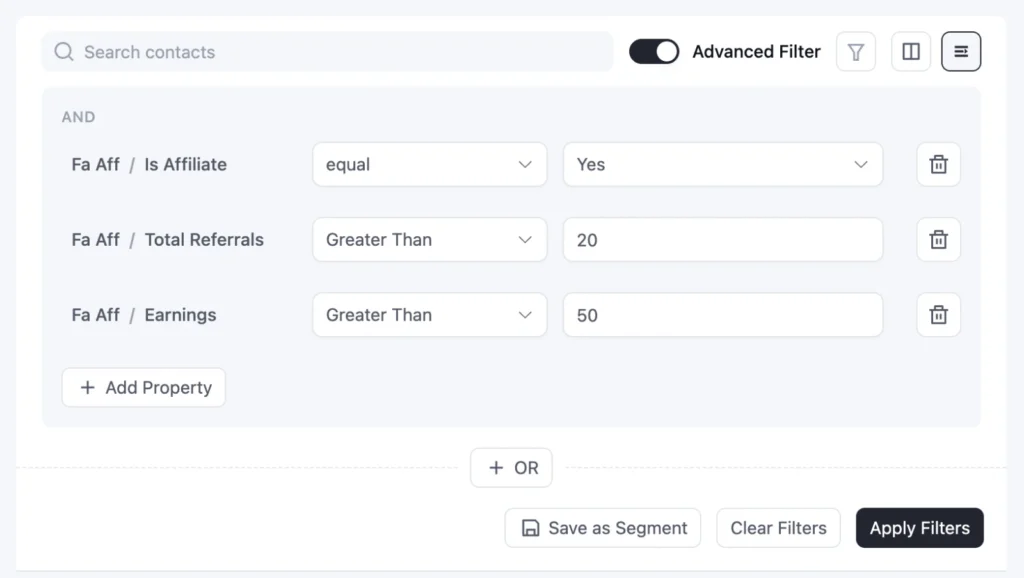
Some partners need a push. Others deserve a reward.
Active affiliates with zero Total Referrals need a starter kit: banners, swipe copy, and your best link. High Earnings point to your top partners, who deserve more than a monthly newsletter.
And anyone with Unpaid Earnings should get a clear payout update. It’s a small email that builds a lot of trust.
How These Segmentation Ideas Help Affiliate Marketing Businesses
A new partner, a silent partner, and your top earner all need different things from you. These segments make sure each one gets it.
- More active affiliates: Partners with zero referrals get an activation kit instead of being forgotten.
- Smoother onboarding: Pending applicants hear back quickly, so they arrive excited, not confused.
- Stronger loyalty: Top earners get the recognition and perks that keep them promoting you.
- More trust: Partners with an unpaid balance get clear payout updates.
- More recruits: Your happiest customers get invited to become partners.
The result is a program that grows without you chasing every partner one by one.
Segmentation Ideas for SaaS and Digital Product Businesses
For a SaaS or digital product, what someone bought matters less than what they do with it.
Event Tracking Segmentation Ideas
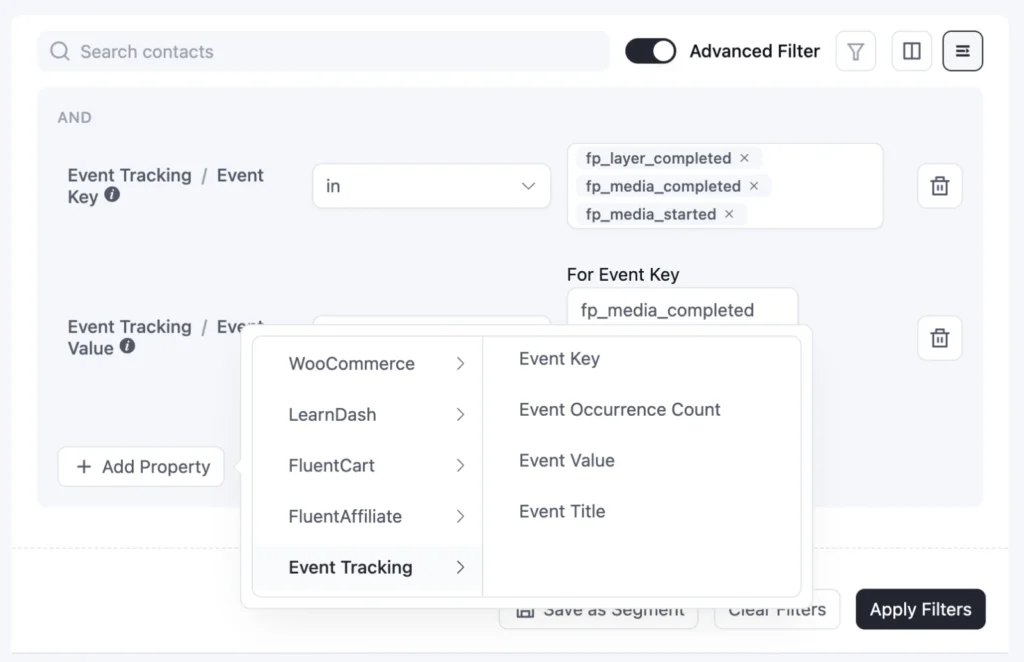
Event Tracking lets FluentCRM record custom actions on each contact’s profile, like a pricing page visit, a feature used, or a video watched.
Every event has a key, a title, and an optional value, and FluentCRM counts how many times it happens.
Events can come from an automation, a few lines of code, or a plugin that sends them for you, like FluentPlayer from the Fluent ecosystem.
Once the Event Tracking module is turned on, here’s how to turn those events into customer segments worth emailing.
- Segment by Product Actions: See who did something in your product, and who didn’t. Signed up but never created a project? Send an activation email. Keeps visiting your pricing page? Send a sales follow-up.
- Segment by Video Engagement: See how far people watched your FluentPlayer videos. Demo finishers get an offer, and early drop-offs get a lighter follow-up. The idea behind video lead scoring.
How These Segmentation Ideas Help SaaS Businesses
In a SaaS product, churn usually starts long before someone cancels. It starts the day they stop using the feature that made them sign up. These segments help you spot that early.
- Better activation: Users who signed up but never activated get help through your free trial email sequence, right when it matters.
- Well-timed upgrades: Power users hear about higher plans once they’re already hitting the limits of their current one.
- More relevant messaging: Each plan only hears about the features it actually has.
- Faster sales cycles: Demo watchers get a sales follow-up while they’re still evaluating.
Advanced Segmentation Ideas: Mix Business Data with Email Engagement
Each business type above leans on one kind of data.
If you want to segment your contacts in a more advanced way, the sharpest way to do it is: mix two.
- What someone did in your business
- How they respond to your emails
Since FluentCRM keeps track of contacts’ email activity, you can combine them freely to prepare a strong email segmentation, and later you can nurture these contacts with personalized campaigns.
Here are some segmentation ideas you can apply by combining both:
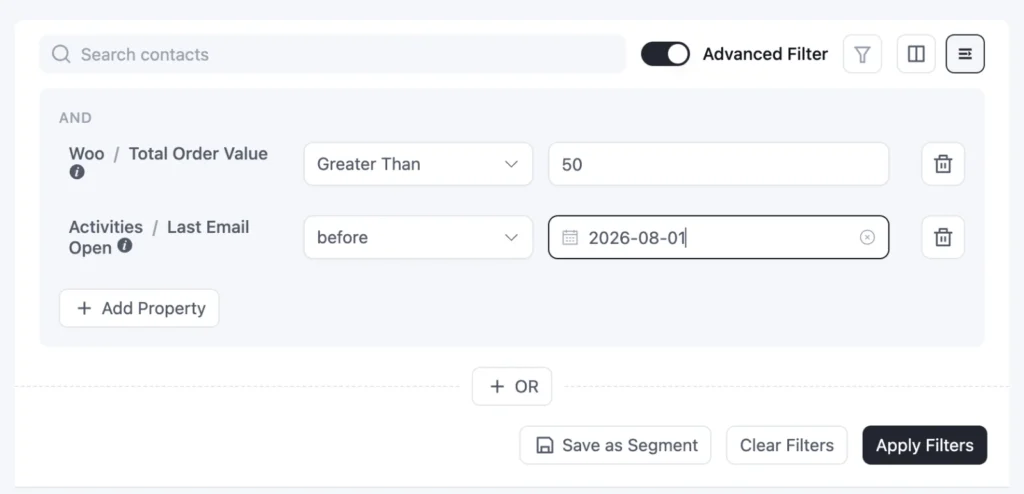
- VIP customers who’ve gone quiet: Pair a high Total Order Value with last email opens with a specific date range. Skip the promo and send a personal “we miss you” instead.
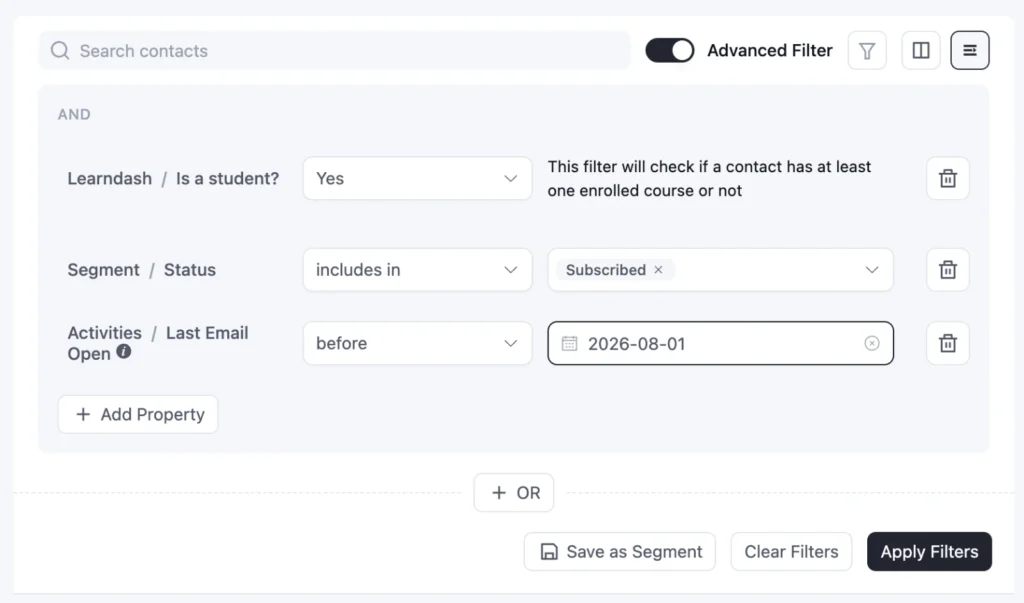
- Engaged readers who haven’t bought: Pair Is a student? with email opens in the last 14-30 days. They clearly like what you say, so a first-purchase offer has a real shot.
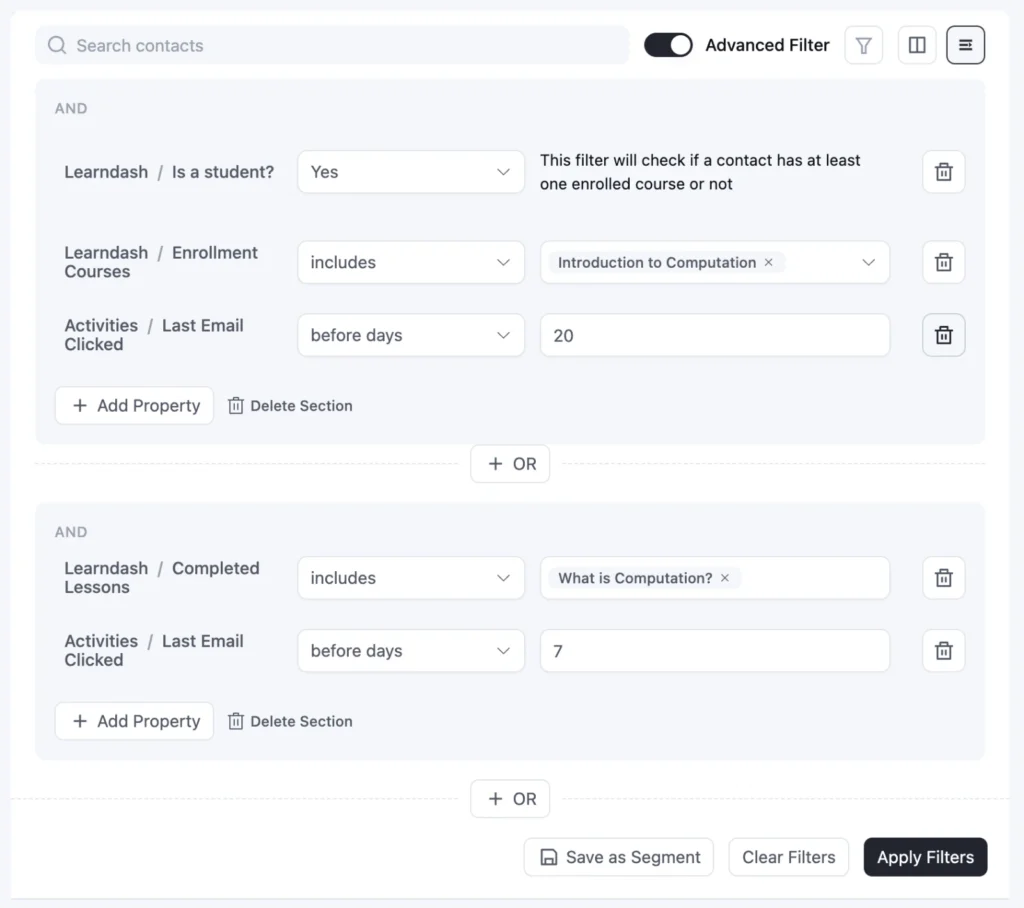
- Stalled students who still read your emails: Pair Completed Lessons with email clicks in the last 14 days. They’re still listening, so a short “pick up where you left off” email can get them moving again.
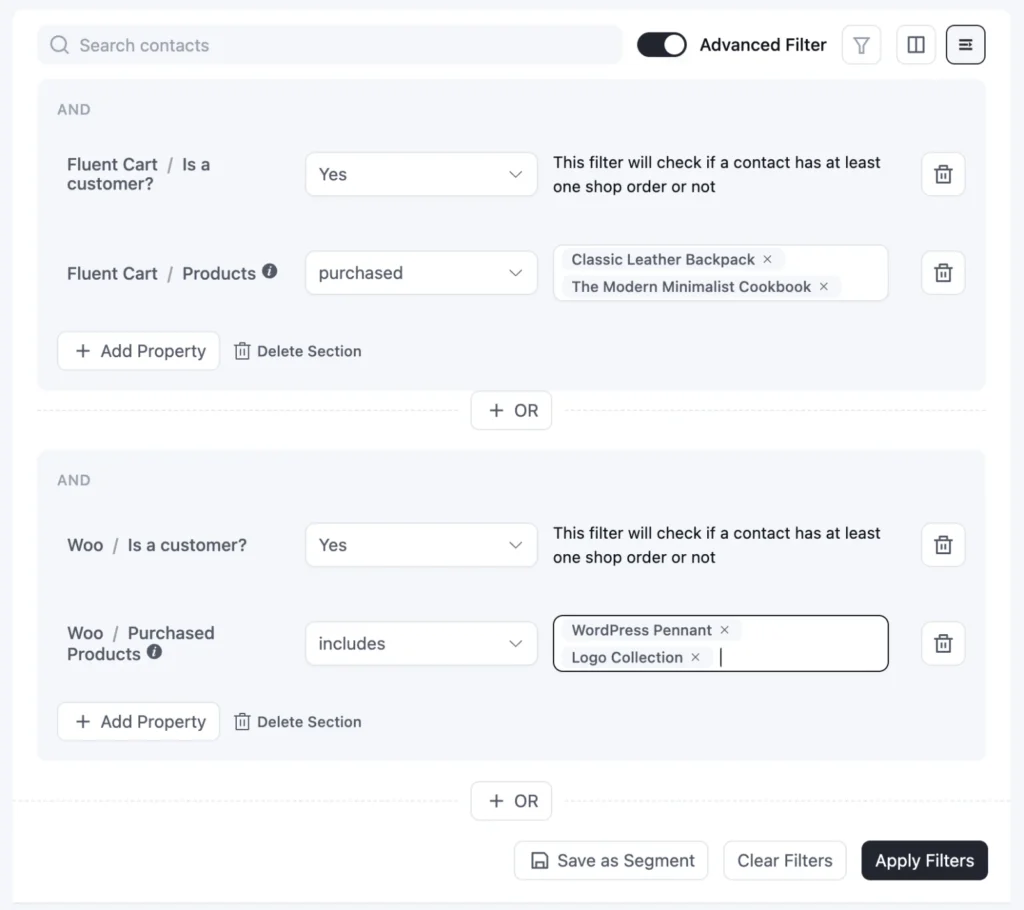
- Customers from either store: Use an OR group to find customers from WooCommerce or FluentCart, and send one campaign to everyone who’s bought from you.
Note: Each one pairs a business signal with a second signal from somewhere else. That’s what turns a broad list into a group you can send one well-timed retention email to.
Start Segmenting Contacts the Way Your Business Works
Every business collects its own kind of data. A store has orders, a course has lessons, a community has spaces, and an affiliate program has referrals.
All this data gives you clear signals to identify:
- Who’s ready to buy?
- Who’s stuck?
- Who’s drifting away?
And FluentCRM just puts it all within reach, right inside Advanced Filter.
So start with the business type closest to yours. Pick any of the segmentation ideas that best suit your business, build it, and send email campaigns that actually work.
Tanzil Ebad Efti
Content Writer & Strategist
Words are my favorite playground. As a Creative Writer at WPManageNinja, I don’t just produce content; I tell stories. By mixing fiction and metaphors with real-life examples, I turn my writing into a creative journey that’s easy for readers to digest and relate to.
Table of Content
Related Articles and Topics
-
What is Email Segmentation? A Simple Guide to Targeting the Right Subscribers
Ask any email marketer a simple question: When was the last time you sent a…
-
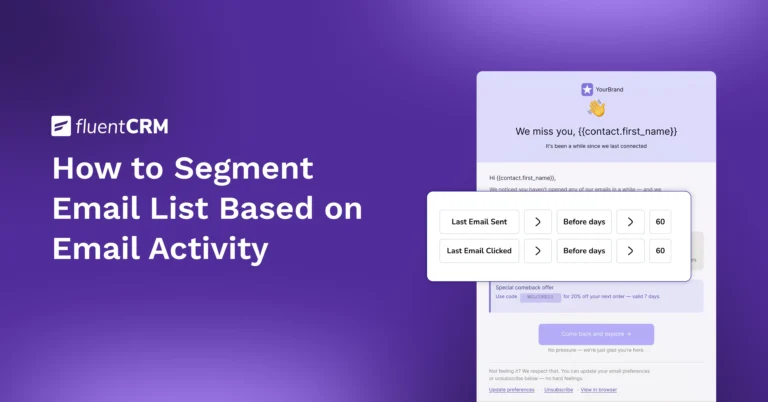
How to Segment Email List Based on Email Activity
If you sent a newsletter campaign last month, could you name the group of people…




