


10 Black Friday Email Examples to Inspire Your Highest-Converting Campaign Yet

Summarize with


Last Updated:
Every November, your subscribers wake up to an inbox that looks the same from top to bottom, with “up to 50% off” in one subject line, “early access” in the next, and a countdown timer in the one after that.
Trust me, your readers notice when your email looks exactly like the twelve above it, because they skip it the same way they skip the others. The discount alone rarely decides who gets opened, since most stores are offering something similar during the same five days.
What separates the emails that get clicked is usually the job each one does in the sequence, whether that job is warming people up, rewarding loyal subscribers first, making the offer obvious or giving a real reason to act before midnight.
Guess what?
That structure is easy to copy once you see it laid out.
Below you’ll find ten Black Friday and Cyber Monday emails from real brands, grouped by the stage they play in a campaign, with what each one does well and what it could do better. After that comes an eight-email sequence you can rebuild for your own store, along with free templates for the key stages.
What Makes a Black Friday Email Work?
Before the examples, here are the four things the strongest emails in this list have in common, which are also the things the weakest Black Friday emails tend to skip.
- One job per email: A teaser builds anticipation and a launch email states the offer, while a last-chance email creates urgency. When one email tries to do all three, the reader gets none of them clearly, so each email in your sequence should have a single purpose and a single main call to action.
- An offer readers can understand in two seconds. The percentage, the product it applies to and the deadline should be readable in the hero section without scrolling, because many of your readers will decide from the preview pane or the first screen on their phone.
- A reason to open that isn’t the discount. Early access for subscribers, a bonus that only exists this week, or a free gift tied to the brand gives readers something they can’t get from the competitor whose email sits just above yours.
- Clean sending. Black Friday is when sending volume peaks, so authenticate your domain, warm up any new sending address weeks in advance, and remove people who have already bought from later sales emails. Nothing irritates a new customer faster than a “last chance to save” email that arrives an hour after they checked out.
Get the AI-powered email marketing and automation inside WordPress. Turn leads into customers, automate user journeys and grow repeat sales, with 45+ plugin integrations and no price hikes as you scale. Valid until December 4.
10 Black Friday Email Examples, Stage by Stage
Due to the fierce eCommerce competition during Black Friday, your regular marketing emails won’t cut it. In order to clinch more email opens and product sales, you need to produce an email that stands out, engages people with your brand, and drives them to click your CTA.
However, ensuring both creativity and effectiveness isn’t an easy chore. Therefore, we’re here with the anatomy of the best Black Friday emails. The examples below follow the order a campaign usually runs in, starting with the teaser and ending with the last call.
Let’s see why they worked and what could have been better so you can compose Black Friday emails that work!
1. Alessi Turns its Teaser Into Pre-sale Account Sign-ups
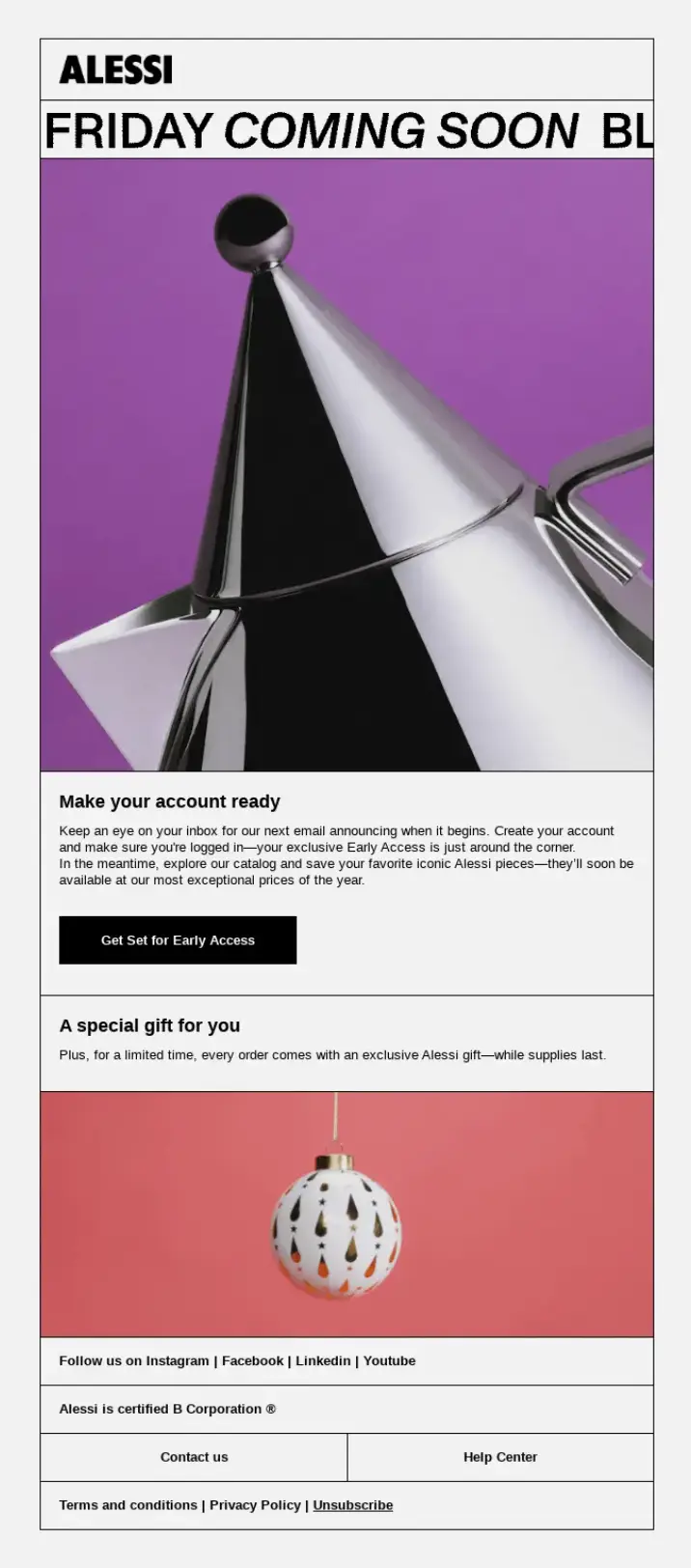
Alessi sends a teaser before the sale opens, using a bold purple hero section, metallic product imagery and a countdown to ask readers to create an account so they’re ready when prices drop. The email doesn’t reveal the discount at all, because its only goal is to get readers signed in before launch day.
Most teasers simply announce that a sale is coming, which gives the reader nothing to do except wait and probably forget. Alessi turns the teaser into an action by asking for an account. And that small step does two things at once, since it builds a list of people who have already shown intent and it removes friction from launch day, when a shopper who is already logged in can go straight from the email to checkout.
The countdown adds a fixed point in time to look forward to, so the launch email arrives as the answer to a question the reader has been holding for days rather than as one more promotion.
Subject Line: Black Friday Preview: Almost Live
How to Use it
Give your teaser one small action that makes buying easier later, such as creating an account, joining an early-access list, saving items to a wishlist or replying with the product they’re waiting for. You can then tag everyone who takes that action and send them the launch email first, which turns your teaser into a segment you can measure.
What it Could do Better
The copy is thin compared with the visuals, so readers are asked to sign up without being told what they get for it. A single line explaining what account holders receive on launch day, such as first pick of limited stock or an extra code, would make the effort feel worth it and would probably lift the sign-up rate.
2. Noom Makes Subscribers Feel Rewarded with Early Access
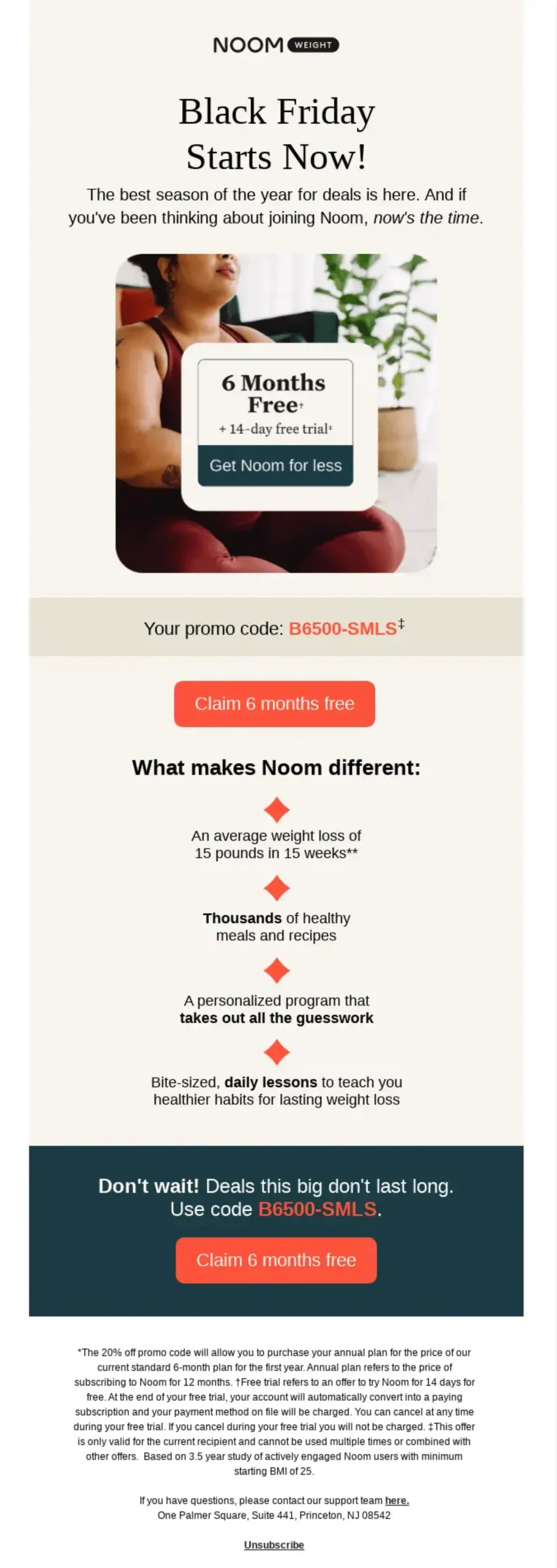
Noom gives existing subscribers early access to its Black Friday offer, which is six months free plus a 14-day trial, and sets the details out on a warm cream layout with one hero photo and a short bulleted list of benefits.
The subject line opens with “Surprise!” and puts the reader’s status as a subscriber first, before any number appears, so the email feels like a reward rather than a sales pitch. That framing matters during a week when every brand is shouting percentages, because a reader who feels singled out is more likely to open than one who sees another discount.
Inside, the calm cream layout and single photo keep the email from feeling like a flash sale, and the bullet list turns the plan’s features into short proof points that readers can scan in a few seconds before they decide whether the trial is worth starting.
Subject Line: Black Friday Preview: Almost Live
How to Use it
Send your early-access email only to subscribers or past customers, say so in the subject line, and open the deal a day or two before the public sale. Early access also spreads your orders across more days, which takes pressure off your checkout and support team during the peak weekend.
What it Could do Better
The copy is thin compared with the visuals, so readers are asked to sign up without being told what they get for it. A single line explaining what account holders receive on launch day, such as first pick of limited stock or an extra code, would make the effort feel worth it and would probably lift the sign-up rate.
3. Fitbit Adds a Mid-Season Deadline to Close Early Access
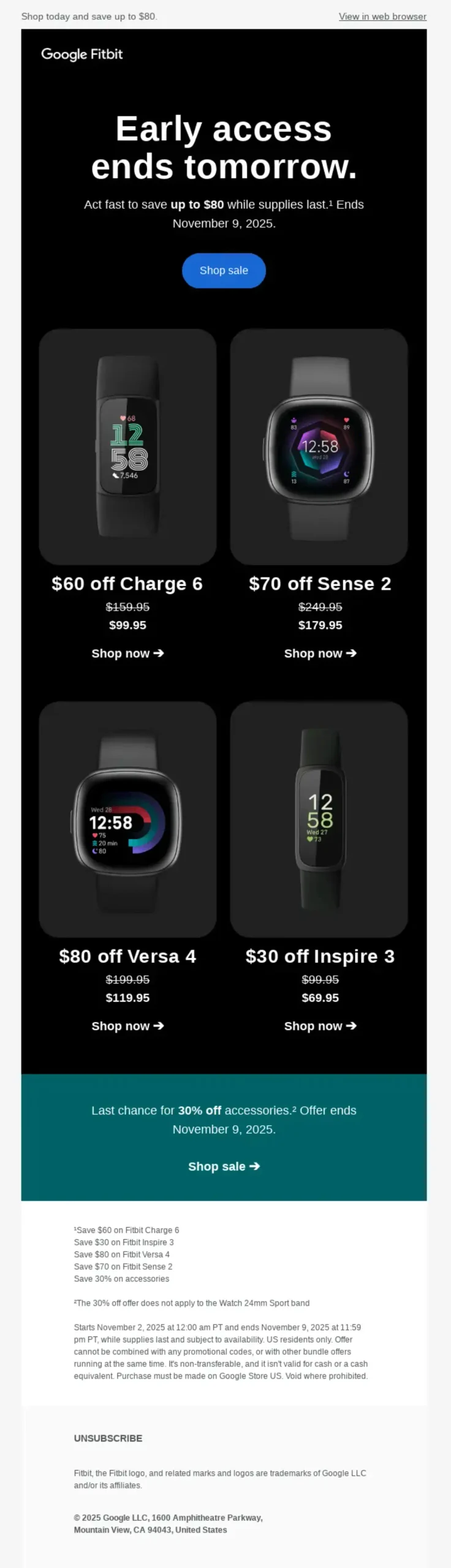
Fitbit closes its early access window with a reminder that the early deals end the next day, using a black background with a teal accent section to separate the offer from the product shots.
Most brands save their urgency for the last day of the sale, which leaves the quieter days before Black Friday without a reason to buy. Fitbit creates a second deadline in the middle of the season, so readers who were planning to wait now have a real decision to make a few days earlier.
The subject line does all the work on its own, since “end tomorrow” tells the reader the offer, the status and the timing before the email is even opened, and the teal section keeps the offer visually apart from the product shots so it doesn’t get lost on the dark background.
Subject Line: Early Black Friday deals end tomorrow
How to Use it
If you run an early-access window, close it with its own deadline email rather than letting it roll quietly into the main sale. Put the deadline in the subject line, and send it only to the people who received the early-access email but haven’t bought.
What it Could do Better
Readers who miss the early window should be told whether a Black Friday price is still coming, otherwise some of them will wait and some will assume they’ve missed out entirely. A short line such as “miss this and the Black Friday price will still be lower than usual, but these bundles won’t return” would keep both groups engaged.
4. Cravings Pays Off Weeks of Anticipation with a One-Line Offer
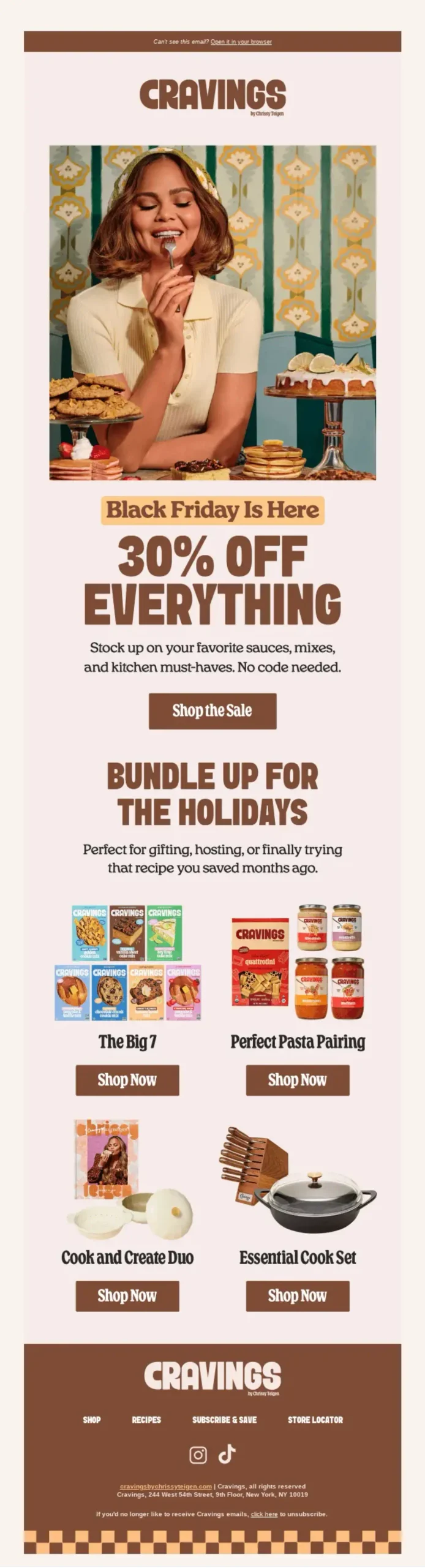
Cravings opens its sale with a retro-styled email built around a warm color palette, a large hero image and 30% off everything.
“The Wait’s Over” only makes sense to someone who knew a sale was coming, so the subject line rewards readers who saw the earlier teasers and pays off the anticipation the brand built in the weeks before. The offer is just as direct, because “30% off everything” doesn’t need terms, exclusions or a product list to explain it, and the reader can decide in a second whether they’re interested.
The retro styling and warm palette also match the brand’s kitchen and comfort-food personality, which keeps the email recognizable as Cravings in an inbox full of black-and-red sale designs.
Subject Line: The Wait’s Over: Black Friday Starts NOW 🍴
How to Use it
Write your launch subject line as the payoff to your teaser, using the same phrase or theme, so that readers connect the two emails. If you can make your offer sitewide, say it in as few words as possible, and if you can’t, name the one category it applies to instead of listing exceptions.
What it Could do Better
The email repeats “Shop Now” buttons throughout, which makes every section compete for the same click. One primary button near the top, with clearly secondary links to categories underneath, would make it easier for readers to tell where to start and would make your click data easier to read afterwards.
5. Teachable Sells the Outcome Instead of the Discount
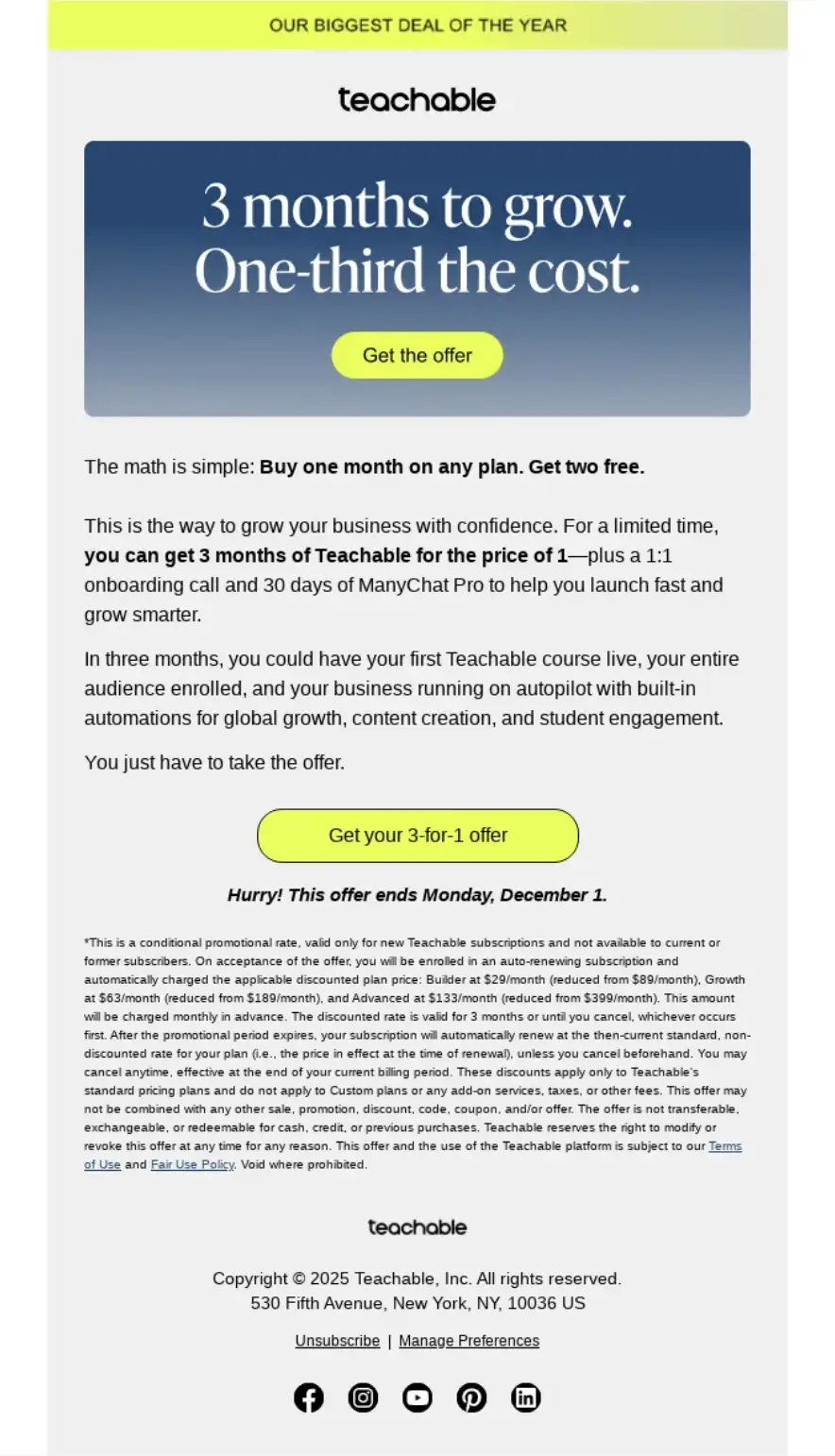
Teachable’s offer combines a 3-for-1 subscription deal with a one-to-one onboarding call and 30 days of ManyChat Pro, and the lime call-to-action button stands out sharply against a cool blue hero section.
For a software product, a bigger discount is easy to ignore, because the reader’s real question isn’t “how much do I save” but “will this pay for itself”. Teachable answers that question in the subject line by promising an offer “that makes you money”, which speaks to the outcome its customers want, which is earning from their courses.
The onboarding call is the smartest part of the bundle, since it lowers the risk of buying a tool you never set up, and a customer who gets set up properly is far more likely to stay after the discounted period ends. The lime button is the only warm-toned element on a blue background, so the eye goes straight to the action.
Subject Line: The Black Friday offer that makes you money
How to Use it
If you sell software, a course or a service, frame your offer around the result the customer is buying and add something that helps them succeed after purchase, such as a setup call, a template pack or a migration service. These extras cost you little, they protect your margin, and they reduce early cancellations.
What it Could do Better
Three separate value pieces in one offer can blur together, especially when readers skim. A short line totting up what the bundle would cost outside Black Friday would help readers see the saving at a glance and would make the deal feel as concrete as a percentage.
6. Grammarly Makes the Discount the Hero
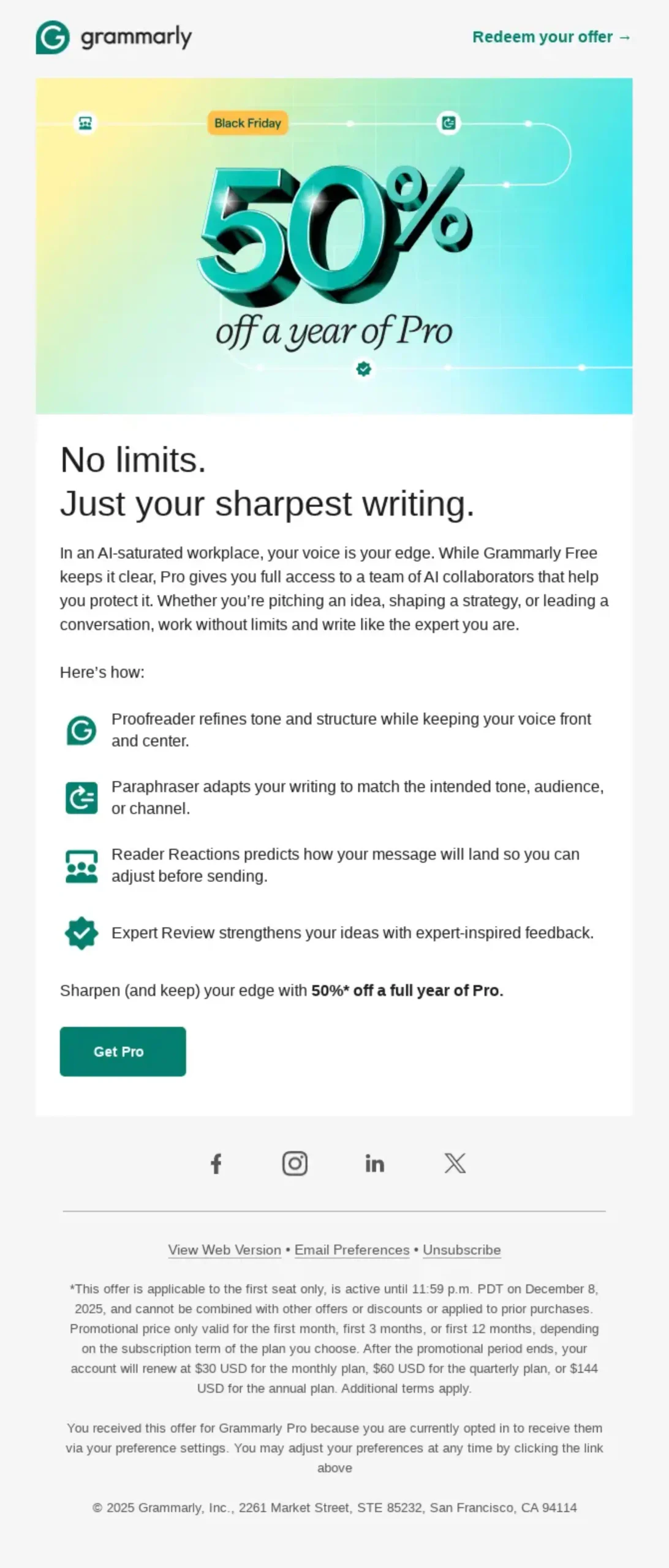
Grammarly offers 50% off a year of Pro and presents the number as a glossy 3D “50%” on a yellow-to-teal gradient, with the copy framing the upgrade as an advantage at work.
The discount is the hero image itself, so readers understand the offer before they read a single word, which matters on a phone where the first screen may be all they see. The glossy 3D treatment keeps a big discount from looking cheap, and the gradient fits Grammarly’s brand rather than borrowing the black-and-red look that most Black Friday emails share.
The copy then gives readers a reason to upgrade beyond the price by tying Pro to how they come across at work, which helps free users picture what they’d use the paid plan for.
Subject Line: 🥳 Black Friday starts now: 50% off Pro
How to Use it
When your discount is your strongest message, make the number the largest element in the email and keep the design premium so the offer still feels like it comes from your brand. Then add one sentence about what the upgrade helps the reader do, because a discount on something they don’t understand is still easy to skip.
What it Could do Better
The email leans on one message, so readers who aren’t sure what Pro adds have to leave the email to find out. A short comparison of the free and Pro plans, even three rows long, would answer that question in place and would likely convert more of the readers who are on the fence.
7. Elgato Stands Out on Cyber Monday by Sounding Like Its Audience
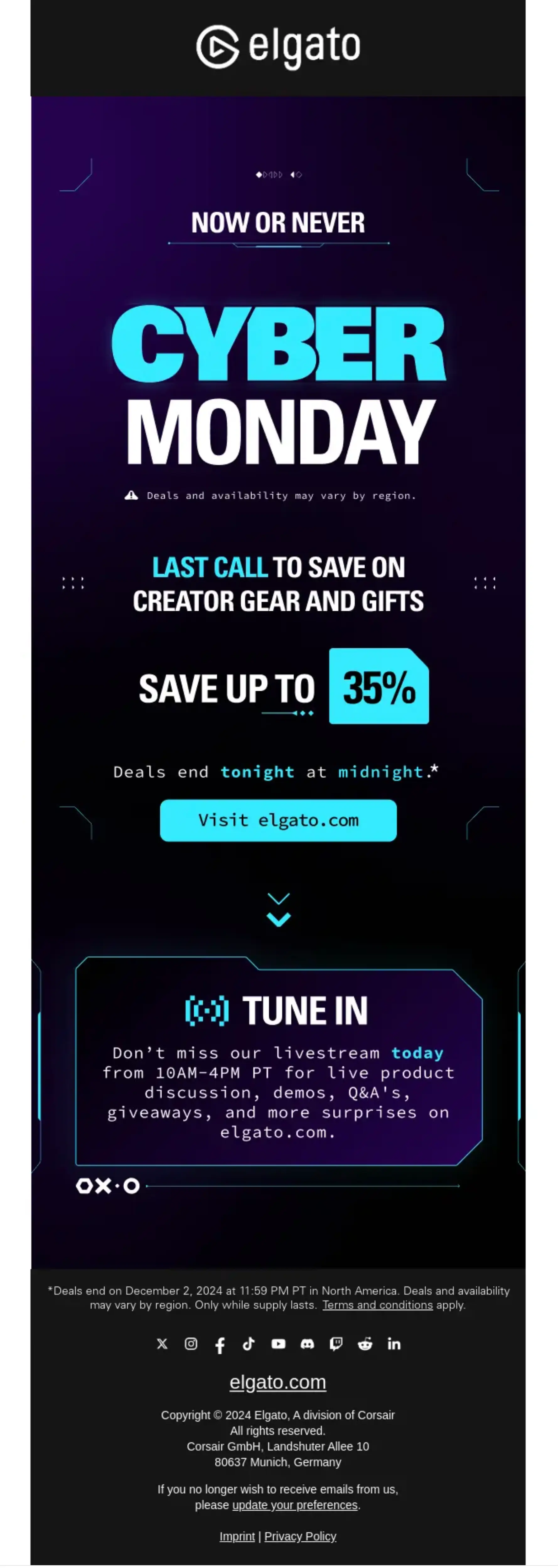
Elgato’s Cyber Monday email uses a dark, neon, retro-gaming design and fast-paced copy to push its creator gear before the sale ends.
By Cyber Monday, readers have already seen days of sale emails and most of them look the same, so the brand that stands out is usually the one that sounds most like itself.
Elgato’s neon, retro-gaming look and quick copy are aimed squarely at streamers and creators, which means the email reads as Elgato’s own rather than another generic sale announcement.
The subject line borrows the way its audience talks, so it feels familiar to them before they’ve even opened it, and that recognition is what readers need on one of the most crowded email days of the year.
Subject Line: Cyber Monday hits different at Elgato ⚡
How to Use it
Give your Cyber Monday email a different angle from your Black Friday one, whether that’s a new design, a new product focus or a tone that’s closer to how your customers actually talk. Readers who ignored Friday’s email need a reason to look again, and the same offer in the same design rarely gives them one.
What it Could do Better
Heavy dark-mode designs can lose contrast in some email clients, and neon text on dark backgrounds can become hard to read when a client inverts colors. Testing how the email renders in Gmail and Outlook, in both light and dark mode, before sending protects the effect the design is going for.
8. Ableton Sells an Upgrade to Customers It Already Has
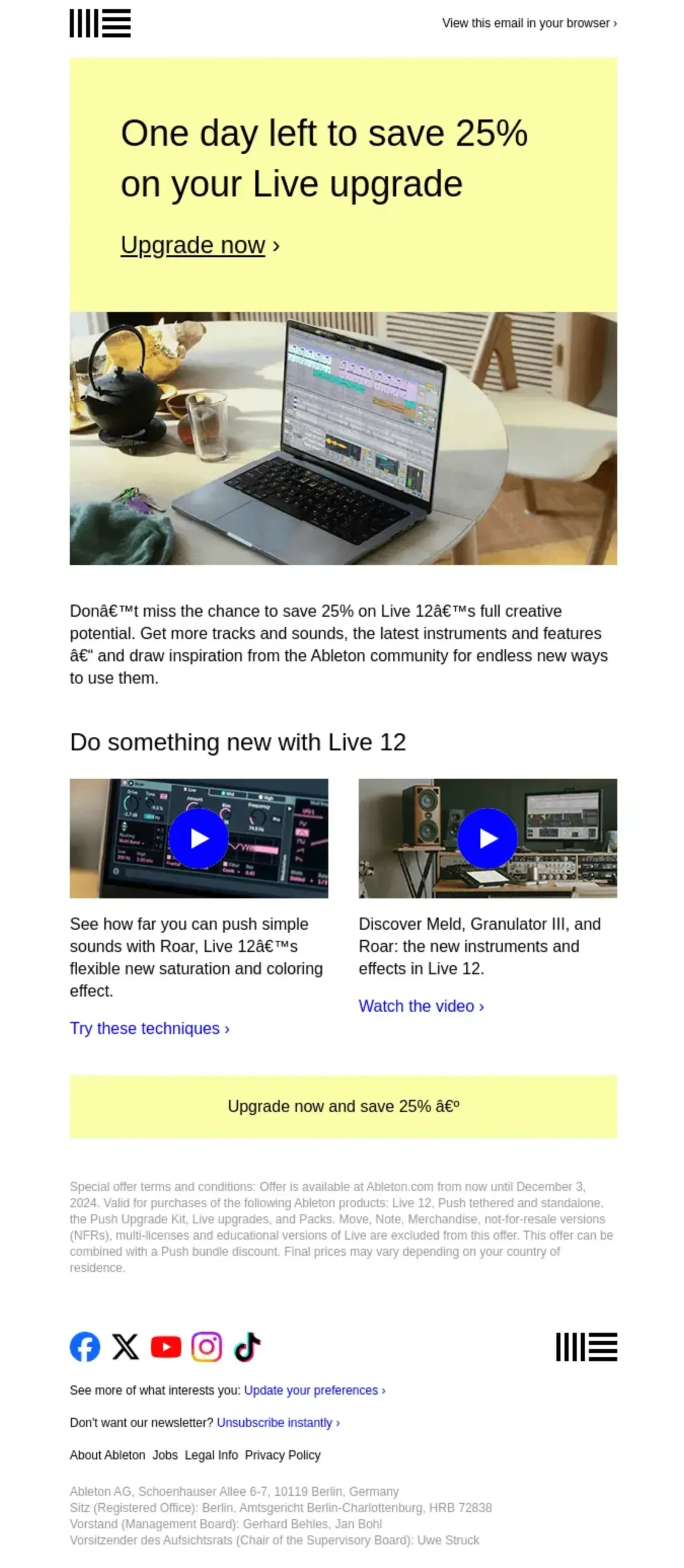
Ableton’s email targets existing users, offering 25% off an upgrade to Live 12 with a yellow hero block and a two-column grid showing what’s new.
Black Friday isn’t only for new customers, and existing users are often the easiest people to sell to, because they already trust the product and only need a reason to move up. The word “your” in the subject line tells readers straight away that this offer is for people who already own Live, and “only until tomorrow” adds a deadline in the same line.
The two-column grid then shows the new features next to the discount, so readers see what they’d be paying for, which means the email sells the upgrade as well as the price.
Subject Line: Save 25% on your Ableton Live upgrade, only until tomorrow
How to Use it
Segment your existing customers and send them an upgrade or add-on offer instead of the discount you give new buyers. Show what they’d gain in a simple grid or list, and keep the offer separate from your main sale emails so that customers don’t receive two competing messages.
What it Could do Better
“Only until tomorrow” is clear in the subject line, but readers in different time zones may not know exactly when “tomorrow” ends. An exact closing time with a time zone in the body, such as “ends 11:59 PM CET on Tuesday”, would remove any doubt and stop late buyers from missing the deadline by a few hours.
9. AllTrails Uses Its Last-Chance Email to Persuade, Not Just Remind
AllTrails sends a final Cyber Monday push that pairs 50% off AllTrails+ with 20% off gear, and it shows the paid features through overlapping phone mockups of maps, park guides and elevation profiles, followed by a free-versus-paid comparison.
Many last-chance emails just repeat the deadline in bigger letters, but the readers who still haven’t bought by the final day usually aren’t waiting for a reminder, they’re waiting to be convinced.
AllTrails uses its final email to answer “what do I actually get” by showing the paid features in use on phone screens, which is exactly where its customers would use them on a trail.
The free-versus-paid comparison then makes the upgrade decision easy, since readers can see in one table what they’re missing on the free plan, and the capitalized “ENDS TONIGHT” in the subject line makes sure the urgency still comes through in the inbox.
Subject Line: ENDS TONIGHT: 50% off AllTrails+

How to Use it
Treat your final email as your most persuasive one rather than your shortest one. Keep the deadline in the subject line, then use the body to handle the main objection that’s stopping people from buying, whether that’s showing the product in use, comparing plans or adding a short testimonial.
What it Could do Better
Two offers in one final email can split attention at the moment you want one clear decision. Leading with the subscription and moving the gear discount to a single secondary line would make the main action clearer.
10. Cometeer Protects Its Margin with a Free Gift and a Pun
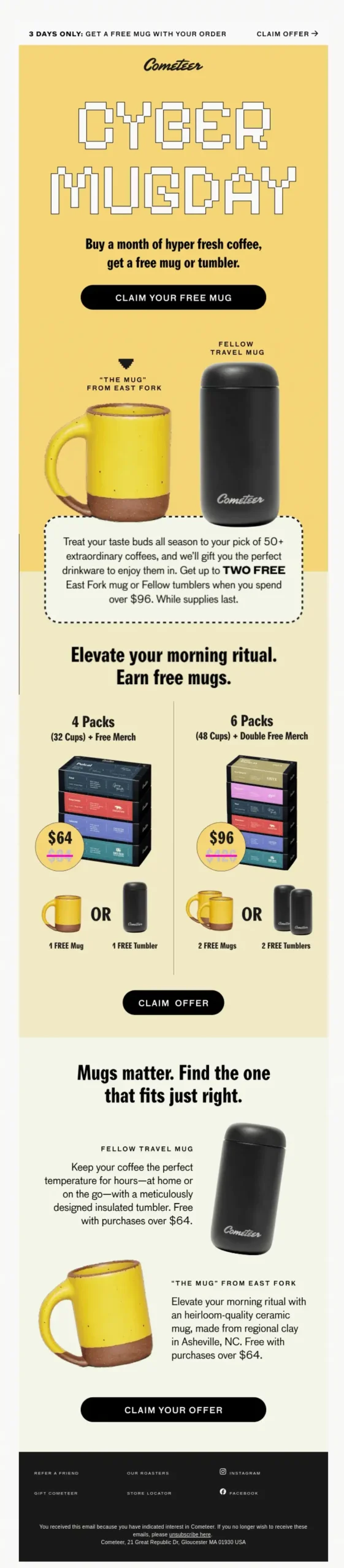
Cometeer renames Cyber Monday “Cyber Mugday” and gives away a free mug with every box of coffee. The pun gets attention in an inbox full of percentages, and because it’s tied to what the brand sells, it’s memorable rather than just cute.
The offer itself is the clever part, since a branded mug costs the brand far less than a deep discount but still feels like a deal, which protects the margin on the product. The gift also keeps working after the sale, because every customer who drinks from that mug sees the brand each morning, which a percentage off can never do.
Subject Line: It’s Cyber MUGDAY! Free mugs with every box 🚀
How to Use it
If you’d rather not cut your prices deeply, offer a gift with purchase that’s linked to your product, such as a branded accessory, a sample of a new item or a bonus template. Then give the promotion a name or pun of its own so that it stands out from the dozens of percentage-off subject lines around it.
What it Could do Better
A gift offer works best when readers can see the gift clearly, because a free item they can’t picture is easy to skip. A large product shot of the mug near the top would make the offer as quick to understand as a discount.
Patterns Worth Copying
Looking across all ten emails, a few patterns repeat often enough to be worth building into your own campaign:
- Subscribers get something first: Noom and Fitbit both use early access, which rewards your list and spreads your sales over more days than the Black Friday weekend.
- The offer is the hero: Grammarly and Cravings both put the discount in the largest element of the email, so the reader doesn’t have to look for it.
- Software sells outcomes and features: Teachable, Ableton and AllTrails all pair the discount with what the buyer will be able to do, because a digital product’s price means little until the reader can see what’s included.
- Gifts and puns protect margin: Cometeer’s free mug shows that a creative bonus can stand out without a deeper discount.
- Deadlines appear more than once: Fitbit sets a deadline for early access and AllTrails sets one for the final day, which gives readers several natural points to decide.
The 8-Email Black Friday Sequence You Can Copy
This is the structure behind most of the examples above, laid out as a timeline you can adapt. We have also added a few templates you can directly copy.
| # | When | Job | Template to start from | |
|---|---|---|---|---|
| 1 | 2 weeks before the sale | Teaser and planning email | Say a deal is coming and when, and give readers something useful in the meantime | Pre-Black Friday Warm-Up Email |
| 2 | Sale opens | Launch or early offer | Open the deal, and give subscribers early access if you offer it | Early Black Friday Offer Email |
| 3 | 3 days after launch | Value email | Show different customer groups how to get the most from what you sell, with one link to the deal | Write from scratch |
| 4 | Mid-sale | Reminder | Restate the offer for people who opened but didn’t buy | Black Friday Sale Reminder Email |
| 5 | Black Friday | Main offer | Your strongest version of the offer, with any upgrade option for existing customers | Black Friday Sales Email |
| 6 | Cyber Monday | Second wave | A fresh angle on the same deal, or a Cyber Monday bonus | Adapt the Black Friday Sales Email |
| 7 | 3 days before the close | Countdown | Count down the remaining days | Adapt the Sale Reminder Email |
| 8 | 24 hours before the close | Final call | State exactly when the deal ends | Adapt the Sale Reminder Email |
A few rules keep this sequence from turning into noise:
- Send every email to one destination, which is your deal page
- Remove buyers from the rest of the sequence as soon as they purchase, so customers only receive what still applies to them.
- If your list is small, merge emails 3 and 4 rather than sending a weaker email just to fill the calendar.
For subject line ideas at each stage, see our lists of Black Friday email subject lines and Cyber Monday subject lines.
Get the AI-powered email marketing and automation inside WordPress. Turn leads into customers, automate user journeys and grow repeat sales, with 45+ plugin integrations and no price hikes as you scale. Valid until December 4.
How to Plan Your Black Friday Email Campaign
- Decide the offer and the dates first. Every email in the sequence depends on knowing the discount, what it applies to, when it opens and when it closes.
- Segment before you write. At a minimum, separate existing customers from leads, so that customers can get an upgrade or loyalty message while leads get the full offer.
- Build your deal page before your emails. Test checkout with the coupon applied on every plan or product you’re promoting, because every email sends readers to that page.
- Prepare your sending. Check that SPF, DKIM and DMARC are set up, and clean out addresses that have bounced or haven’t opened in months.
- Schedule everything in advance. Load all eight emails before the sale opens, so the season runs on schedule even when your support queue fills up.
- Plan for the busy weekend. The Saturday after Black Friday can be as busy as Black Friday itself, so keep your site banner and social posts running over the weekend even if you don’t send an email.
For the wider campaign around your emails, including pricing and promotion channels, read our guide to Black Friday marketing strategies.
Dos and Don’ts

| Do | Don’t |
|---|---|
| Give each email one job and one main call to action | Pack the teaser, offer and deadline into a single email |
| Put the offer in the hero section | Hide the discount below the fold |
| Reward subscribers with early access or a bonus | Send your list the same email as the public sale |
| Remove buyers from later sales emails | Keep sending “last chance” emails to people who already bought |
| Test rendering in Gmail, Outlook and on mobile | Rely on a design that only works in one email client |
| Give the exact closing time in your final emails | Use vague deadlines like “ending soon” |
Craft Emails That Actually Convert This Black Friday
Black Friday emails are one of the most powerful tools to drive holiday sales. The examples we explored show how a strong subject line, clear design, engaging copy, and timely urgency can turn ordinary emails into high-performing campaigns.
By combining creativity with strategy, you can capture attention, spark curiosity, and guide your audience toward action. Remember to personalize where possible, stay consistent with your brand, and test different approaches to see what resonates best.
With thoughtful planning and execution, your Black Friday emails can not only boost conversions but also strengthen customer relationships for the long term.

Nazir Himel
Product Marketing Lead
Hey! I’m an inbound marketing specialist focused on email marketing automation. I love turning complex features into clear, user-centric messaging and when I’m not shaping product stories, I’m experimenting with content frameworks, conversion journeys, and helping others communicate value without sounding salesy!
Table of Content
Related Articles and Topics
-
20 Monthly Newsletter Ideas for When You’re Out of Ideas [+ Real-life Examples]
Even the best ideas fail if your newsletter never lands. Many marketers freeze at a…
-
Real-Life Browse Abandonment Emails from Top Brands [and Why They Convert]
Most stores obsess over cart abandonment, but the real revenue leaks happen before a product…



Leave a Reply