

Halloween Email Marketing: 4 Revenue Leaks and How Automation Plugs Them

Summarize with


Last Updated:
Americans are expected to spend a record $13.5 billion on Halloween in 2026, averaging about $115 per person, according to the National Retail Federation. That is up from $13.1 billion last year!
And, for email marketers, that spending marks the start of a much bigger opportunity!
Halloween kicks off the busiest selling stretch of the year, with Black Friday, Cyber Monday, and the holiday season right behind it.
So, October is not just about sending a few themed campaigns. It is a chance to sharpen the systems you will rely on for the rest of the season.
And the brands that do this well are not simply sending more emails. They are sending the right message at the right time, using automation to make campaigns more timely and personal.
The real opportunity is not just in the campaign itself. It is in what happens behind the scenes, especially at the moments when customers hesitate, drop off, or are ready to buy.
In the sections ahead, we will look at four common revenue leaks and the automated campaigns that can help close each one.
Why Halloween Rewards Email Marketers
A few things make Halloween unusually friendly to email:
- A fixed deadline: October 31 does not move. That gives every campaign built-in urgency without inventing any.
- A long buying window: Shoppers start planning weeks, which leaves room for a sequence instead of a single blast.
- A broad audience: Families, party hosts, decorators, and pet owners all shop for Halloween, and each wants something different.
- A clear visual theme: Orange, black, and a pumpkin make an email recognizable in a crowded inbox before anyone reads a word.
All four advantages only pay off if your campaign is set up to use them. That is where most businesses lose money.
What Are the Common Chokeholds of Halloween Marketing?
Companies often face these challenges in the Halloween season:
- Seasonal audience segments are often missed
- Lack of lead nurturing causes lost early shoppers
- Generic emails lower engagement on repeat campaigns
- No central reporting makes real-time adjustments difficult
- Limited time to A/B test subject lines and visuals
- Lack of personalization for repeat or VIP customers
- Difficulty tracking campaign performance in real time
- Managing multiple product categories overwhelms teams
- Poorly timed emails miss early-bird or last-minute shoppers
Leak 1: One-Off Blasts Instead of a Sequence
The most common Halloween campaign is a single email: “Our Halloween sale is live.” It goes out once, gets opened by the people who were going to buy anyway, and then the inbox moves on.
A long buying window rewards a sequence, not a blast. Each email has one job:
- Teaser. A week out, hint that something is coming. This primes your list and warms up your sender reputation before the big send.
- Launch. Announce the offer clearly: what it is, who it is for, and when it ends.
- Reminder. Midway through, re-send to people who opened but did not click, with a new angle such as a best-seller or a bundle.
- Last chance. In the final 24 to 48 hours, a short, urgent email to everyone who has not bought yet.
The numbers back this up. In Omnisend’s 2026 Ecommerce Marketing Report, automated emails earned $2.87 per send, compared to $0.18 for scheduled campaigns, a 16x difference per message.
How to plug it into FluentCRM
Build the four emails once, then chain them in an automation with wait steps between them. Add a goal so anyone who buys exits the sequence and stops getting sale reminders. You set it up in an afternoon, and it runs on its own until October 31.
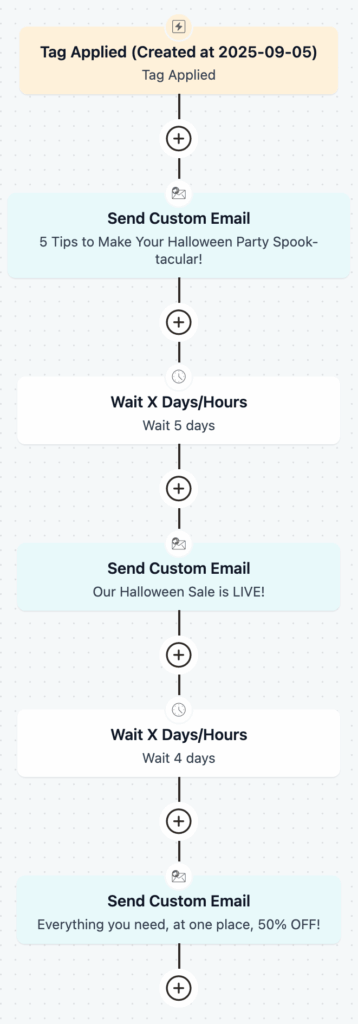
To skip the design work, start from the Halloween Sales Email Template and adapt it for each stage.
Not sure what to say in each email? Our Halloween email marketing ideas cover themes, angles, and real brand examples you can borrow.
Leak 2: One List for Every Shopper
Halloween changes how people buy. A customer who usually orders running shoes might suddenly want a costume for their kid, or decorations for a party. Send everyone the same email, and most of your list sees offers that do not fit them.
Think about who actually shops for Halloween:
- Parents looking for costumes and treats
- Party hosts buying decorations, food, and drinks
- DIY decorators planning weeks ahead
- Pet owners shopping for pet costumes
- Supporters of a cause who respond to giving, not discounts
The problem is that many tools make seasonal segmenting painful. You end up copying contacts into a separate Halloween list and losing the segments you already rely on.
Segmenting pays off. When Mailchimp compared its users’ campaigns, segmented campaigns earned about twice the clicks of non-segmented ones.
How to plug it with FluentCRM
Use tags instead of new lists. Tag contacts by Halloween interest when they click a link, fill out a form, or buy a product. Then build dynamic segments that combine those tags with what you already know, such as past purchases or location.
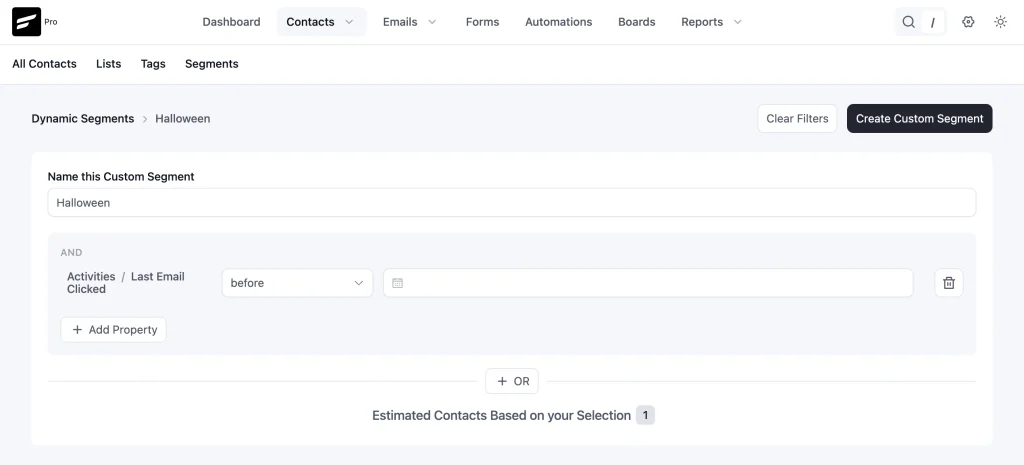
A contact can carry a Halloween tag and keep their usual segments, so nothing breaks after October 31.
If you run a nonprofit or a cause campaign, the Halloween Donation Email Template is built for that segment.
Leak 3: Abandoned Carts
Halloween shoppers browse a lot. They add a costume to the cart, get distracted, and leave. With a hard October 31 deadline, a cart left on the 25th is a sale you either recover fast or lose for good.
About 70% of online shopping carts are abandoned, according to the Baymard Institute, which averages 50 studies. The good news: per Omnisend, one in two people who click an automated abandoned cart or welcome email goes on to buy.
How to plug it with FluentCRM
Turn on abandoned cart automation for your WooCommerce or FluentCart store. When a shopper leaves items behind, FluentCRM sends a reminder automatically. For Halloween, make that reminder seasonal: show the products they left, mention when the sale ends, and keep the copy short.
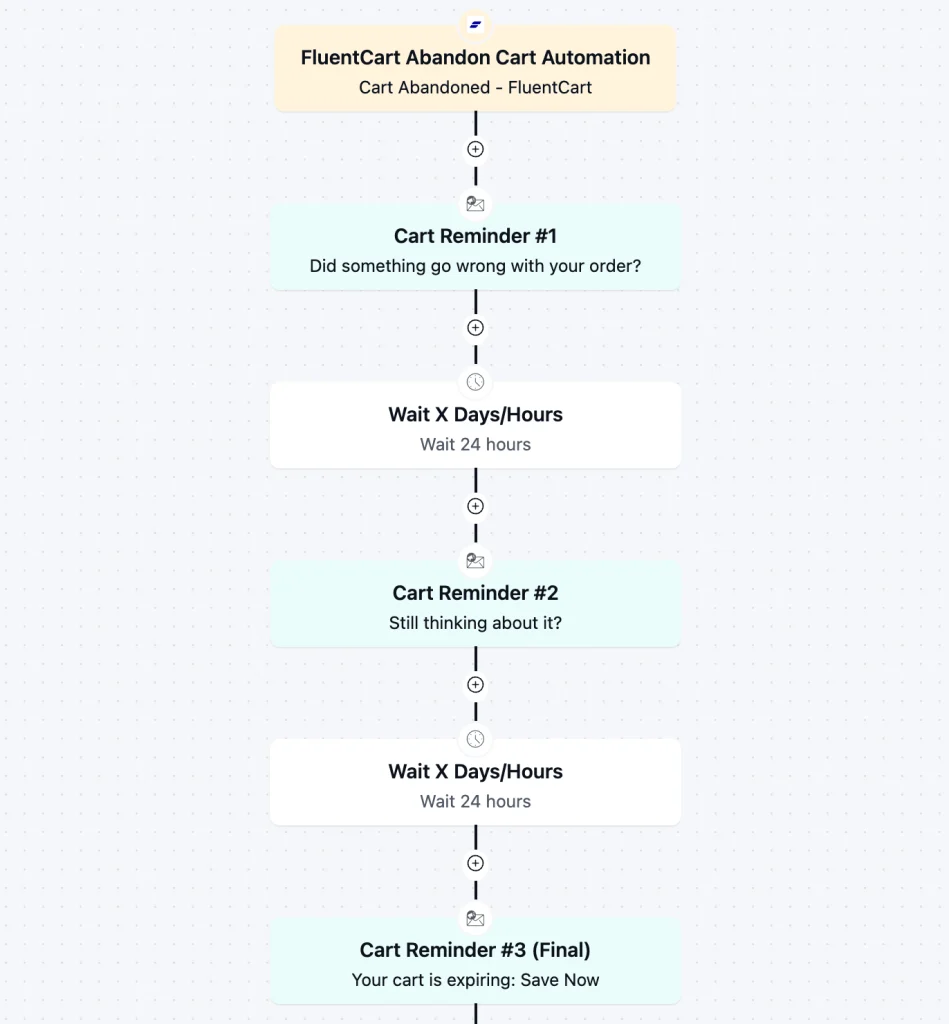
The shopper already wanted the product. Your job is just to bring them back before the deadline.
Running a FluentCart store? Start from the ready-made FluentCart Abandoned Cart Automation template and add your Halloween copy.
Leak 4: Results Scattered Across Tools
During Halloween, you are probably running several things at once: a sale, a few product pushes, maybe a social campaign. If your store data lives in one place and your email stats in another, simple questions get hard to answer:
- Which Halloween email actually drove sales?
- Is the cart reminder paying off?
- Which segment responded best?
When those answers take hours to piece together, you make changes after the season is already over.
How to plug it with FluentCRM
Because FluentCRM runs inside WordPress, your contacts, campaigns, and store activity sit in the same dashboard. Check opens, clicks, and revenue per campaign while the sale is still running.
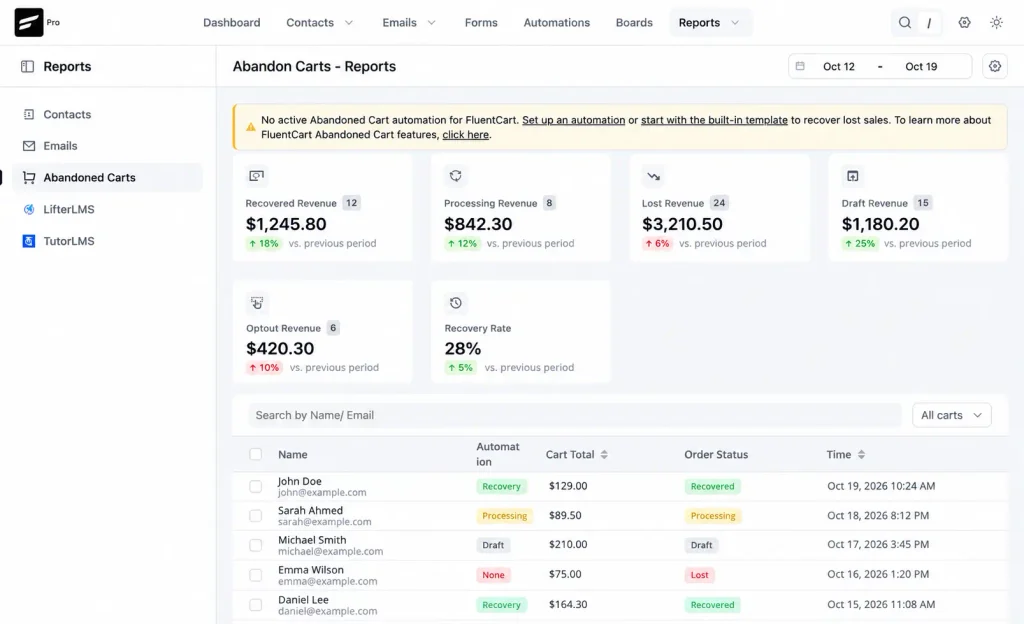
If the reminder underperforms, change the subject line for the last-chance email. If one segment is responding well, send them a follow-up the same day.
What This Looks Like for Real FluentCRM Users
The four leaks above all come back to the same problem: too much manual work, too much data split across tools, and too little control over what happens after someone joins your list, clicks, or buys.
Real FluentCRM users are already solving those problems in different ways.
WP Fusion: More contacts, more automation, lower cost
WP Fusion moved to FluentCRM after rising email marketing costs started limiting how much they could grow their list.
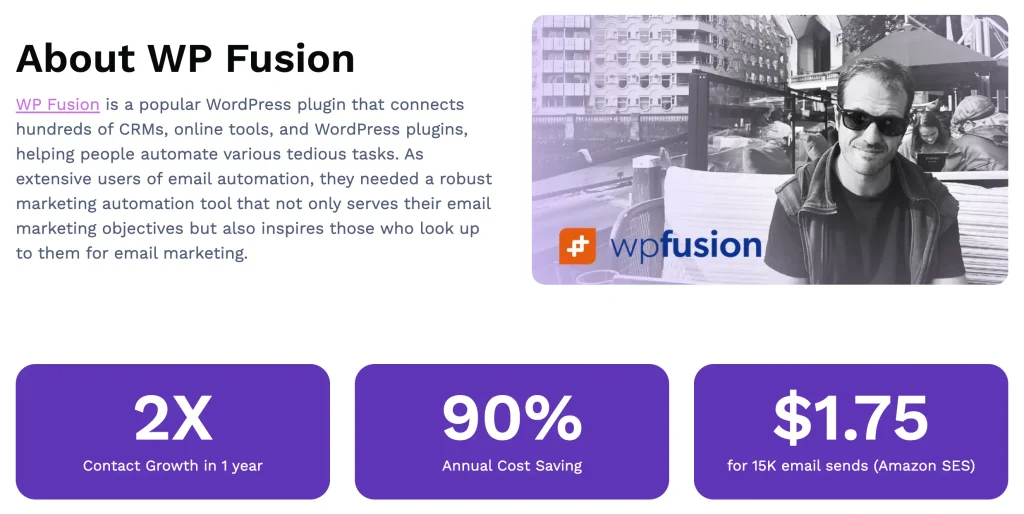
After the move, they rebuilt automations around purchases, license expirations, activations, and follow-ups, while growing from 10,000 to 21,193 contacts.
That is the same principle behind the first two leaks in this guide. Instead of relying on one-off sends or constantly rebuilding lists, the team could keep contacts in one system and let automations handle what happened next.
En Busca del Fuego: Fewer tools, less data scattered everywhere
En Busca del Fuego had a different problem. As the business grew, customer data, marketing, reporting, and automation were spread across multiple tools.
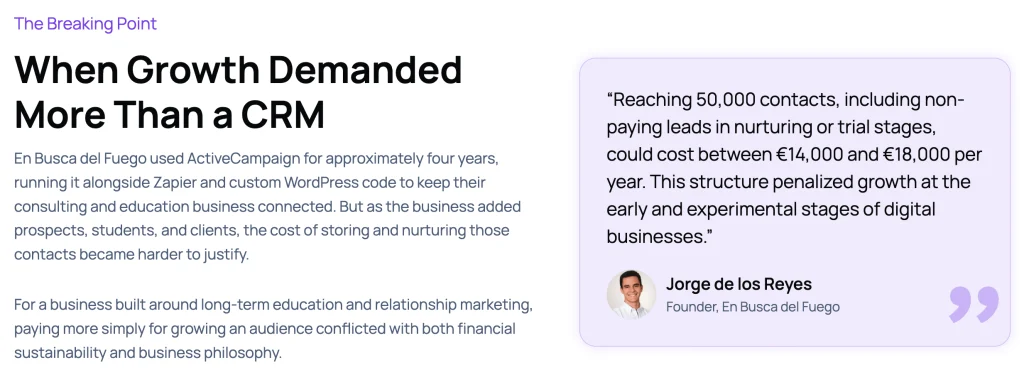
By bringing more of that work into the Fluent ecosystem, they reduced the number of systems they had to manage and saved around €12,000 per year.
That is exactly the kind of problem Leak 4 creates during a seasonal campaign. When customer activity and campaign data live closer together, it becomes much easier to see what is working while the campaign is still running.
Jose Luis Duron: High-volume email without constant manual work
Jose Luis Duron uses FluentCRM to send around 100,000 emails every week, with reported open rates between 30% and 50%.
At that volume, sending everything manually would quickly become unmanageable. Scheduling, segmentation, and automation make it possible to keep campaigns moving without treating every send as a separate job.
That is the same idea behind the Halloween sequences, targeted segments, and cart follow-ups above.
None of these examples are Halloween campaigns. But that is the point.
Halloween simply gives you a short, high-pressure window where these systems matter more. The better your automations, segments, and reporting are before the rush starts, the easier it becomes to catch missed sales, follow up at the right time, and keep the campaign moving without adding more manual work.
Your Halloween Email Checklist
Before you hit send, run through this list:
- Build a four-step sequence: teaser, launch, reminder, last chance
- Add a purchase goal so buyers exit the sale emails
- Tag contacts by Halloween interest instead of creating new lists
- Turn on abandoned cart reminders with a seasonal message
- Set up email authentication before your biggest sends
- Spread large sends to avoid spam filters
- Test subject lines on the launch email, then reuse the winner’s style
- Check campaign revenue midweek and adjust the last-chance email
Browse every seasonal design in the email template library.
Frequently Asked Questions
Here’s the answer to a few frequently asked questions about Halloween Email Marketing:
Set Up Your Halloween Sequence Before October 31
You have days, not weeks, before Halloween. That is enough time to build one sequence, one segment, and one cart reminder, and then let them run.
FluentCRM is 30% off for Halloween. That puts a single-site license at $90 for the first year, with unlimited contacts and no per-email fees. Every plan includes automation, segmentation, abandoned cart recovery, and reporting, plus a 14-day money-back guarantee.
Build it for Halloween, and it is ready for Black Friday.
Samira Farzana
Once set out on literary voyages, I now explore the complexities of content creation. What remains constant? A fascination with unraveling the “why” and “how,” and a knack for finding joy in quiet exploration, with a book as my guide- But when it’s not a book, it’s films and anime.
Table of Content
Related Articles and Topics
-
How to Create a Newsletter Archive on WordPress within 5 Minutes!
You send a newsletter to your subscribers, once they reach their inboxes and read it…
-
New Gutenberg Editor: The Email Builder WordPress Users Always Wanted in FluentCRM
If you’re a WordPress user, isn’t it satisfying to write in Gutenberg? You click the…





Leave a Reply