
FluentCRM is one of the easiest and fastest Email Marketing & CRM solutions for WordPress. This plugin can be installed from your WordPress dashboard. You can also download it from the WordPress site and install it on your dashboard.
Requirements #
To use FluentCRM, you’ll need –
- WordPress version 5.0 or higher
- PHP version 5.6 or higher
Install and Activate FluentCRM #
You can install FluentCRM free version like any other WordPress plugin. Follow the steps given below –
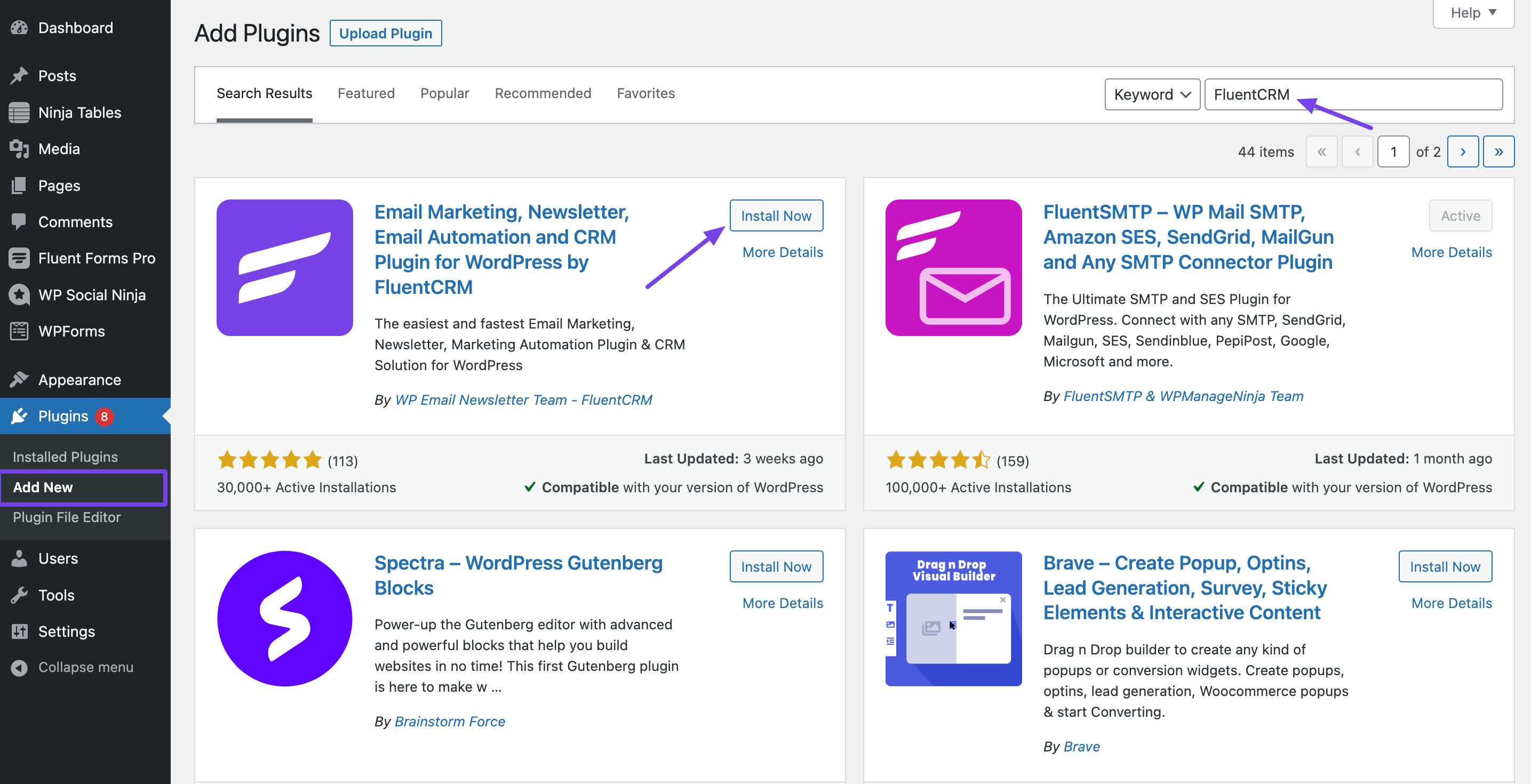
- Go to the WordPress Admin Dashboard → Plugins → Add New
- Type in ‘FluentCRM’ on the search box, click the install button and then Activate it.
- Another method to download the .zip file and upload this on the Add New page is by using the Upload Plugin button, after that click Install & Activate.
Installing and Activating FluentCRM Pro #
To get FluentCRM Pro, purchase the plugin from here, and you’ll be redirected to your WPManageNinja account. After a successful purchase, you can download the Pro version and get the License Key from your WPManageNinja Account.
1. Downloading the Pro Plugin File #
Once you have purchased FluentCRM Pro, the installation file is automatically added to your account dashboard.
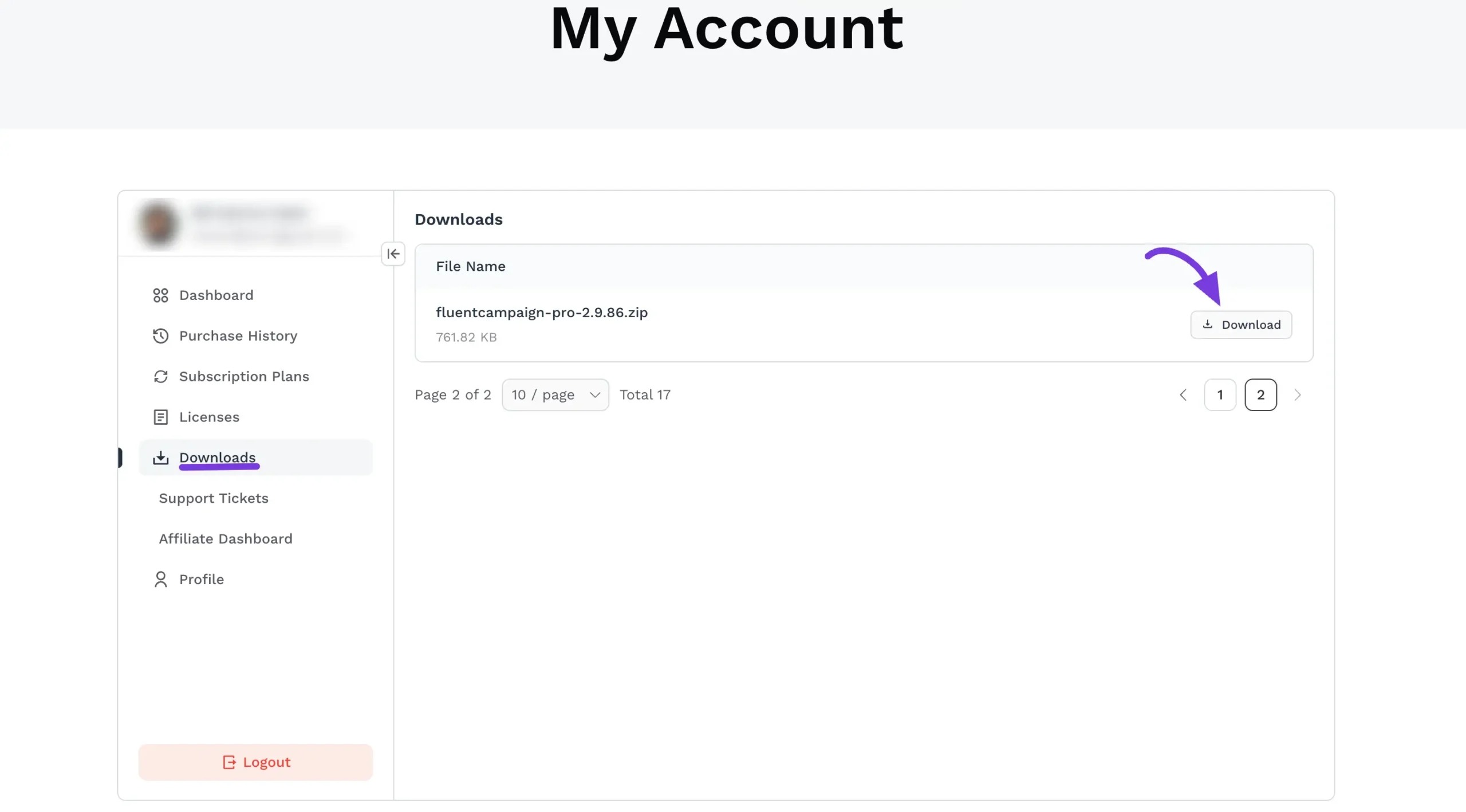
- Log in to your WPManageNinja Account Dashboard.
- From the left-hand navigation menu, click on the Downloads tab.
- Locate the FluentCRM Pro (or
fluentcampaign-pro) zip file in your list of available downloads. - Click the Download button on the right side to save the
.zipfile to your computer.
Note: Do not unzip this file. You will need to upload the entire
.zipfile directly to your WordPress dashboard to install the Pro version.
2. Copying Your License Key #
To activate your premium features and receive automatic updates, you must enter your valid license key after installing the plugin.
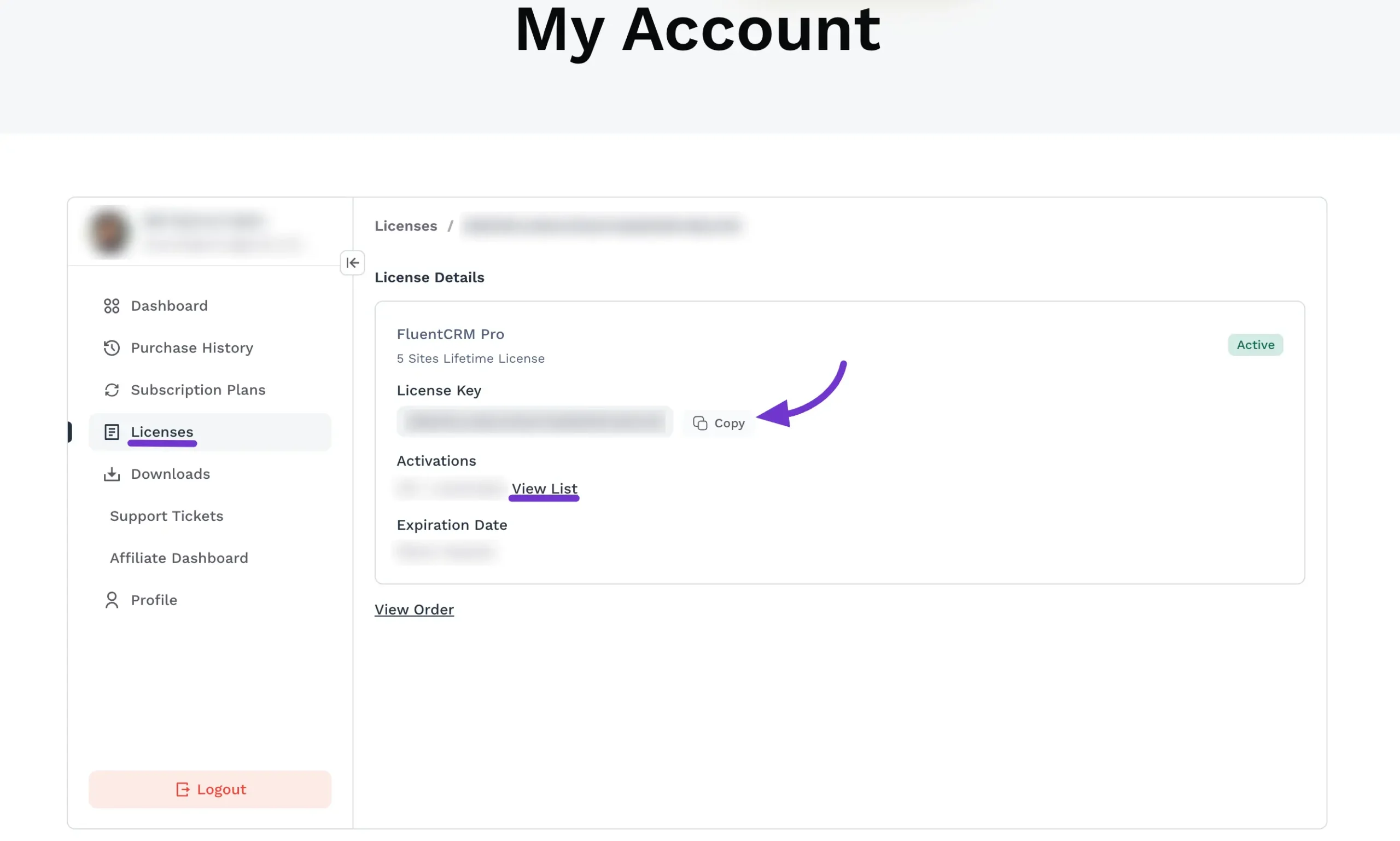
- Still within your WPManageNinja Account Dashboard, navigate to the Licenses tab from the left-hand menu.
- Under the License Details section, locate your active FluentCRM Pro subscription.
- Find the License Key field and click the Copy button to copy the key to your clipboard.
Once you have downloaded the .zip file and copied your license key, you are ready to head over to your WordPress dashboard to upload, install, and activate FluentCRM Pro!
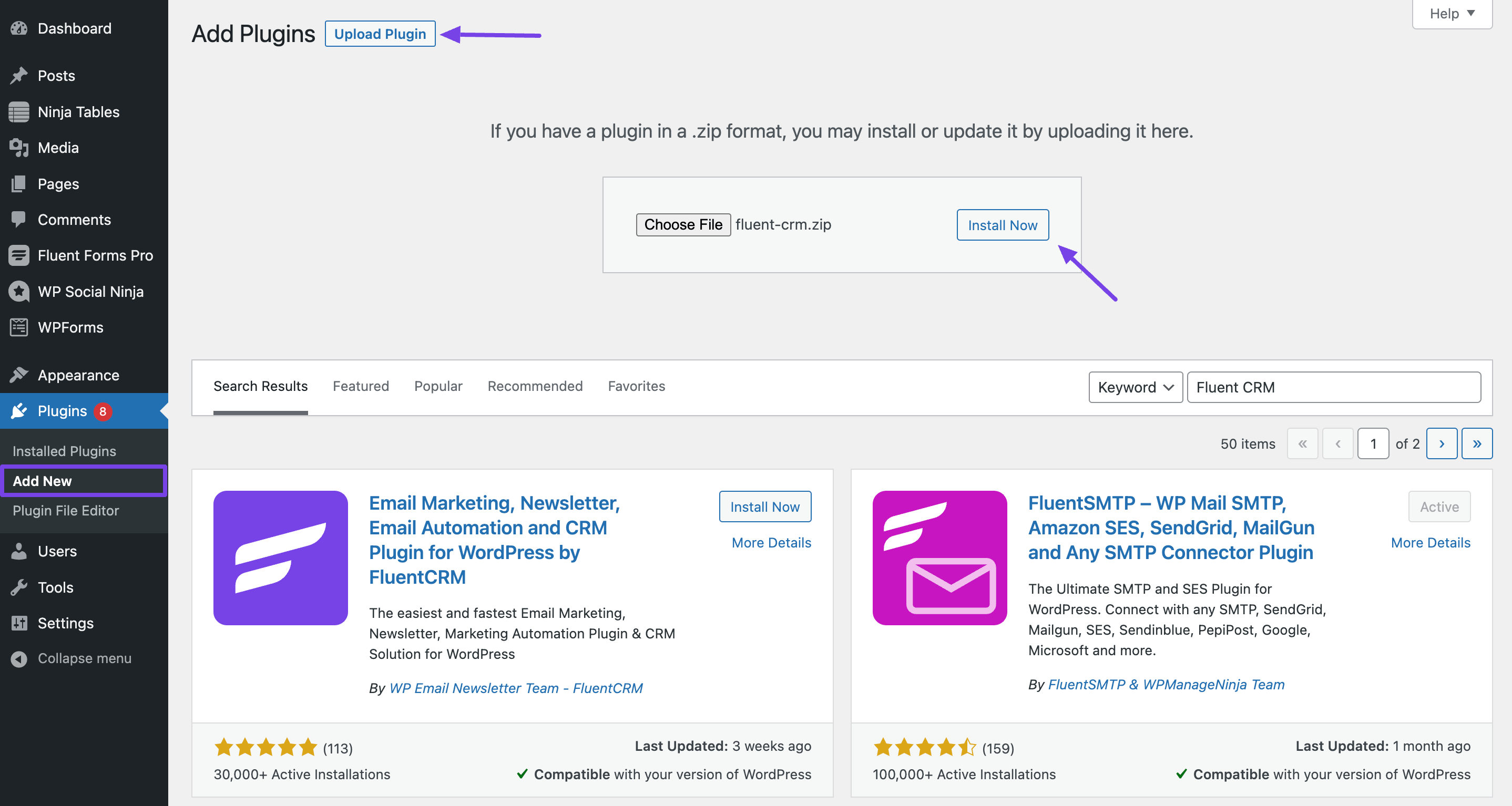
Go to your WordPress dashboard and navigate to Plugins > Add New Plugin from the left sidebar. Click on the Upload Plugin button, select the file, and upload it. Then, click Install Now and activate the plugin. It’s a simple process!
Update FluentCRM #
It’s pretty easy to update both the Free and Pro versions. You can navigate to the plugin page of your dashboard, in order to check if an update is available. If any update is available just click on the update button.
Make sure that the pro version is activated with a valid license key. If you don’t have a license key or the license key is expired, you can purchase a new one or renew the existing one from here
Activate FluentCRM License #
FluentCRM Pro comes with a licensing option to activate your license. Follow these simple steps to activate the license –
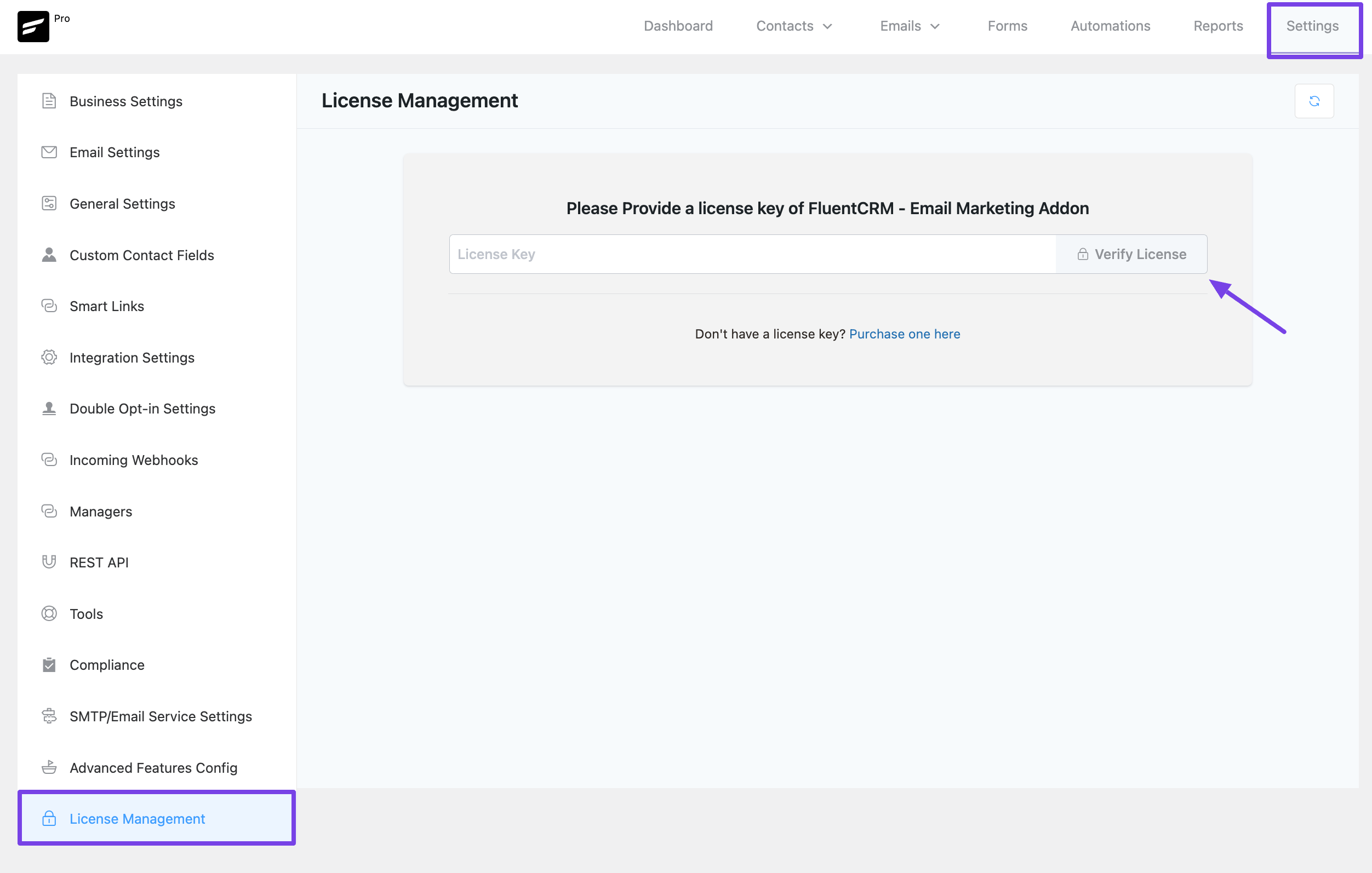
Go to FluentCRM and click on the Settings option from the sidebar. Then click the License Management tab, here you’ll find the option for providing the License Key. So, after adding the key just click the Verify License button. Now you have successfully activated your license!
Renew FluentCRM License #
FluentCRM Pro comes with a licensing option to renew your license. Follow these simple steps to renew the license:
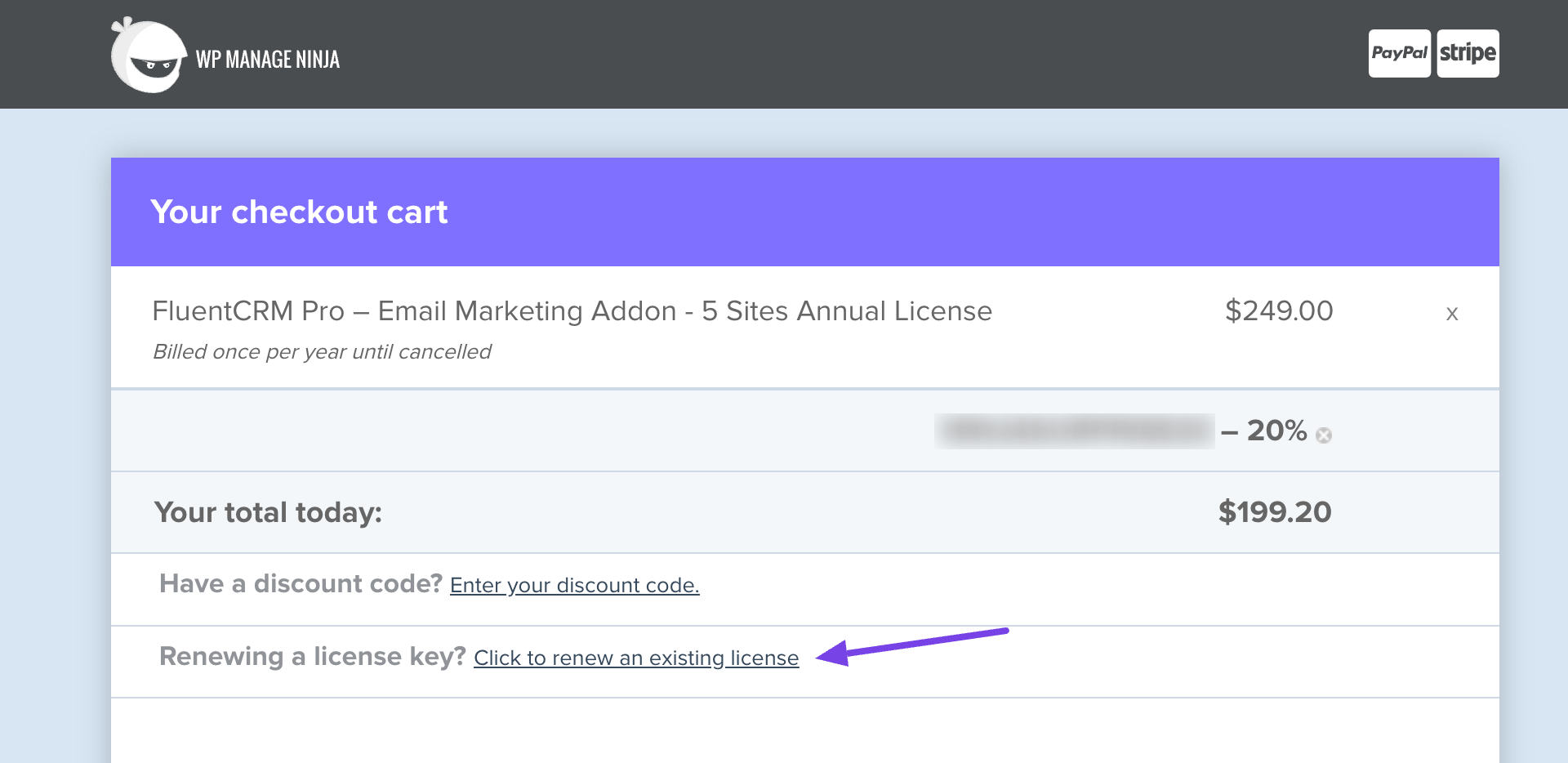
You can start by going to the purchase history from the WPManageNinja Account. Then you’ll see the ‘Renewing a license key?’ link on the checkout cart. Click on that.
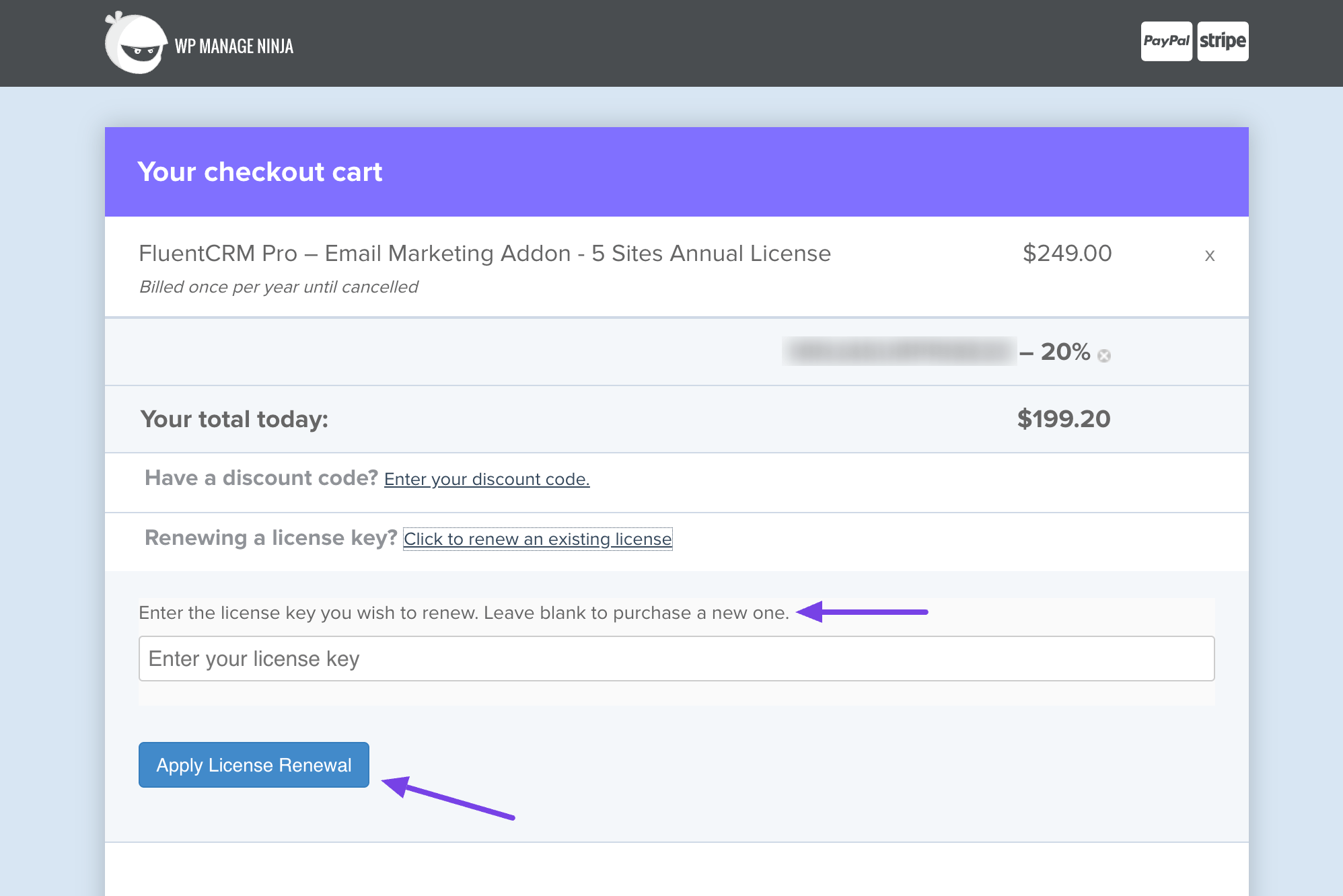
After entering the license key, click the Apply License Renewal button then your license will be activated automatically.
If you have any further questions, concerns, or suggestions, please do not hesitate to contact our support team.



my fluent crm wordpress installation does not have “license management”
How do i fix this?
Hi Gerald, We’re sorry about the inconvenience. Please do a hard reload. Once you do that, the license management should appear. If not, please contact support.
Hello,
I have installed the Free and the Pro plugin. When I enter my license key and later go back to review the license, the license field is empty. I keep getting a warning that the license for FluentCRM Pro needs to be activated.
Hi Jorg, not sure why the license field isn’t showing. Please submit a support ticket.
Installed and activated FluentCRM Pro, but it does not appear in the sidebar or top menu. Any ideas?
Hi Jason, you can try hard releading your WordPress dashboard.
Hi, I installed the free version of FluentCRM but have since have purchased and uploaded FluentCRM Pro to add to my WordPress site. Now I have a list of 3 active plugins: Fluent Forms, Fluent CRM-Marketing Automation For Word-Press, and FluentCRM Pro. Can you advise which plugins are needed to run FluentCRM and which I could safely deactivate and delete – this information is not available anywhere I have looked.
Hi Anne, you need to have all three plugins however, if you’re not using forms, you can deactivate Fluent Forms.
License management not visible for me. Where can I put in my activation key?
Hey Axel, Please go to Settings>License Management and enter your license key. If it doesn’t appear, try a hard reload.
I’m having the same problem. no license option to enter the key.
thanks
I have the same problem, did you manage to fix it?
ESTAVA AFIM DE COMRPAR MAS VEJO QUE TEM MUITAS PESSOAS RELATANDO DIFICULDADES, É UMA PENA !!
I installed both FREE and PAID FCRM plugins, and it keeps bringing me to the set-up wizard. Every time I go through the wizard, it seems to record the updates, and then says – complete. But then if I try to do anything further, it keeps popping back the wizard. Can’t even activate the PRO addon.
Please do a hard reload and if it doesn’t work, please contact our support team: https://wpmanageninja.com/support-tickets/
OMG.. no blank field to register a website.. and “still stuck” email does not send! Fluent came so highly recommended.. not impressed yet as I cannot even add my site!
Hi Asa,
I didn’t quite understand what you meant by “no blank field to register a website”, could you please explain your problem? And we’re getting the still stuck fixed. In the meantime, please contact us through our support portal: https://wpmanageninja.com/support?ref=no_aff
I’m a new WordPress user. It would be helpful if someone would mention the Mautic Integration for Fluent Forms. The first image seems to show that both Fluent CRM Pro and the Mautic Integration are both installed. Yet, there is no explanation if the plugin is needed or optional. I did some research and it looks like Mautic integrates many types of software. I still don’t know if the plugin is needed for Fluent CRM to work properly.