

Using Amazon SES, you can track the invalid email and mark them as Bounced. Amazon will track the delivery status of the email and if it failed to reach the recipient’s mail server, it will be marked as Bounced in your audience status so that you can exclude them in the future campaign.
*Tutorial: How to Configure Amazon SES with FluentCRM
Create a topic in Amazon SNS #
1. Go to Amazon SNS console.
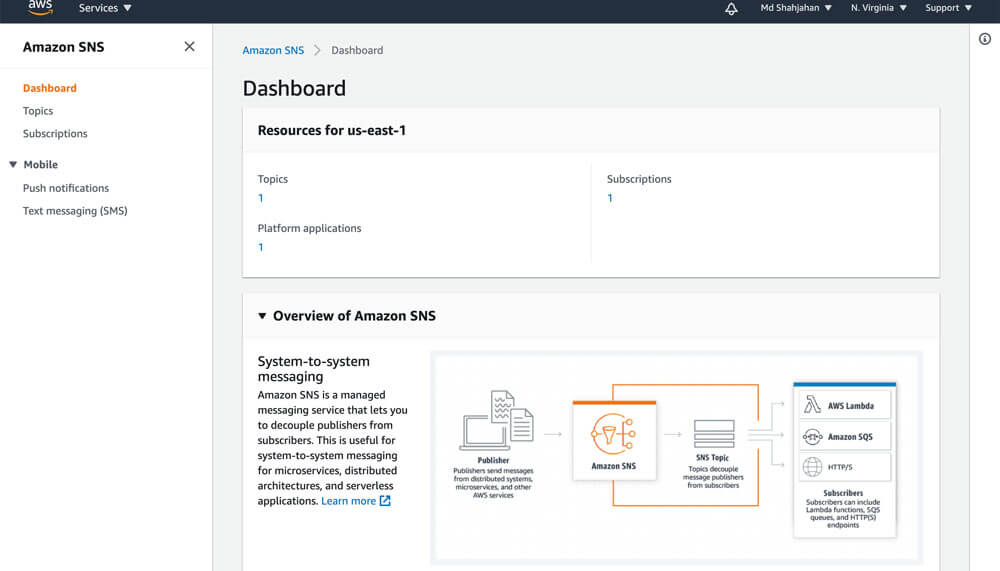
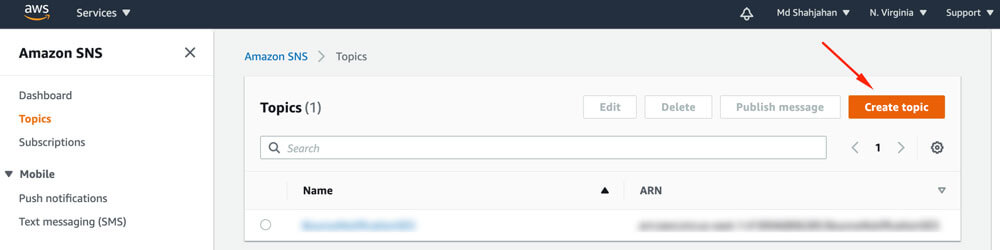
2. Choose Create topic.
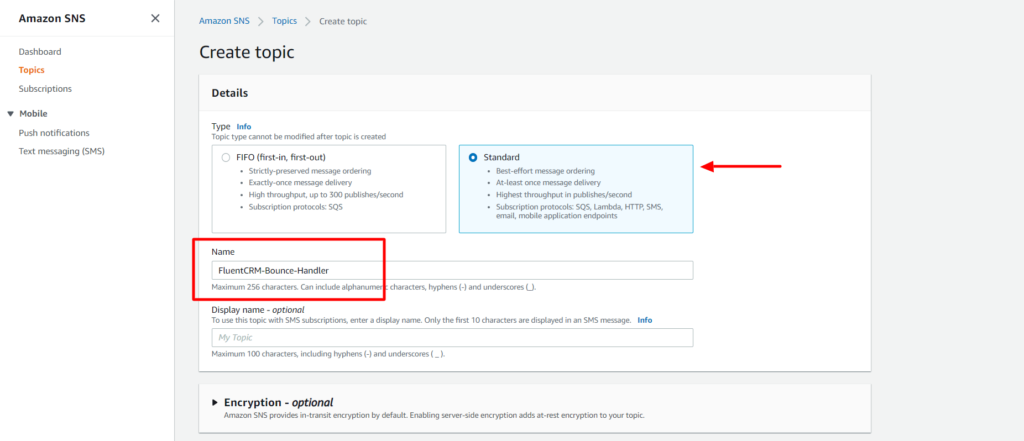
3. Select the Type Standard enter a name for the Topic, click on Create topic button..
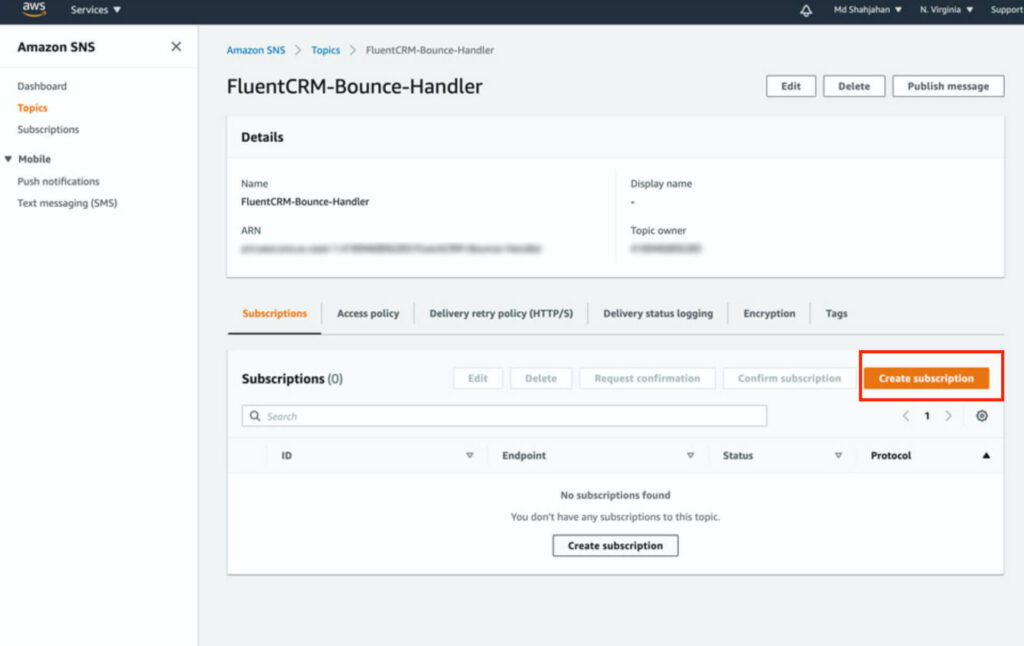
4. From the Topic details of the topic that you created, navigate to Subscriptions, and then choose Create subscription.
5. The topic will be pre-selected, in the Protocol select http or https (based on your server’s SSL status).
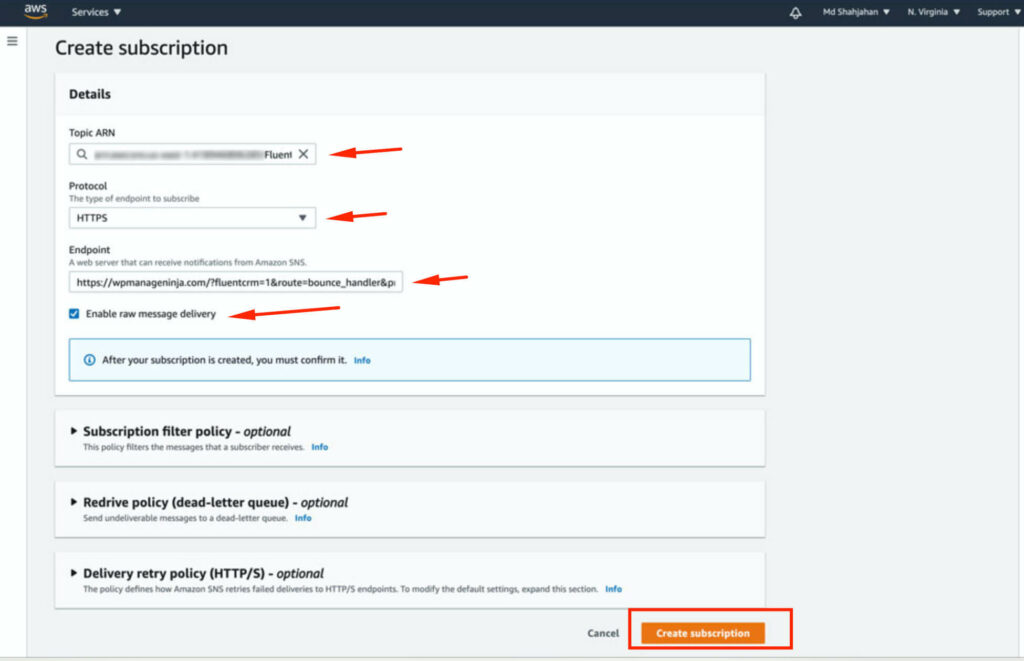
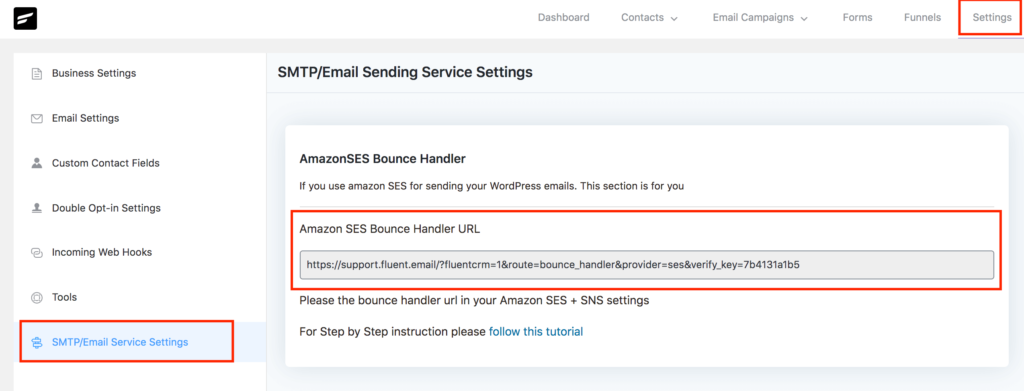
In Endpoint, you need to give your FluentCRM’s endpoint, grab the URL from your FluentCRM dashboard -> Settings -> SMTP/Email Service Settings section.
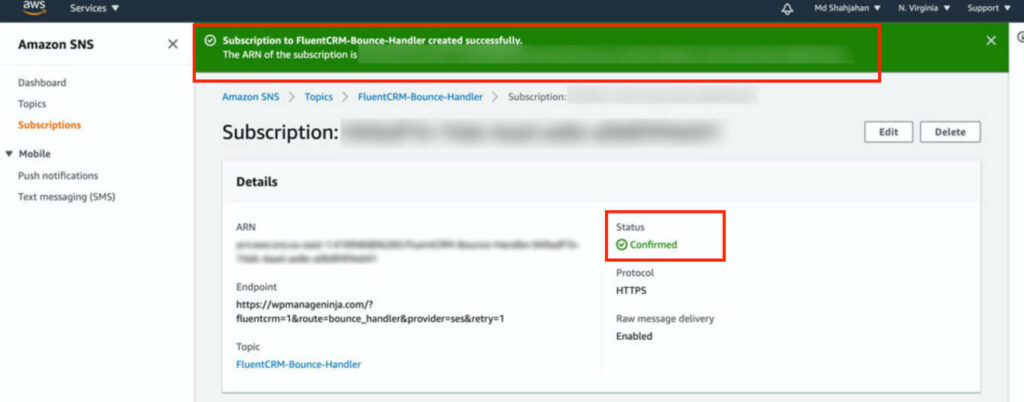
After putting the URL in the Endpoint field, check Enable raw message delivery and click on Create subscription button. You should see a success screen like below:
Configure Amazon SES to send bounce information to FluentCRM #
1. Go to Amazon SES console home, In the navigation pane, choose Verified Identities, and click on Create Identity.
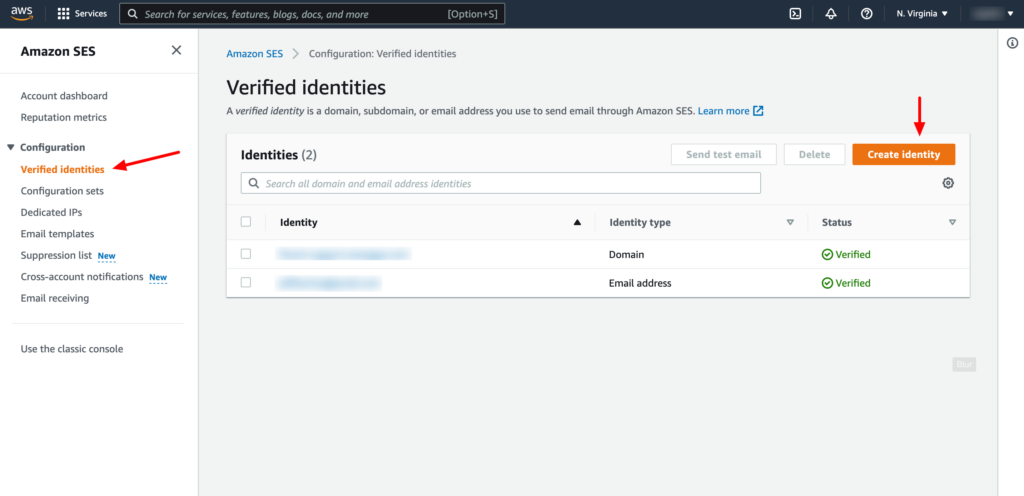
2. Create two identities, one for Domain and another for Email Address. You have to verify the domain and email address in order to set up the notification.
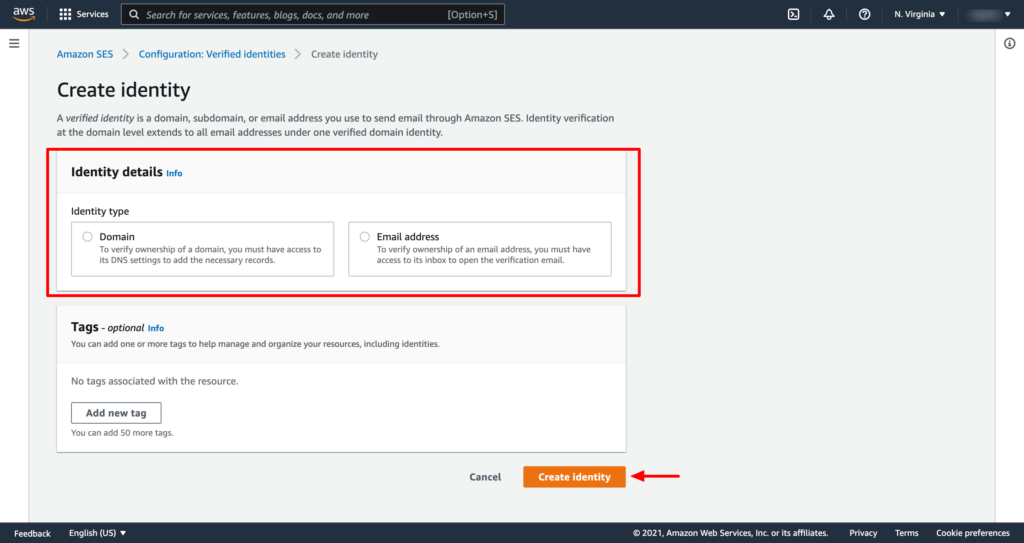
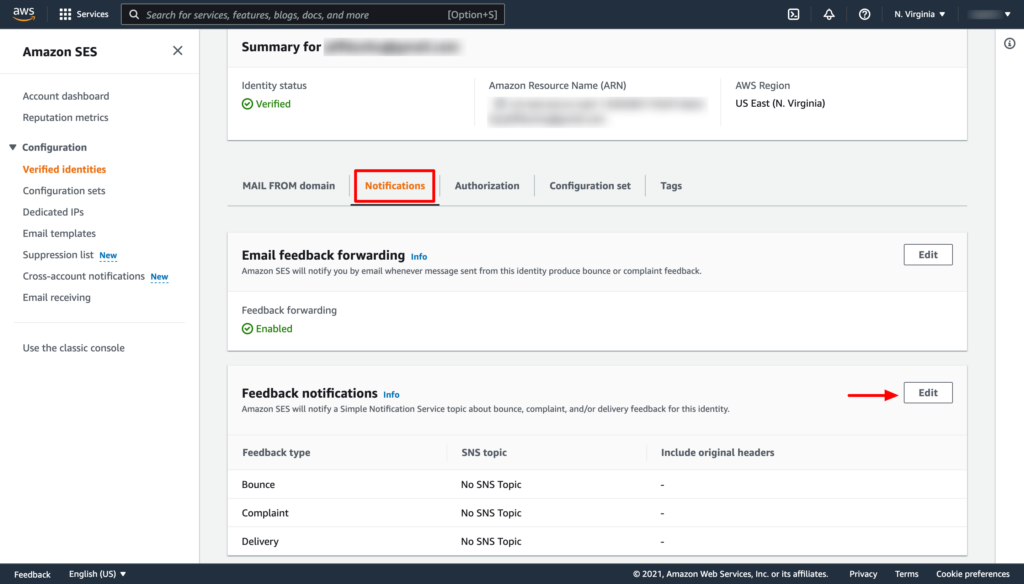
3. From the verified Identities list select the domain or email that you have just verified, In the navigation pane, choose Notifications, and click on the Edit button from the Feedback notifications section.
4. Under SNS Topic Configuration, for Bounces, select the SNS topic that you created. Do the same for Complaints.
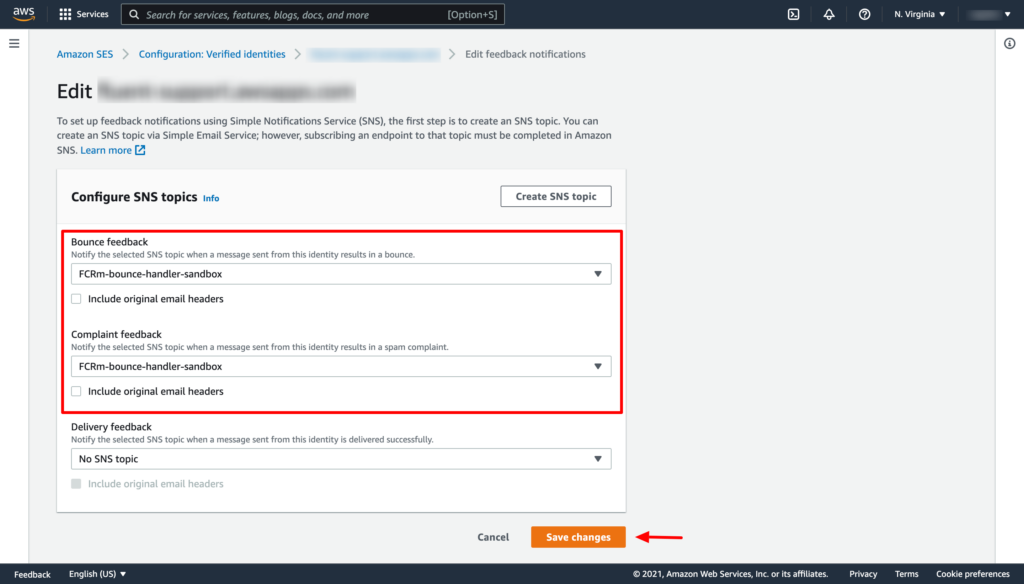
Now click on the Save changes button. Thats it!
You have to repeat the above two steps of adding the SNS topic for both the verified domain and email address separately.
Viewing Bounced Contacts #
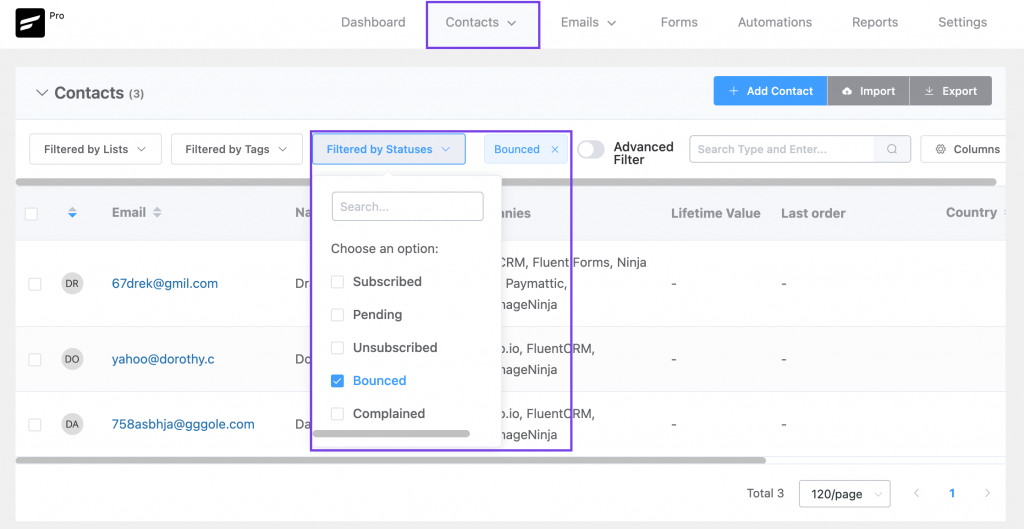
If you want to view bounced contacts, go to FluentCRM Contacts. Then click Filter By Statuses and enable the Bounced checkbox.



Hey folks, just a heads-up – the screenshots you show here (and in many other help pages) are out of date. Amazon SES has many new page looks. So, could you update them here, it would make our jobs much easier?
Thanks for these tutorials.
I have more than one domain verified on SES. Can I use the same topic for more than one domain?
If the domain is verified in SES, do I need to verify any emails as well?
Thank you very much!
Carmine Santangelo
Hi Carmine, No idea about your first question, you might want to try that in a test environment. And yes, you have to verify each email addresses individually.
Hi.
I have followed it step by step but I have a problem at the end. For some reason marks the subscription as pending confirmation. I have tried to send the confirmation manually but nothing happens. Could there be a problem with the endpoint? In Using FluenCRM Pro and and FluentSMTP.
First of all, Thanks
I’m not sure about your query. Could you please submit a support ticket?
There is no “subscription” option on the screen I’m on in the “create topic” screen . What am I doing wrong?
Perhaps you’re in the SES console and not the SNS console?
Hello,
If I have 5 websites : should I create 1 topic with 5 subscriptions ??
Or 5 topics with 1 subscription for each one ?
Thanks
Hi Pierre, 1 topic with 5 subscription should work. Let us know if there’s any issue.
Thanks for this thorough explanation!
We run Fluent CRM on a multisite using a folder structure (TLD/de/ and TLD/en/). How would the setup differ for such a scenario.
I am stuck now at the point of SNS Topic Configuration, since each multisite provides a different Amazon SES Bounce Handler URL. However, in the AWS SNS Topic Configuration I can only choose one of them.
Hey Rainer, it would be best if you submit a support ticket: https://wpmanageninja.com/support-tickets/
Hi George, I’m not sure about your query. It would be best if you submit a support ticket: https://wpmanageninja.com/support-tickets/
Hi Nazir,
Thanks for getting back to me.
Where should I look within the Amazon SES console?
Go to your Amazon SES dashboard and select the ’email addresses’ tab under ’email sending’. you’ll find all the email addresses.
Hi,
If a list subscriber deletes their email address or incorrectly updates their email address. How long should it take for a bounce to be recognized after an email has been sent to that subscriber?
I added a fake email address contact to a list. I wanted to see what happens after I tried to send a campaign which included the contact with the fake email address.
So far nothing. The contact is not flagged as bounced.
What is the process for bounces? When should the bounce ‘Label’ appear on the contacts records in FCRM?
BTW I have correctly configured the Amazon SES bounce handler (with the recent updated instructions) i.e. to add notification the registered Amazon SES email address (in addition to the domain).
Hi Scott, contact will be marked as bounced only when Amazon SES marks it as a hard bounce. You can check it from your Amazon SES console.
Is there a way to configure a List-Unsubscribe header with AmazonSES?