

Using Amazon SES, you can track the invalid email and mark them as Bounced. Amazon will track the delivery status of the email and if it failed to reach the recipient’s mail server, it will be marked as Bounced in your audience status so that you can exclude them in the future campaign.
*Tutorial: How to Configure Amazon SES with FluentCRM
Create a topic in Amazon SNS #
1. Go to Amazon SNS console.
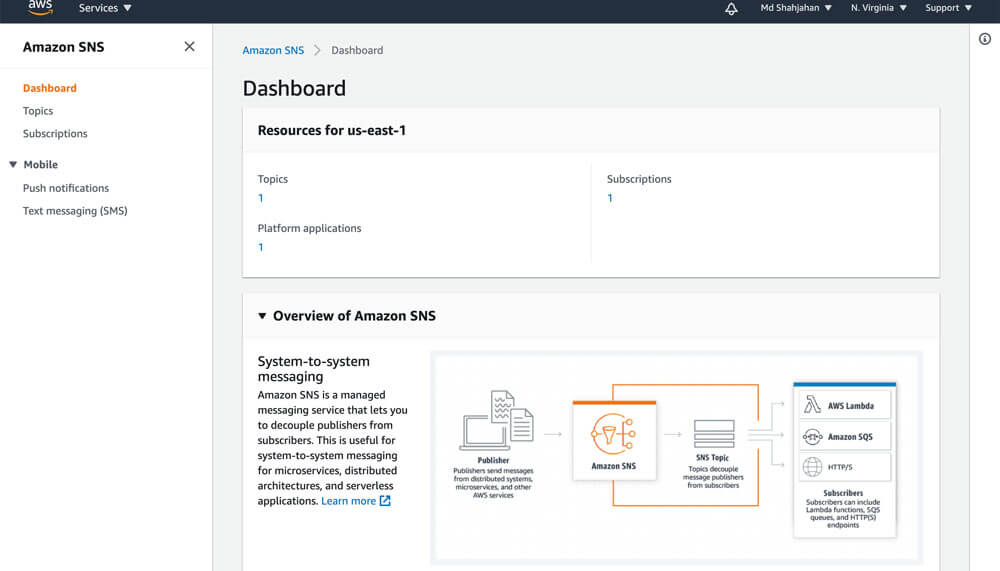
2. Choose Create topic.
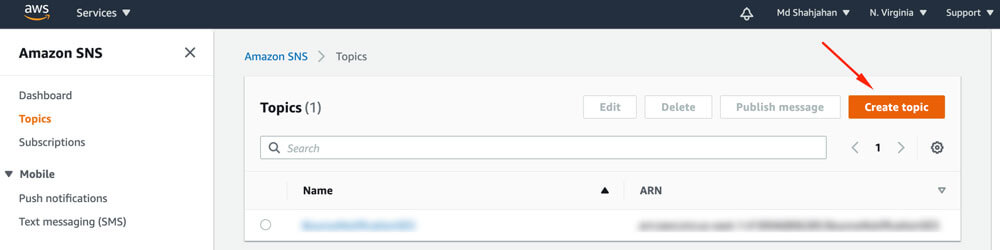
3. Select the Type Standard enter a name for the Topic, click on Create topic button..
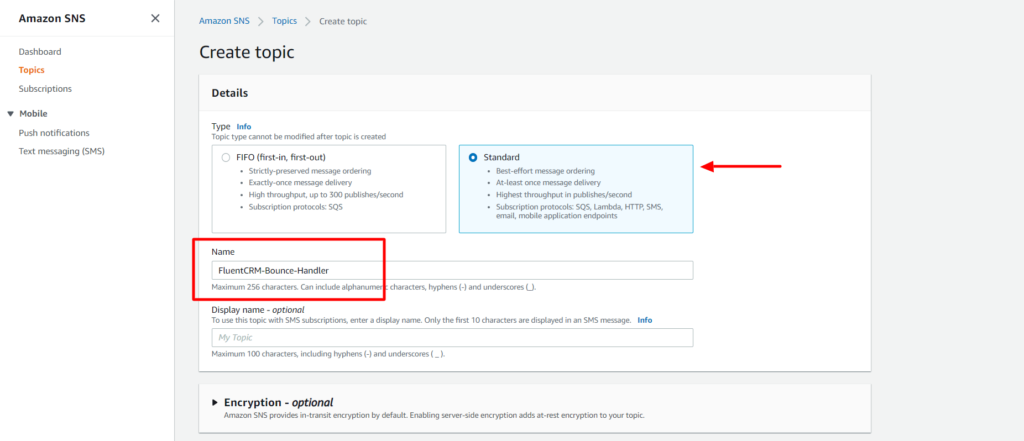
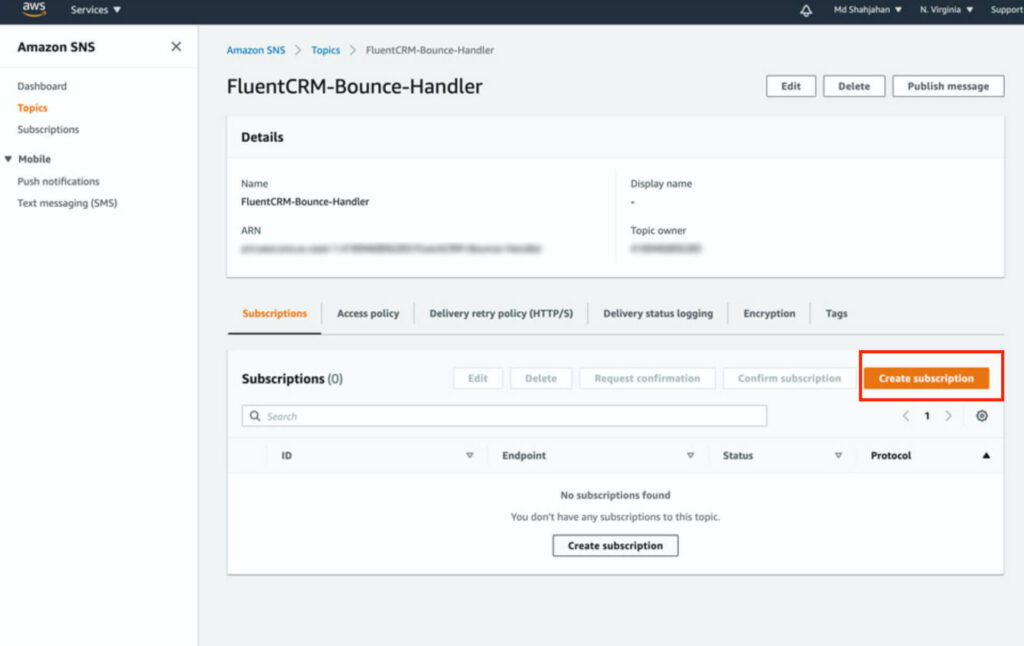
4. From the Topic details of the topic that you created, navigate to Subscriptions, and then choose Create subscription.
5. The topic will be pre-selected, in the Protocol select http or https (based on your server’s SSL status).
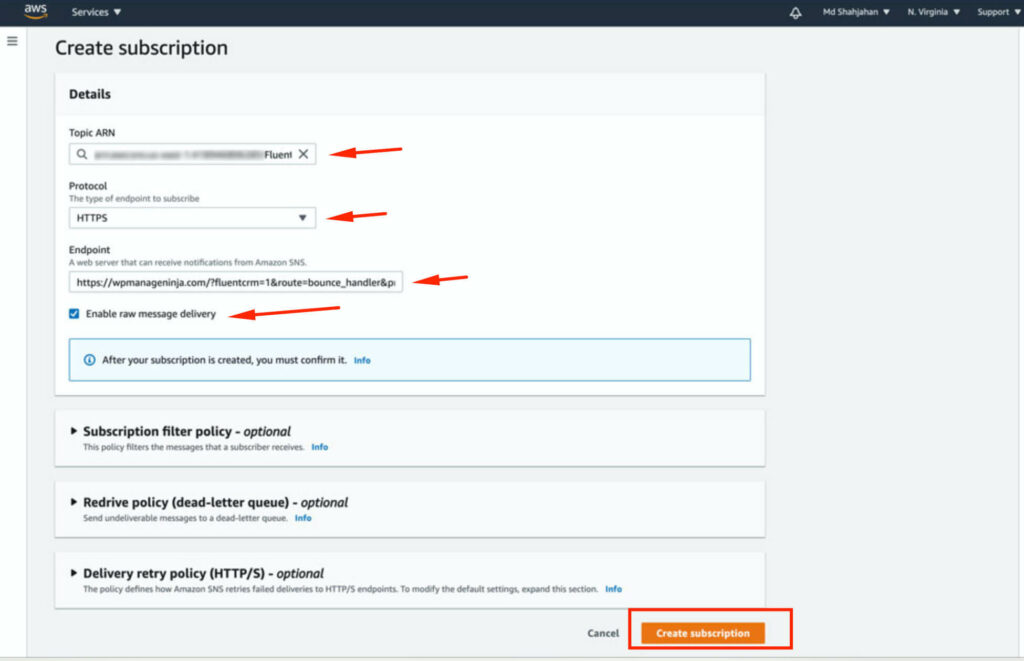
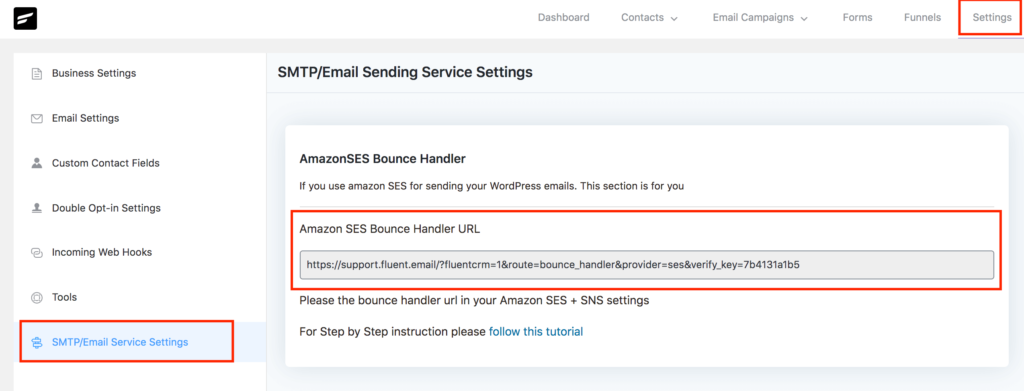
In Endpoint, you need to give your FluentCRM’s endpoint, grab the URL from your FluentCRM dashboard -> Settings -> SMTP/Email Service Settings section.
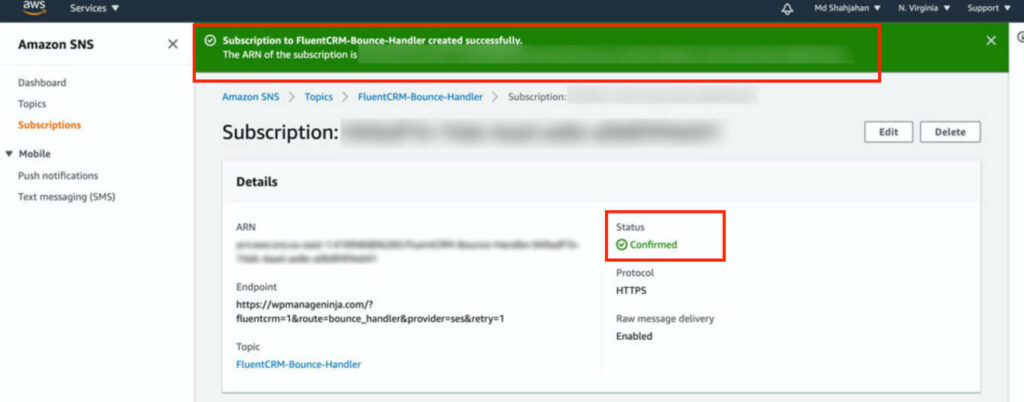
After putting the URL in the Endpoint field, check Enable raw message delivery and click on Create subscription button. You should see a success screen like below:
Configure Amazon SES to send bounce information to FluentCRM #
1. Go to Amazon SES console home, In the navigation pane, choose Verified Identities, and click on Create Identity.
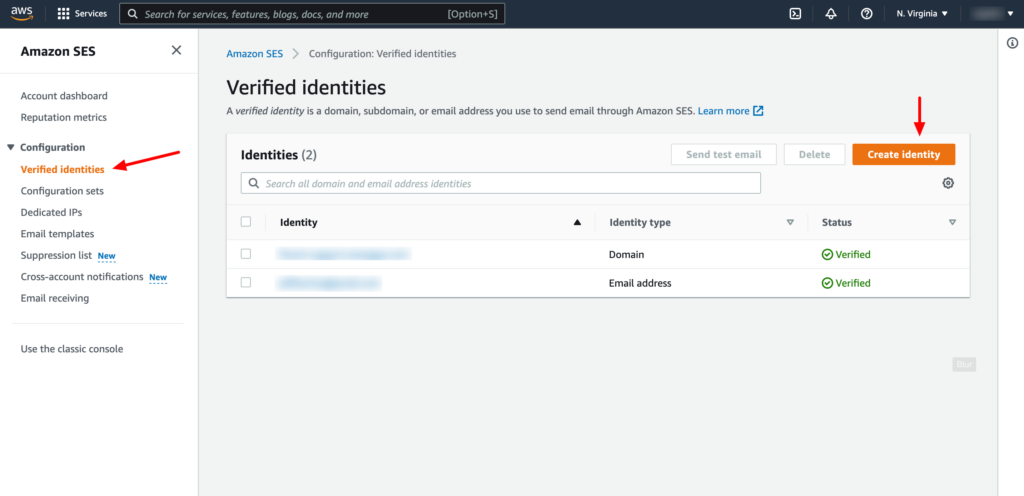
2. Create two identities, one for Domain and another for Email Address. You have to verify the domain and email address in order to set up the notification.
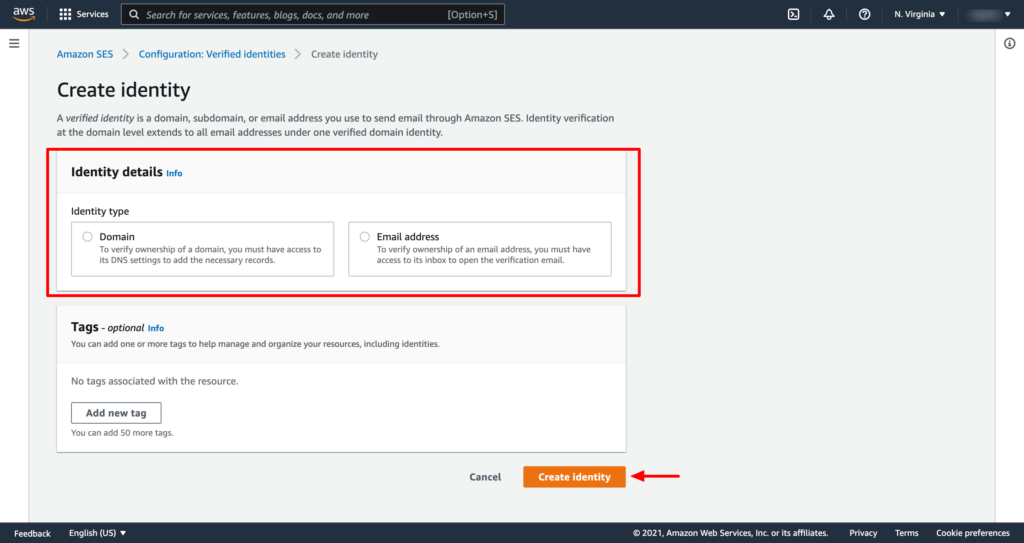
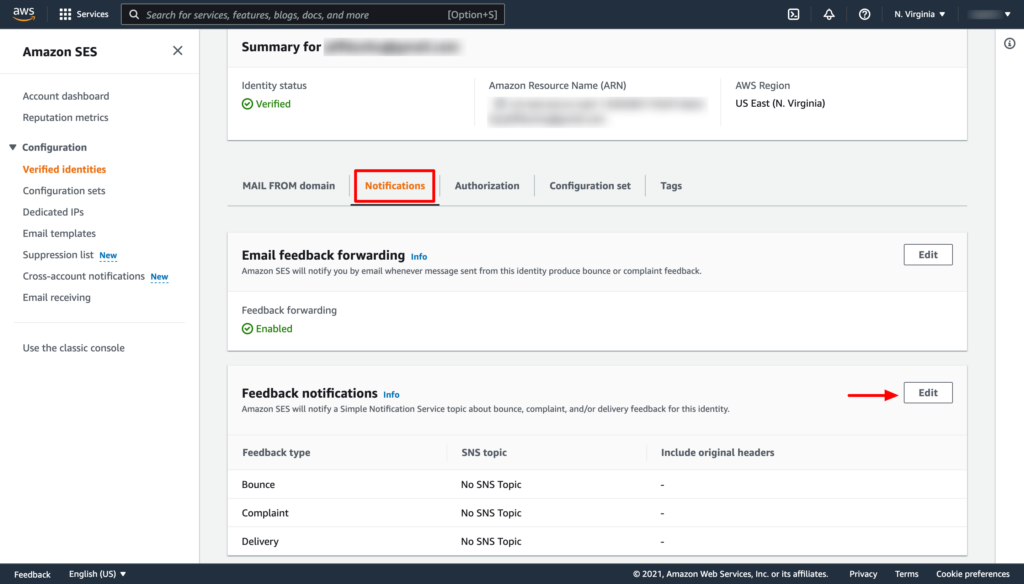
3. From the verified Identities list select the domain or email that you have just verified, In the navigation pane, choose Notifications, and click on the Edit button from the Feedback notifications section.
4. Under SNS Topic Configuration, for Bounces, select the SNS topic that you created. Do the same for Complaints.
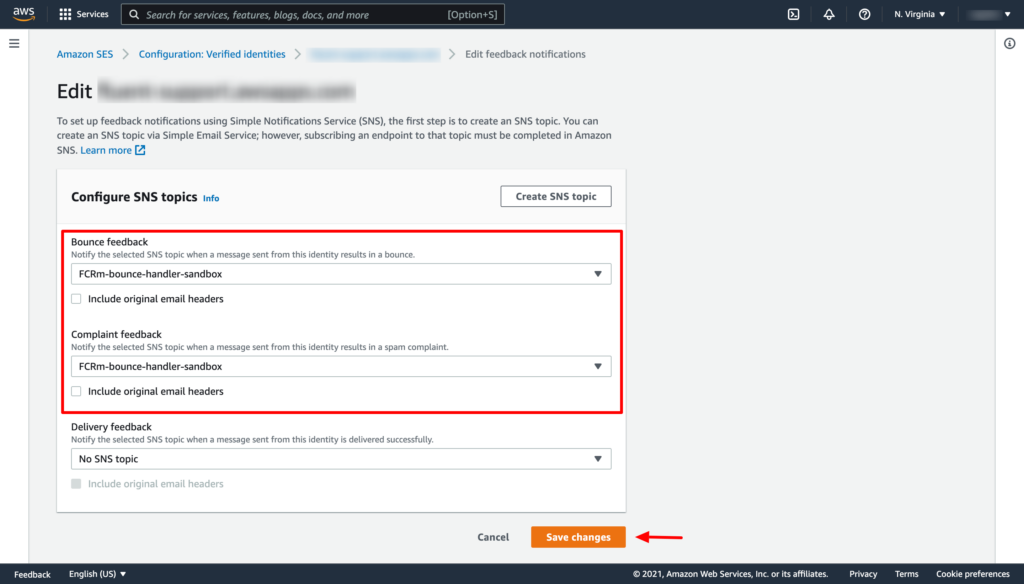
Now click on the Save changes button. Thats it!
You have to repeat the above two steps of adding the SNS topic for both the verified domain and email address separately.
Viewing Bounced Contacts #
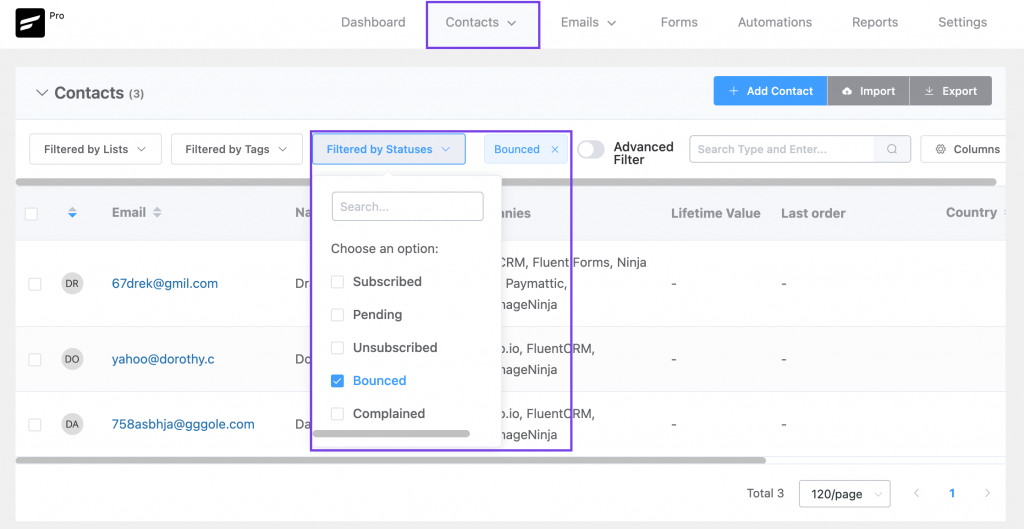
If you want to view bounced contacts, go to FluentCRM Contacts. Then click Filter By Statuses and enable the Bounced checkbox.



I encountered the following problem: when FluentCRM is connected to Amazon SES, it treats all the automatic replies as bounces. Hence, even the out-of-office replies are marked as bounces. How can I have FluentCRM distinguish between undelivered messages and out-of-office replies?
Hi Paul, Sorry about the late reply. If you haven’t done it already I suggest that you open a support ticket as it’s beyond my technical expertise: https://wpmanageninja.com/support-tickets/
Hello,
I recently configured Amazon SES as the SMTP service on my WordPress website to send email campaigns using FluentCRM. However, I noticed that all outgoing emails, including WordPress system notifications (e.g., user registration, order confirmations, etc.), are now being routed through Amazon SES.
My intention is to use Amazon SES exclusively for marketing emails sent via FluentCRM, while all other emails (such as system notifications) should be sent through my hosting provider’s SMTP server, as they were before setting up Amazon SES.
I have reviewed the settings but couldn’t find an option to separate these two types of email traffic. Could you please advise if there is a way to:
1. Configure Amazon SES to only handle marketing emails sent through FluentCRM.
2. Ensure all other system-generated emails are sent using my hosting provider’s SMTP server
Thank you for your assistance!
Hi Wojtek, this could happen for so many reasons but in the tools end, this usually happens if you’ve choosen to force sender email. If that’s not the case, please reach out to our support: https://wpmanageninja.com/support
Can you provide the path where to find it in WordPress settings? Thanks
I submitted a request to Amazon Web services to get out of the sandbox and they denied the request at this time and said they couldn’t provide the reason. What’s next?
If you applied with a new domain, they might reject without stating a reason. It’s ideal to try getting production access with an old domain.
My domain is so old I can’t remember how long I’ve owned it. Probably between 2006-2010
Any recommendations or other options? I was looking forward to having my little system going, CRM, bookings, forms but it’s not shaping out to be this way so far.
Hi Nedy, I’m not sure how this happened. You might want to consult someone with more experience on AWS. There could be a lot of reasons. I recommend posting on our community so others can help: https://www.facebook.com/groups/fluentcrm
I submitted a request to Amazon Web Services to let me out of the sandbox, and they turned me down. Not sure why
Hi Nedy,
Have you been able to get this resolved?
If you can’t, I can help you out with it.
I just got approval for production access from Amazon Web Services some days ago for a client I work with.
You can send me a mail – joseph(@)iamjosephphilip(.)com
Remove the brackets.
Expecting your email
It’s worth considering incorporating a video tutorial to enhance clarity. Ensuring that every step is thoroughly explained without omission and maintaining patience throughout, even if it extends to an hour-long duration, can greatly benefit the audience
Thanks Gulshan. We try to make helpful videos as much as possible. We will be making one for this as well. 🙂
Step 3 looks different on Amazon. The tabs are no longer there. Where can I find them now?
Hi Nedy, We’ll be updating this doc within this week.
I’m confused about the email address. What address should we use? It seems that FluentCRM is being notified via the https address set up in SNS. What is the role of the email address?
Hi Richard, not sure what you’re asking. Can you please submit a ticket?
Step #5 is out of date. HTTP no longer available as a choice for Protocol.
Hi Deborah, We have noticed the issue and we’ll update soon. Thanks for notifying!
You really fascinate me and force me with your high quality to always deal with you
Pro coming soon for me