

Creating a new Email Template #
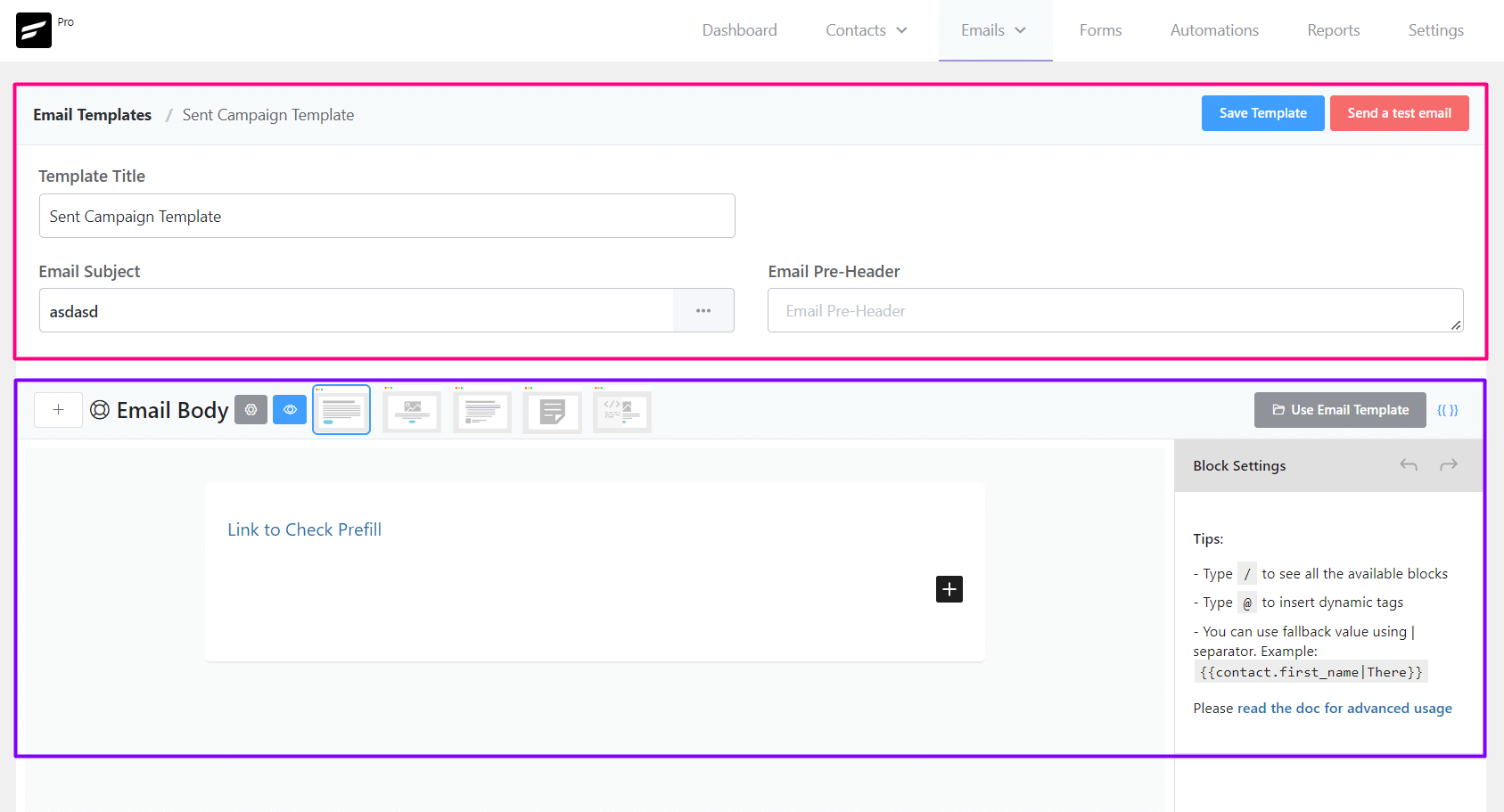
From Emails ➜ Email Templates you can create a template that can be used later around the FluentCRM. The available settings options for Email templates are:
- Template Title: The Title, as an identifier for later use for the Template.
- Email Subject: The Email Subject that is shown as a subject or topic in the recipient’s email clients.
- Email Pre-Header: An Additional short subject that is shown as a small subject line beside the primary subject.
- Save Template: Button to save the template.
- Email Body: Compose your email body using the block editor or visual builder
Sending a Test Email from Email Templates #
To send a test email from Email Templates, please click on the Send a test email button from the top right corner of the Email Templates Settings section as shown in the below screenshot and then input the email address where you want to receive the test email and click on the Send button.
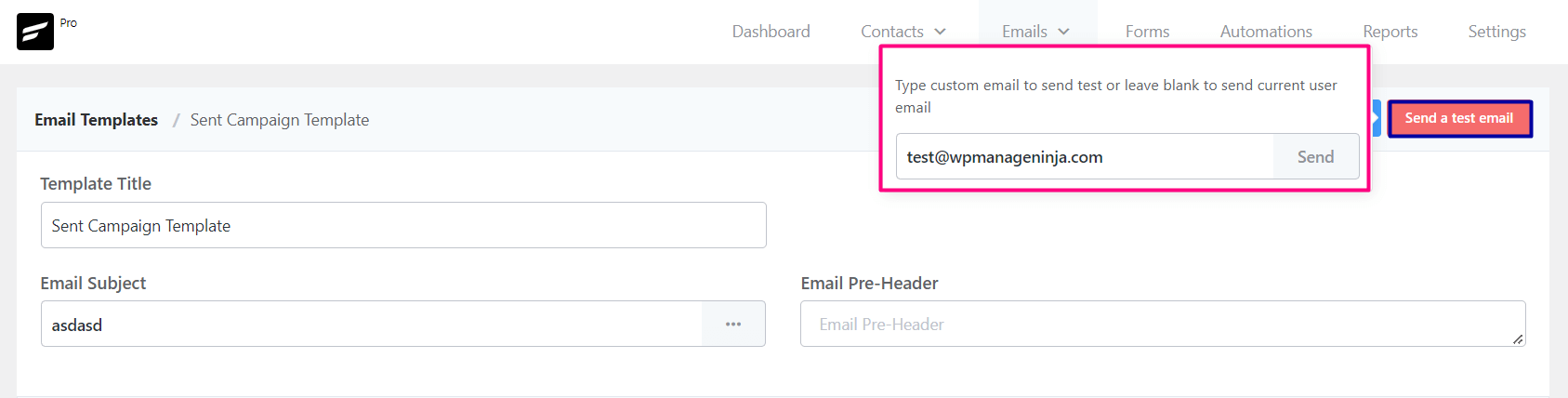
Once the email is sent successfully you will see a Success Message saying the Test email is sent successfully. on the top right corner.
Importing Email Templates into FluentCRM #
To import a predesigned email template from any other sources,
- Go to Emails -> Email Templates and Create a new Email Template. The RAW HTML template type needs to be selected.
- Upload the relevant images to the WordPress website and keep note of the media URLs.
- Open the HTML template with any text editor and update the image URLs.
- Copy the updated code and paste it into the FluentCRM RAW HTML template as the source.
- *** DO NOT CHANGE THE RAW HTML TEMPLATE TYPE ***.
- Now Preview by clicking on the Eye icon and see if the template looks promising.
- Now Save the template and you can now also send a test email to your email address to see how it looks practically.
That’s all about the Email Template. Now use the Email Template from other places in the FluentCRM without recreating the whole template again.



how to add the unsubscribe footer
Hi Olumide, FluentCRM automatically adds the unsubscribe footer. You can customize your email footer in Settings>Email Settings.
Hi, Is there a way to export the HTML email once created to share with 3rd parties to also send to their lists? Thinking for partners and sponsors who want to send to their databases. Forwarding these emails, based on tools, can skew the layout from one email provider to another.
Hi Bonnie, you can copy the raw HTML and share it with anyone you want. Email export isn’t available yet.
Hi I have created an email template and want to do a second one almost identical but I can’t find an option to duplicate? Surely I don’t have to go through another hour setting up the same thing? Please advise thank you
Hi Sarah, you can’t duplicate. Just switch to RAW HTML and use the CTRL+C keyboard command to copy your email template.
Buenos días:
Me pongo en contacto con vosotros, ya que el diseño de plantillas de correo electrónico cuando se envía, en el móvil se ve correctamente, pero al abrirlo en un PC se distorsiona y no se ve bien, no se visualiza como en la previsualización.
Puede ser que nos falte algún plugin o cambiar algún ajuste?
Gracias
Hola lucia
No estoy seguro de que exista tal problema. Comuníquese con nosotros a través de nuestro portal de soporte para que nuestro equipo pueda verificar el problema: https://wpmanageninja.com/support-tickets/
May I also ask about whether any of the emails that are created within Fluent CRM are responsive. These days, responsive emails are critical since so many people are using mobile devices. The sample email I created using Fluent’s block builder didn’t translate well to mobile without having to downgrade the visual appearance of the desktop version, so that the email is readable on a mobile.
The responsiveness of your email templates is entirely up to you. FluentCRM does not provide any email templates so you’ll have to compose them and ensure mobile responsiveness. Many of our users are using Stripo email builder service and they’ve had no issue so far. That means, if you’re using unsupported HTML or CSS, your templates won’t translate well.
Thanks for the quick reply Nazin. Other than Stripo which is a separate platform (separate website) for building email templates, is there a compatible wordpress plugin that would work with Fluent CRM to create responsive emails? Something this is simple to integrate? Ideally, the fluent CRM email block builder should have contained more advanced features to create really snazzy emails that are also responsive. Would such a feature be considered in the near future? I think this would be ideal and make fluent CRM even more versatile and powerful, considering how important and integral email campaigns are to the entire fluent platform.
Yeah, we’re working on the email builder. Hopefully, you’ll see some improvements in the near future. Unfortunately, we can’t suggest any email builder that integrates with FluentCRM at the moment.
Is there a way to duplicate a block or a group of blocks and headings and paragraphs. It would be ideal to be able to just select them blocks/text, copy them and past them lower down in the email. At the moment, it seems this is not possible, correct? Going the HTML route it too complicated.
Please use the keyboard shortcut (ctrl+c and ctrl+v) to copy-paste email body elements.
Is there a widget in the works to add Social Medial icons and links at footer of each email? Or does it come down to manually inserting images of each social media icon in a table and then hyperlinking each one manually?
Hi Tuan
I also struggled with this. But if you use the @ symbol and start typing the name of your field it should appear. If not, you can also add it manually with the following syntax: {{contact.custom.}} replace with the one you want to use. E.g. if I had a field name with ‘score’, it would look like this: {{contact.custom.score}}. Hope this helps
How to send plain text emails
Simply type your email. It will be sent as a plain text email.
I understand how to use @ to get a list of fields to add. If I wish to enter a greeting like “Dear {{First Name}}” is there an option to substitute a placeholder if the contact record has no value in the filed name?
How would one do that?
No, if there’s nothing on that field, nothing will appear.
The format {{contact.first_name|you}} works.