

FluentCRM is a Self Hosted Email Marketing Automation Plugin for WordPress. This plugin provides easy solutions to make your email marketing & customer relationship smooth. Now you can integrate the Elementor page builder native forms with Fluent CRM.
Just follow this simple guide to learn how to integrate Elementor with Fluent CRM.
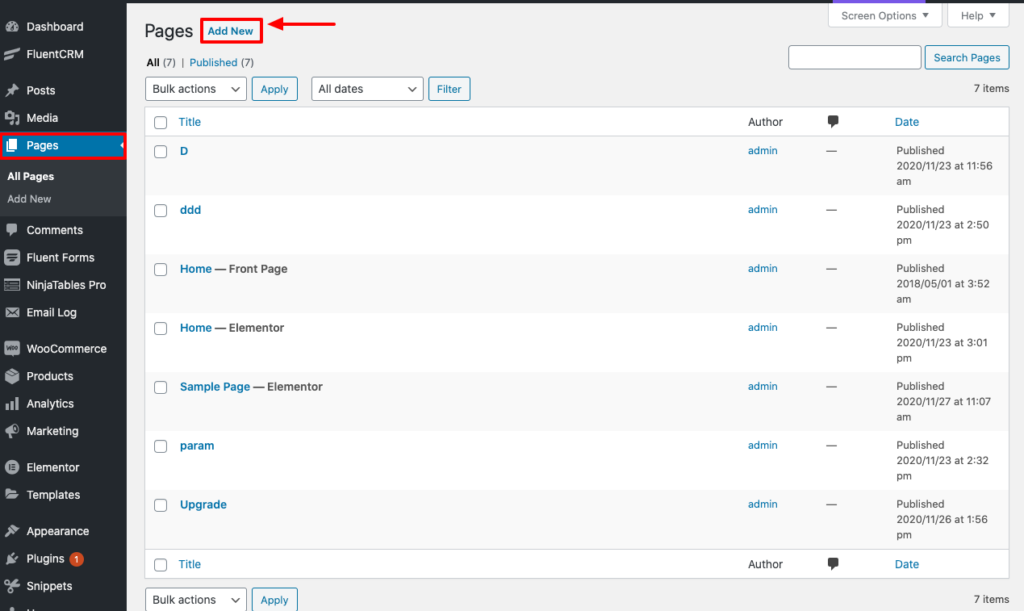
Step-1: At first, go to your dashboard & click on Pages. Then click on Add New Pages to create your Page.
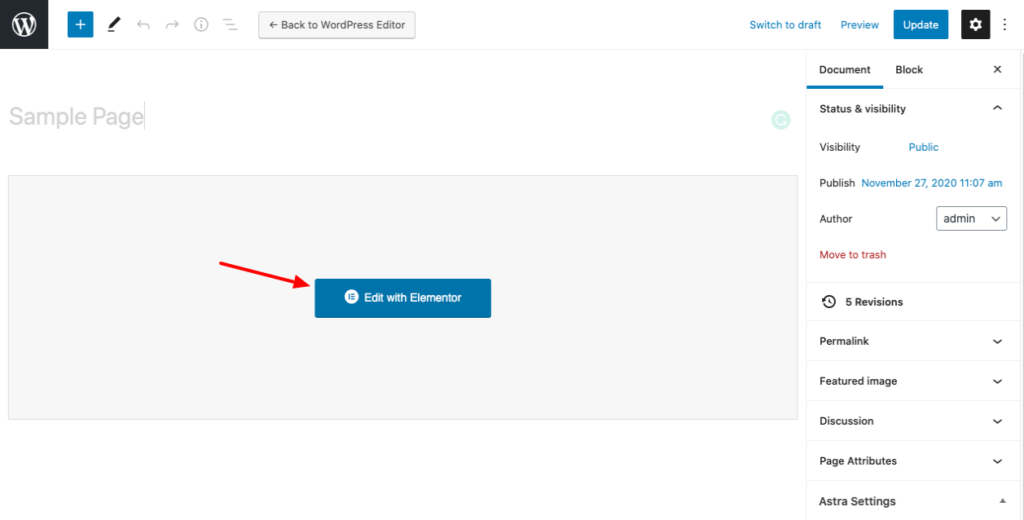
Step-2: In this example, the post is named as ‘Sample Page’. Then you have to click the Edit with Elementor button. Which will take you to the Elementor page editor.
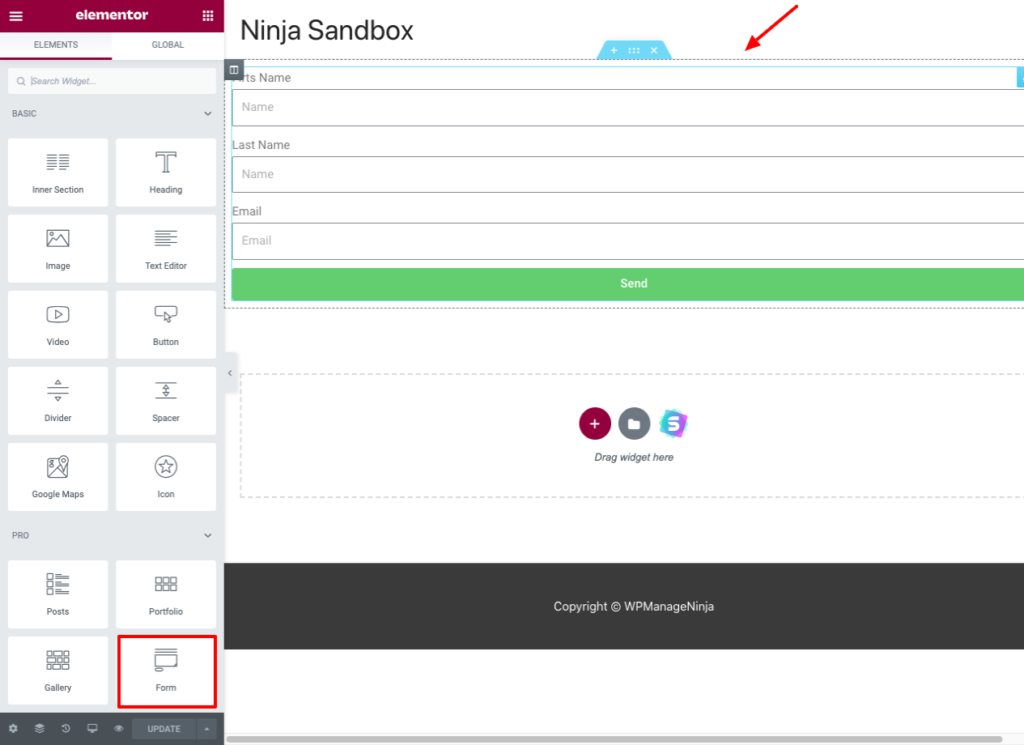
Step-3: Now, let’s create a simple form using Elementor’s Form widget. For demonstration purposes, the form used in this tutorial has a First Name, Last Name & Email field.
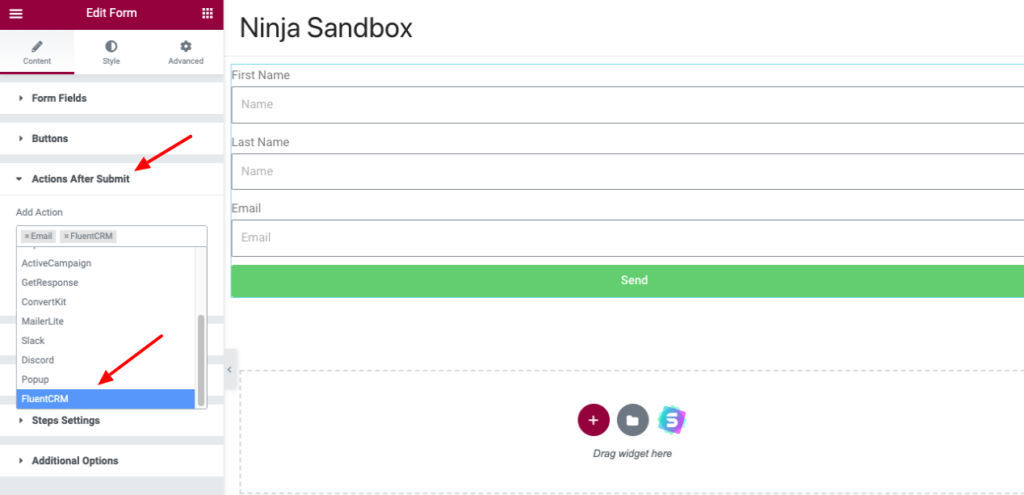
Step-4: Then, scroll down to the Actions after Submit option and click on it. Here you will find an option to Add Actions. You can add actions that will be performed after a user submits a form. After clicking this, select the Fluent CRM option from the dropdown menu.
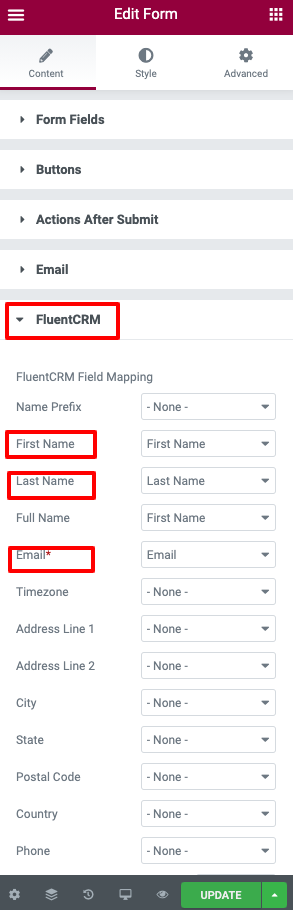
Step-5: After that, you will find a Fluent CRM option below Actions After Submit. This is where you can map the CRM fields according to your form fields. Here First Name, Last Name, and Email fields will be mapped into the form.
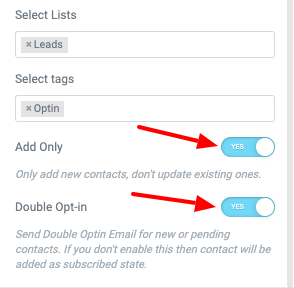
Step-6: You can also turn on the Add Only option when you want to only add new contacts. And don’t need to update your existing contacts.
Step-7: Turn on the Double Opt-in option if you want to send double opt-in emails for new or pending contacts. If you don’t enable this, then the contact will be added as a subscribed state. Lastly, just click the Update button to save your settings.
*Tutorial: How to Connect Any WordPress Forms with FluentCRM



yes, same as chris, fluentcrm is not showing??
Hi Syafiq, we’re looking into this issue. We’ll have a release very soon and if this issue is found, we’ll definitely fix it.
Same! It’s still missing.
Noted, will be fixed in the next version.
Hi team,
fluentCRM not shown in “Actions after submit”… therefore no field mapping possible.
fluentCRM free Version 2.8.20
Elementor pro Version 3.15.1
Regards,
Chris
Hi Chris, Thanks for reporting. we’re looking into this issue. We’ll have a release very soon and if this issue is found, we’ll definitely fix it.
Hi, my dear friend
Please add countdown to email creation blocks as well
Thank you
Does the integration support custom fields?
Hi Jerome, Yes, the integration supports custom fields.
Hi, I have the free version of fluent CRM and the Elementor Pro plugin, and in the “Action After submit” section I can’t find Fluent CRM. at the moment I use the free version to evaluate the purchase of Fluent Crm PRO.
do i need the pro version of fluent crm to have this integration?
Hi Gennaro, Yes, you need to have the pro version of FluentCRM in order to integrate with Elementor Forms.
Hi Nazir, is this still the case now? I’ve just spent all day setting up FluentCRM only to find it doesn’t work with all of my Elementor Pro forms! I am livid, I can’t believe we need to have FluentCRM Pro for this when all the other free Email Marketing platforms seamlessly integrate with Elementor… Please tell me I’m missing something..
Hi Steve, you need to have FluentCRM Pro for Elementor Integration.
Actually, I didn’t figure it out 🙁
Custom fields appear in newly added Elementor forms, however I cannot get them to display in existing ones.
Is there a way to force Fluent CRM to go and look for new fields (from within existing Elementor form)? Or do we need to create all our forms again to see the fields?
Hi there, this is a bug. Hopefully, it will be fixed in the next version. Until then, please use a new form.
How do we insert custom customer fields via Elementor form?
The Custom Customer fields do not display in Elementor forms. Only the default fields are provided as options in Elementor.
Thanks